React-native-code-push: TypeScript Issue
Steps to Reproduce
TypeScript
import CodePush from "react-native-code-push";
...
CodePush.getUpdateMetadata()...
TypeScript Build File
const react_native_code_push_1 = require("react-native-code-push");
...
react_native_code_push_1.default.getUpdateMetadata()...
tsconfig.json
    "module": "commonjs",
    "target": "es2015",
NOTE: moduleResolution: "node" is not necessary as that is the default when "module": "commonjs" is used.
Actual Behavior
What actually happens?
Error:
Cannot read property 'getUpdateMetadata' of undefined
Environment
- react-native-code-push version: 5.2.1
- react-native version: 0.46.0
- iOS/Android/Windows version:
- Does this reproduce on a debug build or release build? Debug but probably both.
- Does this reproduce on a simulator, or only on a physical device? Simulator but probably both.
Issue encountered on Android.
Error is resolved by using:
const CodePush = require("react-native-code-push");
I would rather not use this as I am trying to use TypeScript with it.
 HAMPLENI
All 8 comments
Hello @HAMPLENI, thanks for letting us know.
I'm a little confused how to reproduce it, I just have tried a boilerplate react-native type-script app, added codepush with e.g. getUpdateMetadata method on page. Called tsc to compile the project and didn't see any issues.
Mine complierOptions:
    "compilerOptions": {
        "target": "es2015",
        "module": "commonjs",
        "jsx": "react",
        "outDir": "build",
        "rootDir": "src",
        "allowSyntheticDefaultImports": true,
        "noImplicitAny": true,
        "experimentalDecorators": true,
        "preserveConstEnums": true,
        "allowJs": true,
        "sourceMap": true
    },
So I think it would be great if you could share with us a small sample app where the issue is reproduced, so we can build it on our side and fix it.
Please let me know if it works for you.
 max-mironov
on 22 Jan 2018
max-mironov
on 22 Jan 2018
@HAMPLENI please let us know if you have a chance to look at this!
max-mironov
on 24 Jan 2018
@max-mironov
Tried it with both my config and your config. Still getting the error.
HAMPLENI
on 24 Jan 2018
Hi there @HAMPLENI thanks for sharing the example.
So I've tried to open it with vscode and build it with
cmd + shift + b

Looks good so far, I can see the output in tsbuild/index.js and no errors.
Please let me know what are your steps here.
Btw my typescript version is 2.6.2.
max-mironov
on 25 Jan 2018
@max-mironov
When I execute react-native run-android, the app red boxes with an error:
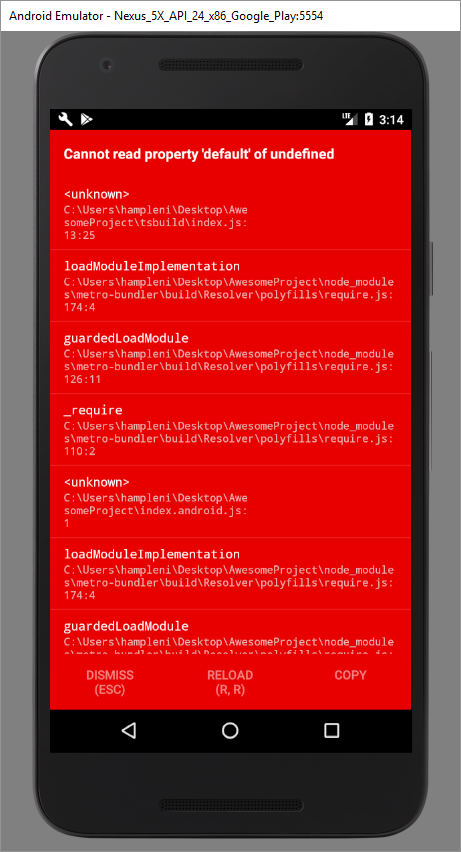
I didn't make the changes to native code to setup CodePush for Android or iOS but I don't think it is necessary for this issue.
HAMPLENI
on 25 Jan 2018
Hi @HAMPLENI
Unfortunately react-native-code-push doesn't support ES6 imports with TypeScript.
Please use const CodePush = require("react-native-code-push"); instead.
Thanks!
 iTOYS
on 21 Mar 2018
iTOYS
on 21 Mar 2018
@iTOYS with your suggestion we no longer get types, the typings files should not lie and say that there is a default export when, in fact, there is none in the CodePush.js file.
 bradleat
on 23 Mar 2018
bradleat
on 23 Mar 2018
I propose to re-open this. As @bradleat says, we don't get any types using require()
Using import we get No default export found in module. warning. Even though the code works fine..
 kg-currenxie
on 7 Jan 2020
kg-currenxie
on 7 Jan 2020
Related issues
 chrisjrex
·
4Comments
chrisjrex
·
4Comments
 Fuhrmann
·
3Comments
Fuhrmann
·
3Comments
 ninjz
·
4Comments
ninjz
·
4Comments
 sergey-akhalkov
·
4Comments
sergey-akhalkov
·
4Comments
 vira-khdr
·
3Comments
vira-khdr
·
3Comments
Most helpful comment
@iTOYS with your suggestion we no longer get types, the typings files should not lie and say that there is a default export when, in fact, there is none in the CodePush.js file.