React-native-code-push: [iOS] CodePush updated failed and rolled back , log "An update is available, but it is being ignored due to having been previously rolled back"
Current behavior
1.I had updated sucess once on my device using codepush
- Than I deleted and reinstall my app many times ,it will log "An update is available, but it is being ignored due to having been previously rolled back" (delete and reinstall many times is the most important operation , because first time install is updated Successful )
3.I downloaded container from my iPhone ,and there is only "assets" fold ,no "main.jsbundle"
4.Sometimes,it logs "SendingCodePushDownloadProgresswith no listeners registered.","[CodePush] 未能移除“unzipped”,因为您没有访问它的权限。","[SSZipArchive] Set attributes failed for directory: /var/mobile/Containers/Data/Application/3A09BB31-977D-4E50-97AE-E07929FD7BBA/Library/Application Support/CodePush/unzipped/RN/main.jsbundle.meta." ,"[CodePush] Update is invalid - A JS bundle file named "main.jsbundle" could not be found within the downloaded contents. Please ensure that your app is syncing with the correct deployment and that you are releasing your CodePush updates using the exact same JS bundle file name that was shipped with your app's binary."
CodePush
codePush.sync({
updateDialog: false,
installMode: codePush.InstallMode.IMMEDIATE
},(sycnStatus)=>{
if(codePush.SyncStatus.UPDATE_INSTALLED==sycnStatus){
        }
    });
iOS Code
NSURL* jsCodeLocation = [CodePush bundleURLForResource:@"main" withExtension:@"jsbundle" subdirectory:@"RNBundle"];
// NSURL* jsCodeLocation = [JJReactNativeManager getRNURL];
self.rootView = [[RCTRootView alloc] initWithBundleURL:jsCodeLocation moduleName:@"memberCenter" initialProperties:nil launchOptions:nil];
self.view = self.rootView;
CodePush Realease
code-push release jjtravel /Users/Gideon/Desktop/RN/ 6.1.5 --deploymentName Staging --description “test” --mandatory true
Upload progress:[==================================================] 100% 0.0s
Successfully released an update containing the "/Users/Gideon/Desktop/RN/" directory to the "Staging" deployment of the "jjtravel" app.
It's has been happened in Production environment
Environment
- react-native-code-push version:5.2.1
- react-native version:0.47.1
- iOS version:11.2.1
- Does this reproduce on a debug build or release build? both on debug and release
- Does this reproduce on a simulator, or only on a physical device? both on simulator and physical device
Thanks very much!
 GideonLiu
All 14 comments
Hi @GideonLiu, thanks for reaching us.
[CodePush] Update is invalid - A JS bundle file named "main.jsbundle" could not be found within the downloaded contents. Please ensure that your app is syncing with the correct deployment and that you are releasing your CodePush updates using the exact same JS bundle file name that was shipped with your app's binary."
Could you please confirm if you are using different deployments for releasing updates for Android and iOS?
 sergey-akhalkov
on 8 Jan 2018
sergey-akhalkov
on 8 Jan 2018
Hi @sergey-akhalkov thanks for helping me to solve my problem.
I can ensure the JS bundle's name is same.
I'm using different app name for Android and iOS, so the deployments is different for releasing updates for Android and iOS.
CodePush updated successfully when my app is first installed, but then I uninstall it and install it again , my app will update failed . It's happen only for iOS. Android does not has this problem.
GideonLiu
on 9 Jan 2018
@GideonLiu, could you please try to perform code-push deployment list <appName> --format json command, then download blobUrl as zip, unzip it and see if package contents have main.jsbundle file inside? If you have a chance - please make a screenshot to show the package structure and contents.
Also I've noted, that you are using general release command to release an update, so please double check if your "/Users/Gideon/Desktop/RN/" directory also contains main.jsbundle file inside.
sergey-akhalkov
on 9 Jan 2018
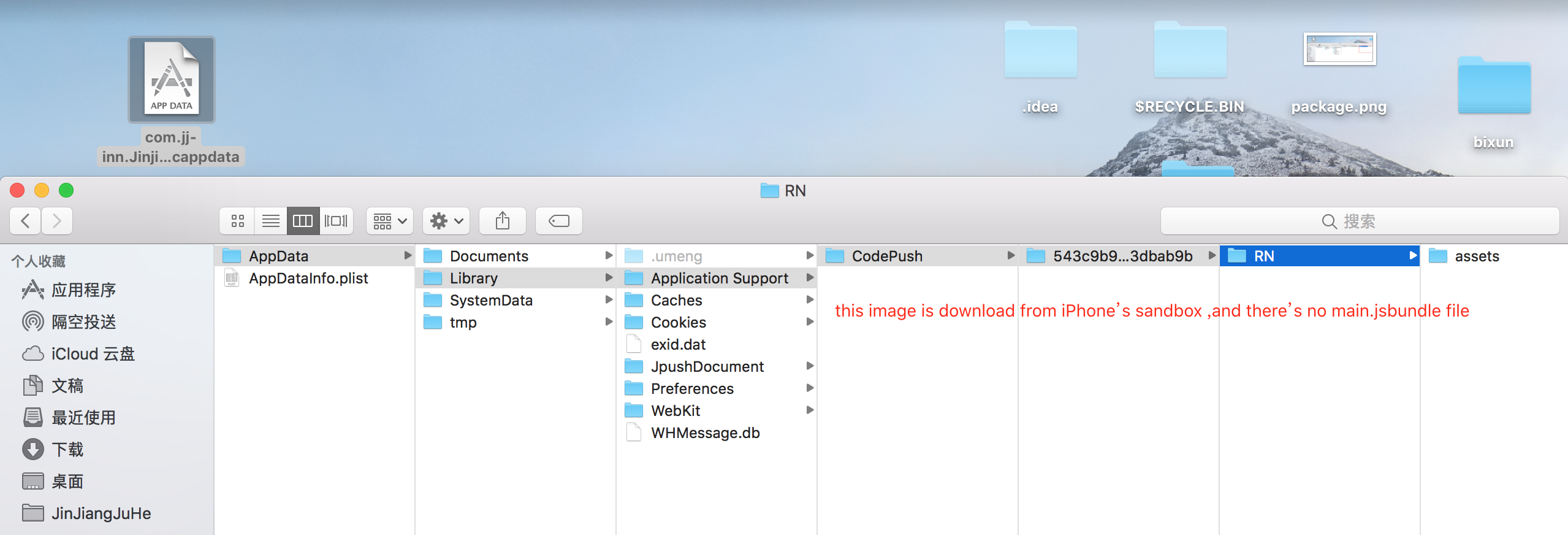
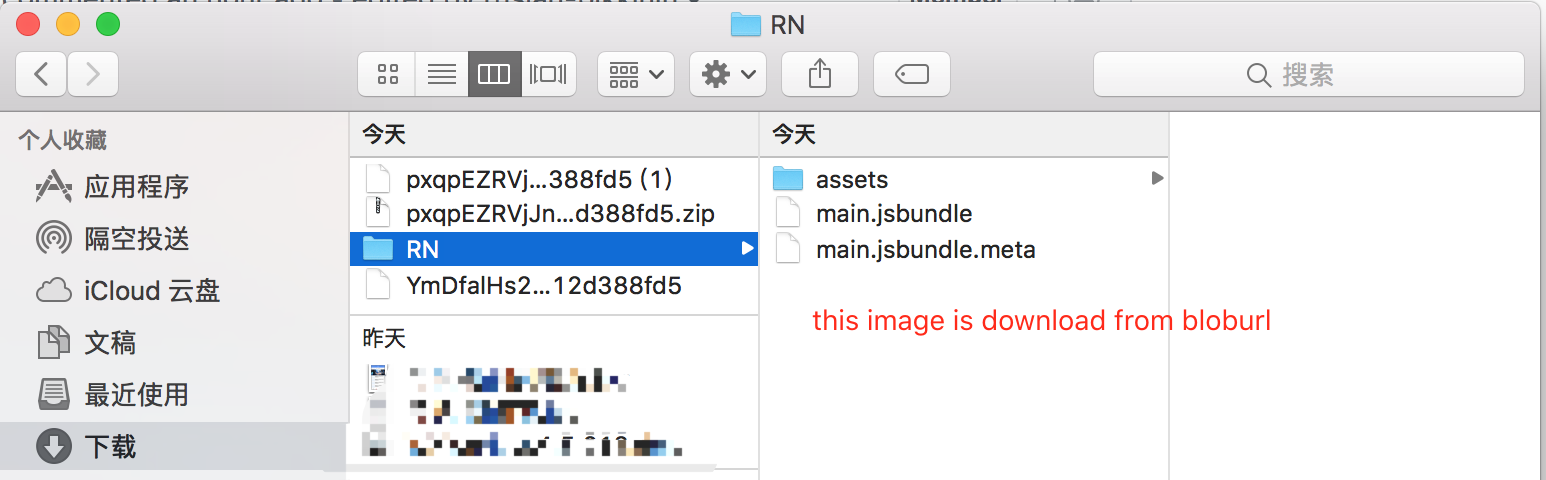
@sergey-akhalkov , I downloaded blobUrl as zip and unziped it , the package contents have main.jsbundle file inside. But I download the sandbox from my iPhone ,and the package contents don't have main.jsbundle file inside

GideonLiu
on 9 Jan 2018
@GideonLiu, seems like iOS part of CodePush SDK awaits "CodePush" folder as prefix for manifest:
https://github.com/Microsoft/react-native-code-push/blob/e1cdd90e4ee6645a138eab8a43d383a37d50ef71/ios/CodePush/CodePushUpdateUtils.m#L9
Could you please try to rename your RN folder as CodePush and let me know if it fixes your issue?
sergey-akhalkov
on 9 Jan 2018
Hi @sergey-akhalkov
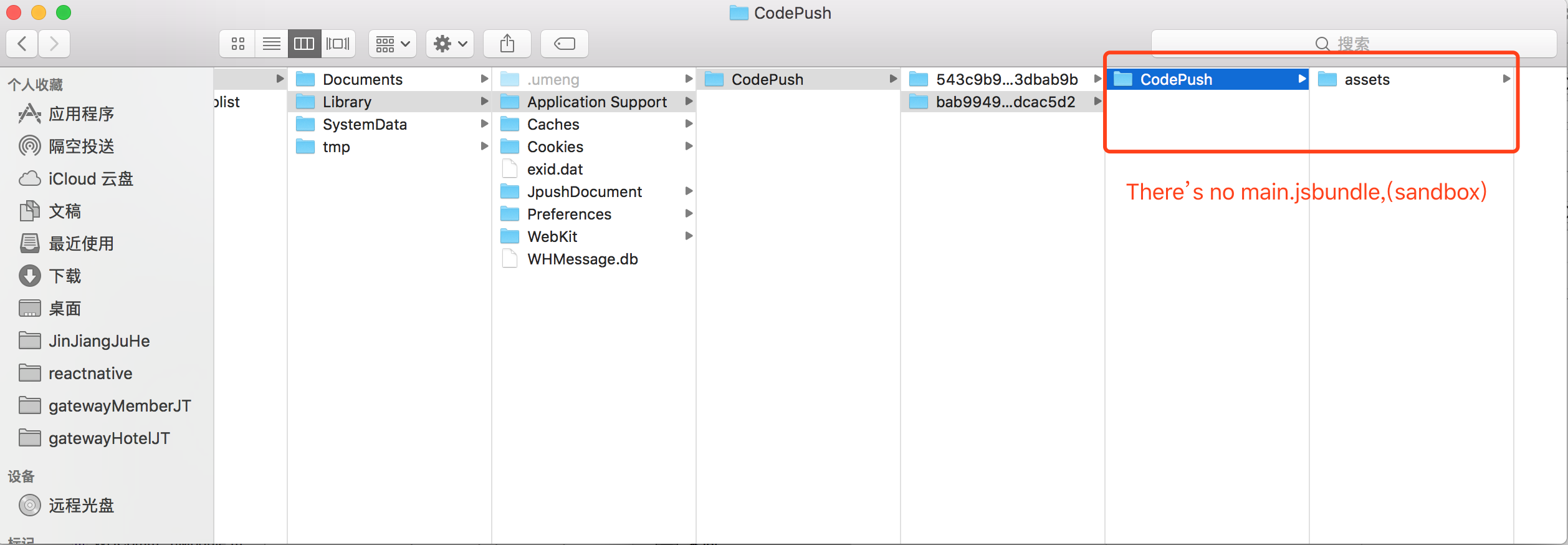
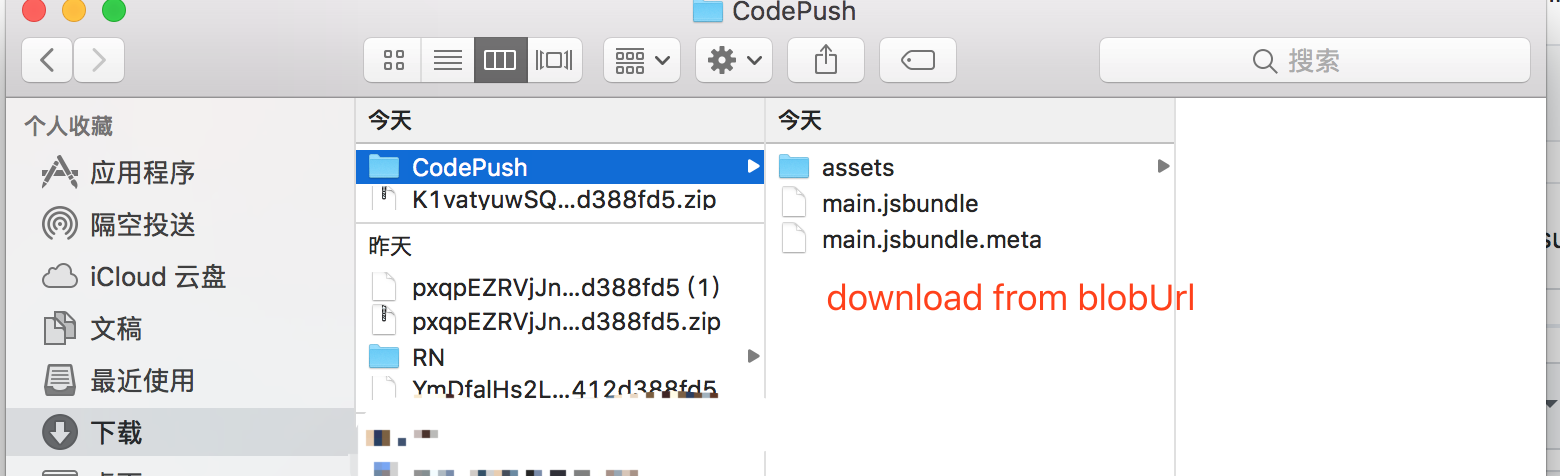
I have renamed your RN folder as CodePush,but it's doesn't work for me.
I download the sandbox from my iPhone ,and the package contents don't have main.jsbundle file inside



GideonLiu
on 10 Jan 2018
@sergey-akhalkov
I think it maybe "incremental updating"(增量更新) make it error, because it never happened first install in iPhone,but will happened when I uninstall an reinstall the app many times later.
(删除app然后重新安装几次后,会发生这个问题,所以我认为是增量更新出现了错误)
GideonLiu
on 10 Jan 2018
@GideonLiu, got it, seems like an issue, we are going to investigate it in order of priority and let you know if we have any news.
As of now, please increment your app version each time you reinstall it - this workaround should help you to avoid of installing diff update instead of full.
Please let me know if you have any questions.
sergey-akhalkov
on 10 Jan 2018
@sergey-akhalkov thanks a lot,if you solve this issue,please let me know.
GideonLiu
on 11 Jan 2018
Hi @GideonLiu
Could you please clarify what do you means:
- Than I deleted and reinstall my app many times
I've tried you case with index.ios.js posted below and latest react-native-code-push all works fine for me:
import React, { Component } from 'react';
import { AppRegistry, StyleSheet, Text, View, TouchableOpacity } from 'react-native';
import codePush from "react-native-code-push";

class App extends React.Component {
  render() {
    return (
      <View style={{flex: 1, justifyContent: 'center', alignItems: 'center'}}>
        <TouchableOpacity
          style = {{height: 70, width: 200, backgroundColor: 'red'}}
          onPress={() => {
             codePush.sync({
                  updateDialog: true,
                  installMode: codePush.InstallMode.IMMEDIATE
              });
          }}>
        <Text>Current version: 14</Text>
      </TouchableOpacity>
      </View>
    )
  }
}

let codePushOptions = { checkFrequency: codePush.CheckFrequency.MANUAL };
App = codePush(codePushOptions)(App);

AppRegistry.registerComponent('Awesome47', () => App);
Could you please make a little example app that I can use for debug.
Thanks!
 iTOYS
on 22 Mar 2018
iTOYS
on 22 Mar 2018
@GideonLiu
Just a friendly ping, are you still have this issue?
iTOYS
on 25 Apr 2018
I find the reason. I init the ReactNative page twice ,so it will download the .zip file twice.Now I init once ,it will not roll back.
GideonLiu
on 26 Apr 2018
Good news)
iTOYS
on 28 Apr 2018
I have the same issue (iOS), and ../Application Support/CodePush/ dir has only one file: codepush.json and its contents is only {}
 dneprDroid
on 26 Mar 2019
dneprDroid
on 26 Mar 2019
Related issues
 marf
·
25Comments
marf
·
25Comments
 ujwal-setlur
·
32Comments
ujwal-setlur
·
32Comments
 huangkaiw3n
·
58Comments
huangkaiw3n
·
58Comments
 danieldunderfelt
·
36Comments
danieldunderfelt
·
36Comments
 niftylettuce
·
28Comments
niftylettuce
·
28Comments