React-native-code-push: [Error] App "XXX" does not exist.
Thanks so much for filing an issue or feature request! Please fill out the following (wherever relevant):
Steps to Reproduce
- code-push release-react com-rrd-finance-android android --bundleName "index.android.bundle" --deploymentName "devRelease" --description "RRD App 5.4.0版本发布" --development false --entryFile "./src/entry/index.android.js" --targetBinarsion ">=5.4.1 <5.5.0"
- But if i execute this command use app owner not collaborator , it publish ok
Expected Behavior
What you expected to happen?
publish ok
Actual Behavior
What actually happens?
App "com-rrd-finance-android" does not exist.
 wangcheng714
All 15 comments
Same here 👍
 felix-zg
on 20 Nov 2017
felix-zg
on 20 Nov 2017
Hey @wangcheng714, @felix-zg
So just to clarify -> you are able to release the update being an owner of the app but collaborators are unable to release the app due to app does not exist error?
If you get a chance - could you please try the following:
1) Share the output of code-push app ls when logged in as a collaborator
2) Try to release the update using the new AppCenter CLI to get out if it is not working also? (appcenter codepush release-react)
3) Login to AppCenter site to verify if you are added as a collaborator's there?
 max-mironov
on 20 Nov 2017
max-mironov
on 20 Nov 2017
Hey @max-mironov,
Thank you for the fast response, I found the following change with code-push app ls.
The app name changed from "AppName" to "Username/AppName".
Change of the app name solved the issue for me.
felix-zg
on 20 Nov 2017
I'm having the same problem as OP.
@felix-zg this totally fixed the problem! Thank you :)
 aubsw
on 20 Nov 2017
aubsw
on 20 Nov 2017
@max-mironov i change the name form AppName to Username/AppName , @felix-zg work for me! Thank you !
wangcheng714
on 21 Nov 2017
Thanks guys, good to know that the issue is resolved for you.
max-mironov
on 21 Nov 2017
Changing AppName to Username/AppName is not working for me.
Note: I am a collaborator not an owner.
 thecachedbyte
on 25 Nov 2017
thecachedbyte
on 25 Nov 2017
Hey @thecachedbyte, thanks for reporting! Several questions:
What is the exact error you see? Is it still "App doesn't exist?"
Are you trying it with OLD CLI? If yes what is the CLI version you are on?
Can you share the output of code-push app ls command?
Can you try it with new CLI and let us know if it is not working either?
max-mironov
on 26 Nov 2017
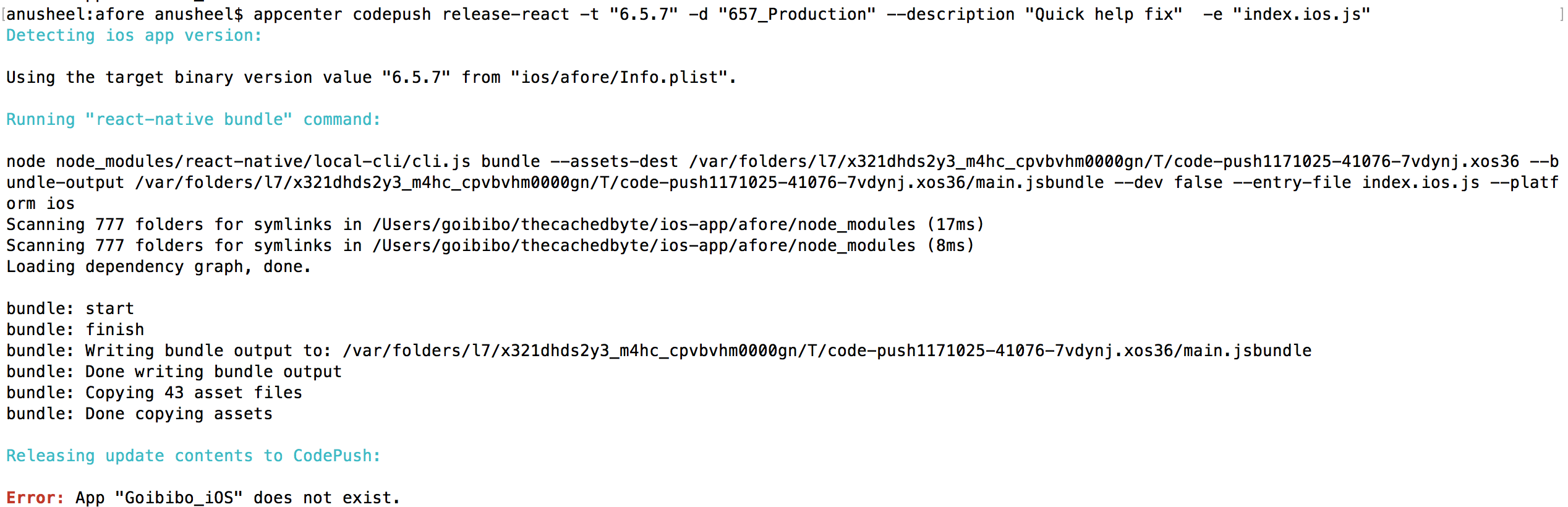
Its happening for new CLI also.. appcenter version 1.0.3.. erroe is same "app doesn't exist" https://github.com/Microsoft/appcenter-cli/issues/324
thecachedbyte
on 27 Nov 2017
Hey @thecachedbyte, just have tried (I am a collaborator for this app) and it works for me.
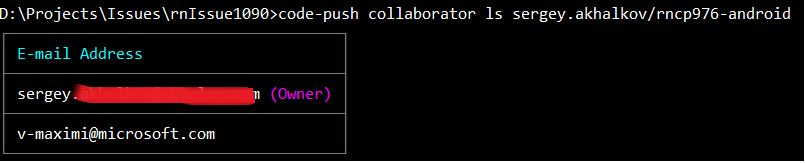
D:\Projects\Issues\rnIssue1090>code-push release-react sergey.akhalkov/rncp976-android android
Detecting android app version:

Using the target binary version value "1.0" from "android\app\build.gradle".
...
Releasing update contents to CodePush:

Upload progress:[==================================================] 100% 0.0s
Successfully released an update containing the "C:\Users\max\AppData\Local\Temp\CodePush" directory to the "Staging" deployment of the "sergey.akhalkov/rncp976-android" app.

D:\Projects\Issues\rnIssue1090>
Can you share the exact command you are executing? Does your app belongs to organization in app center or not?
max-mironov
on 27 Nov 2017
thecachedbyte
on 27 Nov 2017
@thecachedbyte thanks for quick turnaround!
As for new CLI - it seems that this PR is needed to fix your issue (if you get a chance to test it with it that would be great).
Otherwise could you try with old CLI? Could you share the output and command you are using with us?
max-mironov
on 27 Nov 2017
@max-mironov I'm having this same problem, and I'm trying to understand how the PR you referenced would fix it. Does that PR only apply if you've used set-current for the default app? I've tried both ways (implicit app name with set-current and explicit app name with -a flag) with a non-owner account on both old and new CLIs (code-push release-react and appcenter codepush release-react) and I'm still having the problems described by OP.
appcenter --version -> appcenter version 1.0.3
code-push --version -> 2.1.3-beta
 southerneer
on 27 Nov 2017
southerneer
on 27 Nov 2017
@southerneer please take a look at the following comment: https://github.com/Microsoft/appcenter-cli/issues/324#issuecomment-347434975
max-mironov
on 28 Nov 2017
Closing this as the issue is resolved in latest version of appcenter.
max-mironov
on 29 Nov 2017
Related issues
 Phredward
·
3Comments
Phredward
·
3Comments
 ninjz
·
4Comments
ninjz
·
4Comments
 EdmundMai
·
4Comments
EdmundMai
·
4Comments
 diegocouto
·
4Comments
diegocouto
·
4Comments
 quanzaiyu
·
3Comments
quanzaiyu
·
3Comments
Most helpful comment
Hey @max-mironov,
Thank you for the fast response, I found the following change with
code-push app ls.The app name changed from "AppName" to "Username/AppName".
Change of the app name solved the issue for me.