React-native-code-push: CodePushNativeModule.java: error: cannot find symbol (multiple similar errors)
With the latest upgrade (today) of all my packages (rncp included), I cannot build anymore. See errors below:
E:\R\ourMobileApp\node_modules\react-native-code-push\android\app\src\main\java\com\microsoft\codepush\react\CodePushNativeModule.java:9: error: cannot find symbol
import com.facebook.react.ReactApplication;
                         ^
  symbol:   class ReactApplication
  location: package com.facebook.react
E:\R\ourMobileApp\node_modules\react-native-code-push\android\app\src\main\java\com\microsoft\codepush\react\CodePushNativeModule.java:19: error: cannot find symbol
import com.facebook.react.modules.core.ChoreographerCompat;
                                      ^
  symbol:   class ChoreographerCompat
  location: package com.facebook.react.modules.core
E:\R\ourMobileApp\node_modules\react-native-code-push\android\app\src\main\java\com\microsoft\codepush\react\CodePushNativeModule.java:21: error: cannot find symbol
import com.facebook.react.modules.core.ReactChoreographer;
                                      ^
  symbol:   class ReactChoreographer
  location: package com.facebook.react.modules.core
E:\R\ourMobileApp\node_modules\react-native-code-push\android\app\src\main\java\com\microsoft\codepush\react\CodePushNativeModule.java:160: error: cannot find symbol
                        instanceManager.recreateReactContextInBackground();
                                       ^
  symbol:   method recreateReactContextInBackground()
  location: variable instanceManager of type ReactInstanceManager
E:\R\ourMobileApp\node_modules\react-native-code-push\android\app\src\main\java\com\microsoft\codepush\react\CodePushNativeModule.java:197: error: cannot find symbol
        ReactApplication reactApplication = (ReactApplication) currentActivity.getApplication();
        ^
  symbol:   class ReactApplication
  location: class CodePushNativeModule
E:\R\ourMobileApp\node_modules\react-native-code-push\android\app\src\main\java\com\microsoft\codepush\react\CodePushNativeModule.java:197: error: cannot find symbol
        ReactApplication reactApplication = (ReactApplication) currentActivity.getApplication();
                                             ^
  symbol:   class ReactApplication
  location: class CodePushNativeModule
E:\R\ourMobileApp\node_modules\react-native-code-push\android\app\src\main\java\com\microsoft\codepush\react\CodePushNativeModule.java:236: error: package ReactChoreographer does not exist
                                    ReactChoreographer.getInstance().postFrameCallback(ReactChoreographer.CallbackType.TIMERS_EVENTS, new ChoreographerCompat.FrameCallback() {
                                                                                                         ^
E:\R\ourMobileApp\node_modules\react-native-code-push\android\app\src\main\java\com\microsoft\codepush\react\CodePushNativeModule.java:236: error: package ChoreographerCompat does not exist
                                    ReactChoreographer.getInstance().postFrameCallback(ReactChoreographer.CallbackType.TIMERS_EVENTS, new ChoreographerCompat.FrameCallback() {
                                                                                                                                                             ^
E:\R\ourMobileApp\node_modules\react-native-code-push\android\app\src\main\java\com\microsoft\codepush\react\CodePushNativeModule.java:236: error: cannot find symbol
                                    ReactChoreographer.getInstance().postFrameCallback(ReactChoreographer.CallbackType.TIMERS_EVENTS, new ChoreographerCompat.FrameCallback() {
                                    ^
  symbol: variable ReactChoreographer
9 errors
:react-native-code-push:compileReleaseJavaWithJavac FAILED

FAILURE: Build failed with an exception.
Environment
- react-native-code-push version: v5.1.3-beta
- react-native version: ^0.49.3
- iOS/Android/Windows version: Windows 10
- Does this reproduce on a debug build or release build? Both
- Does this reproduce on a simulator, or only on a physical device? Does not go there, build fails
(The more info the faster we will be able to address it!)
 afilp
afilp
All 14 comments
Hi @afilp, could you please double check if your current react-native version is compatible with latest react-native-code-push version.
Please refer to our Compatibility Table for this.
As for react-native-code-push v5.1.3-beta -> only react-native v0.46-v0.49 are supported.
Please let us know if it helps.
 max-mironov
on 25 Oct 2017
max-mironov
on 25 Oct 2017
I'm seeing the same errors with react-native-code-push 5.1.3-beta and react-native 0.49.0
 esauter5
on 25 Oct 2017
esauter5
on 25 Oct 2017
I also see the same problem on 5.0.0-beta as well. I recently upgraded react-native to 0.49.0.
esauter5
on 25 Oct 2017
Found this via: https://github.com/wix/react-native-navigation/issues/314
In my react-native apps android/build.gradle, I changed
maven {
url "$projectDir/../../node_modules/react-native/android"
}
to
maven {
url "$rootDir/../node_modules/react-native/android"
}
and now things build fine. hope this helps!
esauter5
on 25 Oct 2017
@max-mironov I have the latest React Native version: "^0.49.3"
My android/build.gradle is:
// Top-level build file where you can add configuration options common to all sub-projects/modules.
buildscript {
repositories {
jcenter()
}
dependencies {
classpath 'com.android.tools.build:gradle:2.2.3'
classpath 'com.google.gms:google-services:3.1.0' // For firebase-analytics
// NOTE: Do not place your application dependencies here; they belong
// in the individual module build.gradle files
}
}
allprojects {
repositories {
mavenLocal()
jcenter()
maven {
// All of React Native (JS, Obj-C sources, Android binaries) is installed from npm
url "$rootDir/../node_modules/react-native/android"
url 'https://maven.google.com'
}
}
}
Isn't the above the correct maven? Note that I am also using firebase and this requires the google maven.
afilp
on 26 Oct 2017
@afilp I've tried with latest rncp and rn49 from the scratch and don't see any issues with this. Also have added Firebase to my project and was able to build it.
My android/build.gradle is the same as yours except that I don't have url 'https://maven.google.com'. Are you sure you really need this?
Could you confirm that you could reproduce the issue on fresh new react-native app?
If it is something related to your project than it is not easy to say whats wrong here. Probably you could share with us minimum app so we could try to build it on our side to see if we have an error. Please let us know what you think about it.
max-mironov
on 26 Oct 2017
@max-mironov
Actually, I do not have "Firebase" in the project but these two firebase-related packages:
"react-native-firebase-analytics": "^4.0.1",
"react-native-firebase-dynamic-links": "^1.0.3",
I think the problem is with the 2nd one (dynamic-links). Because of an error there I also had to change the dependencies as such:
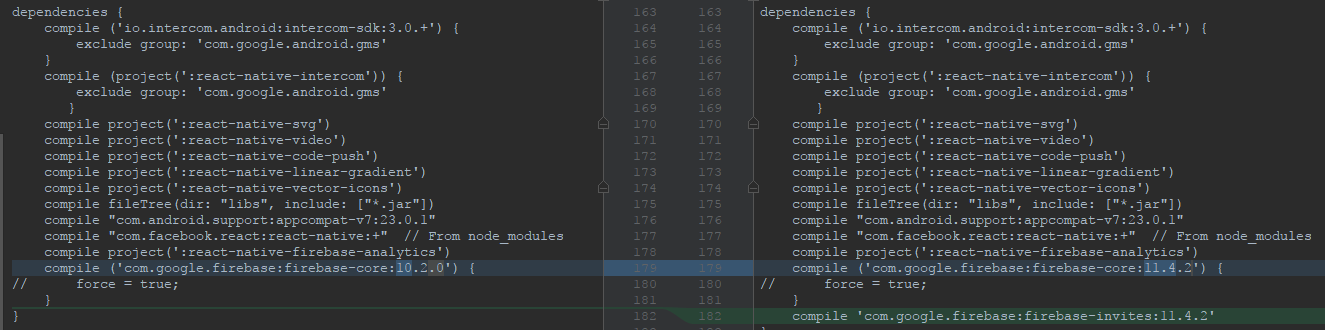
afilp
on 26 Oct 2017
Note, that when I tried after removing react-native-firebase-dynamic-links I get a different error:
\node_modules\react-native-code-push\android\app\src\main\java\com\microsoft\codepush\react\CodePush.java:291: error: method does not override or implement a method from a supertype
    @Override
    ^
@max-mironov
Actually, I read somewhere (https://stackoverflow.com/questions/30114860/multiple-maven-repositories-in-one-gradle-file) that each "maven" should be separate, so I did this change now:

After this change, I do not get the initial errors on initial post, and get this instead (same as above):
\node_modules\react-native-code-push\android\app\src\main\java\com\microsoft\codepush\react\CodePush.java:291: error: method does not override or implement a method from a supertype
    @Override
    ^
So, I think that my initial post had to do with the maven syntax and not related to the react-native-firebase-dynamic-links package anymore, but only to react-native-code-push.
afilp
on 26 Oct 2017
@max-mironov
So, the actual problem is why we get this Override error in code-push, despite we use the compatible versions.
afilp
on 26 Oct 2017
@afilp that is really odd however looks like the issue is related to your configuration - not a codepush itself (as far as we do not get any more reported issues like that).
With that said its really hard to say what is wrong with your configuration/codepush integration without actually looking at the code. Is it possible for you to share with us a small reproducible demo or better provide us with steps how we can fall into this issue (e.g. 1) do rninit init MyIssue1061 2) npm i react-native-code-push 3) react-native link react-native-code-push and so on and so forth).
Looking forward for more information from your side.
max-mironov
on 26 Oct 2017
Hey @afilp do you happen to have any updates about it?
max-mironov
on 30 Oct 2017
@max-mironov
It is fixed now!
It appears that the error was caused with the addition of firebase-dynamic-links package. Some instructions were missing there which caused problems to the rest of the app. I now added additional code and it works fine.
Thank you for your great and instant support!
afilp
on 30 Oct 2017
Awesome! Thanks for update @afilp!
max-mironov
on 30 Oct 2017
Related issues
 quanzaiyu
·
3Comments
quanzaiyu
·
3Comments
 ninjz
·
4Comments
ninjz
·
4Comments
 vira-khdr
·
3Comments
vira-khdr
·
3Comments
 kevando
·
4Comments
kevando
·
4Comments
 sergey-akhalkov
·
4Comments
sergey-akhalkov
·
4Comments
Most helpful comment
@max-mironov
Actually, I read somewhere (https://stackoverflow.com/questions/30114860/multiple-maven-repositories-in-one-gradle-file) that each "maven" should be separate, so I did this change now:
After this change, I do not get the initial errors on initial post, and get this instead (same as above):
So, I think that my initial post had to do with the maven syntax and not related to the
react-native-firebase-dynamic-linkspackage anymore, but only toreact-native-code-push.