React-native-calendars: Missing state prop in custom day component
I tried implementing a custom day component to override the marking type in the calendar. I followed the documentation related to this, but I receive different parameters than what is enumerated in the documentation. See below for more info.
Description
The problem is the dayComponent override does not give marking, state and other props mentionned like onDayPress.
Expected Behavior
I expected the signature to correspond to the doc. If it is an issue related to removed props in later versions, then I would like to know how I can access those props to disable some dates in custom day components.
Expected behavior (taken from v1.403.0):
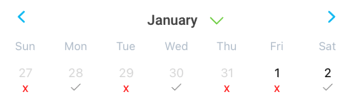
Observed Behavior
See this screenshot for current behavior (on v1.1129.0):

This is an example entry of what I receive from dayComponent override.
{
  "accessibilityLabel": " Friday 8 January 2021 ",
  "children": 8,
  "date": {"dateString": "2021-01-08", "day": 8, "month": 1, "timestamp": 1610064000000, "year": 2021},
  "testID": "native.calendar.SELECT_DATE_SLOT-2021-01-08"
}
Notice there is no marking or state entry. Those are then undefined.
Environment
- react-native-calendars is running version '1.1129.0' which is at the time writing this, the latest release on NPM.
EDIT: I tested the version 1.403 of the lib following this discussion and it works. It also has marking and the other props missing. Maybe those were changed in later versions and the doc was not updated? - react-native is on version '0.63.4'.
Also specify:
- Phone/emulator/simulator & version: ios simulator on latest IOS version.
Reproducible Demo
const renderDayComponent = ({
    date,
    state,
  }: {
    date: CalendarDate
    state: any
  }) => {
    console.log(state) // State is undefined on all entries.
    const isDisabled = state === 'disabled' **// always falsy**
    const textStyle = isDisabled ? styles.disabledText : styles.defaultDateText

    return (
      <View style={mark[date.dateString]?.customStyles.container}>
        <TouchableOpacity onPress={() => onPressDate(date)}>
          <Text style={[styles.center, textStyle]}>{date.day}</Text>
          <View style={styles.markingRow}>
            {checkCompliance(date) ? (
              <CheckmarkIcon
                size={Theme.metrics.shape.size.small}
                color={Theme.colors.primaryDark}
              />
            ) : (
              <Text style={styles.notCompliantText}>x</Text>
            )}
          </View>
        </TouchableOpacity>
      </View>
    )
  }

// ...
<Calendar
            ref={calendarRef}
            current={selectedDate}
            onDayPress={onChangeDate}
            style={styles.calendar}
            minDate={startDate.atStartOfMonth().toDayFormat()}
            maxDate={lastCalendarDate}
            markedDates={mark}
            renderHeader={(date: Date) => Header(date)}
            onMonthChange={({ dateString }: { dateString: string }) =>
              handleMonthChange(dateString)
            }
            dayComponent={renderDayComponent}
            enableSwipeMonths
            disableMonthChange
            disableAllTouchEventsForDisabledDays
          />
 CauchR6
All 9 comments
I’m having a similar problem, missing the onPress prop in my custom day component.
Some trial-and-error showed that this issue started appearing since version 1.830.0 on NPM. This seems to be caused by one of the commits from Dec 10, 2020.
As workaround, I installed the previous version 1.829.0 using npm install [email protected].
 jhogervorst
on 17 Jan 2021
jhogervorst
on 17 Jan 2021
Same issue with state prop in custom day component --- latest version
 BossBele
on 17 Jan 2021
BossBele
on 17 Jan 2021
I’m having a similar problem. found that the lib provide rest of props using propTypes
const dayProps = extractComponentProps(Component, this.props);
I used props from the PeriodDay:
static propTypes = {
state: PropTypes.oneOf(['selected', 'disabled', 'today', '']), //TODO: deprecate
marking: PropTypes.any,
theme: PropTypes.object,
onPress: PropTypes.func,
onLongPress: PropTypes.func,
date: PropTypes.object
};
But, if you want to memoize component that trick not working
 SergeySlutskiyGowombat
on 18 Jan 2021
SergeySlutskiyGowombat
on 18 Jan 2021
I had similar issue with 1.265.0 version and update to 1.403.0 helped me https://github.com/wix/react-native-calendars/issues/1373#issuecomment-746625048.
 YarmolenkoD
on 22 Jan 2021
YarmolenkoD
on 22 Jan 2021
how to solve it ?
 jetBn
on 28 Jan 2021
jetBn
on 28 Jan 2021
how to solve it ?
You can add PropTypes to your custom day component.
I used props from the PeriodDay:
static propTypes = {
state: PropTypes.oneOf(['selected', 'disabled', 'today', '']),
marking: PropTypes.any,
theme: PropTypes.object,
onPress: PropTypes.func,
onLongPress: PropTypes.func,
date: PropTypes.object
};
it helps me
SergeySlutskiyGowombat
on 28 Jan 2021
I'm experiencing the same issue since i did a full new npm installtoday. marking and onPress seem to be undefined in my memoized dayComponent.
Fixed by uninstalling version 1.403.0 and installing version 1.829.0 as mentioned here
 PatrickBokhove
on 28 Jan 2021
PatrickBokhove
on 28 Jan 2021
DayComponent.propTypes = {
state: PropTypes.oneOf(['selected', 'disabled', 'today', '']),
marking: PropTypes.any,
theme: PropTypes.object,
onPress: PropTypes.func,
onLongPress: PropTypes.func,
date: PropTypes.object,
};
I fiexd it with propsTypes
 patradanai
on 4 Feb 2021
patradanai
on 4 Feb 2021
This patch fixed it for me #1407
 quizzy
on 12 Feb 2021
quizzy
on 12 Feb 2021
Related issues
 sommeshEwall
·
3Comments
sommeshEwall
·
3Comments
 nickitatkach
·
4Comments
nickitatkach
·
4Comments
 Yandamuri
·
4Comments
Yandamuri
·
4Comments
 joaosauer
·
4Comments
joaosauer
·
4Comments
 kewin1807
·
4Comments
kewin1807
·
4Comments