React-native-calendars: custom dayComponent not updating style
Description
I may be doing something wrong but for some I cant get the custom days to look correct.
I have marked dates:
    markedDates: {
      '2020-06-01': {
        marked: true,
        customStyles: {
          container: { //{key: 'period', color: 'red'}
            backgroundColor: 'red',
            justifyContent: 'center',
            borderRadius: 16
          }
        }
      },
      '2020-06-02': { selected: true, selectedColor: 'green', marked: true },
    }
in which I am trying the selected method and customStyle method.
I also changed the theme of the calendar:
return (
  <View>
    <Calendar markedDates={state.markedDates} theme={{todayTextColor: 'blue', selectedDayBackgroundColor:'red'}} dayComponent={({ date, state, marking, theme }) => {
      return (
          <View>
            <Text style={{ textAlign: 'center', color: state === 'disabled' ? 'gray' : 'black', }} onPress={() => MarkDay(date)}>
              {date.day}
              {console.log("this is the marking object ", marking)}
            </Text>
            {/* <TrackerModal modalView={this.modal}/> */}
          </View>
      );
    }} />
  </View>
);
}
Expected Behavior
Based off the index.js of the custom day component, I am expected the css of the dates in the markedDates object to appear. But I dont see the customStyle or the selected css appear
Observed Behavior
The console.log statement in the return works and I see the marking object for the right dates, just no css
Environment
Please run these commands in the project folder and fill in their results:
npm ls react-native-calendars: [email protected]npm ls react-native: [email protected]
Also specify:
- Phone/emulator/simulator & version: Using Expo on my iPhone
Does anyone know if im doing anything wrong? or is this a bug?
 gcrev93
All 10 comments
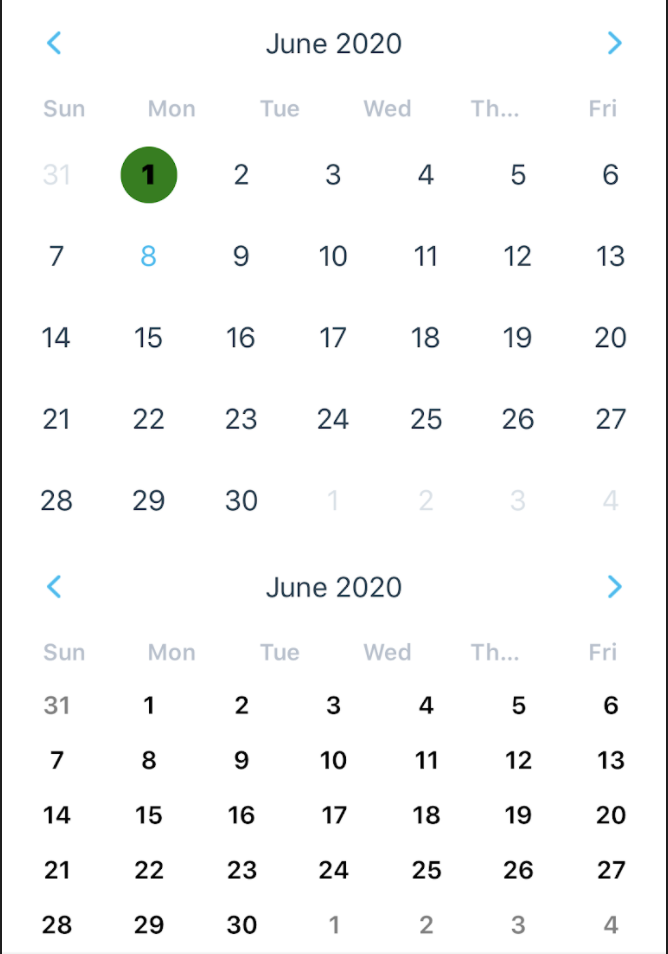
Just to add on this.. I kept playing with the code. I tried adding two calendars and working with marked dates.. they both have the same marked day. One calendar is using the custom Day component and the other is using the standard.
    <View>
      <Calendar
      markingType={'custom'}
  markedDates={{
    '2020-06-01': {
      customStyles: {
        container: {
          backgroundColor: 'green'
        },
        text: {
          color: 'black',
          fontWeight: 'bold'
        }
      }
    }}}

/>
      <Calendar markingType={'custom'} markedDates={{
    '2020-06-01': {
      customStyles: {
        container: {
          backgroundColor: 'green'
        },
        text: {
          color: 'black',
          fontWeight: 'bold'
        }
      }}}} dayComponent={({ date, state, marking, theme }) => {
          return (
            <TouchableOpacity>
            <View>
              <Text style={{ textAlign: 'center', color: state === 'disabled' ? 'gray' : 'black' }} onPress={() => MarkDay(date)}>
                {console.log("this is marked ", marking)}
                {date.day}
              </Text>
              {/* <TrackerModal modalView={this.modal}/> */}
             </View>
            </TouchableOpacity>
          );
        }
      } />
    </View>
  );
}
This is what it look like:
gcrev93
on 8 Jun 2020
Hi @gcrev93,
Maybe our API docs aren't clear enough, but did you check the examples?
In order to use customStyles you should use markingType={'custom'}.
Please check this example:
https://github.com/wix/react-native-calendars/blob/master/example/src/screens/calendars.js#L292
Let me know if you need further help.
 chenei
on 9 Jun 2020
chenei
on 9 Jun 2020
Hello @chenei I have that for both calendars
gcrev93
on 10 Jun 2020
same issue; then setState also no work~
 meiqi1992
on 11 Aug 2020
meiqi1992
on 11 Aug 2020
I'm having the exact same issue, any fixes yet? @chenei
 shalonbd
on 1 Dec 2020
shalonbd
on 1 Dec 2020
If you override markedDates and dayComponent, you have to change it styles by yourself.
For that you will found a parameter in the dayComponent callback called marking. It's the styles provider which will allow you to override your text and container styles.
As an example:
// ...your awesome stuff
dayComponent={({ date, onPress, marking }) => {
    return (
        <YourOwnContainerView containerStyle={marking['customStyles']?.container}>
            <YourOwnText onPress={() => onPress(date)} textStyle={marking['customStyles']?.text}>{date.day}</YourOwnText>
        </YourOwnContainerView>
    )
}}
markingType={"custom"}
markedDates={{
    [markedDay]: {
        customStyles: {
            container: {
                // ...your awesome styles
            },
            text: {
                // ...your awesome styles
            },
        },
    },
}}
// ...your awesome stuff
 oScape
on 7 Dec 2020
oScape
on 7 Dec 2020
In my case, state and marking are undefined.
 jp928
on 4 Jan 2021
jp928
on 4 Jan 2021
@jp928 me too. Pls help!
 nghiatv
on 29 Jan 2021
nghiatv
on 29 Jan 2021
@jp928 try this https://github.com/wix/react-native-calendars/issues/1373#issuecomment-761765261
nghiatv
on 29 Jan 2021
@nghiatv Thanks. 1.829 works.
jp928
on 30 Jan 2021
Related issues
 sommeshEwall
·
3Comments
sommeshEwall
·
3Comments
 filippoitaliano
·
3Comments
filippoitaliano
·
3Comments
 MrAlekhin
·
4Comments
MrAlekhin
·
4Comments
 Yandamuri
·
4Comments
Yandamuri
·
4Comments
 idlework
·
4Comments
idlework
·
4Comments
Most helpful comment
In my case, state and marking are undefined.