React-native-calendars: Agenda - Datepicker without Scrollview?
All 8 comments
Bumping this.
 josefleventon
on 22 May 2020
josefleventon
on 22 May 2020
Do you mean something like this?
https://ibb.co/bHvKpfY
 chenei
on 1 Jun 2020
chenei
on 1 Jun 2020
@josefleventon I just removed the <AgendaList/> from the example.
https://github.com/wix/react-native-calendars/blob/master/example/src/screens/expandableCalendar.js#L184
Not sure what is the use case.
chenei
on 2 Jun 2020
@chenei What i would need is something, like it is shown in your Agenda gif, but only the "header part" of it:
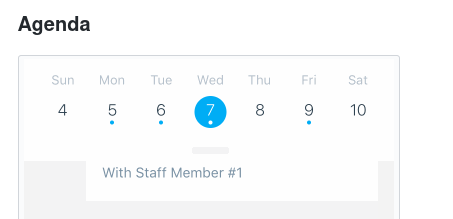
In other words, i would like to have my app's header display a date picker that only shows one entire week at a time, and when you click on it (or pull down) it would then show entire months, also like in your gif.
What I don't need in my use case however, is the agenda/scroll list itself.
 maks-io
on 2 Jun 2020
maks-io
on 2 Jun 2020
This code is taken from our example file (this is how it looks - https://ibb.co/6vxT7XM):
<CalendarProvider
        date={ITEMS[0].title}
        onDateChanged={this.onDateChanged}
        onMonthChange={this.onMonthChange}
        disabledOpacity={0.6}
        // theme={{
        //   todayButtonTextColor: themeColor
        // }}
        // todayBottomMargin={16}
      >
        <ExpandableCalendar
          testID={testIDs.expandableCalendar.CONTAINER}
          // horizontal={false}
          // hideArrows
          // disablePan
          // hideKnob
          // initialPosition={ExpandableCalendar.positions.OPEN}
          // calendarStyle={styles.calendar}
          // headerStyle={styles.calendar} // for horizontal only
          // disableWeekScroll
          // theme={this.getTheme()}
          firstDay={1}
          markedDates={this.getMarkedDates()}
          leftArrowImageSource={require('../img/previous.png')}
          rightArrowImageSource={require('../img/next.png')}
        />
        <View style={{
          display: 'flex',
          justifyContent: 'center',
          alignItems: 'center',
          flex: 1
        }}>
          <Text style={{fontSize: 30}}>Anything you want</Text>
        </View>
      </CalendarProvider>
You can use hideKnob to disable viewing all month. I hope it helps.
chenei
on 2 Jun 2020
@chenei Thank you very much, this was really helpful. I was not aware of the fact that we can directly import "sub components" like the ExpandableCalendar etc.
From my side this is resolved - you may close this in my opinion.
Thanks again!
maks-io
on 2 Jun 2020
I think you should include the ExpandableCalendar in your Readme, it is exactly the feature I was looking for and took so long to find it, I am sure there are others having the same problem.
 KristineTrona
on 8 Jul 2020
KristineTrona
on 8 Jul 2020
This issue has been automatically marked as stale because it has not had recent activity. It will be closed if no further activity occurs. Thank you for your contributions.
![stale[bot] picture](https://avatars.githubusercontent.com/in/1724?v=4&s=40) stale[bot]
on 12 Oct 2020
stale[bot]
on 12 Oct 2020
Related issues
 MrAlekhin
·
4Comments
MrAlekhin
·
4Comments
 sommeshEwall
·
3Comments
sommeshEwall
·
3Comments
 kewin1807
·
4Comments
kewin1807
·
4Comments
 moiiiiit
·
4Comments
moiiiiit
·
4Comments
 Yandamuri
·
4Comments
Yandamuri
·
4Comments
Most helpful comment
I think you should include the ExpandableCalendar in your Readme, it is exactly the feature I was looking for and took so long to find it, I am sure there are others having the same problem.