React-native-calendars: [Question] What If I just want to update `day` component whenever I need ?
Description
I am using CalendarList for my app, and I use custom dayComponent for some purpose.
At first view I want to show normal day component (only date number). Then meanwhile I call api and wait for response. After response, I re-render my component, and so I add some more info in dayComponent.
In short, I want to update (rerender) dayComponent when my component re-renders.
I found this code in calendar/index.js:
  componentWillReceiveProps(nextProps) {
    const current= parseDate(nextProps.current);
    if (current && current.toString('yyyy MM') !== this.state.currentMonth.toString('yyyy MM')) {
      this.setState({
        currentMonth: current.clone()
      });
    }
  }
Due to this, whole calendar does not rerender just because dates are same.
What if I just want to re-render dayComponent ?
Any Idea?
 jaydeep987
All 11 comments
The same question for me, how to re-render dayComponent? Thanks for any helps!!!
 anhkhoi
on 12 Apr 2019
anhkhoi
on 12 Apr 2019
Same here , I want to show the selected date in another colour.
 HaswinVidanage
on 4 Jun 2019
HaswinVidanage
on 4 Jun 2019
@jaydeep987 @anhkhoi @HaswinVidanage
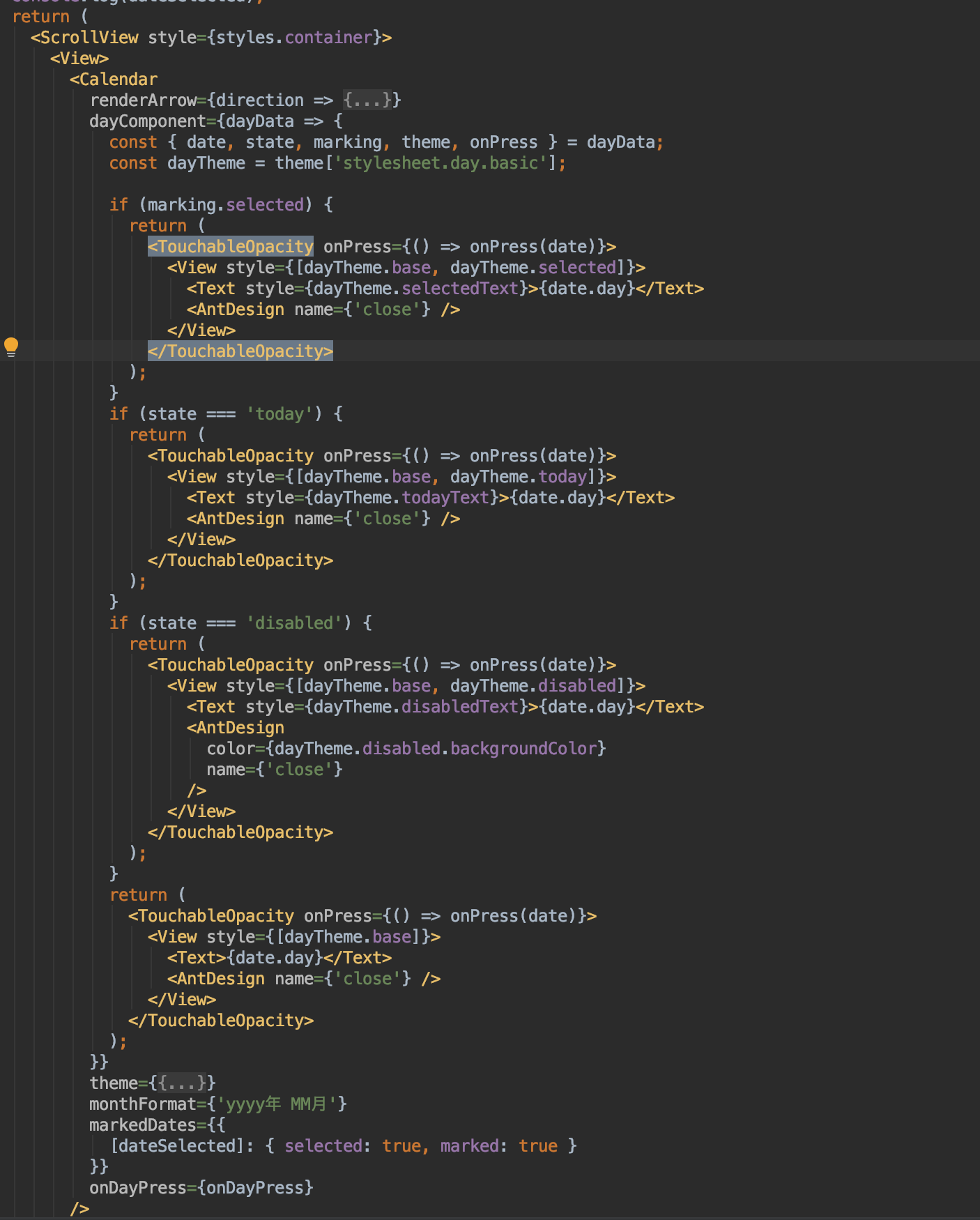
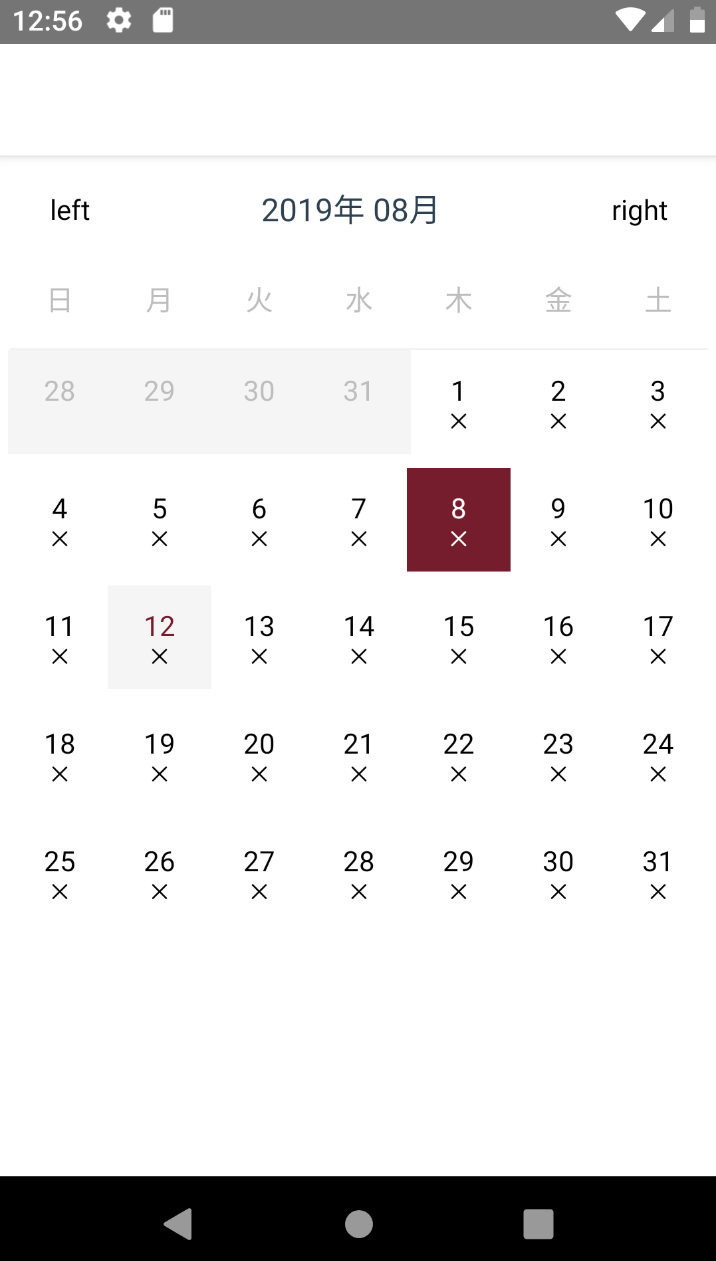
Please using onPress={() => onPress(date)} it work fine.
Like this
 mickey-ichi
on 11 Aug 2019
mickey-ichi
on 11 Aug 2019
Any Update on this issue. I'm unable to update dayComponent on props change.
 pankaj1433
on 27 Sep 2019
pankaj1433
on 27 Sep 2019
Changing reference of markedDates re-renders the dayComponent. With react hooks you can achieve this. Just watch the props that is supposed to re-render the dayComponent using useEffect.
I did this by:
`const [markedDates, setmarkedDates] = useState([]);
useEffect(() => {
const markedDates = { [moment().format('YYYY-MM-DD')]: { marked: true } };
setmarkedDates(markedDates);
}, [watcherFromProps]);
{...otherProps} />`
NOTE: It's a work around and not an appropriate solution.
pankaj1433
on 27 Sep 2019
Same shit. Any hope for an answer here?
 nikbelikov
on 21 Jan 2020
nikbelikov
on 21 Jan 2020
I used hooks and update state when day press. It just worked but it will re-render all day components and but have a delay to show selected day with color. :( Any other solutions? Please help
 Maddumage
on 3 Feb 2020
Maddumage
on 3 Feb 2020
Same problem. When changing markedDates, all dayComponents re-render and the selected day is shown with delay (mostly on Android). I am also using useCallback on the dayComponent, as recommended.
I used hooks and update state when day press. It just worked but it will re-render all day components and but have a delay to show selected day with color. :( Any other solutions? Please help
 teo029
on 26 Apr 2020
teo029
on 26 Apr 2020
It's been more than a year for this. At this moment we can assume it will not be fixed but as a workaround, you might be able to get away with unmounting and mounting the Calendar component with a loading state of some sort.
if loading hides Calendar show Calendar after some milliseconds.
This method can be called when you press on a day and it should rerender everything, unfortunately, I can't seem to only rerender the day selected...
 johhansantana
on 7 Jul 2020
johhansantana
on 7 Jul 2020
This issue has been automatically marked as stale because it has not had recent activity. It will be closed if no further activity occurs. Thank you for your contributions.
![stale[bot] picture](https://avatars.githubusercontent.com/in/1724?v=4&s=40) stale[bot]
on 12 Oct 2020
stale[bot]
on 12 Oct 2020
CalendarList and use dayComponent has the same question
 tututututututu
on 31 Mar 2021
tututututututu
on 31 Mar 2021
Related issues
 kewin1807
·
4Comments
kewin1807
·
4Comments
 filippoitaliano
·
3Comments
filippoitaliano
·
3Comments
 sonnguyenit
·
3Comments
sonnguyenit
·
3Comments
 joaosauer
·
4Comments
joaosauer
·
4Comments
 idlework
·
4Comments
idlework
·
4Comments
Most helpful comment
@jaydeep987 @anhkhoi @HaswinVidanage


Please using
onPress={() => onPress(date)}it work fine.Like this