React-native-calendars: Marked dates display a vertical white line through them on Android
Description
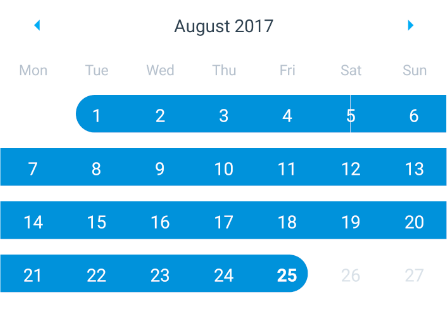
When selecting dates with the Calendar component, some of the marked dates have a white vertical liine through them.
See the tile representing 5th August
Expected Behavior
I simulated a date selection from Aug 1st - Aug 25th. It is expected that all tiles render without a vertical line through it.
Observed Behavior
A single date has a vertical line through it. After testing this in two separate repositories, the problematic date was Aug 5th, is this a coincidence?
Environment
Please run these commands in the project folder and fill in their results:
npm ls react-native-calendars: 1.5.8npm ls react-native: 0.44.0 (& 0.45.1)
Also specify:
- Phone/emulator/simulator & version: Nexus 6P, Android 7.0 (Marshmellow), API 24
Reproducible Demo
Repo: https://github.com/hannigand/react-native-calendars
Steps:
cd exampleyarn installreact-native run-android- Navigate to the
Calendartab - Observe the first Calendar
 hannigand
All 6 comments
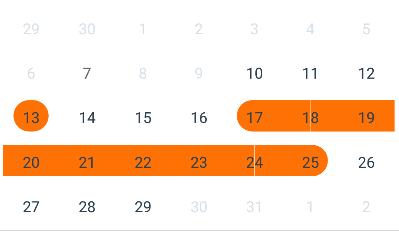
Same issue here
 JCMais
on 1 Sep 2017
JCMais
on 1 Sep 2017
Same as #61
 tautvilas
on 14 Sep 2017
tautvilas
on 14 Sep 2017
This is caused by the margins on the calendar wrapper, removing them fix the issue.
JCMais
on 14 Sep 2017
@JCMais could you elaborate? Thanks
tautvilas
on 14 Sep 2017
Poke @tautvilas please could you review the pull request (#177).
hannigand
on 27 Sep 2017
Reviewed and merged
tautvilas
on 28 Sep 2017
Related issues
 microwin168
·
4Comments
microwin168
·
4Comments
 Yandamuri
·
4Comments
Yandamuri
·
4Comments
 idlework
·
4Comments
idlework
·
4Comments
 nickitatkach
·
4Comments
nickitatkach
·
4Comments
 MrAlekhin
·
4Comments
MrAlekhin
·
4Comments
Most helpful comment
Same issue here