React-native-calendars: Adding Month to the Agenda
When scrolling through the days on the agenda - especially if you have a lot of items - it's not obvious which month you are currently in. If you click on the knob then you will see what month you are in in the calendar list view
Something like below is what I mean -

The issue I have with the way I have done the above - basically just a text above the agenda showing current moth from state - is that the month is still there in the calendar list view as you can see here -
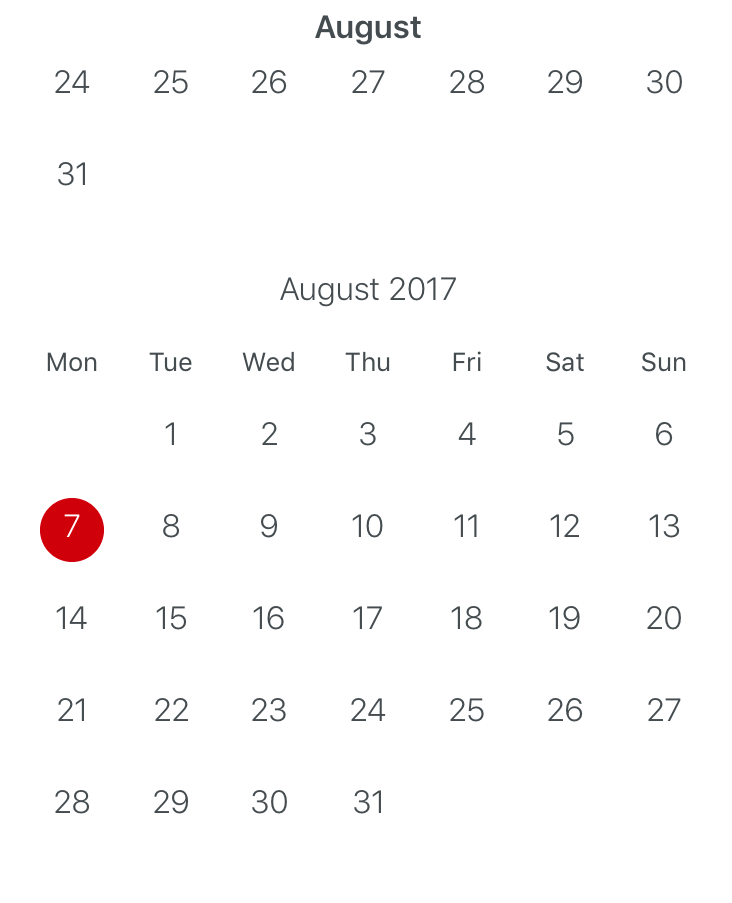
So either an enhancement that allows perhaps a toggle for showing current month or to have a new prop that would allow custom functionality when the knob is pressed.....
I'm a bit surprised it hasn't been raised before - but I could not find anything in past issues...
 georgetroughton
All 5 comments
I actually had this problem this morning funny enough. I got myself into this situation like this,
- You need to get the month that you start in. So when the screen loads it will show the current month. Control this with the
selected={Starting date here}
- You need to control the date change when the days are scrolled through.
onDayChange={(date) => { this.getMonth(date.month); }}
- You need to know when the month is changed by clicking the
knoband scrolling through months to select a new day.
onDayPress={(date) => { this.getMonth(date.month); }}
Here is a copy of the function I am using to pass the new month date in to update the month being shown to the user.
getMonth(date) {
        const month = date - 1;
        const monthNames = ['January', 'February', 'March', 'April', 'May', 'June',
            'July', 'August', 'September', 'October', 'November', 'December',
        ];

        this.setState({ month: monthNames[month], showMonth: true });
    }
So at that point you have the month. In my case we are using moment in the agenda to pass an initial date in. So I get the initial date like this,
componentWillMount() {
        const currentDate = moment(this.props.selectedDate, 'YYYY/MM/DD');
        const month = currentDate.format('M');

        this.getMonth(month);
    }
Then I have the month stored in state.
constructor(props) {
        super(props);
this.state = {
            month: '',
        };
}
Finally we can use the month above the Agenda component like this,
<Text style={styles.currentMonth}>{this.state.month}</Text>
Now once you make it past all of that. Your problem will be solved. BUT! You will be faced with a new problem. The problem I am stuck on. Since you are showing the month above the Agenda view you will always see it. Even when the knob is clicked. Which means you are going to have this ugly month name sitting above the months as you scroll through them till you pick a day to get back to the week view.
There is no way to track when the knob is clicked. If you use the prop to make your own knob it does not work because onPress does not seem to fire off.
I have inspected the code and cannot figure out why onPress wont work. Does anyone know the answer to that alone? At this point I would be happy to copy in the plugin to solve my problem but I can't figure out how the plugin is tracking when the knob is clicked or dragged.
I do see some functions changing state when the
I have an issue open about this. I can't believe there is no way to track when knob is clicked so I am hoping someone tells me there is and I just missed it.
When the app is loaded,
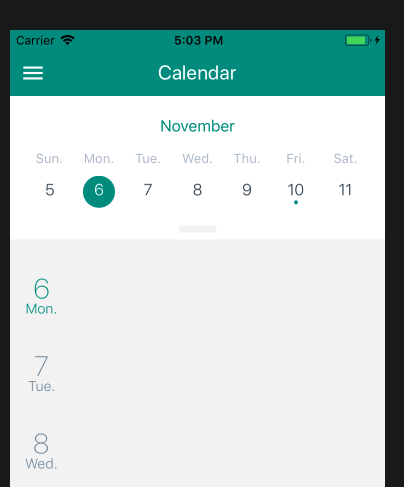
Then when the knob is clicked,
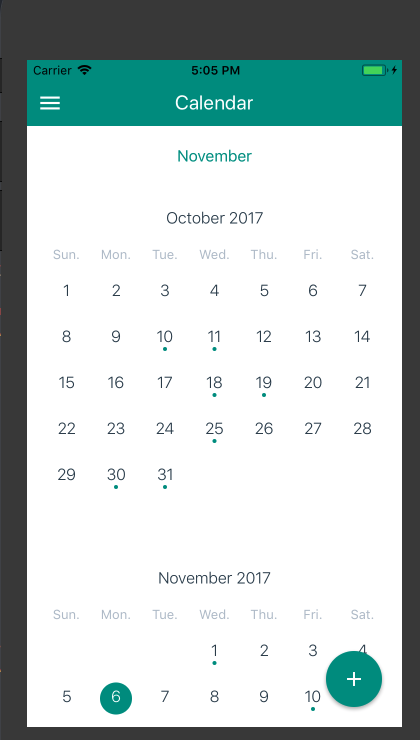
HAAALLLP!
I need to hide the month I created when the knob is clicked. Then show it again when the day is pressed.
So if the person who started this issue found a solution to solve their problem please do tell!
If anyone has a better way please let me know.
 wuno
on 7 Nov 2017
wuno
on 7 Nov 2017
227
 dborstelmann
on 10 Nov 2017
dborstelmann
on 10 Nov 2017
Can I manually highlight all sundays of the year in Agenda
 Veeraharikumar
on 10 May 2018
Veeraharikumar
on 10 May 2018
@wuno did you ever solve this problem? I have the same problem and I tried the onCalendarToggled, but then the new issue was that the calendar wasn't fully expanding in month view with the onCalendarToggled.
 mching107
on 8 Feb 2020
mching107
on 8 Feb 2020
@mching107, I wish I could help you. I know we did get the calendar working for our use case but it was a few years ago and I have no memory of any of it. :(
wuno
on 8 Feb 2020
Related issues
 ercpereda
·
4Comments
ercpereda
·
4Comments
 filippoitaliano
·
3Comments
filippoitaliano
·
3Comments
 matieux
·
4Comments
matieux
·
4Comments
 sommeshEwall
·
3Comments
sommeshEwall
·
3Comments
 kewin1807
·
4Comments
kewin1807
·
4Comments
Most helpful comment
I actually had this problem this morning funny enough. I got myself into this situation like this,
selected={Starting date here}onDayChange={(date) => { this.getMonth(date.month); }}knoband scrolling through months to select a new day.onDayPress={(date) => { this.getMonth(date.month); }}Here is a copy of the function I am using to pass the new month date in to update the month being shown to the user.
So at that point you have the month. In my case we are using moment in the agenda to pass an initial date in. So I get the initial date like this,
Then I have the month stored in state.
Finally we can use the month above the Agenda component like this,
Now once you make it past all of that. Your problem will be solved. BUT! You will be faced with a new problem. The problem I am stuck on. Since you are showing the month above the Agenda view you will always see it. Even when the knob is clicked. Which means you are going to have this ugly month name sitting above the months as you scroll through them till you pick a day to get back to the week view.
There is no way to track when the knob is clicked. If you use the prop to make your own knob it does not work because onPress does not seem to fire off.
I have inspected the code and cannot figure out why onPress wont work. Does anyone know the answer to that alone? At this point I would be happy to copy in the plugin to solve my problem but I can't figure out how the plugin is tracking when the knob is clicked or dragged.
I do see some functions changing state when the
I have an issue open about this. I can't believe there is no way to track when knob is clicked so I am hoping someone tells me there is and I just missed it.
When the app is loaded,
Then when the knob is clicked,
HAAALLLP!
I need to hide the month I created when the
knobis clicked. Then show it again when the day is pressed.So if the person who started this issue found a solution to solve their problem please do tell!
If anyone has a better way please let me know.