React-native-branch-deep-linking-attribution: [!] No podspec found for `Branch-SDK` in `../node_modules/react-native-branch/ios`
After running yarn add react-native-branch to add the lib, i added on a podfile, but for the "Branch-sdk" the pod file doesn't exist.
pod 'Branch-SDK', path: '../node_modules/react-native-branch/ios'
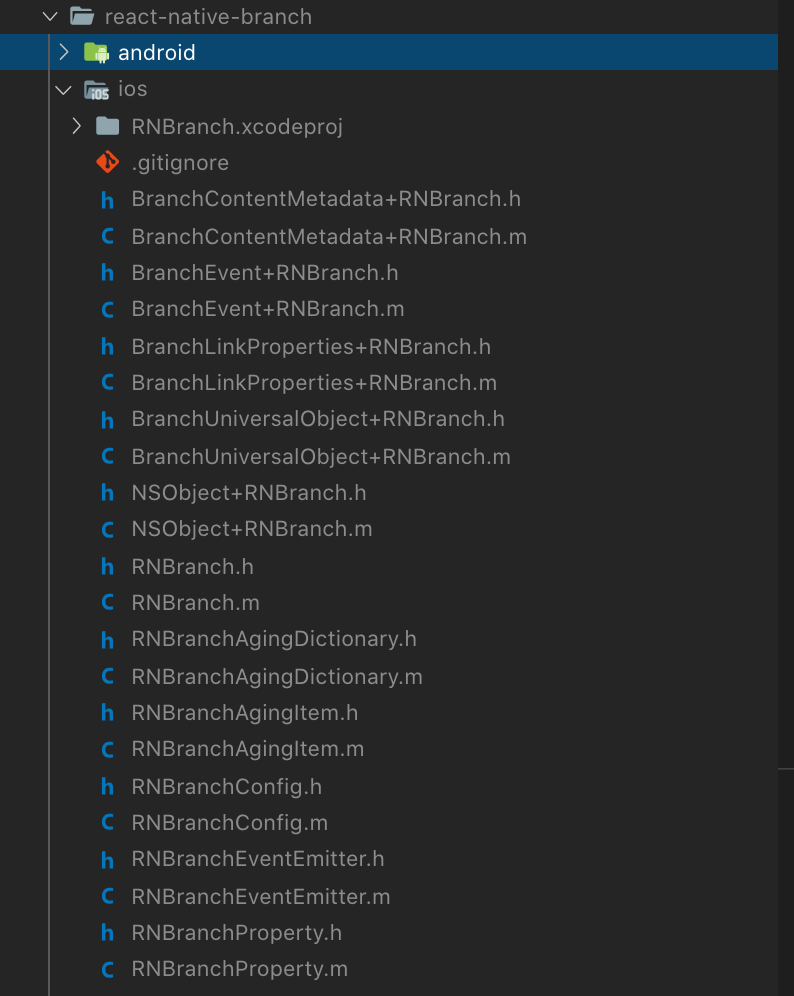
Fetching podspec for `Branch-SDK` from `../node_modules/react-native-branch/ios`
[!] No podspec found for `Branch-SDK` in `../node_modules/react-native-branch/ios
How can i proceed if the Podspec doesn't exist? The version is "react-native-branch": "^3.1.1",
 ebellumat
All 4 comments
@ebellumat is there any solution that you got
 saikiranoptisol
on 3 Sep 2019
saikiranoptisol
on 3 Sep 2019
Yes, i use the release from a tag from this repo. The NPM version is old...
just replace your react-native-branch in your package.json for this:
"react-native-branch": "BranchMetrics/react-native-branch-deep-linking-attribution#v4.1.0"
ebellumat
on 4 Sep 2019
Use Branch iOS SDK directly is work for me.
pod 'react-native-branch', path: '../node_modules/react-native-branch'
pod 'Branch', '0.27.1
https://github.com/BranchMetrics/react-native-branch-deep-linking-attribution/blob/master/docs/cocoapods.md#installation-without-the-react-pod
 shchu
on 5 Sep 2019
shchu
on 5 Sep 2019
Use only this one:
pod 'react-native-branch', path: '../node_modules/react-native-branch'
It includes Branch pod in its .podspec file ('Branch', '0.27.1')
 aliberski
on 27 Sep 2019
aliberski
on 27 Sep 2019
Related issues
 danilobuerger
·
7Comments
danilobuerger
·
7Comments
 willbattel
·
3Comments
willbattel
·
3Comments
 lukefanning
·
4Comments
lukefanning
·
4Comments
 pyankoff
·
5Comments
pyankoff
·
5Comments
 terreb
·
4Comments
terreb
·
4Comments
Most helpful comment
Yes, i use the release from a tag from this repo. The NPM version is old...
just replace your react-native-branch in your package.json for this:
"react-native-branch": "BranchMetrics/react-native-branch-deep-linking-attribution#v4.1.0"