React-native-branch-deep-linking-attribution: getLatestReferringParams() sometimes does not pick up on app open via Branch link
My problem is that when I open my app via a branch link (xxx.app.link/xxx) it only sometimes picks up that the app was opened via a Branch link. I know it's super interesting that this is an intermittent problem but I thought someone might have some ideas
Here's my code
this._unsubscribeFromBranch = branch.subscribe(({ error, params }) => {
            if (error) {
                //alert(`Error from Branch: ${error}`);
            }
            else if (params) {
                //alert('sub'+JSON.stringify(params));
                         }})
I've also used
const lastParams = await branch.getLatestReferringParams(); // params from last open
            if (lastParams) {
                alert('lastparam'+JSON.stringify(lastParams));
            }
with the same result. Sometimes picks up, sometimes doesn't.
It's in my componentDidMount. Note: I am using react-native-navigation and this component is one of my initial screens
 sajsanghvi
All 21 comments
I have similar issues... Using React Router. When I open the app and the params are not defined i reroute to a no params screen with a refresh button. Which if i click takes me back to the loading state which will again check the params. Sometimes i need to click the refresh button a couple times and then I have the params defined. I am using an async componentDidMount life cycle function to check. Seems to be some kind of async issue indeed...
 s10mcow
on 29 Nov 2018
s10mcow
on 29 Nov 2018
@sajsanghvi - Can you please try adjusting the TTL values to see if this issue goes away. To adjust this please see the documentation here- https://docs.branch.io/pages/apps/react-native/#track-users
 sequoiaat
on 29 Nov 2018
sequoiaat
on 29 Nov 2018
@sequoiaat i upped the TTL to 10 secs.. still no luck
s10mcow
on 29 Nov 2018
Also tried adjusting the TTL to 10/20 seconds no luck
sajsanghvi
on 3 Dec 2018
@sajsanghvi and @stenmuchow are you still experiencing this issue?
 csalmi-branch
on 29 Jan 2019
csalmi-branch
on 29 Jan 2019
Yes definitely still experiencing
On Mon, Jan 28, 2019 at 4:19 PM csalmi-branch notifications@github.com
wrote:
@sajsanghvi https://github.com/sajsanghvi and @stenmuchow
https://github.com/stenmuchow are you still experiencing this issue?—
You are receiving this because you were mentioned.
Reply to this email directly, view it on GitHub
https://github.com/BranchMetrics/react-native-branch-deep-linking/issues/395#issuecomment-458355734,
or mute the thread
https://github.com/notifications/unsubscribe-auth/AG4veBRQjaKgt2ygceX47nWsQ3Gttu49ks5vH5N4gaJpZM4Y4M2r
.>
Sajan Sanghvi
COO, Laylo
(760)-518-8668
laylo.fm
sajsanghvi
on 29 Jan 2019
@sajsanghvi Could you provide us with a bit more information about what versions you are using and your general configuration?
csalmi-branch
on 29 Jan 2019
@sajsanghvi If you are still experiencing this issue, can you please give us some more information about your configuration?
csalmi-branch
on 13 Feb 2019
@sajsanghvi and @stenmuchow Does the following link help you with your issue?
https://docs.branch.io/pages/apps/react-native/#using-getlatestreferringparams-to-handle-link-opens
If not please send us some more information about your implementation.
csalmi-branch
on 26 Feb 2019
@csalmi-branch hi. I'm also experiencing this annoying bug. And I found a stable way to reproduce it.
For me it happens only on iOS.
So this is my AppDelegate.m
#import "AppDelegate.h"
#import <React/RCTBundleURLProvider.h>
#import <React/RCTLinkingManager.h>
#import <React/RCTRootView.h>
#import <FBSDKCoreKit/FBSDKCoreKit.h>
#import <FBSDKLoginKit/FBSDKLoginKit.h>
#import <Fabric/Fabric.h>
#import <Crashlytics/Crashlytics.h>
#import <react-native-branch/RNBranch.h>
@implementation AppDelegate
- (BOOL)application:(UIApplication *)application didFinishLaunchingWithOptions:(NSDictionary *)launchOptions
{
[RNBranch initSessionWithLaunchOptions:launchOptions isReferrable:YES];
NSURL *jsCodeLocation;
#ifdef DEBUG
jsCodeLocation = [[RCTBundleURLProvider sharedSettings] jsBundleURLForBundleRoot:@"index" fallbackResource:nil];
#else
jsCodeLocation = [[NSBundle mainBundle] URLForResource:@"main" withExtension:@"jsbundle"];
#endif
[Fabric with:@[[Crashlytics class]]];
RCTRootView *rootView = [[RCTRootView alloc] initWithBundleURL:jsCodeLocation
moduleName:@"Mobilize"
initialProperties:nil
launchOptions:launchOptions];
rootView.backgroundColor = [[UIColor alloc] initWithRed:1.0f green:1.0f blue:1.0f alpha:1];
self.window = [[UIWindow alloc] initWithFrame:[UIScreen mainScreen].bounds];
UIViewController *rootViewController = [UIViewController new];
rootViewController.view = rootView;
self.window.rootViewController = rootViewController;
[self.window makeKeyAndVisible];
return [[FBSDKApplicationDelegate sharedInstance] application:application
                                    didFinishLaunchingWithOptions:launchOptions];
}
- (void)applicationDidBecomeActive:(UIApplication *)application {
[FBSDKAppEvents activateApp];
}
- (BOOL)application:(UIApplication *)application openURL:(NSURL *)url sourceApplication:(NSString *)sourceApplication annotation:(id)annotation {
if (![RNBranch.branch application:application openURL:url sourceApplication:sourceApplication annotation:annotation]) {
return [[FBSDKApplicationDelegate sharedInstance] application:application
openURL:url
sourceApplication:sourceApplication
annotation:annotation];
}
return YES;
}
- (BOOL)application:(UIApplication *)application continueUserActivity:(NSUserActivity *)userActivity
restorationHandler:(void (^)(NSArray * _Nullable))restorationHandler
{
return [RNBranch continueUserActivity:userActivity];
}
@end
And this is my small index.js file:
import { AppRegistry } from 'react-native'
import Branch from 'react-native-branch'
import { name } from './app.json'
import React from 'react'
class Application extends React.Component {
componentDidMount = () => {
Branch.getLatestReferringParams().then(result =>
console.log('latestReferringParams: ' + JSON.stringify(result))
)
Branch.subscribe(this.handleLink)
}
handleLink = result => {
console.log('handleLink ' + JSON.stringify(result))
}
render = () => null
}
AppRegistry.registerComponent(name, () => Application)
So I'll describe all I do:
1) I build and install my app on real iPhone 6
2) I open the app from launcher and I got in the logs:
latestReferringParams: {"+clicked_branch_link":false,"+is_first_session":false}
handleLink {"error":null,"uri":null,"params":{"+clicked_branch_link":false,"+is_first_session":false,"cached_initial_event":true}}
3) I close the app and click on the link https://mobilize.app.link/QeVpSjreOU. It opens the app but in the log I see wrong thing:
latestReferringParams: {"+clicked_branch_link":false,"+is_first_session":false}
4)Then I don't (!!!) close the app and go and click this link again. The app goes from background and in the logs I see the right thing:
handleLink {"error":null,"uri":"https://mobilize.app.link/QeVpSjreOU","params":{"+clicked_branch_link":true,"~campaign":"post_view","$one_time_use":false,"~feature":"Visit the group on the app","url":"mob://open-post/11381/19314/lounge/141544","+match_guaranteed":true,"~creation_source":0,"~id":631454646313059200,"~channel":"email","~referring_link":"https://mobilize.app.link/QeVpSjreOU","+is_first_session":false,"+click_timestamp":1551878956}}
5) Now I close the app and click on my link again. It opens the app and in the logs I see the right thing:
latestReferringParams: {"+click_timestamp":1551878956,"+clicked_branch_link":true,"$one_time_use":false,"~feature":"Visit the group on the app","url":"mob://open-post/11381/19314/lounge/141544","+match_guaranteed":true,"~creation_source":0,"~channel":"email","~id":631454646313059200,"~referring_link":"https://mobilize.app.link/QeVpSjreOU","+is_first_session":false,"~campaign":"post_view"}
6) Now I close the app and open it again from launcher. In the log I see:
latestReferringParams: {"+clicked_branch_link":false,"+is_first_session":false}
handleLink {"error":null,"uri":null,"params":{"+clicked_branch_link":false,"+is_first_session":false,"cached_initial_event":true}}
7) Now I close the app and click on my link again. In the logs I see wrong thing again:
latestReferringParams: {"+clicked_branch_link":false,"+is_first_session":false}
So I hope my logs will help you to fix this problem as soon as possible
 sergeyshpadyrev
on 6 Mar 2019
sergeyshpadyrev
on 6 Mar 2019
@sergeyshpadyrev thank you for the thorough response! We will investigate this issue further and let you know what we find!
csalmi-branch
on 7 Mar 2019
@sergeyshpadyrev There is no reason to expect getLatestReferringParams to return the right result until the branch.subscribe callback has been invoked. If you move the call inside the branch.subscribe block, it should return the same thing as the params passed in. I'm not sure what use case there is for calling getLatestReferringParams here. Please also see https://github.com/BranchMetrics/react-native-branch-deep-linking#using-getlatestreferringparams-to-handle-link-opens for more information. I think the behavior you're describing sounds correct. I just don't see exactly what you're trying to accomplish with getLatestReferringParams.
 jdee
on 7 Mar 2019
jdee
on 7 Mar 2019
@jdee Ok I change my index.js to this:
import { AppRegistry } from 'react-native'
import Branch from 'react-native-branch'
import { name } from './app.json'
import React from 'react'
class Application extends React.Component {
componentDidMount = () => {
Branch.subscribe(this.handleLink)
}
handleLink = result => {
console.log('handleLink ' + JSON.stringify(result))
}
render = () => null
}
AppRegistry.registerComponent(name, () => Application)
And what I have now:
- I build and install my app on real iPhone 6
- I open the app from launcher and I got in the logs
handleLink {"error":null,"uri":null,"params":{"+clicked_branch_link":false,"+is_first_session":false,"cached_initial_event":true}}
- I close the app and click on the link
https://mobilize.app.link/QeVpSjreOU. It opens the app but I see nothing in the log though I expect to see "handleLink: ..." there
sergeyshpadyrev
on 7 Mar 2019
@sergeyshpadyrev Your code all looks right to me. I don't know why this is not working for you. Have you tried any of the example apps in the repo? I would recommend looking at webview_example. You have to set it up to use your Branch key(s), domain(s) and bundle identifier (or create a new test app in the Branch Dashboard and use those parameters). Then you can run on a device. Share any page from the app and then repeat your test. If you kill the app and launch it from the link you shared, it will open and route to the page for that link. For example, if you share the page for Mars, when you open that link, it will route to Mars, even from a cold start. I think this way you'd be able to see what's different between your app and the working example.
jdee
on 8 Mar 2019
A general comment on debugging links at launch on iOS. You can use Xcode. You have to adjust your scheme. Choose "Edit Scheme..." from the Scheme pulldown (also available via Product > Scheme > Edit Scheme...).
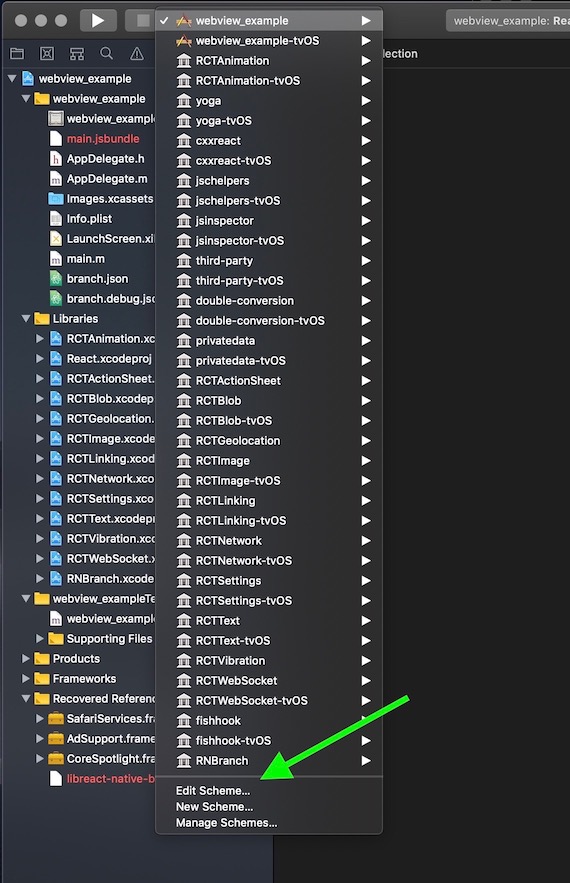
On the Info tab for the Run action, select "Wait for executable to be launched."
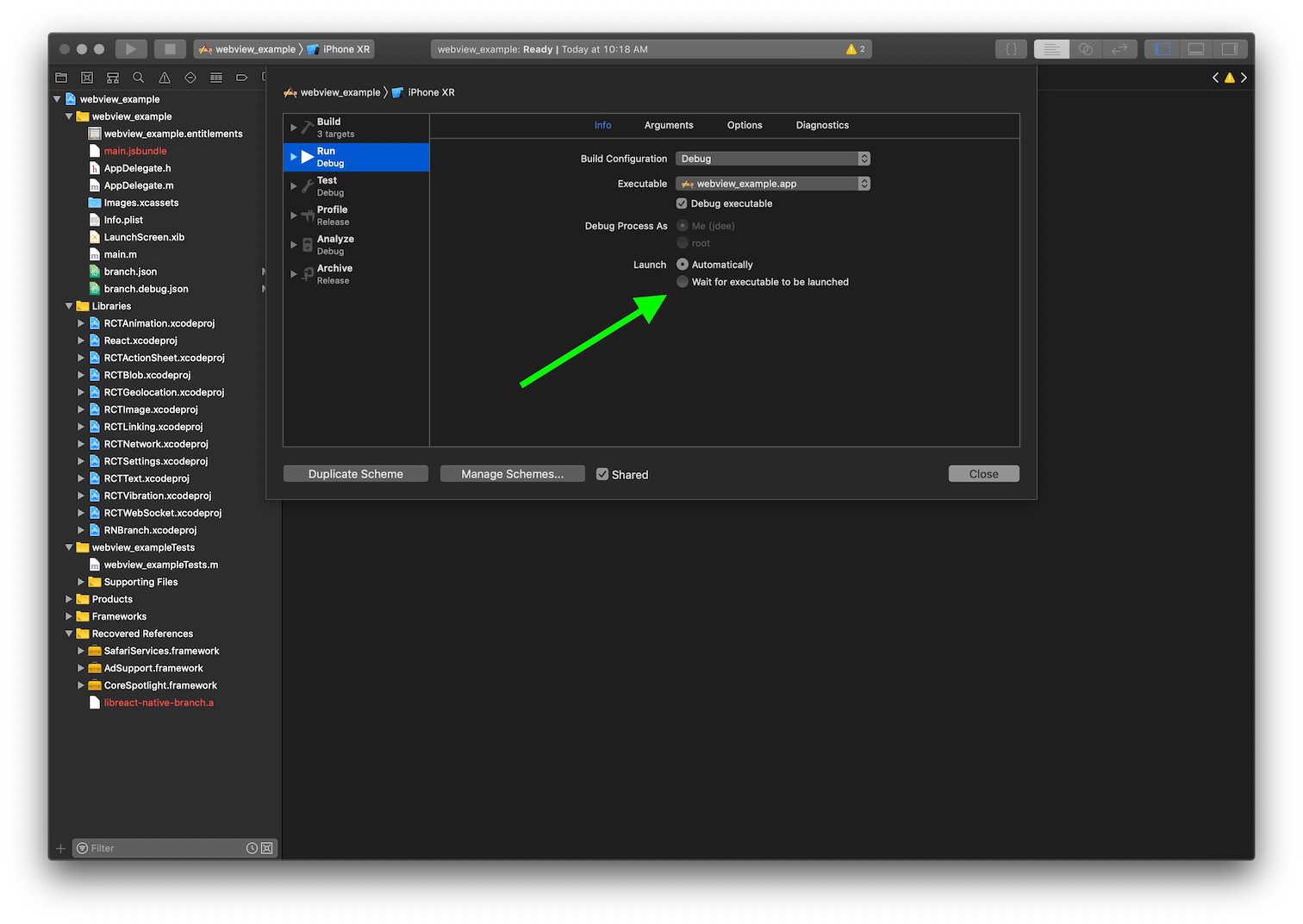
Now when you debug using Xcode, the app won't automatically start. You can open a link to launch the app. Xcode will connect. You can step through, examine variables, etc.
jdee
on 8 Mar 2019
I found that in my case it didn't work because of this line in AppDelegate .m
return [[FBSDKApplicationDelegate sharedInstance] application:application
didFinishLaunchingWithOptions:launchOptions];
I changed it to this line:
 [[FBSDKApplicationDelegate sharedInstance] application:application
                                    didFinishLaunchingWithOptions:launchOptions];
return YES;
Now it works.
sergeyshpadyrev
on 10 Mar 2019
Im still experiencing this error exactly as @sergeyshpadyrev mentioned above in his close app open app thread. @csalmi-branch what can i do to help debug this issue for you guys?
s10mcow
on 21 Mar 2019
I am also experiencing this issues (I believe), where about 50% of the time the app recognizes that it was LAUNCHED (not foregrounded) with a link. If the app is already running (but backgrounded), it seems like it recognizes that a link was clicked 100%.
So, seems like a timing issue, that sometimes the app is a bit slower to start up and before subscribe is called, and if that is too long, it doesn't recognize the link.
 edwardmsmith
on 3 Apr 2019
edwardmsmith
on 3 Apr 2019
Yeah, this definitely seems like a timing issue. If I build my react native app in "production" mode, the success rate for link-click-launches seems to be 100%.
For a bit more information, I'm using Redux-Saga, and setting the branch subscription events up as an eventChannel, which I don't start up until a number of other app startup tasks have finished - including starting a websocket connection and a few other things.
I'm not entirely sure how long that startup time is - I'll try and figure it out.
edwardmsmith
on 4 Apr 2019
This may be the issue: https://github.com/BranchMetrics/react-native-branch-deep-linking-attribution/issues/465
 RoboTeddy
on 25 Jun 2019
RoboTeddy
on 25 Jun 2019
@branch-it @brian-springer @branchlet
My Branch.subcribe gives null params in Foreground. When I move from the application Foreground and background and vice versa. Please check my methods below for deep linking
MY Component Constructor, I have registered this method
1.
this.handleAppStateChange = this.handleAppStateChange.bind(this);
2.
async componentDidMount() {
AppState.addEventListener('change', this.handleAppStateChange);
}
3.
`
handleAppStateChange = async (nextAppState) => {
if (nextAppState === 'background') {
console.log("App is in Background Mode.")
if (this._unsubscribeFromBranch) {
this._unsubscribeFromBranch()
this._unsubscribeFromBranch = null
}
}
if (nextAppState === 'active') {
console.log("App is in Active Foreground Mode.")
// Initialize branch sdk
let params = await this.initBranchSDK();
//Deep link handle
if (params.error) {
console.info('=====error=====Deep link', error);
} else {
if (params['~referring_link'] || params['+non_branch_link']) {
params['~referring_link'] ? this.fetchParaFromLink(params['~referring_link']) : this.fetchParaFromLink(params['+non_branch_link'])
}
}
}
}
initBranchSDK = async () => {
return new Promise(function (resolve, reject) {
this._unsubscribeFromBranch = Branch.subscribe(({ error, params }) => {
setTimeout(function () {
if (error) {
console.info('error', error);
}
reject(error)
}, 20000);
resolve(params)
});
});
}
`
4.
componentWillUnmount() {
    AppState.removeEventListener('change', this.handleAppStateChange);
  }
 zymr-viveksharma
on 16 Jul 2019
zymr-viveksharma
on 16 Jul 2019
Related issues
 Amurmurmur
·
6Comments
Amurmurmur
·
6Comments
 beausmith
·
8Comments
beausmith
·
8Comments
 rickardinho
·
4Comments
rickardinho
·
4Comments
 terreb
·
4Comments
terreb
·
4Comments
 jandrell-formoso
·
4Comments
jandrell-formoso
·
4Comments
Most helpful comment
I found that in my case it didn't work because of this line in
AppDelegate .mI changed it to this line:
Now it works.