React-native-branch-deep-linking-attribution: React Native installation instructions are not clear
From the RN installation instructions,
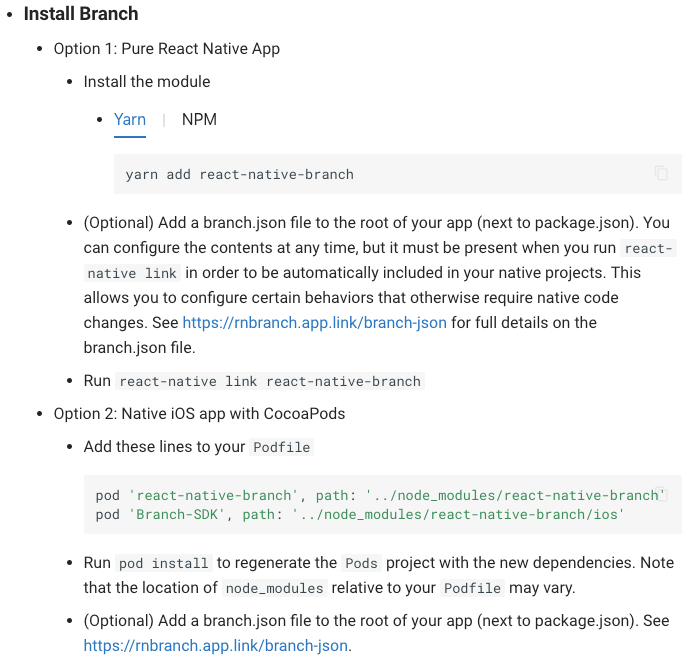
So there are two options.
Ok I'll go with Option 1. Try that and get cannot find module react-native-branch when trying to build
Reading further....

Am I installing >2.0.0? I guess I am.
Maybe these update instructions apply to me?

Hmm... I guess I'm supposed to remove the packages I just installed?

Hmm.. but I just added it using react-native link. What that correct? Or should I have done Option 2?
Maybe the Podfile is wrong?
Checked Podfile and found that only
pod "react-native-branch", path: "../node_modules/react-native-branch"
was there.
So maybe I need
pod "Branch-SDK", path: "../node_modules/react-native-branch/ios"
but this I am being told to remove?
Anyway I added that line and got a step further. Then encountered,
'React/RCTLog.h' file not found
Weird. Ok,
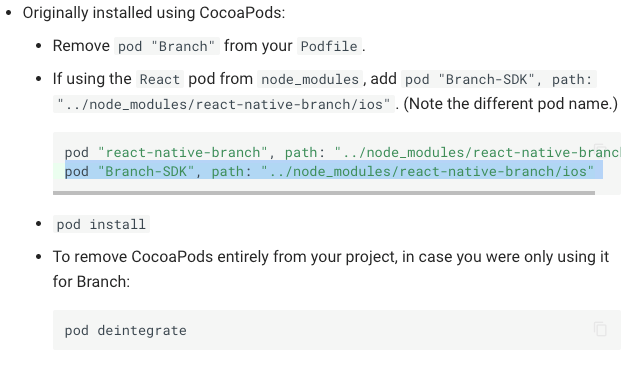
So am I supposed to be removing this config from the Podfile or adding it? There's a line there about removing CocoaPods entirely so maybe that means I don't need any pods?
Did something screw up with react-native link?
Ok maybe we can unlink and re-link:
react-native unlink react-native-branch
rnpm-install info Unlinking react-native-branch android dependency
rnpm-install info Android module react-native-branch has been successfully unlinked
rnpm-install info iOS module react-native-branch is not installed
react-native-branch info Removed Branch configuration from Android project
/node_modules/xcode/lib/pbxProject.js:1813
return this.hash.project.objects['PBXVariantGroup'][key];
^TypeError: Cannot read property '#
Error: Error occured during executing "node ./node_modules/react-native-branch/scripts/removeBranchConfig.js" command
at ChildProcess.prelink (/node_modules/react-native/local-cli/core/makeCommand.js:29:15)
at emitTwo (events.js:106:13)
at ChildProcess.emit (events.js:191:7)
at maybeClose (internal/child_process.js:885:16)
at Process.ChildProcess._handle.onexit (internal/child_process.js:226:5)
Well that's not good. I hope that didn't break my project state.
Run
react-native link react-native-branch
Oh, I guess it adds
pod 'react-native-branch', :path => '../node_modules/react-native-branch'
to the Podfile.
So maybe I do need that Branch-SDK line? Ok add that back.
Try pod install
...
Installing React (0.11.0)
...
[!] React has been deprecated
Ok, why is it adding React..do I need that? And it is deprecated?
Anyway.... now I am getting:
'React/RCTLog.h' file not found
And am not sure why.
 econner
All 9 comments
The command react-native link react-native-branch works on your end?
After install I tried to run that, but nothing appears to be linked for branchio..
➜  app/path ✗ react-native link react-native-branch
Scanning 698 folders for symlinks in /Users/onecore/uprise/bopv2/BOP-White-Label/node_modules (17ms)
And after doing all the android setup steps I'm not able to build the project, since the branchio packages are not present, so all the related import fail.
Any idea @jdee / @econner ?
Regards!
 gustavonecore
on 23 Aug 2018
gustavonecore
on 23 Aug 2018
Hey @gustavonecore ,
I did manage to get it to build eventually. react-native link react-native-branch worked for me for Android.
I believe you just need the following config:
diff --git a/android/app/build.gradle b/android/app/build.gradle
index 913fae3..257c192 100644
--- a/android/app/build.gradle
+++ b/android/app/build.gradle
@@ -172,6 +172,7 @@ android {
 }

 dependencies {
+    compile project(':react-native-branch')
     compile project(':react-native-splash-screen')
     compile project(':react-native-spinkit')
     compile project(':react-native-navigation')

diff --git a/android/app/src/main/java/com/yourappname/YourAppNameMobile/MainApplication.java b/android/app/src/main/java/com/yourappname/YourAppNameMobile/MainApplication.java
index 213faca..ed2ba64 100644
--- a/android/app/src/main/java/com/yourappname/YourAppNameMobile/MainApplication.java
+++ b/android/app/src/main/java/com/yourappname/YourAppNameMobile/MainApplication.java
@@ -55,6 +55,7 @@ public class MainApplication extends NavigationApplication {

         return Arrays.asList(
             new MainReactPackage(),
+            new RNBranchPackage(),
             new NavigationReactPackage(),
             new IntercomPackage(),
             new ImagePickerPackage(),

diff --git a/android/settings.gradle b/android/settings.gradle
index d383e61..2dd16a7 100644
--- a/android/settings.gradle
+++ b/android/settings.gradle
@@ -1,4 +1,6 @@
 rootProject.name = 'YourAppName'
+include ':react-native-branch'
+project(':react-native-branch').projectDir = new File(rootProject.projectDir, '../node_modules/react-native-branch/android')
 include ':react-native-splash-screen'
 project(':react-native-splash-screen').projectDir = new File(rootProject.projectDir, '../node_modules/react-native-splash-screen/android')
 include ':react-native-spinkit'
For iOS I had to completely deintegrate CocoaPods from my project before running react-native link. See my comment here: https://github.com/BranchMetrics/react-native-branch-deep-linking/issues/361#issuecomment-415149270
econner
on 23 Aug 2018
Thanks man,
..well, I did get it working seeing the example app and doing the link process manually.
Nice tip about iOS, I'll be facing it after running some tests on android.
Regards!
gustavonecore
on 23 Aug 2018
@econner @jdee we're running into these exact same issues as well.. Why would react-native link react-native-branch modify the Podfile if that's the "Pure React Native" way?
 dwilt
on 24 Sep 2018
dwilt
on 24 Sep 2018
@dwilt I believe a change was made to React Native to try to make things Just Work if you're using CocoaPods, but I don't think react-native-branch-deep-linking was updated to accommodate this change.
From https://github.com/facebook/react-native/pull/15460,
This change will allow to link projects that contains its own .podspec file to CocoaPods-based projects. In case link detect Podfile in iOS directory, it will look for related .podspec file in linked project directory, and add it to Podfile. If Podfile and .podspec files are not present, it will fall back to previous implementation.
So the .podspec file of this project I guess does not play nicely. Not really sure.
econner
on 24 Sep 2018
@econner Yup, your steps worked. Thanks, and great find. This will help me on other plugins where this is the issue as well.
dwilt
on 24 Sep 2018
@sequoiaat Did you guys do anything to fix this?
econner
on 12 Nov 2018
@econner, no specific changes to this one -- we figured the workaround here would be OK for now. Is it continuing to come up?
 Sarkar
on 12 Nov 2018
Sarkar
on 12 Nov 2018
The workaround is ok, but it would be better I think to not have to deintegrate Cocoapods before trying to install this library. Is there a way to make the .podspec file play nicely? Or can you advise that we're doing something incorrectly when using Cocoapods?
Specifically I am talking about: https://github.com/BranchMetrics/react-native-branch-deep-linking/issues/361#issuecomment-415149270
I guess I'm fine with this issue being closed if we can move the discussion over to #361
econner
on 12 Nov 2018
Related issues
 Amurmurmur
·
6Comments
Amurmurmur
·
6Comments
 SurajMDurgad
·
4Comments
SurajMDurgad
·
4Comments
 thaitanloi365
·
6Comments
thaitanloi365
·
6Comments
 RobertoNegro
·
4Comments
RobertoNegro
·
4Comments
 john1jan
·
6Comments
john1jan
·
6Comments
Most helpful comment
@econner Yup, your steps worked. Thanks, and great find. This will help me on other plugins where this is the issue as well.