React-native-branch-deep-linking-attribution: iOS install: ld: library not found for -lBranch
Hi,
I'm struggling with the install for 0.4.0 on iOS, here is the error message :
ld: warning: directory not found for option '-L/Users/michaell/Dev/new/proactive/RNApp/ios/build/Debug-iphoneos/Branch'
ld: library not found for -lBranch
clang: error: linker command failed with exit code 1 (use -v to see invocation)
I've followed carefully all the steps required.
Thanks
 mlumbroso
All 29 comments
did you follow the "full installation" or the pod install instructions?
 rt2zz
on 25 Jul 2016
rt2zz
on 25 Jul 2016
I tried both, but couldn't make it work, at the end, I decided not to include it for the moment.
When I have to try again, I will copy the different error messages I got
mlumbroso
on 25 Jul 2016
it sounds like Branch is not being included. I would double check your podfile, make sure Branch is included, update to the latest version of cocoa pods, and rerun pod install.
rt2zz
on 25 Jul 2016
This error I got over it at the end, I needed to manually link libBranch.a on top of libRNBranch.a, but that led to other errors, will update as soon as I can detail
mlumbroso
on 26 Jul 2016
So, I tried on a fresh basis with the latest version (0.4.1), install worked well, but since I'm using RN0.27.2 it gives me an error with the NativeEventEmitter .
I tried 0.4.0 and 0.3.0 it compiles with no error, but then gives me undefined is not an object (evaluating RNBranch.setDebug), which I guess means it doesn't recognise the lib is loaded.
One thing that looked weird is that I tried rnpm unlink the lib, but it would only let me for Android, for iOS it gives me an error, I don't know if that is linked with my issue though.
Any thoughts here?
Thanks
mlumbroso
on 26 Jul 2016
I've tried reinstalling the latest version, followed carefully all the instructions, I have an error on line #import "RNBranch.h"
/Users/michaell/Dev/new/proactive/RNApp/ios/Proactive/AppDelegate.m:13:9: 'RNBranch.h' file not found
I followed full installation instructions
PS : Actually I don't see the two files in Pods/Branch/Branch-SDK but I don't think that's linked right?
I think of a rpm link issue (see previous message), does that seem consistent?
Thanks
mlumbroso
on 28 Jul 2016
I have not used rnpm since a much earlier version.
I suspect you are missing the third step here where you add rnbranch to the header search paths so that it can be discovered at application boot time.
Also for reference I am referring to usage with the most basic install with a podfile roughly as follows:
Podfile
target 'MyApp' do
  pod 'Branch'
  //...
@mlumbroso did things work out for you? Let me know, I am happy to dig in further if needed.
rt2zz
on 18 Aug 2016
@rt2zz I will try again tomorrow, will let you know.
I still believe something went wrong the first time I installed it, since rnpm unlink can't unlink it with the error.
mlumbroso
on 21 Aug 2016
Still not working, not matter what I tried, I'm convinced it has to do with the unlink throwing an error, because I triple checked every step of the install once again...
I opened an issue regarding rnpm :
https://github.com/facebook/react-native/issues/9504
mlumbroso
on 21 Aug 2016
@mlumbroso got it. fwiw you can still remove the module manually by undoing all of the steps listed here: https://github.com/BranchMetrics/react-native-branch-deep-linking/blob/master/docs/installation.md#manual-linking
Are you still getting the same error ld: library not found for -lBranch? That looks like an issue with how the Pod is setup. I would recommend trying to reset your pods as follows:
rm -rf Podsrm Podfile.lockpod install
Also double check pod 'Branch' is in your Podfile. Before doing all that you might also consider upgrading your ruby and cocoapods packages as well.
rt2zz
on 21 Aug 2016
I redid those steps (including deleting old .xcworkspace) to no avail :
_ If I include LibBranch.A from the pods in the frameworks, I have ld: library not found for -lBranch
_ If I don't, I can compile but I have the problem when running the app : undefined is not an object (evaluating RNBranch.setDebug)
Maybe it is linked to those errors on pod install :
[!] The `Proactive [Debug]` target overrides the `LIBRARY_SEARCH_PATHS` build setting defined in `Pods/Target Support Files/Pods-Proactive/Pods-Proactive.debug.xcconfig'. This can lead to problems with the CocoaPods installation
    - Use the `$(inherited)` flag, or
    - Remove the build settings from the target.

[!] The `Proactive [Debug]` target overrides the `OTHER_LDFLAGS` build setting defined in `Pods/Target Support Files/Pods-Proactive/Pods-Proactive.debug.xcconfig'. This can lead to problems with the CocoaPods installation
    - Use the `$(inherited)` flag, or
    - Remove the build settings from the target.

[!] The `Proactive [Release]` target overrides the `LIBRARY_SEARCH_PATHS` build setting defined in `Pods/Target Support Files/Pods-Proactive/Pods-Proactive.release.xcconfig'. This can lead to problems with the CocoaPods installation
    - Use the `$(inherited)` flag, or
    - Remove the build settings from the target.

[!] The `Proactive [Release]` target overrides the `OTHER_LDFLAGS` build setting defined in `Pods/Target Support Files/Pods-Proactive/Pods-Proactive.release.xcconfig'. This can lead to problems with the CocoaPods installation
    - Use the `$(inherited)` flag, or
    - Remove the build settings from the target.
This sounds like progress. Lets go the second route (i.e. do not link libBranch.a)
_ If I don't, I can compile but I have the problem when running the app : undefined is not an object (evaluating RNBranch.setDebug)
This indicates RN did not load RNBranch as a native module. You probably need to go into build phases > link binary with libraries > link libRNBranch
Make sure you are linking libRNBranch.
Also double check in Build Settings > Header Search Paths > add $(SRCROOT)/../node_modules/react-native-branch/ios
rt2zz
on 22 Aug 2016
I tried again, it's doing the same error (undefined is not an object)
I also followed this step after : http://stackoverflow.com/questions/18376416/the-target-overrides-the-other-ldflags-build-setting-defined-in-pods-pods
which adds indeed something with branch in the other flags
And then it gives me back the error : library not found for -lBranch
No matter if i include libRNBranch, libBranch or both or none.
I noticed something weird on the RNBranch.xcodeproj on my Libraries, the Frameworks/libBranch.a is displayed in red and the path is something like /MyProject/node_modules/react-native-branch/ios/build/Debug-iphoneos/libBranch.a
which doesn't exist.
Might it be that?
mlumbroso
on 23 Aug 2016
New update :
I deleted everything linked to pod (xcworkspace, build phases, pod files...) and rebuilt it.
With LibRNBranch.a included and pod reinstalled, on first compile I have these errors :
Undefined symbols for architecture x86_64:
  "_OBJC_CLASS_$_Branch", referenced from:
      objc-class-ref in libRNBranch.a(RNBranch.o)
  "_OBJC_CLASS_$_BranchLinkProperties", referenced from:
      objc-class-ref in libRNBranch.a(RNBranch.o)
  "_OBJC_CLASS_$_BranchUniversalObject", referenced from:
      objc-class-ref in libRNBranch.a(RNBranch.o)
ld: symbol(s) not found for architecture x86_64
clang: error: linker command failed with exit code 1 (use -v to see invocation)
If I redo the step of the stack overflow (add inherited to linker flags), I'm back to library not found for -lBranch
mlumbroso
on 25 Aug 2016
FOUND IT!!!
Adding $(inherited) to other linker flags was necessary but not enough, I had to add it to Library Search Paths too. Glad it's finally working....
Maybe it should also be added to the iOS SDK documentation, if that happens to someone else.
PS : Now testing it, I wasn't able to make it work on TestFlight, do I need to set up a test key, or should live key alone also works on TestFlight?
mlumbroso
on 25 Aug 2016
Yes!! we will definitely add that explicitly to the docs.
Regarding Testflight, it does not care which branch environment you use. Does deep linking work for you in the simulator but not in Testflight? or does it fail to resolve in both environments?
What happens when you follow a branch link? Does it take you to the fallback url?
rt2zz
on 26 Aug 2016
Yes it does, with links generated from iOS, not from Android though.
More precisely :
1) Links generated from Android open the app on Android and I can act upon them.
2) Links generated from Android open the App Store on iOS.
3) Links from iOS open the stores, wether from iOS or Android.
Is there some sort of URL debbugger for Branch?
mlumbroso
on 26 Aug 2016
You can debug a link by adding ?debug=1 to the end of it and opening in a browser: https://dev.branch.io/getting-started/integration-testing/guide/ios/#debugging-an-individual-link
Based on the symptoms you are describing it sounds like you have the wrong branch key in iOS. For good measure I would recommend adding _both_ the test branch domain and live branch domain to your "Associated Domain" in xcode. then verify that the branch key being used is the same for both iOS and android.
You can also create some test links in the branch admin in the Marketing Links section. I have found it useful in the past to set up a quick test link page on surge.sh with a few links that I can quickly tap into.
Also iirc some people have had issues testing universal links in the simulator, so make sure to try it on a physical iOS device.
rt2zz
on 26 Aug 2016
Hi,
thanks for your answers.
I'm testing on real devices with testflight build.
I looked at the debugs, what I see on the ones created in Android, there is the source property :
source android
that I don't see in iOS.
I added both domains in Associated domains, added both keys as per the instructions. My app should be in prod today, I will test if I have any more luck there.
mlumbroso
on 28 Aug 2016
No more luck with the App Store version, so it's not linked to testFlight.
mlumbroso
on 28 Aug 2016
Maybe there is a more appropriate place than here to solve this issue, please tell me if this is the case :-)
mlumbroso
on 29 Aug 2016
Any news?
mlumbroso
on 31 Aug 2016
@mlumbroso can you ping me by email (visible in my github profile)
rt2zz
on 1 Sep 2016
Wanted to check if you guys got this sorted out? Would be great to post the solution here.
 aaustin
on 23 Nov 2016
aaustin
on 23 Nov 2016
There have been some pretty big changes regarding how builds are done for iOS with 2.0.0. I don't think this issue is relevant anymore. Closing.
 jdee
on 20 May 2017
jdee
on 20 May 2017
I was getting similar errors, but from the command-line when trying to run xcodebuild
 markhu
on 24 May 2018
markhu
on 24 May 2018
Hi,
In which version are you checking, this issue was reported in earlier versions.
Will look into it and get back to you soon.
 sequoiaat
on 25 May 2018
sequoiaat
on 25 May 2018
OUND IT!!!
Adding $(inherited) to other linker flags was necessary but not enough, I had to add it to Library Search Paths too. Glad it's finally working....
Maybe it should also be added to the iOS SDK documentation, if that happens to someone else.
PS : Now testing it, I wasn't able to make it work on TestFlight, do I need to set up a test key, or should live key alone also works on TestFlight?
How exactly do you add $(inherited) to the header search paths @mlumbroso ? I was trying to add it as in the following screenshot but I don't know precisely what you did to fix it. Can you advise me?
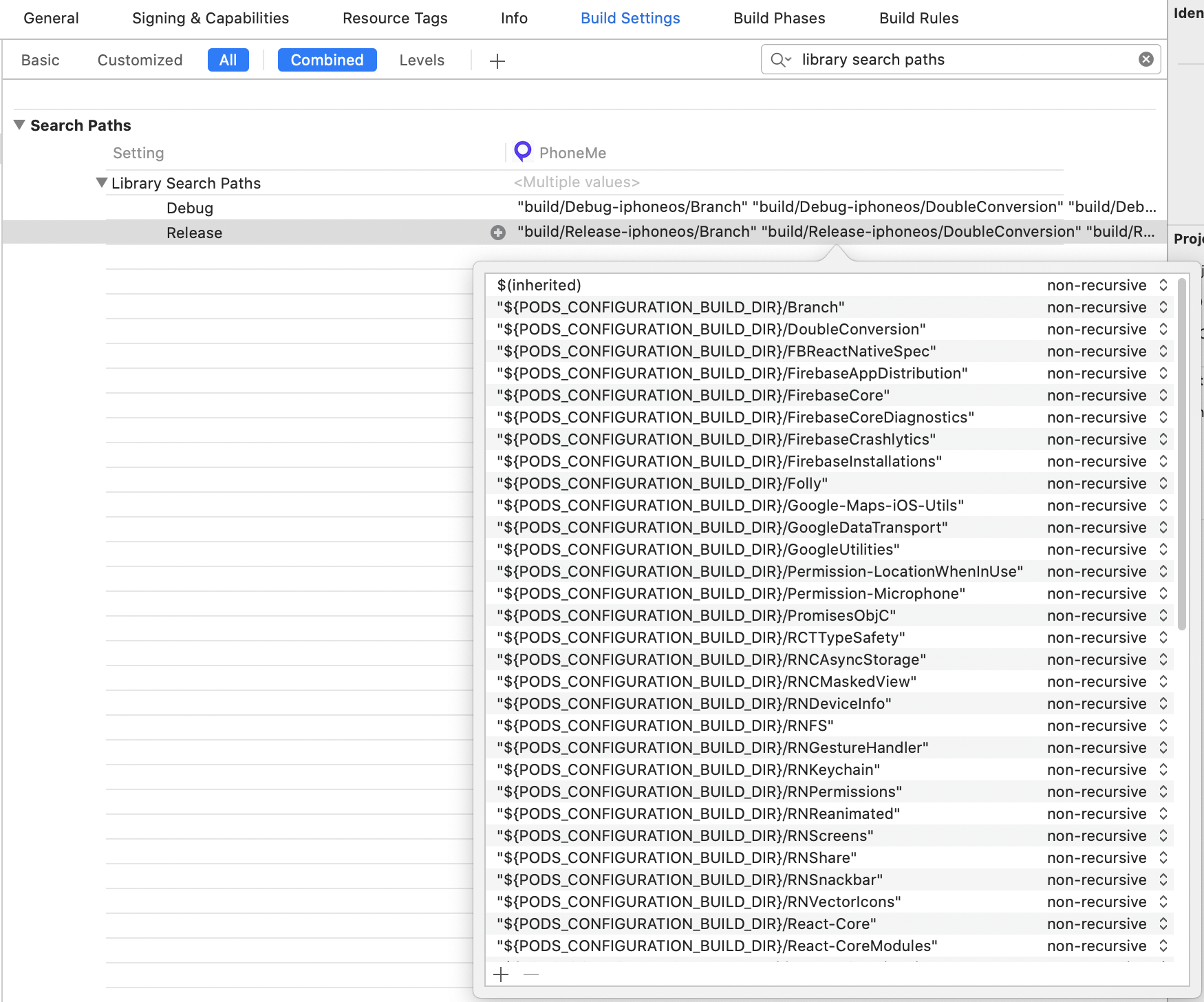
In addition, where did you manage to obtain the libRNBranch.a binary file? I am unable to find its anywhere in packages list. Did you find it uploaded somewhere on the internet? Please get back to me at your earliest convenience. Your help is greatly appreciated. Thanks.
 farhankassam2
on 5 Oct 2020
farhankassam2
on 5 Oct 2020
Related issues
 pyankoff
·
5Comments
pyankoff
·
5Comments
 RobertoNegro
·
4Comments
RobertoNegro
·
4Comments
 lukefanning
·
4Comments
lukefanning
·
4Comments
 willbattel
·
3Comments
willbattel
·
3Comments
 felixchan
·
5Comments
felixchan
·
5Comments
Most helpful comment
FOUND IT!!!
Adding $(inherited) to other linker flags was necessary but not enough, I had to add it to Library Search Paths too. Glad it's finally working....
Maybe it should also be added to the iOS SDK documentation, if that happens to someone else.
PS : Now testing it, I wasn't able to make it work on TestFlight, do I need to set up a test key, or should live key alone also works on TestFlight?