React-native-ble-plx: BLE Permission not working on 0.63.2 with Android 10
Hello there,
My project was on React Native 0.63.2 version and when I tried to scan ble devices couldn't see any of them. Even I asking permission and allow the location. It happens only Android 10 devices.
When I check the error callback it says: [BleError: Device is not authorized to use BluetoothLE]
This error not happens on 0.62.2
Interesting things are:
- When I ask permission on Android 10, it's not ask "Allow Always", only "Allow While Using" and "Deny"
- When I go to Settings => Apps =>
=> Permissions => Location section and I select "Deny" and "Allow While Using" again, the error disappears and app can search devices properly.
Buggy versions:
    "react": "16.13.1",
    "react-native": "0.63.2",
    "react-native-ble-plx": "^2.0.1"
Working versions:
    "react": "16.11.0",
    "react-native": "0.62.2",
    "react-native-ble-plx": "^2.0.1"
AndroidManifest.xml permissions
  <uses-permission android:name="android.permission.INTERNET" />
  <uses-permission android:name="android.permission.BLUETOOTH"/>
  <uses-permission android:name="android.permission.BLUETOOTH_ADMIN"/>
  <uses-permission android:name="android.permission.ACCESS_FINE_LOCATION"/>
It may not happens because of this package, maybe React Native itself but I found it on this package.
 ezranbayantemur
All 13 comments
Hello,
same for me if I use the SDK version 29
{
buildToolsVersion = "29.0.2"
minSdkVersion = 18
compileSdkVersion = 29
targetSdkVersion = 29
}
if I go back to SDK version 28, everything is fine
{
buildToolsVersion = "28.0.3"
minSdkVersion = 18
compileSdkVersion = 28
targetSdkVersion = 28
}
Regards,
 dfrancio
on 27 Aug 2020
dfrancio
on 27 Aug 2020
Hi,
I had the same issue when I updated my _targetSdkVersion_ from _28_ to _29_.
Replacing the android permission ACCESS_COARSE_LOCATION with ACCESS_FINE_LOCATION in my _AndroidManifest.xml_ and in my app's code for manually asking the user with _PermissionAndroid_ fixed it for me.
Recap of what's working for me :
_build.gradle :_
buildToolsVersion = "29.0.2"
minSdkVersion = 18
compileSdkVersion = 29
targetSdkVersion = 29
_AndroidManifest.xml :_
<uses-permission android:name="android.permission.INTERNET" />
<uses-permission android:name="android.permission.BLUETOOTH"/>
<uses-permission android:name="android.permission.BLUETOOTH_ADMIN"/>
<uses-permission-sdk-23 android:name="android.permission.ACCESS_FINE_LOCATION"/>
<uses-feature android:name="android.hardware.bluetooth_le" android:required="true"/>
<uses-permission android:name="android.permission.FOREGROUND_SERVICE"/>
_in my app's code :_
const granted = await PermissionsAndroid.request(
    PermissionsAndroid.PERMISSIONS.ACCESS_FINE_LOCATION,
    {
        title: 'Permission Localisation Bluetooth',
        message: 'Requirement for Bluetooth'
        buttonNeutral: 'Later',
        buttonNegative: 'Cancel',
        buttonPositive: 'OK',
    }
);
Hope this helps.
 owav
on 27 Aug 2020
owav
on 27 Aug 2020
Hello,
I've tried the @owav 's solution and it works! Thanks for sharing.
Regards
dfrancio
on 27 Aug 2020
I believe this should work with COARSE location settings too, we don’t want to ask for GPS/FINE permissions to our users. Is there any way we can help you fix it?
 acasademont
on 31 Aug 2020
acasademont
on 31 Aug 2020
@acasademont this may be due to permission changes in android 10 :
https://developer.android.com/about/versions/10/privacy/changes#location-telephony-bluetooth-wifi
So I guess we just have to say goodbye to COARSE_LOCATION.
If anyone with a broader understanding can confirm this...
owav
on 31 Aug 2020
@owav yeah, but then RN 0.62 on Android 10 should fail too, but it works, there must be something else we’re missing on RN 0.63.
acasademont
on 31 Aug 2020
@acasademont That "missing" is about RN or this package? According that, we should tell them this problem for prevent other problem
ezranbayantemur
on 31 Aug 2020
We've been investigating a bit and the this library does not have any bugs. As you previously mentioned, the only issue is that RN 0.63 targets Android SDK 29, which in turn has the new permissions in place. A nice article detailing the changes can be found here:
https://developer.android.com/about/versions/10/privacy/changes (not only the FINE/COARSE but probably also the background permissions might be relevant)
So probably the only thing that needs an update is the README & examples. We'll keep testing RN 0.63!
acasademont
on 31 Aug 2020
Updated from RN 0.61 to 0.63.2... And I see that error.
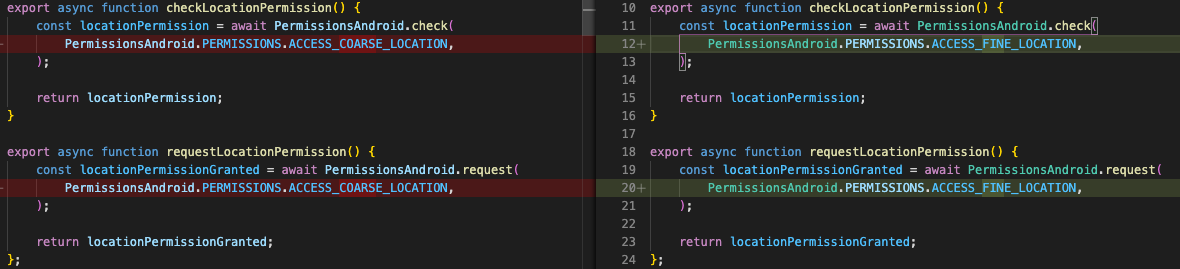
That changes fixes a problem. Thanks @owav.

ps: I don't use uses-feature android:name="android.hardware.bluetooth_le" and all fine.
 zmnv
on 2 Sep 2020
zmnv
on 2 Sep 2020
tbh, I think this issue might be closed now, it's definitely not a library bug.
acasademont
on 3 Sep 2020
If you have suggestions where and how change the documentation/wiki/readme — feel free to speak up. :) Cheers!
 dariuszseweryn
on 22 Sep 2020
dariuszseweryn
on 22 Sep 2020
This issue has been automatically marked as stale because it has not had recent activity. It will be closed if no further activity occurs. Thank you for your contributions.
![stale[bot] picture](https://avatars.githubusercontent.com/in/1724?v=4&s=40) stale[bot]
on 22 Nov 2020
stale[bot]
on 22 Nov 2020
I struggled with this issue for about 6 hours, nothing worked. Then I restarted my phone and it worked immediately.
 Xenofono
on 2 Dec 2020
Xenofono
on 2 Dec 2020
Related issues
 haohcraft
·
5Comments
haohcraft
·
5Comments
 brycejacobs
·
5Comments
brycejacobs
·
5Comments
 samthui
·
4Comments
samthui
·
4Comments
 lenninlc
·
3Comments
lenninlc
·
3Comments
 kevinmeyvaert
·
4Comments
kevinmeyvaert
·
4Comments
Most helpful comment
Hi,
I had the same issue when I updated my _targetSdkVersion_ from _28_ to _29_.
Replacing the android permission ACCESS_COARSE_LOCATION with ACCESS_FINE_LOCATION in my _AndroidManifest.xml_ and in my app's code for manually asking the user with _PermissionAndroid_ fixed it for me.
Recap of what's working for me :
_build.gradle :_
_AndroidManifest.xml :_
_in my app's code :_
Hope this helps.