React-native-ble-plx: [iOS] cancelConnection not working
Version
Tell us which versions you are using:
- react-native-ble-plx v2.0.1
- react-native v63..0
- iOS 13.6
Actual behaviour
When I try to device.cancelConnection() on Android it works just fine, but on iOS it fails.
This is my code
import React, { useEffect, useState } from 'react'
import { View, Text, TouchableOpacity } from 'react-native'
import { BleManager } from 'react-native-ble-plx'

const BluetoothTest = () => {
  const [isBtConnected, setBtConnected] = useState(false)

  const [device, setDevice] = useState()

  const [isConnected, setIsConnected] = useState(false)

  var manager = new BleManager()

  useEffect(() => {
    const subscription = manager.onStateChange(
      state =>
        state === 'PoweredOn'
          ? scanAndConnect() &
            // subscription.remove() &
            console.log('Bluetooth on') &
            setBtConnected(true)
          : console.log('Bluetooth Off') & setBtConnected(false),
      true
    )

    return () => manager.destroy()
  }, [])

  const scanAndConnect = () => {
    manager.startDeviceScan(null, null, (error, device) => {
      // Handle error (scanning will be stopped automatically)
      if (error) {
        console.log(error)
      } else if (device) {
        // Check if it is a device you are looking for
        if (device.name === 'Nicolas' || device.localName === 'Nicolas') {
          // Stop scanning as it's not necessary if you are scanning for one device.
          manager.stopDeviceScan()

          // Connect
          device
            .connect()
            .then(() => {
              // Log connection
              device
                .isConnected()
                .then(bool =>
                  console.log(' Device Connected', bool, device.name)
                )

              manager
                .isDeviceConnected(device.id)
                .then(bool =>
                  console.log(' Manager Connected', bool, device.name)
                )

              return device.discoverAllServicesAndCharacteristics()
            })
            .then(() => {
              setDevice(device)
              setIsConnected(true)
              console.log('Device Connected')
            })

          // const sub = device.onDisconnected((error, device) => {
          //   console.log('disconnected')
          //   setIsConnected(false)
          //   setDevice(null)
          //   sub.remove()
          // })
        }
      }
    })
  }

  return (
    <View>
      {isConnected
        ? <TouchableOpacity
            onPress={() => {
              device
                .cancelConnection()
                .then(cancelled => console.log(cancelled))
                .catch(error => console.log(error))

              // Another way of disconnecting, not working neither
              // manager
              //   .cancelDeviceConnection(device.id)
              //   .then(cancelled => console.log(cancelled))
              //   .catch(error => console.log(error))

              setIsConnected(false)
            }}
          >
            <Text>Disconnect</Text>
          </TouchableOpacity>
        : <TouchableOpacity
            onPress={() => {
              device.connect().then(device => setDevice(device))

              setIsConnected(true)
            }}
          >
            <Text>Connect</Text>
          </TouchableOpacity>}
    </View>
  )
}

export default BluetoothTest
Stack trace and console log
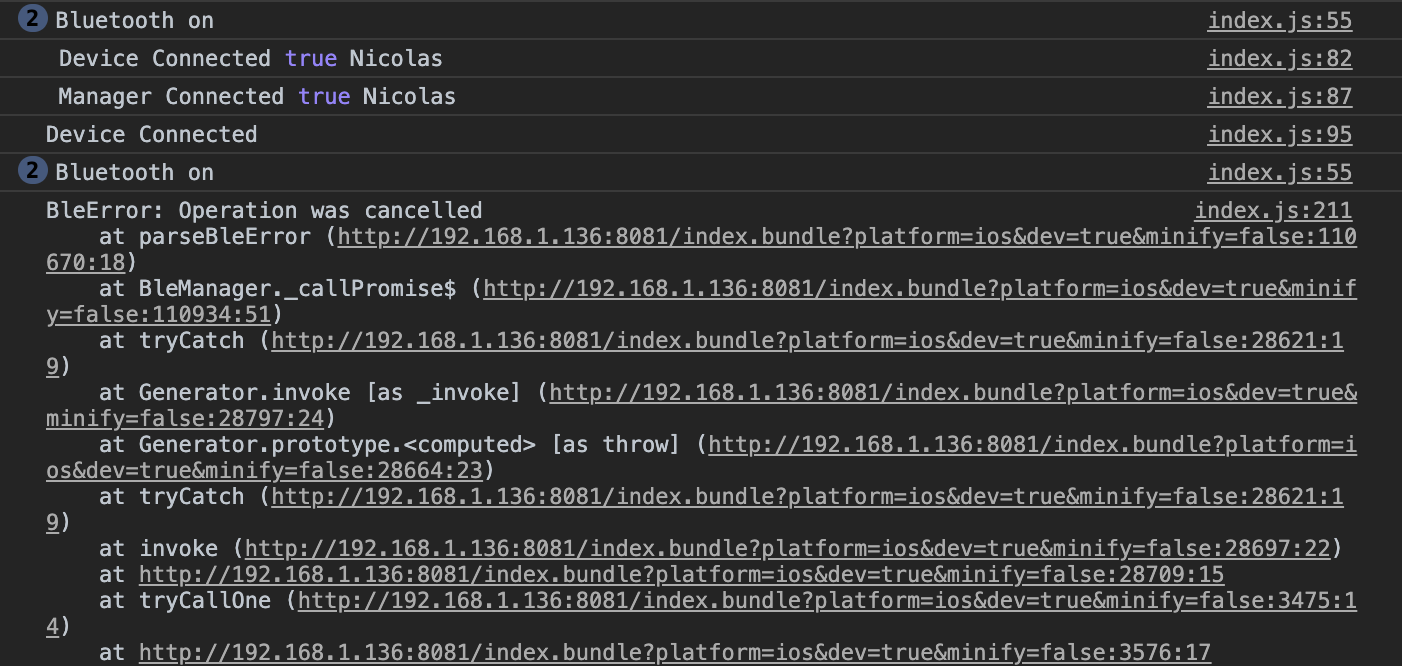
 nriccar
All 3 comments
We are having the same issue as well. Anybody figured out a fix?
 moudallal
on 31 Aug 2020
moudallal
on 31 Aug 2020
@nriccar @andycamp @dariuszseweryn
Update: After 1 hour of smashing my head against the keyboard, I figured it out.
The code above shows that the BleManager instance is initiated inside this stateless functional component called (BluetoothTest) that you're exporting and that I'm supposing you're rendering directly to your screen (since it's returning JSX).
I was kinda doing the same, I was instantiating the BleManager like this:
export default function HomeScreen() {
    const [manager, setManager] = useState(new BleManager());
    // etc.
}
As I've read on so many issues on this repo, it's better to manage the Bluetooth away from the UI, meaning, to instantiate the BleManager outside of the UI or the Functional Stateless Component.
How?
import React, { useEffect, useState } from 'react'
import { View, Text, TouchableOpacity } from 'react-native'
import { BleManager } from 'react-native-ble-plx'

// Where to instantiate the BleManager
const manager = new BleManager()

const BluetoothTest = () => {
    // Handle device connections, etc. in here
}

export default BluetoothTest
Now, you can quickly disconnect from your device using the device ID like the following.
(I made it as a function to be called when a button is pressed)
const disconnect = async () => {
    await manager.cancelDeviceConnection("YOUR DEVICE ID HERE");
};
Since you're already connected to your device, getting your device's ID should not be a problem, just pass it to the method.
Of course, you can use .then() and .catch() to handle the Promise, but I prefer async/await, it's just cleaner.
On another note, I see that you are destroying your BleManager instance. I've seen on another issue, quoting @Cierpliwy, that you shouldn't really need to call the destroy method.
See https://github.com/Polidea/react-native-ble-plx/issues/405#issuecomment-525195978
I hope this solves your issue. I don't think this is a bug, just not enough attention given to separating UI and Bluetooth in the Docs or the Wiki (or maybe there is and I'm too sleepy to notice).
Hope I helped <3
moudallal
on 31 Aug 2020
This issue has been automatically marked as stale because it has not had recent activity. It will be closed if no further activity occurs. Thank you for your contributions.
![stale[bot] picture](https://avatars.githubusercontent.com/in/1724?v=4&s=40) stale[bot]
on 1 Nov 2020
stale[bot]
on 1 Nov 2020
Related issues
 JordanKlaers
·
5Comments
JordanKlaers
·
5Comments
 SlavaInstinctools
·
4Comments
SlavaInstinctools
·
4Comments
 paddlefish
·
4Comments
paddlefish
·
4Comments
 devgeno
·
4Comments
devgeno
·
4Comments
 lenninlc
·
3Comments
lenninlc
·
3Comments
Most helpful comment
@nriccar @andycamp @dariuszseweryn
Update: After 1 hour of smashing my head against the keyboard, I figured it out.
The code above shows that the BleManager instance is initiated inside this stateless functional component called (BluetoothTest) that you're exporting and that I'm supposing you're rendering directly to your screen (since it's returning JSX).
I was kinda doing the same, I was instantiating the BleManager like this:
As I've read on so many issues on this repo, it's better to manage the Bluetooth away from the UI, meaning, to instantiate the BleManager outside of the UI or the Functional Stateless Component.
How?
Now, you can quickly disconnect from your device using the device ID like the following.
(I made it as a function to be called when a button is pressed)
Since you're already connected to your device, getting your device's ID should not be a problem, just pass it to the method.
Of course, you can use
.then()and.catch()to handle the Promise, but I prefer async/await, it's just cleaner.On another note, I see that you are destroying your BleManager instance. I've seen on another issue, quoting @Cierpliwy, that you shouldn't really need to call the destroy method.
See https://github.com/Polidea/react-native-ble-plx/issues/405#issuecomment-525195978
I hope this solves your issue. I don't think this is a bug, just not enough attention given to separating UI and Bluetooth in the Docs or the Wiki (or maybe there is and I'm too sleepy to notice).
Hope I helped <3