React-native-ble-plx: Can anyone help me with background mode ios?
I managed to create a service on my code so it connects to ble devices successfully, also data gets send on background.
What i wanna achieve is that if connection is lost on background, the app should be able to rescan and reconnect once the device is in range again.
I followed the docs but still the moment the app goes in background no scan is started.
Here is the code that is used to scan in background:
manager.startDeviceScan(
        ["0000fff0-0000-1000-8000-00805f9b34fb"],
        { allowDuplicates: true },
        (error, device) => {
          console.log("scannig");
          if (error) {
            console.log("error :", error);
          }
          if (device) {
            console.log("device :", device);
            if (device.name) {
              let deviceNameToLowerCase = device.name.toLowerCase();
              console.log("found device");

            }
          }
        }
      );
This is my first question, so sorry if i'm being unclear.
 arberhh
All 13 comments
@Cierpliwy could you please take a look at this.
arberhh
on 12 May 2020
Hello @arberhh
Can you please be more specific about what your situation is, what you do expect, on what platform you test, on what phone, what is the scenario you test. There is a wiki page on ios background operation. for android there is the foreground service you need to implement.
 dariuszseweryn
on 12 May 2020
dariuszseweryn
on 12 May 2020
@dariuszseweryn yes i managed to implement the foreground service for android.
So about my situation on ios devices i want to reconnect to device once the device is in range.
On android on disconnect event i called scan function and once the device is in range again, it reconnects.
For ios i updated the plist as the docs said, also enabled background mode.
I did new scanning operation providing the service uuid on disconnect event but still if disconnect happens and the app is in background no scan is started.
Thank you for responding
arberhh
on 12 May 2020
I can share I have the same issue. I was even thinking if this is not how iOS works. 🤔 Anyway, I can't perform scan in the background: startDeviceScan simply doesn't fire if the app is not in the foreground.
Is it something well known?
EDIT: Using the latest 2.0 version and latest iOS version.
 jukben
on 12 May 2020
jukben
on 12 May 2020
@arberhh I am facing the same issue about reconnect on background mode. Can someone please help me out.
Settings I have done :
in info.plist
<key>UIBackgroundModes</key>
    <array>
        <string>bluetooth-central</string>
        <string>bluetooth-peripheral</string>
        <string>processing</string>
    </array>
And in startDeviceScan giving array of UUID
this.manager.startDeviceScan(['6e400001-b5a3-f393-e0a9-e50e24dcca9e'], { allowDuplicates: true }, (error, device) => {})
what extra I am missing to implement background scan on ios ?
 priyanka-Sadh
on 22 May 2020
priyanka-Sadh
on 22 May 2020
@priyanka-Sadh sorry I didn't answer sooner, yes I used the same settings u used, but background scan didn't work for me, were u testing with a device or an emulator.
arberhh
on 25 May 2020
@arberhh I am using on physical device.
priyanka-Sadh
on 26 May 2020
Can you attach native logs? What context are you calling the manager from? Are you sure it is being called?
dariuszseweryn
on 26 May 2020
@dariuszseweryn
https://prnt.sc/ssdn0x
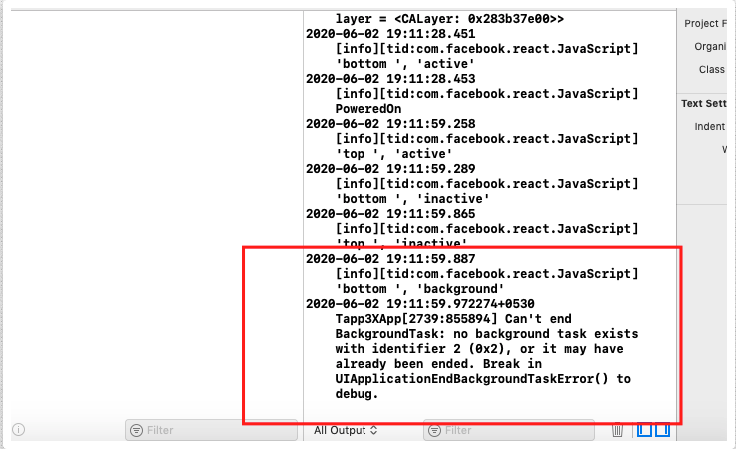
here you go to see debug log(above), once my app goes to background mode.
Suggest me What I need to do for background mode scanning.
And Is it possible with this library or not ? need to know this.
priyanka-Sadh
on 2 Jun 2020
@dariuszseweryn Please check above log. Sorry in delay
priyanka-Sadh
on 3 Jun 2020
@dariuszseweryn
constructor(props) {
        super(props)
        this.manager = new BleManager({
            restoreStateIdentifier: 'BleInTheBackground',
              restoreStateFunction: restoredState => {
                if (restoredState == null) {
                  // BleManager was constructed for the first time.
                } else {
                    console.log("restoredState");
                    console.log(restoredState);
// BleManager was restored. CheckrestoredState.connectedPeripheralsproperty.
}
}
})
}
console.log("restoredState"); is not displaying what does it mean ? I am writting restoreStateIdentifier at wrong place ?
priyanka-Sadh
on 3 Jun 2020
It seems that the task is not there. If it has ended then probably you do not conform to what was described in this wiki page.
There is everything we know about iOS background behaviour. You have to deal with the implementation.
dariuszseweryn
on 6 Jun 2020
Thanks for the link @dariuszseweryn, I probably found the culprit in my case
You have to specify service UUID as the first argument of bleManager.startDeviceScan function to be able to discover the device in background mode. That means your peripheral should advertise specified service UUID in advertisement data. That's important.
I somehow missed this before.
EDIT: I can confirm that it works as expected when you provide the service! ✅
jukben
on 7 Jun 2020
Related issues
 alfacommunication-alessandro
·
3Comments
alfacommunication-alessandro
·
3Comments
 SlavaInstinctools
·
4Comments
alfacommunication-alessandro
·
4Comments
SlavaInstinctools
·
4Comments
alfacommunication-alessandro
·
4Comments
 KarthickCSK
·
3Comments
KarthickCSK
·
3Comments
 lenninlc
·
3Comments
lenninlc
·
3Comments