React-native-ble-plx: Found issue in Discovering the characteristics - Version 1.1.0 and above
Using BLE-PLX Library for Scanning and Connecting to BLE devices
Did check your reference implementation as provided at - https://www.polidea.com/blog/ReactNative_and_Bluetooth_to_An_Other_level/
used the below code block to discover all services -
 device
          .connect()
          .then(device => {
            this.info('Discovering services and characteristics');
            return device.discoverAllServicesAndCharacteristics();
          })
          .then(device => {
            this.info('Setting notifications');
            return this.setupNotifications(device);
          })
The issue i found, is the device has no service UUIDs list even when the libraries like
react-native-ble-manager as successfully scanning and discovering services and characteristics
Attaching the screenshot of device properties - after scanning and discovering services -

Kindly resolve the above issue as i am using your library in one of my project as initially i found it more better and easy to use. Kindly fix the bug as soon as possible, will be helpful.
 ApurvMahesh
All 11 comments
I believe you have not read wiki regarding service discovery
 dariuszseweryn
on 30 Jan 2020
dariuszseweryn
on 30 Jan 2020
I believe you have not read wiki regarding service discovery
May be i am not getting what you want to convey, but i am using the same method as it is described - device.discoverAllServicesAndCharacteristics(): Promise
Kindly let me know, your views on this.
ApurvMahesh
on 30 Jan 2020
This part:
When the service discovery was already performed after the connection has been established it is possible to retrieve the cached services by calling:
device.services(): Promise<Service[]>or
bleManager.servicesForDevice(deviceIdentifier: DeviceId): Promise<Array<Service>>
dariuszseweryn
on 30 Jan 2020
This part:
When the service discovery was already performed after the connection has been established it is possible to retrieve the cached services by calling:
device.services(): Promise<Service[]>or
bleManager.servicesForDevice(deviceIdentifier: DeviceId): Promise<Array<Service>>
Hi @dariuszseweryn I checked the api doc and what you say is correct, but still i am having issue in discovering any services or characcteristics for the BLE device.
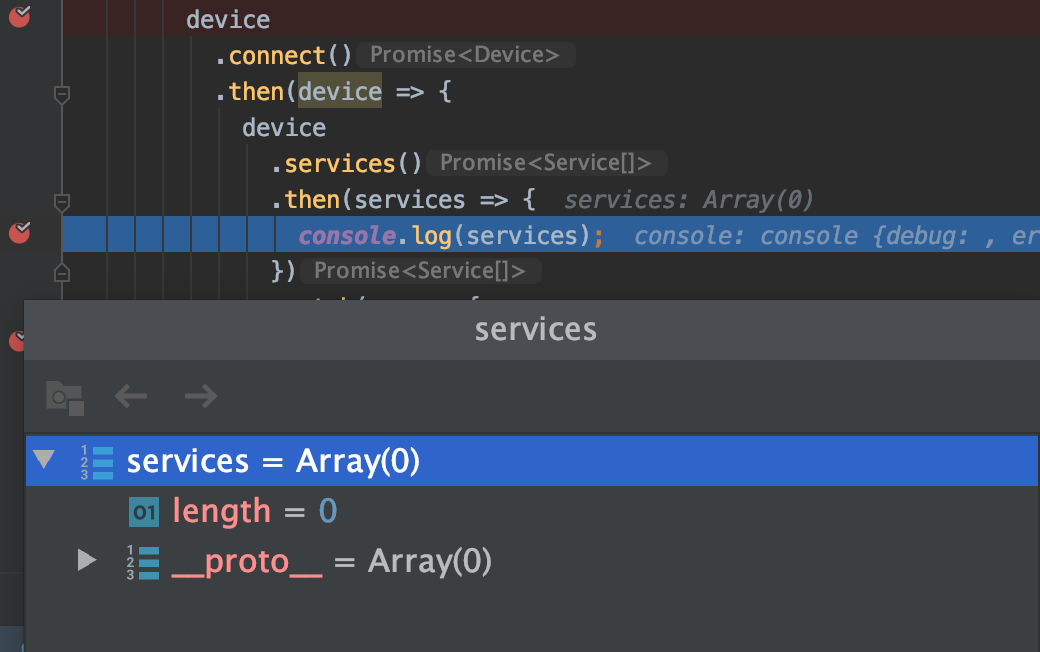
Below am posting the screen shot of the response which i got from
device.services()
Kindly refer to the screen shot for more information.
ApurvMahesh
on 30 Jan 2020
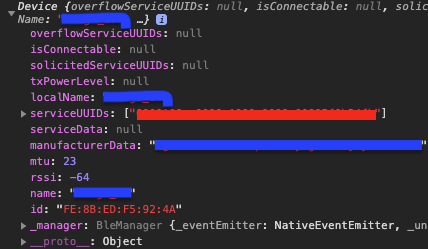
I have the same Problem. Even on scanning more information is shown:
Scanning:
After discovering (same for after connecting):
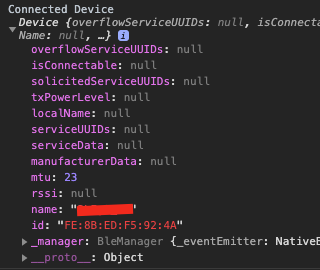
Example:
await stopScanning();
setConnectionState(ConnectionState.CONNECTING);
const connectedDevice = await device.connect();
console.log('Connected Device', connectedDevice);
setConnectionState(ConnectionState.DISCOVERING);
const foundServices = await connectedDevice.discoverAllServicesAndCharacteristics();
console.log('Services', foundServices);
EDIT:
It seems like if the same Device is reused, the services can be discovered.
E.g.:
await device.connect();
await device.discoverAllServicesAndCharacteristics();
await device.services();
So the device returned from connect() is "empty".
 eliasws
on 30 Jan 2020
eliasws
on 30 Jan 2020
@ApurvMahesh You may be facing an Android OS bug but I cannot really tell without native logs as per bug report template
@eliasws these are correct as most of the data is available only during a scan
dariuszseweryn
on 30 Jan 2020
@ApurvMahesh You may be facing an Android OS bug but I cannot really tell without native logs as per bug report template
@eliasws these are correct as most of the data is available only during a scan
@dariuszseweryn I am facing the same issue as eliasws posted and it's not an Android specific issue as the screenshots i posted are related to iOS device.
ApurvMahesh
on 31 Jan 2020
@dariuszseweryn, I am also facing the same issue.
when tested on NRF connect application i am able list down the characteristics and services but the same thing will return null response for service[]. same on both Android as well in IOS.
pls can you look into this issue
 Ajaykumar02
on 31 Jan 2020
Ajaykumar02
on 31 Jan 2020
Ok. Let me clarify. Device has multiple properties:
▸ id
▸ name
▸ rssi
▸ mtu
▸ manufacturerData
▸ serviceData
▸ serviceUUIDs
▸ localName
▸ txPowerLevel
▸ solicitedServiceUUIDs
▸ isConnectable
▸ overflowServiceUUIDs
We can group them into explicit categories:
Read-only (stable) values:
▸ id
Properties, which can be modified, when the new Device object is fetched from the API (Device by itself is immutable and "snapshot" of it at the moment of the call):
▸ name
▸ mtu
Properties, which are fetched during the scanning procedure from the advertisement data (they are always null outside device scanning):
▸ rssi
▸ manufacturerData
▸ serviceData
▸ serviceUUIDs
▸ localName
▸ txPowerLevel
▸ solicitedServiceUUIDs
▸ isConnectable
▸ overflowServiceUUIDs
Therefore if you want to get services of the device (not services advertised during scanning procedure) you have to call sequentially device.iscoverAllServicesAndCharacteristics() and then device.services(). The result of the last call should return Array<Service>. I guess that's what you expect.
Why all of the properties are in one bag? That's just a mistake during early development, which we left as it is to keep backward compatibility (it's so important for me in this crazy JS world).
 Cierpliwy
on 31 Jan 2020
Cierpliwy
on 31 Jan 2020
@Cierpliwy Thanks a lot for your response. I tried the same as you suggested. It is working and i am able to get the list of services and characteristics. Thanks a lot. Hereby closing the issue, as it was invalid. @dariuszseweryn thanks a lot for your help bro.
ApurvMahesh
on 31 Jan 2020
@Cierpliwy, cool i have not used the device.services(). Thank you for clarification.
Ajaykumar02
on 1 Feb 2020
Related issues
 KarthickCSK
·
3Comments
KarthickCSK
·
3Comments
 kevinmeyvaert
·
4Comments
kevinmeyvaert
·
4Comments
 brycejacobs
·
5Comments
brycejacobs
·
5Comments
 cltsang
·
4Comments
cltsang
·
4Comments
 paddlefish
·
4Comments
paddlefish
·
4Comments
Most helpful comment
Ok. Let me clarify. Device has multiple properties:
We can group them into explicit categories:
Read-only (stable) values:
Properties, which can be modified, when the new Device object is fetched from the API (Device by itself is immutable and "snapshot" of it at the moment of the call):
Properties, which are fetched during the scanning procedure from the advertisement data (they are always null outside device scanning):
Therefore if you want to get services of the device (not services advertised during scanning procedure) you have to call sequentially
device.iscoverAllServicesAndCharacteristics()and thendevice.services(). The result of the last call should returnArray<Service>. I guess that's what you expect.Why all of the properties are in one bag? That's just a mistake during early development, which we left as it is to keep backward compatibility (it's so important for me in this crazy JS world).