React-native-ble-plx: Android, connectToDevice() repeatedly fails after a few successes
react-native-ble-plx 1.0.3
react-native 0.59.1
Android-only issue. This occurs across makes, models, and OS versions. For example: Pixel 1, Pixel 2, Galaxy S8, Galaxy S7, Nexus. OS's range from 6.0 - 9.0. This began happening after upgrading both RN and RNBP.
Our app connects to washers and dryers via bluetooth. Our MachineListScreen lists available machines
machineA
machineB
machineC
Using connectToDevice(machine), we are successfully able to connect to machineA, machineB, and machineC, transition to ConnectedToMachineScreen and run interactions.
This works only once!
The next time we connectToDevice(machine), it simply fails to connect. The error is a DeviceConnectionFailed. It's due to a connection attempt timeout that we impose, but this is immaterial. Our timeout for a connection attempt is 10 seconds. But we've tried bumping it to 30 seconds, 60 seconds, et cetera, and it still fails.
This doesn't happen on iOS. iOS connects repeatedly.
Here's the code.
_handleMachinePress = async machine => {
  try {
    this.setState({ loading: true });
    await ble.connectionManager.connectToMachine(machine);
    const passProps = { ...props };
    navigateToScreen(ConnectedToMachineScreen, passProps);
  } catch (error) {
    console.warn(error);
  } finally {
    this.setState({ loading: false });
  }
}
export const connectToMachine = async machine => {
  return new Promise(async (resolve, reject) => {
    let connectedDevice;
    try {
      connectedDevice = await ble.connectToDevice(machine.id, { timeout: 10000 });
    } catch (error) {
      try {
        await timeout(5000);
        connectedDevice = await ble.connectToDevice(machine.id, { timeout: 10000 });
      } catch (error) {
        reject(error);
        return;
      }
    }
    try {
      const exploredDevice = await connectedDevice.discoverAllServicesAndCharacteristics();
      await exploredDevice.services();
      resolve();
    } catch (error) {
      reject(error);
    }
  });
};
 GreanBeetle
All 22 comments
Experiencing the same problem, after a disconnect the app fails to reconnect to the peripheral, this occured after upgrading to React Native 0.60.x. I get isDeviceConnected false, but when I try to reconnect i get the error 203 Device is already connected.
 folofse
on 19 Jul 2019
folofse
on 19 Jul 2019
@folofse So, I found a hacky solution to this. I don't love it. But it has worked so far Update this code failed. See our solution below
let ble = new BleManager()

const scanDevices =() => {
  let arr = [];
  ble.startDeviceScan( options => {
    arr.push(device)
  })
  return arr;
}

ble.destroy()

ble = new BleManager()

ble.connectToDevice(arr[x]);
Again, I think this is a poor solution, but resetting the BleManager by destroying and re-creating it seems to help. If someone has a better alternative, please advise.
GreanBeetle
on 22 Jul 2019
@GreanBeetle Yes it seems like a new instance of BLEManager will solve the problem. I should dig around in the code a bit and see what might be the root of the problem between connects.
I also had a similar problem with isDeviceConnected=false with the other BlueTooth package https://github.com/innoveit/react-native-ble-manager so it might be a Android related problem that it returns isDeviceConnected=false even if its currently connected.
folofse
on 22 Jul 2019
Still an issue. @Cierpliwy Any thoughts?
GreanBeetle
on 25 Jul 2019
same issue here, when I repeat doing connect and cancelConnection.It could success only once or several times. After a few success, connect function will execute without any response. I added the timeout option to connect and get the timeout Error: ERROR: Operation was cancelled. The error repeat until I reopen the app.
it could be some bug with cancelConnection.
My work around solution is do disable and immediately re-enable bluetooth(using react-native-bluetooth-status) to cancel connection instead of call cancelConnection.
hope that helped.
 kyoyadmoon
on 25 Jul 2019
kyoyadmoon
on 25 Jul 2019
@kyoyadmoon I'll give that a try
GreanBeetle
on 26 Jul 2019
I've seen a problem that might be related. If I call BleManager.connectToDevice and then call BleManager.cancelDeviceConnection before the device connects, then the devices becomes connected and the BleManager instance reports that the device is not connected. Calling BleManager.cancelDeviceConnection does not release the connection. Even closing my app does not release the connection. Calling BleManager.disable releases the connection. I assume BleManager.destroy would release the connection, but I have not tried it.
 chaselal
on 1 Aug 2019
chaselal
on 1 Aug 2019
@chaselal In our case, we run somewhat complex transactions with firmware. There are numerous writeCharacteristicWithResponseForDevice() calls before we cancelDeviceConnection. When we _do_ cancel, what I've discovered is that react-native-ble-plx just breaks. All methods stop working: connectToDevice() fails, startDeviceScan() fails, destroy() fails ...
I've resorted to a crappy work-around using react-native-restart to restart the app and wipe out the BleManager ...
GreanBeetle
on 1 Aug 2019
@GreanBeetle I doubt this affects your problem, but there is a bug in your code. At least, it looks like one. connectToMachine = async machine ... should be connectToMachine = machine ... because currently connectToMachine returns a Promise<Promise>. You probably want it to just return a Promise. The extra async introduces the extra Promise. What happens now is awaiting connectToMachine resolves immediately, instead of resolving after the machine connects.
chaselal
on 1 Aug 2019
@chaselal Ah yeah we await that. It could prob be cleaner but it works ...
GreanBeetle
on 1 Aug 2019
Do you await await connectToMachine(machine)? You need two awaits for the
code you posted.
On Thu, Aug 1, 2019, 12:16 PM John Rykken notifications@github.com wrote:
@chaselal https://github.com/chaselal Ah yeah we await that
—
You are receiving this because you were mentioned.
Reply to this email directly, view it on GitHub
https://github.com/Polidea/react-native-ble-plx/issues/501?email_source=notifications&email_token=AA57GKZFPAPNRR3CK2WJQBLQCMD4LA5CNFSM4IESBH22YY3PNVWWK3TUL52HS4DFVREXG43VMVBW63LNMVXHJKTDN5WW2ZLOORPWSZGOD3LDZTA#issuecomment-517356748,
or mute the thread
https://github.com/notifications/unsubscribe-auth/AA57GK6DBJ4UQJ3YHMQQZATQCMD4LANCNFSM4IESBH2Q
.
chaselal
on 1 Aug 2019
Nope. Just the one.
import { connectToMachine } from 'utils'

connect = async m => { await connectToMachine(m) }
I see the same issue here. I believe the root problem is that cancelDeviceConnection does not end up calling 'disconnect' (or close in some cases) on the underlying BluetoothGatt instance. It's leaving all the underlying android state in limbo.
 glenne
on 24 Aug 2019
glenne
on 24 Aug 2019
@glenne Our fix ultimately looked something like this
## BLEManager/index.js ##
import { BleManager } from 'react-native-ble-plx';

export const create = () => {
  ble = new BleManager();
};

export const setLogLevel = logLevel => {
  ble.setLogLevel(logLevel);
};

export const restart = () => {
  ble.destroy();
  create();
};

export const cancelConnection = machineId => ble.cancelDeviceConnection(machineId);

create();

export let ble;
After a successful interaction with a peripheral, we cancelConnection() and restart(). We went through numerous iterations of this general concept and, for whatever reason, this particular setup worked. Also, for what it's worth, we found that removing characteristic subscriptions yielded some ble manager perf gains.
import { ble } from './index'
const monitorTxCharacteristicSubscription = ble.monitorCharacteristicForDevice(<args> => {
  // do stuff
});
monitorTxCharacteristicSubscription.remove();
@GreanBeetle I too am seeing Operation was cancelled. Seems random for that moment, I tried your suggestion. Seems more reliable after a little testing. Still not perfect though
 WilliamAlexander
on 8 Sep 2019
WilliamAlexander
on 8 Sep 2019
We're having the same issue. After calling cancelDeviceConnection the BleManager is stuck, no response on any method.
 ThomasStubbe
on 19 Sep 2019
ThomasStubbe
on 19 Sep 2019
This issue has been automatically marked as stale because it has not had recent activity. It will be closed if no further activity occurs. Thank you for your contributions.
![stale[bot] picture](https://avatars.githubusercontent.com/in/1724?v=4&s=40) stale[bot]
on 18 Nov 2019
stale[bot]
on 18 Nov 2019
Sad this is being retired when it's still an issue with no reasonable workaround. If I have more than one device I have to abort all and reconnect just to disconnect one.
glenne
on 25 Nov 2019
ping @dariuszseweryn
Experiencing the same issue:
    console.log(await to(bleManager.cancelDeviceConnection(deviceId)));
    const [errConnect, device] = await to(bleManager.connectToDevice(deviceId));
    console.log(errConnect);
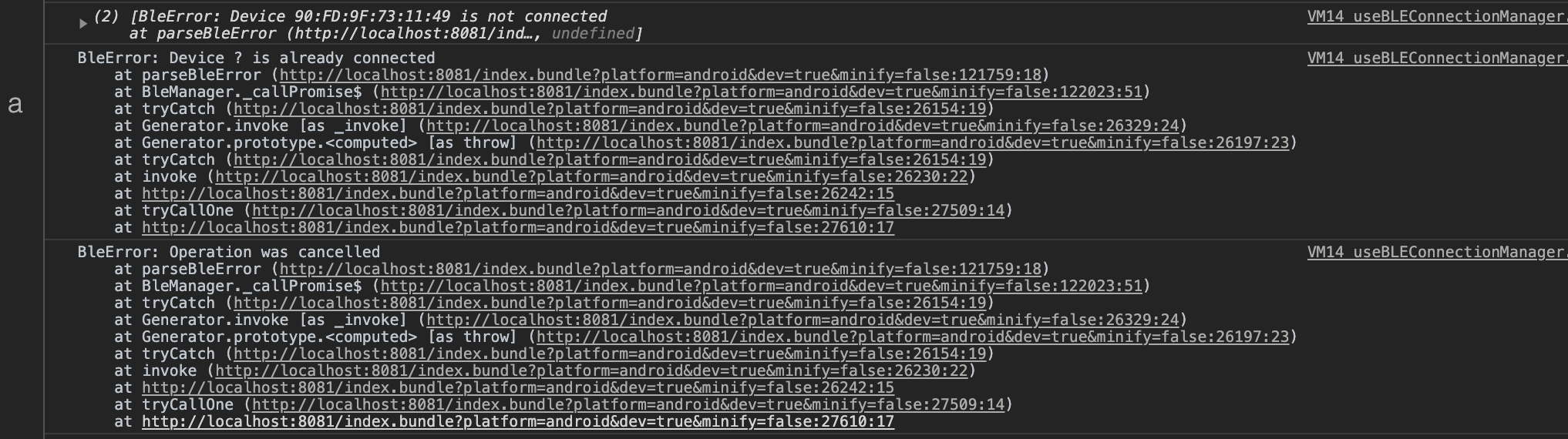
It occurs when I disable Bluetooth while being connected…
Maybe could you help us? Thanks :)
 ScreamZ
on 20 Dec 2019
ScreamZ
on 20 Dec 2019
Yes, this is still a common issue for us.
let ble = new BleManager()
console.log("Manager 1", ble)
ble.destroy()
ble = new BleManager()
console.log("Manager 2", ble)
After this, any ble method we call (e.g. ble.state()) freezes our app.
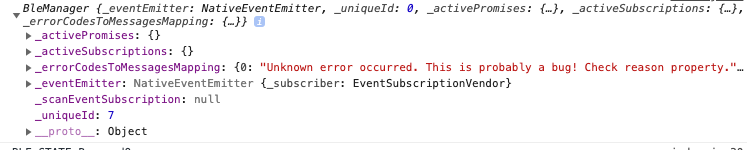
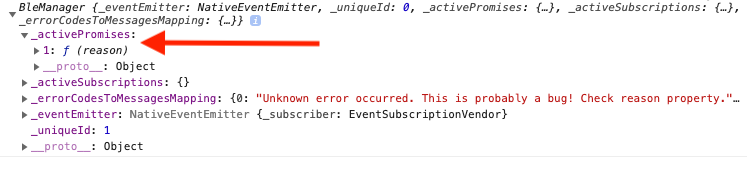
Console logging the ble manager instance, I've found one difference
(a) A working ble manager looks this
(b) A faulty ble manager that will freeze the app looks like this. Note that it has a single unresolved promise in the _activePromises property
GreanBeetle
on 20 Dec 2019
Please add related info according to the issue template with special care of adding logs and native logs as described.
 dariuszseweryn
on 20 Dec 2019
dariuszseweryn
on 20 Dec 2019
@GreanBeetle I get the same problem with pending promises. Have you found a solution?
 gregogalante
on 31 Jul 2020
gregogalante
on 31 Jul 2020
Related issues
 kevinmeyvaert
·
4Comments
kevinmeyvaert
·
4Comments
 alfacommunication-alessandro
·
4Comments
alfacommunication-alessandro
·
3Comments
alfacommunication-alessandro
·
4Comments
alfacommunication-alessandro
·
3Comments
 samthui
·
4Comments
samthui
·
4Comments
 KarthickCSK
·
3Comments
KarthickCSK
·
3Comments
Most helpful comment
@folofse So, I found a hacky solution to this. I don't love it. But it has worked so far Update this code failed. See our solution below
Again, I think this is a poor solution, but resetting the BleManager by destroying and re-creating it seems to help. If someone has a better alternative, please advise.