React-native-background-geolocation: Background service stop working when app is killed
Your Environment
- Plugin version:
- Platform: iOS or Android
- OS version:
- Device manufacturer and model:
- Running in Simulator:
- React Native version:
- Plugin configuration options:
- Link to your project:
Context
Expected Behavior
Actual Behavior
Possible Fix
Steps to Reproduce
1.
2.
3.
4.
Context
Debug logs
 karimkhamwani
All 29 comments
BackgroundGeolocation.configure({
  desiredAccuracy: BackgroundGeolocation.HIGH_ACCURACY,
  stationaryRadius: 50,
  distanceFilter: 50,
  debug: true,
  startOnBoot: true,
  stopOnTerminate : false,
  locationProvider: BackgroundGeolocation.ACTIVITY_PROVIDER,
  interval: 1000,
  fastestInterval: 5000,
  activitiesInterval: 1000,
  stopOnStillActivity: false
});
I implemented react headless js to work around this...
https://github.com/eacbkk/react-native-background-geolocation
Here's what you need to do:
https://github.com/eacbkk/react-native-background-geolocation#react-android-headless-location-service-experimental
Here is the commit:
https://github.com/eacbkk/react-native-background-geolocation/commit/8e0645588b7e950e6abadd8808523506ebca11c5
@mauron85 This could be useful. would you consider adding this feature?
 eacbkk
on 19 Mar 2019
eacbkk
on 19 Mar 2019
@eacbkk thanks for reply
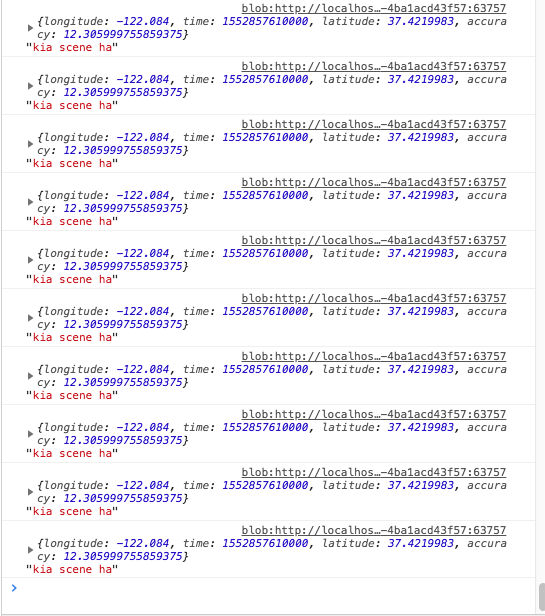
After implementing this it's working in background when app is kill but i see multiple logs of it, instead of one log
componentWillMount(){
AppRegistry.registerHeadlessTask('RNLocationHeadlessService', () => this.locationHeadlessService);
}
locationHeadlessService = async (location) => {
console.log(location , "kia scene ha");
return Promise.resolve();
};
karimkhamwani
on 19 Mar 2019
It's because you've put the AppRegistry.registerHeadlessTask in componentwillmount. It should go to your indexjs where you register the React application. Search for AppRegistry.registerComponent in your source. you have to put AppRegistry.registerHeadlessTask on the same place.
eacbkk
on 19 Mar 2019
@eacbkk how should i able to update the state then?
karimkhamwani
on 21 Mar 2019
@eacbkk is your experimental branch replacing my impl of headless with react native headless version? If so feel free to push PR, so I wont loose track of this.
 mauron85
on 21 Mar 2019
mauron85
on 21 Mar 2019
@mauron85 i have test this commit it works great.
karimkhamwani
on 22 Mar 2019
@eacbkk ^^^ ?
karimkhamwani
on 22 Mar 2019
@mauron85 it does not replace it. Because 'background-geolocation-android' currently doesn't have React as a dependency. My implementation is on 'react-native-background-geolocation'. If you think it's okay to include react as a dependency in that layer, I can look into replacing that.
eacbkk
on 26 Mar 2019
@eacbkk how should i able to update the state then?
your headless implementation shouldn't be used to update ui state... It doesn't work when UI is visible. It's only for background operation.
eacbkk
on 26 Mar 2019
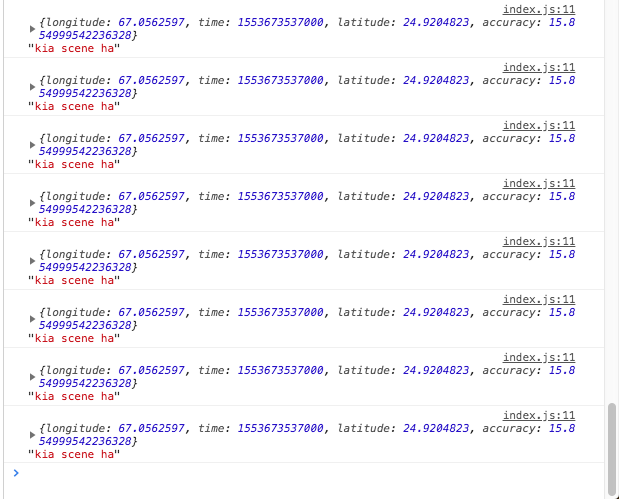
@eacbkk even i place code in root file still getting multiple logs.
import { AppRegistry } from 'react-native';
import App from './App';
import { name as appName } from './app.json';
/* call the endpoint in background */
locationHeadlessService = async location => {
console.log(location, 'kia scene ha');
return Promise.resolve();
};
AppRegistry.registerHeadlessTask(
'RNLocationHeadlessService',
() => this.locationHeadlessService,
);
AppRegistry.registerComponent(appName, () => App);
karimkhamwani
on 27 Mar 2019
@eacbkk I was calling background.start() multiple times that why multiple logs happens
karimkhamwani
on 29 Mar 2019
@eacbkk is there any way to de register headlesstask
AppRegistry.registerHeadlessTask('RNLocationHeadlessService', () => this.locationHeadlessService);
karimkhamwani
on 29 Mar 2019
@eacbkk is there any way to de register headlesstask
AppRegistry.registerHeadlessTask('RNLocationHeadlessService', () => this.locationHeadlessService);
what's the use case. I don't believe react native supports deregistering.
eacbkk
on 31 Mar 2019
@eacbkk I'm working on live tracking app, i want to use background location only when rides starts and stop using background location when rides ends.
karimkhamwani
on 1 Apr 2019
@eacbkk I'm working on live tracking app, i want to use background location only when rides starts and stop using background location when rides ends.
Yah. But why would you need to de-register the headless service? Calling the stop function should suffice. If you don't want to do that, check for some condition in your js function I guess.
eacbkk
on 2 Apr 2019
@eacbkk i tried your commit and it works as expected. I used registerHeadlessTask at the componentDidMount
  componentDidMount() {
    console.log('map did mount');
    AppRegistry.registerHeadlessTask('RNLocationHeadlessService', () => this.locationHeadlessService);
I think you can create pull request about it because otherwise it does not work when app is killed.
 hadnazzar
on 9 Apr 2019
hadnazzar
on 9 Apr 2019
Do we have better solution or still going for @eacbkk workaround?
 Saqib92
on 6 May 2019
Saqib92
on 6 May 2019
I implemented react headless js to work around this...
https://github.com/eacbkk/react-native-background-geolocation
Here's what you need to do:
https://github.com/eacbkk/react-native-background-geolocation#react-android-headless-location-service-experimentalHere is the commit:
eacbkk@8e06455@mauron85 This could be useful. would you consider adding this feature?
is possible in IOS ?
 kevinzDzul
on 7 May 2019
kevinzDzul
on 7 May 2019
@mauron85 do you think we can integrate the implementation? It has been in my production application for the last few months. And I can report it has been working great. The only catch is I need to include the react-native library in the android commons project.
eacbkk
on 29 May 2019
This issue has been automatically marked as stale because it has not had recent activity. It will be closed if no further activity occurs. Thank you for your contributions.
![stale[bot] picture](https://avatars.githubusercontent.com/in/1724?v=4&s=40) stale[bot]
on 24 Dec 2019
stale[bot]
on 24 Dec 2019
This issue has been automatically closed, because it has not had recent activity. If you believe this issue shouldn't be closed, please reopen or write down a comment requesting issue reopening with explanation why you think it's important. Thank you for your contributions.
stale[bot]
on 31 Dec 2019
to revive this..
@eacbkk is your experimental branch replacing my impl of headless with react native headless version? If so feel free to push PR, so I wont loose track of this.
I don't see PR in the list ? @eacbkk
 littlehome-eugene
on 7 Feb 2020
littlehome-eugene
on 7 Feb 2020
@eacbkk
Thanks for the patch (https://github.com/eacbkk/react-native-background-geolocation/commit/8e0645588b7e950e6abadd8808523506ebca11c5)
I've managed to run it fine.
However I find sometime the headless task is not called out of sudden , I find restarting app a few times fixes the problem.
Has anyone encountered such problem?
littlehome-eugene
on 7 Feb 2020
Why on me, headless task only work once. If I close the app for second time headless task does not work anymore.
 rosnaib11
on 3 Jul 2020
rosnaib11
on 3 Jul 2020
Sorry my bad, the problem I guess was I keep calling BackgroundGeolocation.stop();. on componentWillUnmount followed by BackgroundGeolocation.start();. The listener might not rebinding, when I remove .stop() it works
rosnaib11
on 3 Jul 2020
After call BackgroundGeolocation.stop(); and then i call BackgroundGeolocation.start(); headlesstask won't start again.
 lyseiha
on 28 Jul 2020
lyseiha
on 28 Jul 2020
I implemented react headless js to work around this...
https://github.com/eacbkk/react-native-background-geolocation
Here's what you need to do:
https://github.com/eacbkk/react-native-background-geolocation#react-android-headless-location-service-experimentalHere is the commit:
eacbkk@8e06455@mauron85 This could be useful. would you consider adding this feature?
It stop working when clear all app from recently. but in few minute foreground notification pop up and i debug in android studio location still update but headlesstask not working.
lyseiha
on 5 Aug 2020
@eacbkk is it necessary to perform stuff inside headlesssLocationService.js file? Because I'm sending my data directly through url parameter. If my app is terminated, headlesssLocationService.js works. But at the same time my BackgroundGeolocation.configure settings also working.
My headlessLocationService.js. This works if I terminate the app
export default async (Location) => {
  console.log(location);
  // do something here
  return Promise.resolve()
}
But at the same time this also working if I terminate the app.
BackgroundGeolocation.configure({
      desiredAccuracy: BackgroundGeolocation.HIGH_ACCURACY,
      stationaryRadius: 5,
      distanceFilter: 5,
      notificationTitle: 'Trackme GPS Tracking',
      notificationText: 'Enabled',
      notificationIconColor: '#3D80E5',
      notificationsEnabled: true,
      debug: true,
      startOnBoot: false,
      stopOnTerminate: false,
      locationProvider: BackgroundGeolocation.ACTIVITY_PROVIDER,
      interval: interval,
      fastestInterval: 5000,
      activitiesInterval: 5000,
      stopOnStillActivity: false,
      url: `${Config.API_DEV}/api/services/location`,
      syncUrl: `${Config.API_DEV}/api/services/sync_location`,
      syncThreshold: 100,
      httpHeaders: {
        Accept: 'application/json',
        'Content-Type': 'application/json',
      },
      // customize post properties
      postTemplate: {
        id: '@id',
        lat: '@latitude',
        lon: '@longitude',
        gps_time: '@time',
        speed: '@speed',
        bearing: '@bearing',
        altitude: '@altitude',
        accuracy: '@accuracy',

        macaddress: data ? data.macaddress : null,
        objectid: data ? data.objectid : null,
        statusDesc: this.appstate,
      },
    })
Which one should I follow?
rosnaib11
on 23 Jan 2021
Related issues
 rakeshiitd
·
5Comments
rakeshiitd
·
5Comments
 vinceprofeta
·
5Comments
vinceprofeta
·
5Comments
 farruxx
·
3Comments
farruxx
·
3Comments
 theebi
·
4Comments
theebi
·
4Comments
 HaswinVidanage
·
3Comments
HaswinVidanage
·
3Comments
Most helpful comment
@mauron85 do you think we can integrate the implementation? It has been in my production application for the last few months. And I can report it has been working great. The only catch is I need to include the react-native library in the android commons project.