React-native-background-geolocation: The minSdk version should not be declared in the android manifest file.
Your Environment
- Plugin version: ^0.5.0-alpha.50
- Platform: Android
- OS version: Linux 4.4 Linux Mint 18 (Sarah)
- Device manufacturer and model: none, its a build problem
- Running in Simulator: No
- React Native version: 0.57.8
- Plugin configuration options: ?
- Link to your project: -
Context
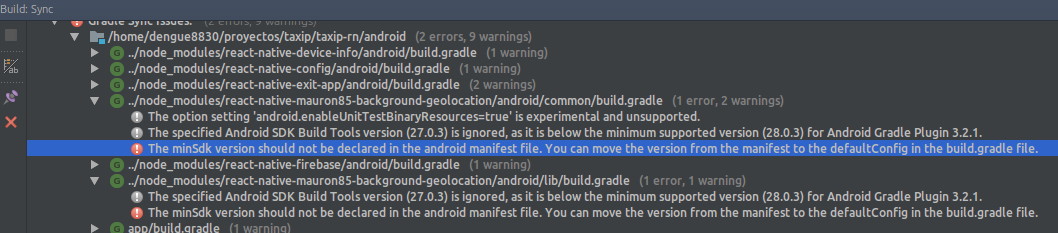
I can't run the app from the android studio because the build finish with errors, but i can run and generate release builds from console with out problems.
The error is:
The minSdk version should not be declared in the android manifest file. You can move the version from the manifest to the defaultConfig in the build.gradle file.
and it refers to the modules in the image (i haven't the min sdk info in my android manifest file)
Here is my app/build.gradle
dependencies {
    implementation project(':react-native-firebase')
    implementation project(':react-native-exit-app')
    implementation project(':react-native-mauron85-background-geolocation')
    implementation project(':react-native-config')
    implementation project(':react-native-device-info')
    // Excluimos la dependencia para importarla por separado para coexistencia con otros que dependen de playservices
    // como sugieren aca https://github.com/react-community/react-native-maps/blob/master/docs/installation.md#android
    // implementation(project(':react-native-maps')){
    //     exclude group: 'com.google.android.gms', module: 'play-services-base'
    //     exclude group: 'com.google.android.gms', module: 'play-services-maps'
    // }
    // Importamos play services por separado para que pueda coexistir esta dependencia con
    // una unica version para firebase y para maps
    implementation 'com.google.android.gms:play-services-base:16.0.1'
    // implementation 'com.google.android.gms:play-services-maps:16.0.0'
    // Firebase
    implementation "com.google.firebase:firebase-core:16.0.4"
    implementation "com.google.firebase:firebase-messaging:17.3.4"
    implementation fileTree(dir: "libs", include: ["*.jar"])
    implementation "com.android.support:appcompat-v7:${rootProject.ext.supportLibVersion}"
    implementation "com.facebook.react:react-native:+"  // From node_modules
}
and here my /build.gradle
// Top-level build file where you can add configuration options common to all sub-projects/modules.

buildscript {
    repositories {
        google()
        jcenter()
    }
    dependencies {
        classpath 'com.android.tools.build:gradle:3.2.1'
        // Para firebase
        classpath 'com.google.gms:google-services:4.0.1'
        // NOTE: Do not place your application dependencies here; they belong
        // in the individual module build.gradle files
    }
}

allprojects {
    repositories {
        mavenLocal()
        google()
        jcenter()
        maven {
            // All of React Native (JS, Obj-C sources, Android binaries) is installed from npm
            url "$rootDir/../node_modules/react-native/android"
        }
    }
}

subprojects {
    afterEvaluate {project ->
        if (project.hasProperty("android")) {
            android {
                compileSdkVersion 27
                buildToolsVersion '27.0.3'
            }
        }
    }
}

ext {
    buildToolsVersion = "27.0.3"
    minSdkVersion = 16
    compileSdkVersion = 27
    targetSdkVersion = 26
    supportLibVersion = "27.1.1"
}

task wrapper(type: Wrapper) {
    gradleVersion = '4.6'
    distributionUrl = distributionUrl.replace("bin", "all")
}
Expected Behavior
I should be able to run the app for android studio (eg: for debugging purposes)
Actual Behavior
I can't run the app from the android studio

Possible Fix
Steps to Reproduce
- install plugin
- open android studio
- see the error in build console
Context
This is not a huge problem because i can run and build my app, indeed i have been using this plugin since a long time and its the first time i need run the app from android studio.
Debug logs
 dengue8830
All 6 comments
I have the same issue. The minSdkVersion was declared in ext, but it cannot override the module Manifest. I still can run and build, but gradle sync always failed.
 pkhien95
on 14 Mar 2019
pkhien95
on 14 Mar 2019
I am facing the same issue...ERROR: The minSdk version should not be declared in the android manifest file. You can move the version from the manifest to the defaultConfig in the build.gradle file.
Remove minSdkVersion and sync project
Affected Modules: react-native-mauron85-background-geolocation, react-native-mauron85-background-geolocation-common
 zymr-viveksharma
on 20 Mar 2019
zymr-viveksharma
on 20 Mar 2019
Do you guys know that you can override minSdkVersion in gradle ext section?
https://github.com/mauron85/react-native-background-geolocation#dependencies
EDIT: Or it doesn't work for manifest xml?
 mauron85
on 21 Mar 2019
mauron85
on 21 Mar 2019
it seems doesn't work for manifest xml because i have minSdkVersion declared in my /build.gradle (i posted it in the issue description)
dengue8830
on 24 Mar 2019
@mauron85 @danielgindi
and others also can you please check the pr's and get this merged and released.
Many people will face the same issue
 hb2708
on 1 Jul 2019
hb2708
on 1 Jul 2019
Fix has been merged.
mauron85
on 10 Jul 2019
Related issues
 vendramini
·
3Comments
vendramini
·
3Comments
 farruxx
·
3Comments
farruxx
·
3Comments
 arochedy
·
5Comments
arochedy
·
5Comments
 vinceprofeta
·
5Comments
vinceprofeta
·
5Comments
 pewh
·
6Comments
pewh
·
6Comments
Most helpful comment
I have the same issue. The
minSdkVersionwas declared in ext, but it cannot override the module Manifest. I still can run and build, but gradle sync always failed.