React-native-background-geolocation: How to stop showing location notification?
Your Environment
Plugin version: "^0.5.0-alpha.34"
Platform: iOS or Android: Android
OS version: All
Device manufacturer and model: All
React Native version: 0.55.1
Plugin configuration options:
BackgroundGeolocation.configure({
       stopOnTerminate: true,
       desiredAccuracy: BackgroundGeolocation.MEDIUM_ACCURACY,
       stationaryRadius: 1000,
       distanceFilter: 7000,
       notificationTitle: 'Route verification',
       notificationText: 'enabled',
       startOnBoot: true,
       stopOnTerminate: true,
       locationProvider: BackgroundGeolocation.DISTANCE_FILTER_PROVIDER,
       interval: 10000,
       fastestInterval: 5000,
       activitiesInterval: 10000,
       postTemplate: {
         lat: '@latitude',
         lng: '@longitude',
       },
       url: API.baseUrl + '/driver/location/',
       httpHeaders: {
         'Authorization': `Bearer ${props.accessToken}`,
       },
     })
I disabled location tracking when app is closed or in the background, but when app is opened, users still get notification (notificationTitle: 'Route verification', notificationText: 'enabled',). Is it possible to stop showing this location notification?
 Luckygirlllll
All 11 comments
Set startForeground false
On Wed, 18 Jul 2018 at 10:24, Iryna Kanivets notifications@github.com
wrote:
Your Environment
Plugin version: "^0.5.0-alpha.34"
Platform: iOS or Android: Android
OS version: All
Device manufacturer and model: All
React Native version: 0.55.1
Plugin configuration options:BackgroundGeolocation.configure({
stopOnTerminate: true,
desiredAccuracy: BackgroundGeolocation.MEDIUM_ACCURACY,
stationaryRadius: 1000,
distanceFilter: 7000,
notificationTitle: 'Route verification',
notificationText: 'enabled',
startOnBoot: true,
stopOnTerminate: true,
locationProvider: BackgroundGeolocation.DISTANCE_FILTER_PROVIDER,
interval: 10000,
fastestInterval: 5000,
activitiesInterval: 10000,
postTemplate: {
lat: '@latitude',
lng: '@longitude',
},
url: API.baseUrl + '/driver/location/',
httpHeaders: {
'Authorization':Bearer ${props.accessToken},
},
})I disabled location tracking when app is closed or in the background, but
when app is opened, users still get notification (notificationTitle: 'Route
verification', notificationText: 'enabled',). Is it possible to stop
showing this location notification?—
You are receiving this because you are subscribed to this thread.
Reply to this email directly, view it on GitHub
https://github.com/mauron85/react-native-background-geolocation/issues/242,
or mute the thread
https://github.com/notifications/unsubscribe-auth/AAV8GqKoFlIvFk31xd24XljkNJjDV6iJks5uHvCygaJpZM4VUJ4f
.
 mauron85
on 18 Jul 2018
mauron85
on 18 Jul 2018
@mauron85 startForeground:false, should be inside the BackgroundGeolocation.configure() ? And it will stop the notification?
Luckygirlllll
on 18 Jul 2018
Thanks!
Luckygirlllll
on 18 Jul 2018
Normally it's the default value. But keep in mind, configure supports partial configuration.
So if you
.configure({ startForeground: false })
It will saved in configuration table and used even if you remove startForeground from subsequent configure calls.
mauron85
on 18 Jul 2018
mauron85
on 23 Aug 2018
Hey @mauron85, i disabled notifications and foreground services, yet the local notification remains.
    BackgroundGeolocation.configure({
      desiredAccuracy: BackgroundGeolocation.PASSIVE_ACCURACY,
      distanceFilter: 1000,
      stationaryRadius: 1000,
      startOnBoot: true,
      stopOnTerminate: false,
      debug: false,
      locationProvider: BackgroundGeolocation.DISTANCE_FILTER_PROVIDER,
      notificationsEnabled: false,
      startForeground: false,
    });
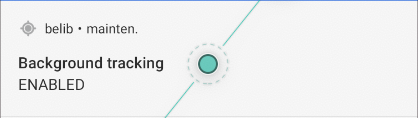
Any hints on this ? Thanks !
EDIT : further investigations revealed that whenever the app goes to Paused, the BackgroundGeolocationFacade::pause is called, in which the startForeground function is called no matter the configuration.
EDIT 2 : i can assert that commenting this line indeed fixes the problem, and everything works fine. If this is just a matter of verifying the config, I can probably submit a PR.
 rewieer
on 18 Jul 2019
rewieer
on 18 Jul 2019
For those interested, my fix have been removed from this package for understandable reasons. Yet i've forked it at https://github.com/rewieer/react-native-background-geolocation.
It might serve as a temporary fix.
rewieer
on 30 Aug 2019
@rewieer your "fix" will actually make plugin prone to be killed by the system anytime. This has been discussed many times here. Service must call startForeground when running in background. It may be tempting and also might work in some scenarios (like targeting old android apis), but I highly recommend to avoid this.
mauron85
on 30 Aug 2019
I'd highly recommend to avoid this as well, but I needed it for my particular case and decided some people might need it too, albeit with the knowledge of the consequences.
Until now it worked fine on production in Android 9 devices (Samsung and Google phones).
rewieer
on 30 Aug 2019
can we disable location notification on ios ?
 tienlongng95
on 27 Jul 2020
tienlongng95
on 27 Jul 2020
can we disable location notification on ios ? there are so many of them
 kristoff2016
on 30 Sep 2020
kristoff2016
on 30 Sep 2020
Related issues
 farruxx
·
3Comments
farruxx
·
3Comments
 alexsegura
·
5Comments
alexsegura
·
5Comments
 ianaz
·
4Comments
ianaz
·
4Comments
 sefatunckanat
·
7Comments
sefatunckanat
·
7Comments
 vinceprofeta
·
5Comments
vinceprofeta
·
5Comments
Most helpful comment
Set startForeground false
On Wed, 18 Jul 2018 at 10:24, Iryna Kanivets notifications@github.com
wrote: