React-native-background-geolocation: Could not get unknown property 'android' for project ':app' of type org.gradle.api.Project.
downgraded gradle and now this issue .All I have done was install@latest and react-native link 'project;
Your Environment
- Plugin version:
- Platform: iOS or Android
- OS version:
- Device manufacturer and model:
- React Native version:
- Plugin configuration options:
- Link to your project:
Context
Expected Behavior
Actual Behavior
Possible Fix
Steps to Reproduce
1.
2.
3.
4.
Context
Debug logs
 j-mendez
All 11 comments
Anyone have solution for this ?
 AmeerHamzaRiaz
on 29 Jun 2018
AmeerHamzaRiaz
on 29 Jun 2018
I'm having the same. I just enabled gradle3 like it made in there https://github.com/mauron85/react-native-mauron85-background-geolocation-skeleton
I'm not experienced with android development (web only). Can anyone help me please? Thanks.
 mark-slepkov
on 31 Jul 2018
mark-slepkov
on 31 Jul 2018
I had to abandon my project. Just because I couldn't solve this issue :/ https://github.com/mauron85/react-native-background-geolocation/issues/217
AmeerHamzaRiaz
on 31 Jul 2018
I downgraded buildToolsVersion and `supportLibVersion
ext {
compileSdkVersion = 26
targetSdkVersion = 26
buildToolsVersion = "26.0.2"
supportLibVersion = "25.3.1"
googlePlayServicesVersion = "11.8.0"
// oreoEXPERIMENTAL = "yes"
gradle3EXPERIMENTAL = "yes"
}
so now it builds but my app crashes right on start.
if I comment this string in MainApplication.java
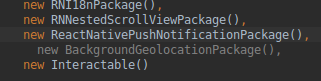
then no crash on start, but geolocation does not work. ((
mark-slepkov
on 31 Jul 2018
@j-mendez Why'd you close this? What was the solution?
 tmaly1980
on 16 Jun 2020
tmaly1980
on 16 Jun 2020
OK Turns out for me the issue was in the android-common submodule:
I needed to change in VERSIONS.gradle:
    if (findProject('..:app') != null) {
        applicationId = project('..:app').android.defaultConfig.applicationId
    } else if (findProject(':app') != null) {
        applicationId = project(':app').android.defaultConfig.applicationId
    }
to:
    if (findProject('..:app') != null && project('..:app').hasProperty('android')) {
        applicationId = project('..:app').android.defaultConfig.applicationId
    } else if (findProject(':app') != null && project(':app').hasProperty('android')) {
        applicationId = project(':app').android.defaultConfig.applicationId
    }
@tmaly1980 very nice find.
I think the issue is in settings.gradle
I really wonder why can't it see the android property tho, because for my project it is there.
 hesa2020
on 18 Jun 2020
hesa2020
on 18 Jun 2020
@tmaly1980 sorry, should have posted the solution. Setup your project for AndroidX and it should work.
j-mendez
on 21 Jun 2020
OK Turns out for me the issue was in the android-common submodule:
I needed to change in VERSIONS.gradle:
    if (findProject('..:app') != null) {
        applicationId = project('..:app').android.defaultConfig.applicationId
    } else if (findProject(':app') != null) {
        applicationId = project(':app').android.defaultConfig.applicationId
    }
to:
    if (findProject('..:app') != null && project('..:app').hasProperty('android')) {
        applicationId = project('..:app').android.defaultConfig.applicationId
    } else if (findProject(':app') != null && project(':app').hasProperty('android')) {
        applicationId = project(':app').android.defaultConfig.applicationId
    }
This worked for me on RN 0.62.2 - thank you. I wonder if I could turn it into patch-module..
 hooksoft
on 20 Nov 2020
hooksoft
on 20 Nov 2020
OK Turns out for me the issue was in the android-common submodule:
I needed to change in VERSIONS.gradle:if (findProject('..:app') != null) { applicationId = project('..:app').android.defaultConfig.applicationId } else if (findProject(':app') != null) { applicationId = project(':app').android.defaultConfig.applicationId }to:
    if (findProject('..:app') != null && project('..:app').hasProperty('android')) {
        applicationId = project('..:app').android.defaultConfig.applicationId
    } else if (findProject(':app') != null && project(':app').hasProperty('android')) {
        applicationId = project(':app').android.defaultConfig.applicationId
    }
This worked for me on RN 0.62.2 - thank you. I wonder if I could turn it into patch-module..
Why i don't have file VERSION.gradle in my project?
 caolong0204
on 27 Nov 2020
caolong0204
on 27 Nov 2020
@tmaly1980 sorry, should have posted the solution. Setup your project for AndroidX and it should work.
can you say detail about steps to setup?Please
caolong0204
on 27 Nov 2020
Related issues
 ianaz
·
4Comments
ianaz
·
4Comments
 vendramini
·
3Comments
vendramini
·
3Comments
 pewh
·
6Comments
pewh
·
6Comments
 anishroff
·
4Comments
anishroff
·
4Comments
 rakeshiitd
·
5Comments
rakeshiitd
·
5Comments
Most helpful comment
OK Turns out for me the issue was in the android-common submodule:
I needed to change in VERSIONS.gradle:
to: