React-native-background-geolocation: Compatibility iOS 11
Your Environment
- Plugin version: 2.8.1
- Platform: iOS
- OS version: 11.0 (Beta 2)
- Device manufacturer / model: iPhone 7 (or any other model)
Expected Behavior
While calling the startGeofences method permissions are asked.
After confirming permissions the module starts working.
Actual Behavior
Nothing happens. No permissions for geolocation and probably therefore also no working module.
Steps to Reproduce
- Install latest Xcode-beta (beta 2 with iOS 11.0 beta 2)
- Run any application with this module
 robmoorman
All 26 comments
In your .plist, do you have Location Always Usage Description in addition to Location When In Use Usage Description? iOS 11 enforces apps to offer both now.
 christocracy
on 3 Jul 2017
christocracy
on 3 Jul 2017

christocracy
on 3 Jul 2017
Ok cool will give it a try
robmoorman
on 3 Jul 2017
Blood hell: iOS 11 has changed the key name NSLocationAlwaysUsageDescription -> NSLocationAlwaysAndWhenInUseUsageDescription
2017-07-03 10:42:12.066579-0400 BG Geo 2[2528:151833] This app has attempted to access
privacy-sensitive data without a usage description.

The app's Info.plist must contain both NSLocationAlwaysAndWhenInUseUsageDescription
and NSLocationWhenInUseUsageDescription keys with string values explaining to the user
how the app uses this data
TSLocationManager needs a small fix too, to request this new permission.
However, XCode 9 beta 2 is crashing constantly on me. I have to wait until they release a new beta to fix this.

christocracy
on 3 Jul 2017
Ok it also seems to prevent older iOS versions having not the the new plist description to support both NSLocationAlwaysAndWhenInUseUsageDescription and NSLocationWhenInUseUsageDescription
robmoorman
on 3 Jul 2017
Correct. I won't be able to fix this for iOS 11 until a new beta of XCode 9 is released.
christocracy
on 5 Jul 2017
Hi @christocracy I see beta 3 is released yesterday, hopefully this fixes your Xcode issues https://developer.apple.com/download/
robmoorman
on 11 Jul 2017
Thanks
christocracy
on 11 Jul 2017
Still crashes for me.
christocracy
on 11 Jul 2017
Ok, I powered through the crashes enough to push a fix to the premium version.
XCode still crashes all the time but sometimes it stays up long enough to get some work done.
christocracy
on 12 Jul 2017
Asking this here but lmk if you'd rather have a separate issue.
Have you discovered a way to get around having the blue bar appear on iOS but still get location updates in the background?
Also, just to make sure I'm following correctly, the next version (presumably 2.9) will be _required_ for compatibility with iOS 11. Correct?
 jcity
on 17 Jul 2017
jcity
on 17 Jul 2017
To get rid of blue bar, user must accept location request "Always". You'll want to configure the plugin with locationAuthorizationRequest: "Always"
christocracy
on 17 Jul 2017
2.9 will be compatible with iOS 11
christocracy
on 17 Jul 2017
Will configuring with locationAuthorizationRequest: "Always" hide the blue bar on iOS 11 too?
jcity
on 17 Jul 2017
The blue bar appears only when the user has selected "When In Use" when the location permission is requested.
This plugin is designed primarily for "Always" authorization. The plugin's behaviour is severely weakened when used with "When In Use".
This is a long-term tracking plugin, primarily designed for fleet-tracking applications where the end-user knows exactly what's going on.
christocracy
on 17 Jul 2017
The blue bar appears only when the user has selected "When In Use" when the location permission is requested.
This is true for iOS 10 but not iOS 11:
ANY time a background app uses your location in iOS 11 the blue bar is on.
https://twitter.com/rjonesy/status/877528841543188480
 JAStanton
on 17 Jul 2017
JAStanton
on 17 Jul 2017
I haven't been able to get XCode 9.beta to work reliably on my machine without crashing.
Seems the blue bar will be permanent then. Hopefully that doesn't apply to significant-changes and geofences.
christocracy
on 17 Jul 2017
I personally have no issue with the blue bar. This plugin is primarily designed for fleet-tracking app where the user knows exactly what the app is doing.
The user should know when an app is aggressively tracking their location.
christocracy
on 17 Jul 2017
Yes: blue bar will only appear when plugin is in "moving" state. It will be off when plugin is in stationary-state.
It will not appear from geofence monitoring or significant-changes.
It will only appear when CLLocationManager#startUpdatingLocation. That's reasonable.
christocracy
on 17 Jul 2017
any update on this? Do we just need to add these keys to info.plist or will we need to update this lib?
 aaronbuchanan
on 22 Sep 2017
aaronbuchanan
on 22 Sep 2017
You just need to add new plist key NSAlwaysAndWhenInUseUsageDescription.
And install plugin from master for now.
I’m building with latest Xcode on my iPhone 6s @ iOS 11. Everything is normal
christocracy
on 22 Sep 2017
I did everything (or at least I assumed)
- Point to master in package.json
- Add plist key
- Rerun pod install for podfile
- Upgrade the extension file for the new background-fetch syntax
- Turn on debug
- Running on xcode 9, iOS 11 simulator, turned on location in the debug menu
But it doesn't work, it is doing nothing. Below is the log:
(void *) $0 = 0x000060c0001bcd20
2017-09-26 03:27:04:312 app[70331:11365086] Expo Remote Notification services won't work in an ExpoKit app because Expo can not manage your APNS certificates.
2017-09-26 03:27:04:344 app[70331:11365086] 2017-09-26 03:27:04.344 [warn][tid:main][RCTBridge.m:114] Class RCTDevMenu was not exported. Did you forget to use RCT_EXPORT_MODULE()?
2017-09-26 03:27:04:345 app[70331:11365086] 2017-09-26 03:27:04.345 [warn][tid:main][RCTBridge.m:114] Class EXFrameExceptionsManager was not exported. Did you forget to use RCT_EXPORT_MODULE()?
🔵-[Settings init] Settings loaded
🔵-[Settings setOdometer:] 0
⚠️-[ExpoKit application:didFailToRegisterForRemoteNotificationsWithError:] Failed to register for remote notifs: Error Domain=NSCocoaErrorDomain Code=3010 "remote notifications are not supported in the simulator" UserInfo={NSLocalizedDescription=remote notifications are not supported in the simulator}
‼️EXDeveloperRCTLogFunction_block_invoke_2 2017-09-26 03:27:05.333 [info][tid:main][RCTBatchedBridge.mm:77] Initializing <RCTBatchedBridge: 0x60000038b870> (parent: <RCTBridge: 0x6000000b7d60>, executor: RCTJSCExecutor)
‼️EXDeveloperRCTLogFunction_block_invoke_2 2017-09-26 03:27:05.338 [info][tid:main][RCTRootView.m:302] Running application main ({
    ....
})
‼️EXDeveloperRCTLogFunction_block_invoke_2 2017-09-26 03:27:06.881 [info][tid:com.facebook.react.JavaScript] Automatically skipping Sentry initialization in development
‼️EXDeveloperRCTLogFunction_block_invoke_2 2017-09-26 03:27:06.913 [info][tid:com.facebook.react.JavaScript] Running application "main" with appParams: {"rootTag":1,"initialProps":{"exp":{"manifest":{"description":"App on React Native","packagerOpts":{"lanType":"ip","strict":false,"minify":false,"urlRandomness":"iy-2f7","hostType":"localhost","urlType":"exp","dev":true},"slug":"app-24may","bundleUrl":"http://localhost:19001/node_modules/expo/AppEntry.bundle?platform=ios&dev=true&strict=false&minify=false&hot=false&assetPlugin=expo/tools/hashAssetFiles","debuggerHost":"localhost:19001","android":{"package":"com.exampleapp.app"},"icon":"./assets/icons/app.png","loading":{"icon":"./assets/icons/app.png","backgroundColor":"#345468","hideExponentText":true,"iconUrl":"http://localhost:19001/assets/./assets/icons/app.png"},"primaryColor":"#345468","isVerified":true,"name":"App","version":"1.9","xde":true,"iconUrl":"http://localhost:19001/assets/./assets/icons/app.png","id":"@pencilcheck/app-24may","orientation":"portrait","sdkVersion":"19.0.0","ios":{"buildNumber":"2","supportsTablet":false,"isRemoteJSEnabled":true,"bundleIdentifier":"com.exampleapp.app"},"hooks":{"postPublish":[{"file":"sentry-expo/upload-sourcemaps","config":{"organization":"org","project":"app","authToken":"aa4c063bbe3d4a34b81ff2e9095f7a6fd5caba33673c4cd4829d263c42e33fa1"}}]},"notification":{"iconUrl":"http://localhost:19001/assets/./assets/icons/app.png","icon":"./assets/icons/app.png"},"logUrl":"http://localhost:19000/logs","env":{},"isDetached":true,"detach":{"scheme":"exp0c49a2978cfb40e383db0fa9e93745f8","androidExpoViewUrl":"https://s3.amazonaws.com/exp-exponent-view-code/android-v1.18.4-sdk19.0.0-6a16d457-12f1-4cfa-bea1-0d7ced30ba41.tar.gz","iosExpoViewUrl":"https://s3.amazonaws.com/exp-exponent-view-code/ios-v1.18.2-sdk19.0.0-3fabbbb7-61b3-4a1e-9932-12d0aa6af276.tar.gz"},"privacy":"unlisted","mainModuleName":"node_modules/expo/AppEntry","developer":{"tool":"exp"},"scheme":"app"},"appOwnership":"standalone","initialUri":"exp0c49a2978cfb40e383db0fa9e93745f8://localhost:19000","shell":true}}}. __DEV__ === true, development-level warning are ON, performance optimizations are OFF
2017-09-26 03:27:07.115 app[70331:113650867]  INFO: Reveal Server started (Protocol Version 25).
‼️EXDeveloperRCTLogFunction_block_invoke_2 2017-09-26 03:27:07.141 [info][tid:com.facebook.react.JavaScript] getInfo
‼️EXDeveloperRCTLogFunction_block_invoke_2 2017-09-26 03:27:07.165 [info][tid:com.facebook.react.JavaScript] getInfo

╔═══════════════════════════════════════════════════════════
║ -[Settings load:]
{
    activityRecognitionInterval = 10000;
    activityType = Other;
    autoSync = 1;
    autoSyncThreshold = 0;
    batchSync = 0;
    debug = 1;
    desiredAccuracy = 100;
    desiredOdometerAccuracy = 100;
    disableElasticity = 0;
    disableMotionActivityUpdates = 0;
    disableStopDetection = 0;
    distanceFilter = 10;
    elasticityMultiplier = 1;
    enabled = 0;
    extras =     {
    };
    geofenceInitialTriggerEntry = 1;
    geofenceProximityRadius = 1000;
    geofenceTemplate = "";
    headers =     {
    };
    heartbeatInterval = 60;
    httpRootProperty = location;
    httpTimeout = 60000;
    isHeartbeatEnabled = 0;
    isMoving = 0;
    locationAuthorizationAlert =     {
        cancelButton = Cancel;
        instructions = "You must enable 'Always' for location services in the device Settings";
        settingsButton = Settings;
        titleWhenNotEnabled = "Location services are not enabled";
        titleWhenOff = "Location services are OFF";
    };
    locationAuthorizationRequest = Always;
    locationTemplate = "";
    locationTimeout = 60;
    locationsOrderDirection = ASC;
    logLevel = 5;
    logMaxDays = 7;
    maxBatchSize = "-1";
    maxDaysToPersist = 1;
    maxRecordsToPersist = "-1";
    method = POST;
    minimumActivityRecognitionConfidence = 70;
    odometer = 0;
    params =     {
    };
    pausesLocationUpdatesAutomatically = 1;
    preventSuspend = 0;
    schedule =     (
    );
    schedulerEnabled = 0;
    startOnBoot = 1;
    stationaryRadius = 100;
    stopAfterElapsedMinutes = "-1";
    stopDetectionDelay = 0;
    stopOnStationary = 0;
    stopOnTerminate = 0;
    stopTimeout = 5;
    trackingMode = 1;
    url = "";
    useSignificantChangesOnly = 0;
}
╚═══════════════════════════════════════════════════════════
ℹ️-[LocationDAO purge:] 1
‼️EXDeveloperRCTLogFunction_block_invoke_2 2017-09-26 03:27:15.684 [info][tid:com.facebook.react.JavaScript] 'Background Geolocation started.  Current state: ', false

╔═══════════════════════════════════════════════════════════
║ -[TSLocationManager start]
╚═══════════════════════════════════════════════════════════
🔵-[TSLocationManager setPace:] 0
🎾-[TSLocationManager startUpdatingLocation] Location-services: ON
‼️EXDeveloperRCTLogFunction_block_invoke_2 2017-09-26 03:27:15.694 [info][tid:com.facebook.react.JavaScript] - BackgroundGeolocation configured and ready in Geolocation.js
ℹ️+[LocationAuthorization run:] status: 0
🔵+[LocationAuthorization run:] Request: requestAlwaysAuthorization
🎾-[TSLocationManager startMonitoringBackgroundFetch] BackgroundFetch: ON
‼️EXDeveloperRCTLogFunction_block_invoke_2 2017-09-26 03:27:15.707 [info][tid:com.facebook.react.JavaScript] Navigating to app
‼️EXDeveloperRCTLogFunction_block_invoke_2 2017-09-26 03:27:17.787 [warn][tid:com.facebook.react.JavaScript] Possible Unhandled Promise Rejection (id: 0):
Error: Network error: Store reset while query was in flight.
ApolloError@http://localhost:19001/node_modules/expo/AppEntry.bundle?platform=ios&dev=true&strict=false&minify=false&hot=false&assetPlugin=expo/tools/hashAssetFiles:87259:36
http://localhost:19001/node_modules/expo/AppEntry.bundle?platform=ios&dev=true&strict=false&minify=false&hot=false&assetPlugin=expo/tools/hashAssetFiles:88336:46
tryCallOne@http://localhost:19001/node_modules/expo/AppEntry.bundle?platform=ios&dev=true&strict=false&minify=false&hot=false&assetPlugin=expo/tools/hashAssetFiles:11311:14
http://localhost:19001/node_modules/expo/AppEntry.bundle?platform=ios&dev=true&strict=false&minify=false&hot=false&assetPlugin=expo/tools/hashAssetFiles:11397:25
callTimer@http://localhost:19001/node_modules/expo/AppEntry.bundle?platform=ios&dev=true&strict=false&minify=false&hot=false&assetPlugin=expo/tools/hashAssetFiles:2284:17
callImmediatesPass@http://localhost:19001/node_modules/expo/AppEntry.bundle?platform=ios&dev=true&strict=false&minify=false&hot=false&assetPlugin=expo/tools/hashAssetFiles:2373:36
callImmediates@http://localhost:19001/node_modules/expo/AppEntry.bundle?platform=ios&dev=true&strict=false&minify=false&hot=false&assetPlugin=expo/tools/hashAssetFiles:2384:48
__callImmediates@http://localhost:19001/node_modules/expo/AppEntry.bundle?platform=ios&dev=true&strict=false&minify=false&hot=false&assetPlugin=expo/tools/hashAssetFiles:2152:39
http://localhost:19001/node_modules/expo/AppEntry.bundle?platform=ios&dev=true&strict=false&minify=false&hot=false&assetPlugin=expo/tools/hashAssetFiles:2042:32
__guard@http://localhost:19001/node_modules/expo/AppEntry.bundle?platform=ios&dev=true&strict=false&minify=false&hot=false&assetPlugin=expo/tools/hashAssetFiles:2141:11
flushedQueue@http://localhost:19001/node_modules/expo/AppEntry.bundle?platform=ios&dev=true&strict=false&minify=false&hot=false&assetPlugin=expo/tools/hashAssetFiles:2041:19
flushedQueue@[native code]
callFunctionReturnFlushedQueue@[native code]
ℹ️-[TSDBLogger db_save] Log committed
‼️EXDeveloperRCTLogFunction_block_invoke_2 2017-09-26 03:28:27.306 [info][tid:main][RCTSRWebSocket.m:520] SocketRocket: In debug mode.  Allowing connection to any root cert
Just ran in a older iOS simulator (9.2 to be precise) and it showed the request dialog and it worked, I didn't change any code.
 pencilcheck
on 26 Sep 2017
pencilcheck
on 26 Sep 2017
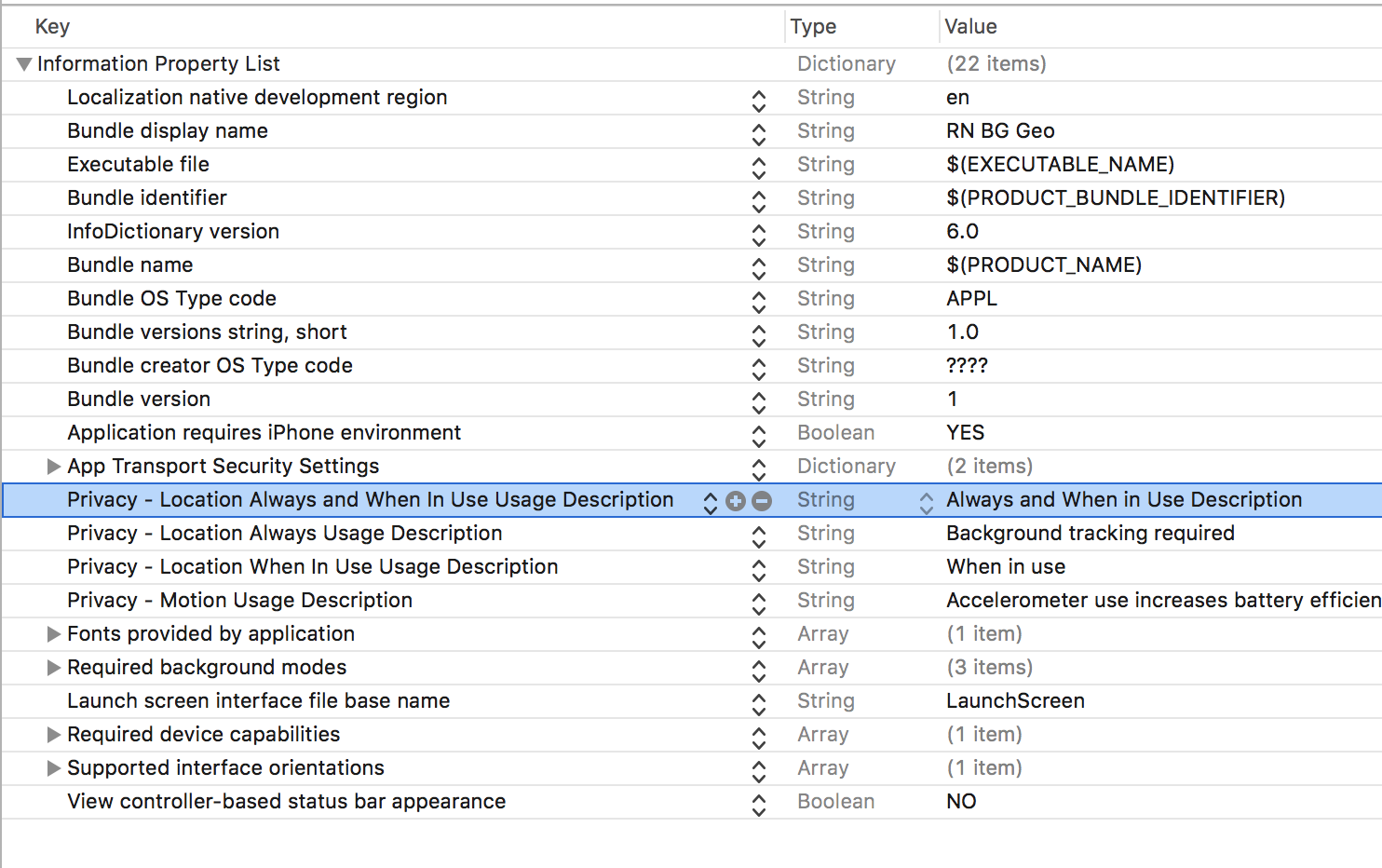
@pencilcheck So you have the key Privacy - Location Always and When In Use Usage Description in your .plist?
christocracy
on 26 Sep 2017
I got it to work, thanks to your screenshot, turns out I need more than Privacy - Location Always and When In Use Usage Description, and Privacy - Location Always Usage Description, Privacy - Motion Usage Description in my .plist

pencilcheck
on 26 Sep 2017
Yes, I discovered this myself today.
christocracy
on 26 Sep 2017
Related issues
JAStanton
·
3Comments
 alfredbaudisch
·
6Comments
alfredbaudisch
·
6Comments
 leighquince
·
3Comments
leighquince
·
3Comments
 ca057
·
7Comments
ca057
·
7Comments
 woodpav
·
5Comments
woodpav
·
5Comments