React-native-background-geolocation: App Store Submit Rejected due to UIBackgroundModes key in Info.plist file
Hi.
Thanks for publishing such a great library.
I've built an iOS app by using this library and now, I am trying to submit it to app store.
My app uses real time background geolocation tracking when the user continuously moves with the iOS device such as driving and working and etc.
Depend on your library, if user don't moves and stay in a same place, background geolocation is not working and it only works on motion state.
Please check this (This is apple app submit rejection issue)
_Performance - 2.5.4
Your app still declares support for location in the UIBackgroundModes key in your Info.plist file but does not have any features that require persistent location. Apps that declare support for location in the UIBackgroundModes key in your Info.plist file must have features that require persistent location._
Apple review team claims when I put UIBackgroundModes key in Info.plist, it requires persistent location and my app doesn't used persistent location.
But actually, my app uses realtime background tracking even the app is in background and even the device has been restarted and this thing only happens when user moves with the device and I think they are testing this without moving the device. Maybe not by a human and by auto testing with some robotic programs.
BackgroundGeolocation.configure({
            ...
            stopOnTerminate: false,
            startOnBoot: true,
            ...
});
I configured this service like this.
I've explained about this to apple review team many times and they continuously reject my submissions with this reason several times.
How can I pass this app review by apple?
Do you have experience submitting apps which are using this library to app store before?
Thanks
Bin
 binzailani3136
All 29 comments
In your App Store description, place the following text and resubmit.
"Continued use of GPS running in the background can dramatically decrease battery life."
What is the purpose of your app?
 christocracy
on 12 Dec 2016
christocracy
on 12 Dec 2016
Thanks for your prompt reply.
I've translated that sentence in Germany and wrote it in App description.
Because that app is going to be published on German App Store.
So, do I need to translate it in English?
binzailani3136
on 12 Dec 2016
I would assume that sentence should apply in the language of the app. I'm
not sure. Do it in both. If they accept it, remove the English phrase.
christocracy
on 12 Dec 2016
Thanks, I will try to add both English and German and let you know it works or not.
binzailani3136
on 12 Dec 2016
Any update?
christocracy
on 5 Jan 2017
Hi.
Sorry for delay.
I've succeeded uploading it to app store by having phone call with apple developers.
Below is the sad story how I passed apple review.
When I upload the app, apple reviews with a program in a robotic way.
I am not sure what kind of programs they use for review the app.
I think, they have made the program for beta review of submitted apps.
After pass this 'robotic' review, real human starts reviewing the app.
But my app was continuously rejected again and again by this 'robotic' reviewing stage.
I've explained them 'I really use background location fetching functionality in my app, but it only occurs when iOS device moves with the user's movements such as user is driving or working'.
But that 'robot' tests the app in a fixed position without any movements and how that background geolocation tracking is fired? and how 'robot' can understand my explanations?
I've rejected with this same issue more than 4 times.
I am really get angrier and finally, I called the apple review team and explained everything and they understood and passed the apple review.
That's all.
binzailani3136
on 5 Jan 2017
Thanks, that's really good to know.
christocracy
on 5 Jan 2017
Btw, since you're a customer, you should should not use the public repo anymore. Use the private repo cordova-background-geolocation-android (will be renamed soon) for both iOS and Android now.
This free repo no longer receives latest updates. It's only the latest stable release from now on.
christocracy
on 5 Jan 2017
Thanks.
binzailani3136
on 5 Jan 2017
hi @christocracy
We also got rejected last night due to this reason.
My question: we only use location for geofencing – do we still need UIBackgroundModes key?
 oferRounds
on 18 Oct 2018
oferRounds
on 18 Oct 2018
Apple doesn't care what you're using location for. They feel your app doesn't deserve this checkbox enabled (which add the UIBackgroundModes location to your plist.
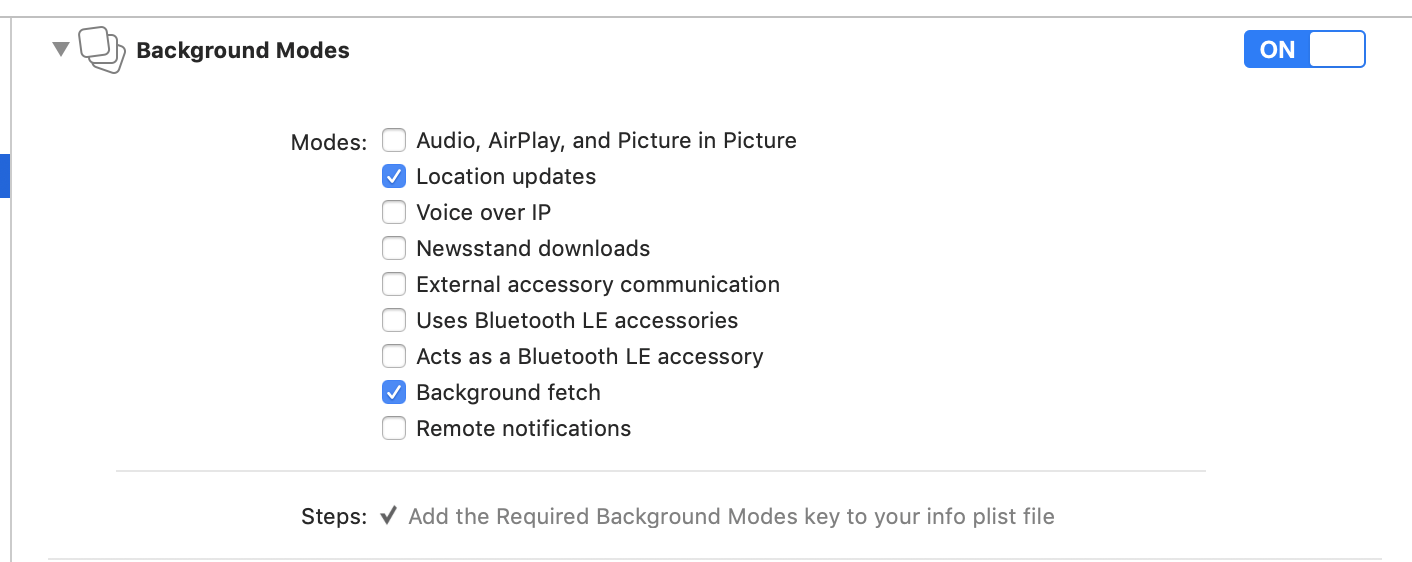
You can either appeal your decision with them or remove the UIBackgroundMode location (uncheck that box)
christocracy
on 18 Oct 2018
Thanks, but the plugin – on its geofencing mode – doesn’t need it? Will it work ok without it?
oferRounds
on 18 Oct 2018
No.
On Thu, Oct 18, 2018 at 7:58 AM Ofer Morag notifications@github.com wrote:
Thanks, but the plugin – on its geofencing mode – doesn’t need it? Will it
work ok without it?—
You are receiving this because you were mentioned.Reply to this email directly, view it on GitHub
https://github.com/transistorsoft/react-native-background-geolocation/issues/181#issuecomment-430980970,
or mute the thread
https://github.com/notifications/unsubscribe-auth/AAA6l4TDAAXlT-jwFEtZ2-NCgUgUBhaHks5umGzigaJpZM4LK789
.>
Snet form Gmail Mobile
christocracy
on 18 Oct 2018
no, as in – it doesn’t need it?
oferRounds
on 18 Oct 2018
Doesn’t need
On Thu, Oct 18, 2018 at 8:04 AM Ofer Morag notifications@github.com wrote:
no, as in – it doesn’t need it?
—
You are receiving this because you were mentioned.Reply to this email directly, view it on GitHub
https://github.com/transistorsoft/react-native-background-geolocation/issues/181#issuecomment-430982516,
or mute the thread
https://github.com/notifications/unsubscribe-auth/AAA6l-U5fnd-lmyD3F__SmTMBb2RE8aaks5umG4xgaJpZM4LK789
.>
Snet form Gmail Mobile
christocracy
on 18 Oct 2018
Thanks!
oferRounds
on 18 Oct 2018
@christocracy Hi Chris, i have similar issue with Appstore rejecting my app because i have enabled location in UIBackgroundModes. I am using it but with updates only with larger distance changes. They have suggested to use significant-changes, but this code works well for what i need, so i would prefer to use it as it is. Also preferably i want to use same code on the Android and i am not sure, but i think that significant-changes cant be used on Android?
This is the reason for rejecting app:
Your app declares support for location in the UIBackgroundModes key in your Info.plist file but does not have any features that require persistent location. Apps that declare support for location in the UIBackgroundModes key in your Info.plist file must have features that require persistent location.
Second message
Regarding 2.5.4, your app declares support for location in the UIBackgroundModes key in your Info.plist file but does not have any features that require persistent location.
To resolve this issue, it would be appropriate to revise your app to include features that require the persistent use of real-time location updates while the app is in the background
If they are so keen on me removing it, i dont have much issue with it, eventho i am using it. Can i just remove it in the info.plist if i am using this code or i need to have it enabled in the info.plist to make this code work?
```
AppState.addEventListener('change', this.handleAppStateChange);
BackgroundGeolocation.onLocation(this.onLocation.bind(this), this.onError);
    BackgroundGeolocation.ready({
        reset: true,
        disableElasticity: true,
        desiredAccuracy: BackgroundGeolocation.DESIRED_ACCURACY_HIGH,
        distanceFilter: 900, //900
        stopTimeout: 1,
        debug: false,
        //logLevel: BackgroundGeolocation.LOG_LEVEL_VERBOSE,
        stopOnTerminate: false,
        startOnBoot: true,
        disableMotionActivityUpdates: true,
        autoSync: false,
        maxRecordsToPersist: 0,
        stationaryRadius: 100,
        preventSuspend: true
    }, (state) => {
        if (!state.enabled) {
            BackgroundGeolocation.start(function () {
                console.log("BG Geolocation Starts");
            });
        }
    });
onLocation(location) {
if (location && this.state.userObj.userKey.length > 0) {
if (location.sample == true) {
return;
}
        if (location.coords.speed < 2) {
            globalLat = location.coords.latitude;
            globalLong = location.coords.longitude;

            var distInM = //Calculate Distance

            if (distInM > 500) {
                //update location in the db
            }
        }
    }
}
requestLocationPermission = () => {
var permissionType = Platform.OS === 'android'
? Permissions.PERMISSIONS.ANDROID.ACCESS_FINE_LOCATION
: Permissions.PERMISSIONS.IOS.LOCATION_ALWAYS;
    Permissions.check(permissionType).then(response => {
        if (response != Permissions.RESULTS.GRANTED) {
            Permissions.request(permissionType).then(response => {
                if (response == Permissions.RESULTS.GRANTED) {
                    //Set Location Data
                }
                else {
                    //No Data
                }
            });
        }
    });
```
Edit: I was thinking i might just change the distanceFilter and stationaryRadius to much lower values for now, so i can get through review and then increase it in the update. Its realy not a big problem to get those updates more often actualy. Would you know what kind of values would make it look to Apple that it is actualy using real-time background location data for the distanceFilter and stationaryRadius? ( assuming that would help )
 LukePenkava
on 27 Nov 2019
LukePenkava
on 27 Nov 2019
Hi Chris,
Thanks for this great plugin. I must say I'm impressed with how well it works.
I am also having same issue with above.
Guideline 2.5.4 - Performance - Software Requirements
Your app declares support for audio in the UIBackgroundModes key in your Info.plist but did not include features that require persistent audio.
Guideline 2.5.4 - Performance - Software Requirements
Your app declares support for location in the UIBackgroundModes key in your Info.plist file but does not have any features that require persistent location. Apps that declare support for location in the UIBackgroundModes key in your Info.plist file must have features that require persistent location.
For now, I already replied them on the use case. Hopefully it'll go forward.
Our app has a geolocation tracking feature whenever a user moves or is working. It does not fire the geolocation or background "location" feature whenever the user stays in a fixed position. This tracking happens only on office hour schedule where the distribution agents that works directly for us also agree to the terms.
Regarding the background "audio", it is used only for debugging the geolocation when it is firing but important to the app nonetheless for our developers. We set it up using a react native plugin.
 firdaussoberi
on 2 Mar 2020
firdaussoberi
on 2 Mar 2020
Why did you enable Audio background mode? The setup docs state this is
only for development testing, so can hear the plugin emit debug soundFX
when using debug: true.
You DO NOT submit your app to Apple with that enabled!
On Mon, Mar 2, 2020 at 4:21 AM Firdaus Soberi notifications@github.com
wrote:
Hi Chris,
Thanks for this great plugin. I must say I'm impressed with how well it
works.
I am also having same issue with above.Guideline 2.5.4 - Performance - Software Requirements
Your app declares support for audio in the UIBackgroundModes key in your
Info.plist but did not include features that require persistent audio.Guideline 2.5.4 - Performance - Software Requirements
Your app declares support for location in the UIBackgroundModes key in
your Info.plist file but does not have any features that require persistent
location. Apps that declare support for location in the UIBackgroundModes
key in your Info.plist file must have features that require persistent
location.For now, I already replied them on the use case. Hopefully it'll go
forward.Our app has a geolocation tracking feature whenever a user moves or is
working. It does not fire the geolocation or background "location" feature
whenever the user stays in a fixed position. This tracking happens only on
office hour schedule where the distribution agents that works directly for
us also agree to the terms.Regarding the background "audio", it is used only for debugging the
geolocation when it is firing but important to the app nonetheless for our
developers. We set it up using a react native plugin.—
You are receiving this because you were mentioned.
Reply to this email directly, view it on GitHub
https://github.com/transistorsoft/react-native-background-geolocation/issues/181?email_source=notifications&email_token=AAADVF6SXPMY2U5USYYRRZDRFNT7FA5CNFSM4CZLX462YY3PNVWWK3TUL52HS4DFVREXG43VMVBW63LNMVXHJKTDN5WW2ZLOORPWSZGOENOLEEI#issuecomment-593277457,
or unsubscribe
https://github.com/notifications/unsubscribe-auth/AAADVFZNOC3A7JCX3EIABWLRFNT7FANCNFSM4CZLX46Q
.>
Snet form Gmail Mobile
christocracy
on 2 Mar 2020
Thanks Chris,
My bad. We've decided to rebuild and remove the audio key. However, on the location key Apple don't want let us to proceed and forcing us to use Apple Business Manager instead which is what we don't want.
Your app declares support for location in the UIBackgroundModes key in your Info.plist file but does not have any features that require persistent location. Specifically, your app uses location background mode for the sole purpose of tracking employees, which is not appropriate on the App Store.
Please revise your app to include additional features for your users that require the persistent use of real-time location updates while the app is in the background.
If tracking your employees’ locations is your only intended use of background location, it would be more appropriate to distribute and sell your app as a custom app, directly to your company, through Apple Business Manager.
So if I want to use background geolocation feature that post to url, can I remove the location updates key (leaving only background fetch key)? Or the plugin need it? Thanks
firdaussoberi
on 2 Mar 2020
If you remove the location mode, you must set useSignificantChangesOnly: true. You will receive a location only every 500-1000 meters.
Otherwise, do as Apple says.
christocracy
on 2 Mar 2020
Oh thanks Chris,
I think that'll do. Because our user base is mainly android, only a few uses iOS devices but we still need it nonetheless.
Another thing, just to clarify,
I do useSignificantChangesOnly: true and remove location updates key, and everything (post to url, background tracking, startonboot) should work out of the box just as fine right?
I don't get why they're so picky this time (just a mistake and it open can of worms). Previously I updated just fine, in fact few days ago I passed review with the plugin right in it. 😅
firdaussoberi
on 2 Mar 2020
@firdaussoberi just to commiserate, they allowed something like 20 versions of my app before they requested I switch to useSignificantChanges (which works well, by the way), then allowed another 20 or so versions and rejected for something else that had been there all along. Dealing with Apple is frustrating in the extreme. Good luck with your app :-)
 mikehardy
on 2 Mar 2020
mikehardy
on 2 Mar 2020
If you remove the _location_ mode, you must set useSignificantChangesOnly: true. You will receive a location only every 500-1000 meters.
Otherwise, do as Apple says.
I see in philosophy of operation that 'location' capability is only used for preventsuspend mode right. Or does other things also use that.
So if I remove location key, app will be suspended when stationary and resumes again when it moves past the geofence radius. Foreground, background and when app terminated should have no effect with location key disabled (with preventsuspend false, stoponterminate true and assuming it moves) right?
firdaussoberi
on 2 Mar 2020
preventSuspend is a specialized mode required by 1% of use-cases. Prevent suspend is not required or referenced by the Philosophy of Operation.. preventSuspend should be avoided in almost every use-case.
christocracy
on 2 Mar 2020
And, of course, preventSuspend is impossible without background location capability,
christocracy
on 2 Mar 2020
Hi Chris,
We're currently doing final review before submitting the new build.
We uncheck everything else except "background fetch" but we also saw something else being checked, "background processing".
Just to confirm, the library don't need "background processing" right (Can't remember if I added it due to other plugin)?
Am using Xcode version 11.3.1 (11C504).
edit: this is for startBackgroundTask right? So I safely assume I can remove this
firdaussoberi
on 3 Mar 2020
See Setup docs for react-native-background-fetch regarding Background Processing.
christocracy
on 3 Mar 2020
If you remove the _location_ mode, you must set useSignificantChangesOnly: true. You will receive a location only every 500-1000 meters.
Otherwise, do as Apple says.
Apparently Apple doesn't like the location key (without arguing its use case) . I removed it leaving only background fetch and finally it got approved.
Thanks for all the help!
firdaussoberi
on 4 Mar 2020
Related issues
 compojoom
·
3Comments
compojoom
·
3Comments
 ca057
·
7Comments
ca057
·
7Comments
 ramkey-akil
·
3Comments
ramkey-akil
·
3Comments
 woodpav
·
5Comments
woodpav
·
5Comments
 vishgoel007
·
3Comments
vishgoel007
·
3Comments
Most helpful comment
Hi.
Sorry for delay.
I've succeeded uploading it to app store by having phone call with apple developers.
Below is the sad story how I passed apple review.
When I upload the app, apple reviews with a program in a robotic way.
I am not sure what kind of programs they use for review the app.
I think, they have made the program for beta review of submitted apps.
After pass this 'robotic' review, real human starts reviewing the app.
But my app was continuously rejected again and again by this 'robotic' reviewing stage.
I've explained them 'I really use background location fetching functionality in my app, but it only occurs when iOS device moves with the user's movements such as user is driving or working'.
But that 'robot' tests the app in a fixed position without any movements and how that background geolocation tracking is fired? and how 'robot' can understand my explanations?
I've rejected with this same issue more than 4 times.
I am really get angrier and finally, I called the apple review team and explained everything and they understood and passed the apple review.
That's all.