React-native-apple-authentication: Auth failed with com.apple.AuthenticationServices.AuthorizationError error 1000
I'm testing this on a simulator with iOS 13.2.2 (Sign-in with Apple available)
I get the Apple Sign-in button and the auth popup shows up perfectly.
Upon entering password, I get the following error
Error: The operation couldn’t be completed. (com.apple.AuthenticationServices.AuthorizationError error 1000.)
fn@http://localhost:8081/index.bundle?platform=ios&dev=true&minify=false:10740:45
getCredentialStateForUser@http://localhost:8081/index.bundle?platform=ios&dev=true&minify=false:136852:53
_callee2$@http://localhost:8081/index.bundle?platform=ios&dev=true&minify=false:115753:116
tryCatch@http://localhost:8081/index.bundle?platform=ios&dev=true&minify=false:2040:23
invoke@http://localhost:8081/index.bundle?platform=ios&dev=true&minify=false:2215:32
tryCatch@http://localhost:8081/index.bundle?platform=ios&dev=true&minify=false:2040:23
invoke@http://localhost:8081/index.bundle?platform=ios&dev=true&minify=false:2116:30
http://localhost:8081/index.bundle?platform=ios&dev=true&minify=false:2126:21
tryCallOne@http://localhost:8081/index.bundle?platform=ios&dev=true&minify=false:11791:16
http://localhost:8081/index.bundle?platform=ios&dev=true&minify=false:11892:27
_callTimer@http://localhost:8081/index.bundle?platform=ios&dev=true&minify=false:38368:17
_callImmediatesPass@http://localhost:8081/index.bundle?platform=ios&dev=true&minify=false:38404:19
callImmediates@http://localhost:8081/index.bundle?platform=ios&dev=true&minify=false:38623:33
callImmediates@[native code]
__callImmediates@http://localhost:8081/index.bundle?platform=ios&dev=true&minify=false:11229:35
http://localhost:8081/index.bundle?platform=ios&dev=true&minify=false:11006:34
__guard@http://localhost:8081/index.bundle?platform=ios&dev=true&minify=false:11212:15
flushedQueue@http://localhost:8081/index.bundle?platform=ios&dev=true&minify=false:11005:21
flushedQueue@[native code]
invokeCallbackAndReturnFlushedQueue@[native code]
Does it even work on simulators? What am I missing here?
Thank you.
 naveendevs
All 80 comments
Works fine on simulators, I tested it a bunch just last night.
1000 is UNKNOWN error: https://github.com/invertase/react-native-apple-authentication/blob/master/docs/enums/_lib_index_d_.rnappleauth.appleautherror.md
Not sure why, but maybe if you build in Xcode and watch the log it will include information?
Including the code in use vs the babel-ized stack would likely help reproduce
 mikehardy
on 10 Dec 2019
mikehardy
on 10 Dec 2019
Thank you for the suggestion.
I got this on xcode debug console.
2019-12-11 00:32:40.430577+0530 Lobstr[15774:1573876] RNAppleAuth -> didCompleteWithAuthorization
2019-12-11 00:32:40.432 [info][tid:com.facebook.react.JavaScript] 000990.949c2950b5f74401b58ec16314387a28.1324


2019-12-11 00:34:07.312435+0530 Lobstr[15774:1573876] RNAppleAuth -> didCompleteWithAuthorization
2019-12-11 00:34:07.346546+0530 Lobstr[15774:1575753] [core] Credential State request returned with error: Error Domain=AKAuthenticationError Code=-7001 "(null)"
2019-12-11 00:34:07.382 [info][tid:com.facebook.react.JavaScript] [Error: The operation couldn’t be completed. (com.apple.AuthenticationServices.AuthorizationError error 1000.)]
And I'm using this code from example
  onAppleButtonPress = async () => {
    console.log('LOGGING')
    const requestOptions = {
      requestedOperation: AppleAuthRequestOperation.LOGIN,
      requestedScopes: [AppleAuthRequestScope.EMAIL, AppleAuthRequestScope.FULL_NAME],
    };
    const { user } = await appleAuth.performRequest(requestOptions);
    console.log(user)

    const appleAuthRequestResponse = await appleAuth.performRequest({
      requestedOperation: AppleAuthRequestOperation.LOGIN,
      requestedScopes: [AppleAuthRequestScope.EMAIL, AppleAuthRequestScope.FULL_NAME],
    });

    try {
      const credentialState = await appleAuth.getCredentialStateForUser(user);
      if (credentialState === AppleAuthCredentialState.AUTHORIZED) {
      }
    } catch (error) {
      console.log(error)
      if (error.code === AppleAuthError.CANCELED) {
      }
      if (error.code === AppleAuthError.FAILED) {
      }
      if (error.code === AppleAuthError.INVALID_RESPONSE) {
      }
      if (error.code === AppleAuthError.NOT_HANDLED) {
      }
      if (error.code === AppleAuthError.UNKNOWN) {
      }
    }
  }
Found this on Apple Developer forums, but looks like of no use.
https://forums.developer.apple.com/thread/122983
naveendevs
on 10 Dec 2019
Can you re-try this without the requested operation? I am using it successfully, but without the requested operation, and I think the example is the same, and I recall someone else having a related problem? https://github.com/invertase/react-native-firebase/pull/2979#issuecomment-562954939
Although it didn't seem to help there, so I assign low-probability of fix with that.
For me I am integrating with react-native-firebase and I do not do getCredentialState, I just feed it directly to firebase and they work with the credential. Is it necessary to call that :thinking:
The example does it https://github.com/invertase/react-native-apple-authentication/blob/master/example/app.js#L38 - can you reproduce with the example?
mikehardy
on 10 Dec 2019
Tried without requestedOperation, didn't work.
What do you feed to firebase? I believe, a token is required from Apple Sign-in call to authenticate.
naveendevs
on 10 Dec 2019
No idea if this will be applicable, but here's the ridiculously-too-big method I use, works for me?
  async appleSignIn(link?: boolean): Promise<boolean> {
    try {
      const appleCredential = await AppleAuth.performRequest({
        requestedOperation: AppleAuthRequestOperation.LOGIN,
        requestedScopes: [AppleAuthRequestScope.EMAIL, AppleAuthRequestScope.FULL_NAME],
      });

      console.log(
        'UserStore::appleSignIn - user result is:',
        JSON.stringify(appleCredential, null, 2)
      );

      // FIXME we should really store the uid we get back, looks like:
      //   "uid": "000420.fa782337956f441eb0e23e43d8c337b5.0503" and is all we get in future

      this.removeUserChangeListener();

      if (appleCredential.email) {
        const providers = await this.getProvidersForEmail(appleCredential.email);
        console.log(
          'UserStore::appleSignIn - got providers for email: ',
          JSON.stringify(providers, null, 2)
        );
        // if google.com is not in the providers, it is first login via google.
        let appleProvider = false;
        let passwordProvider = false;
        for (let i = 0; i < providers.length; i++) {
          if (providers[i] === 'apple.com') {
            appleProvider = true;
          } else if (providers[i] === 'password') {
            passwordProvider = true;
          }
        }

        // If there are providers, but not apple, google actually just automatically does it right.
        if (providers.length !== 0 && !appleProvider) {
          if (passwordProvider) {
            console.log(
              'UserStore::appleSignIn -  other providers but google auto-connects if it is password provider'
            );
          } else {
            this.handleCredentialInUse();
            return Promise.resolve(false);
          }
        }

        // If this is the first time we are seeing apple, handle apple privacy
        // Apple has specific requirements before linking non-anonymous
        // FIXME this may be a problem though as email might not come through again?
        // do we need to rely on uid here?
        if (!appleProvider) {
          console.log('UserStore::appleSignIn - verifying user is okay with apple + non-anonymous');
          const choice = await AlertAsync(
            I18NService.translate('LoginApplePrivacyTitle'),
            I18NService.translate('LoginApplePrivacyText'),
            [
              {
                text: I18NService.translate('Cancel'),
                onPress: () => 'Cancel',
              },
              {
                text: 'OK',
                onPress: () => 'OK',
              },
            ],
            {
              cancelable: false,
              onDismiss: () => 'Cancel',
            }
          );
          if (choice === 'Cancel') {
            console.log(
              'UserStore::appleSignIn - user does not want to link apple id + non-anonymous'
            );
            return Promise.resolve(false);
          }
          console.log(
            'UserStore::appleSignIn - user is just fine linking apple id + non-anonymous'
          );
        }
        // If there are no other providers we should ask if they already have an account
        if (
          providers.length === 0 &&
          (!firebase.auth().currentUser?.providerData ||
            firebase.auth().currentUser?.providerData.length === 0)
        ) {
          console.log('UserStore::appleSignIn - no other providers. See if they are sure');
          const choice = await AlertAsync(
            I18NService.translate('LoginFirstLoginTitle'),
            I18NService.translate('LoginFirstLoginText'),
            [
              {
                text: I18NService.translate('LoginFirstLoginOtherAccountsButton'),
                onPress: () => 'Other Accounts',
              },
              {
                text: I18NService.translate('LoginFirstLoginPleaseContinueButton'),
                onPress: () => 'Please Continue',
              },
            ],
            {
              cancelable: false,
              onDismiss: () => 'Please Continue',
            }
          );
          if (choice === 'Other Accounts') {
            console.log('UserStore::appleSignIn - user wants to handle other accounts');
            return Promise.resolve(false);
          }
          console.log(
            'UserStore::appleSignIn - user is just fine continuing and creating new account'
          );

          this.setIsNewUser(true);
        }
      } else {
        console.log('UserStore::appleSignIn - no email present, not first apple sign in?');
      }

      // create a new firebase credential with the token
      const credential = firebase.auth.AppleAuthProvider.credential(
        appleCredential.identityToken,
        appleCredential.nonce
      );
      console.log('UserStore::appleSignIn - credential is', JSON.stringify(credential, null, 2));
      let firebaseUserCredential;
      if (!link) {
        // login with credential
        firebaseUserCredential = await firebase.auth().signInWithCredential(credential);
        Analytics.setAnalyticsUser(firebaseUserCredential.user.uid); // TODO, set our own ID?
        Analytics.setAnalyticsUserProperties({ email: firebaseUserCredential.user.email });
        Analytics.analyticsEvent('successAppleSignIn');
      } else {
        if (!firebase.auth().currentUser) {
          return Promise.resolve(false);
        }
        firebaseUserCredential = await firebase.auth().currentUser?.linkWithCredential(credential);
        Analytics.setAnalyticsUser(firebase.auth().currentUser!.uid); // TODO, set our own ID?
        Analytics.setAnalyticsUserProperties({ email: firebase.auth().currentUser!.email });
        Analytics.analyticsEvent('successAppleLink');
      }

      console.log(
        'UserStore::appleSignIn - firebaseCredential was',
        JSON.stringify(firebaseUserCredential)
      );
      this.userChangedHandler(
        firebaseUserCredential!.user,
        firebaseUserCredential!.additionalUserInfo
      );
      return Promise.resolve(true);
    } catch (error) {
      if (error.code === 'ERR_CANCELLED') {
        // user cancelled the login flow
        console.log('UserStore::appleSignIn - user cancelled');
      } else if (error.code === AppleAuthError.CANCELED) {
        // user cancelled the login flow
        console.log('UserStore::appleSignIn - authentication request failed');
      } else if (
        error.code === 'auth/email-already-in-use' ||
        error.code === 'auth/credential-already-in-use'
      ) {
        console.log('UserStore::appleSignIn - email already in use, instruct on unlink/delete');
        this.handleAccountInUse();
      } else if (error.code === 'auth/account-exists-with-different-credential') {
        this.handleCredentialInUse();
      } else {
        // some other error happened
        console.log(
          'UserStore::appleSignIn - unknown error?' + error,
          JSON.stringify(error, null, 2)
        );
        RX.Alert.show(
          I18NService.translate('ConnectedAccountsConnectionError'),
          I18NService.translate(error.code)
        );
      }
    } finally {
      this.addUserChangedListener();
    }

    return Promise.resolve(false);
  }
on my simulator i got this AuthorizationError error 1000 but on device it's worked fine
 eduzera
on 11 Dec 2019
eduzera
on 11 Dec 2019
I had the same error, turns out I did not follow the firebase documentation and did not configure Sign In with Apple. After following the instructions it's working for me on both simulator and device.
https://firebase.google.com/docs/auth/ios/apple?authuser=0#configure_sign_in_with_apple
 colloquet
on 12 Dec 2019
colloquet
on 12 Dec 2019
@colloquet I can't believe you missed one of the 2,431 things to configure in apple + firebase developer console for it to work :sweat_smile: (joking of course)
mikehardy
on 12 Dec 2019
I got this on the Simulator just now when I attempted apple sign-in for the first time and did not have my apple id set up. It set up the ID correctly but when I went back to the app it did not actually attempt sign-in, it just threw the 1000 error, then I tapped the sign-in button again and it worked. So maybe worth re-trying once when you see this error? unless it maps to other cases - test first of course
mikehardy
on 14 Dec 2019
I get the same error:
Error: The operation couldn’t be completed. (com.apple.AuthenticationServices.AuthorizationError error 1000.)
I'm testing the app in a simulator. None of the proposed fixes worked out.
 dclipca
on 16 Dec 2019
dclipca
on 16 Dec 2019
Same error here, I'm reproduce the example without Firebase here but It didn't work.
 havinhthai
on 17 Dec 2019
havinhthai
on 17 Dec 2019
If the error appears after you perform the login then try to use a real device. It might be the case that it doesn't work on a simulator.
dclipca
on 17 Dec 2019
If the error appears after you perform the login then try to use a real device. It might be the case that it doesn't work on a simulator.
You're right. It works on a real device
 phuoc-insignia
on 18 Dec 2019
phuoc-insignia
on 18 Dec 2019
If the error appears after you perform the login then try to use a real device. It might be the case that it doesn't work on a simulator.
You're right. It works on a real device
Thank you for confirming this. It seems I will have to get a real device from somewhere.
dclipca
on 18 Dec 2019
Just commenting to say it actually works for me in a simulator? But only the second time - the first time the simulator takes me through the whole "set up your iCloud account on this device" flow, then goes back to the app and I get error 1000. Then (with a valid iCloud account setup), apple sign in works just fine 🤷♂
mikehardy
on 18 Dec 2019
Got the same error
 pacozaa
on 19 Dec 2019
pacozaa
on 19 Dec 2019
Just commenting to say it actually works for me in a simulator? But only the second time - the first time the simulator takes me through the whole "set up your iCloud account on this device" flow, then goes back to the app and I get error 1000. Then (with a valid iCloud account setup), apple sign in works just fine 🤷♂
I get the error 1000 no matter how many times I try (after the "set up your iCloud account on this device"). Also, I checked the auth on a real device and it works.
dclipca
on 19 Dec 2019
I fix it by configuration in xcode.
TARGETS>Signing & Capabilities>+Capability then search sign in then add it. Problem solved!
@colloquet suggestion is on point for me. Thank you :)
pacozaa
on 20 Dec 2019
Yes, In the case of @pacozaa and mine, I was missing adding the SingIn capabilities. Since you have to update XCode to be able to integrate with Apple SignIn. Is not obvious you need to click the + icon on the top to add such capability, In previous versions the capabilities are at glance you just need to check/uncheck.
This time you need to hit + at the top and then a dialog pops up and double click to add any capability, in this case SignIn with Apple.
 alexxsanchezm
on 20 Dec 2019
alexxsanchezm
on 20 Dec 2019
@alexxsanchezm Can you test your app on simulator?
havinhthai
on 20 Dec 2019
My problem is I only add Sign In Capability to release version, so I can't test on development version.
I fixed it by add Sign In Capability to both of versions.
havinhthai
on 20 Dec 2019
My problem is I only add
Sign In Capabilityto release version, so I can't test on development version.I fixed it by add
Sign In Capabilityto both of versions.
Yes, it works on the simulator as well.
What do you mean by
both versions
alexxsanchezm
on 20 Dec 2019
I added Sign In Capability to debug and release version.
havinhthai
on 20 Dec 2019
I have the same error (I get the error 1000 no matter how many times I try (after the "set up your iCloud account on this device"). Also, I checked the auth on a real device and it works.) but I have the Sign In Capability both in Debug and Release versions. I am not using Firebase.
dclipca
on 20 Dec 2019
This is what I have done to fix the problem, it might be helpful in your case as well:
If you have a developer account, under Certificates, Identifiers & Profiles -> Identifiers -> YOUR_APP_BUNDLE_ID

After doing this you might have to update your Provisioning Profile for both development and distribution as well.
In Xcode, make sure Sign in with Apple is enabled:

Hope this helps.
colloquet
on 21 Dec 2019


I am testing on real device since beginning
I am using firebase and I am having same message. no hope.
"react": "16.9.0",
"react-native": "0.61.5",
"@invertase/react-native-apple-authentication": "^0.1.1",
"react-native-firebase": "^5.6.0",
Xcode Version 11.2.1 (11B500)
Device : iphone SE , OS 13.3
OSX : Catalina 10.15.2
appleAuth.isSupported returns true though.
Firebase

I cleaned build folder, deleted drived data folder, reinstalled app into the device. no luck
 amitbravo
on 9 Jan 2020
amitbravo
on 9 Jan 2020
@amitbravo I noticed your screenshot only show you have added Sign In with Apple capability for your release build, can you check if it is also enabled under “All” or “Debug”?
colloquet
on 12 Jan 2020
@colloquet thank you. it was unchecked at debug, its added and now working fine.
amitbravo
on 13 Jan 2020
@amitbravo I noticed your screenshot only show you have added Sign In with Apple capability for your release build, can you check if it is also enabled under “All” or “Debug”?
Thank you, I had the same issue.
 RodolfoGS
on 17 Jan 2020
RodolfoGS
on 17 Jan 2020
Anybody has an issue on IOS Simulator like this. I have pop up open asking me to choose should I share my email or hide and then button Continue with a password. On next screen I enter password from my apple ID and nothing happens. Is something wrong on my side or it is simulator issue?
 Jalson1982
on 4 Feb 2020
Jalson1982
on 4 Feb 2020
First time you set up your apple account on the simulator in response to using the API to request auth, apple does the whole setup and everything then returns an error (1000 I think). Second+ times it works. :man_shrugging: - not a library thing, it's an underlying API thing. Luckily iPeople always have their iAccounts on their iDevices so in practice not an iIssue
mikehardy
on 4 Feb 2020
Someone is still having this issue in emulator ? I applied the lib without the firebase
this first process works fine
const appleAuthRequestResponse = await appleAuth.performRequest({
                requestedOperation: AppleAuthRequestOperation.LOGIN,
                requestedScopes: [AppleAuthRequestScope.EMAIL, AppleAuthRequestScope.FULL_NAME],
            });
but the second one, to retrieve the credentialState is giving to me this 1000 error
const credentialState = await appleAuth.getCredentialStateForUser(appleAuthRequestResponse.user)
And yes, I already applied the Sign In With Apple inside the xcode project on ALL part inside Signing and Capabilities, where cover the debug and release options
 mendesfelipe87
on 5 Feb 2020
mendesfelipe87
on 5 Feb 2020
I'm also getting this error in the simulator. At first, I had just implemented the start of the process, with the appleAuth.performRequest followed by the appleAuth.getCredentialStateForUser. The get credential state call would error out. However, I then went and implemented using the appleAuth.onCredentialRevoked callback, and now I'm seeing that as soon as the performRequest promise returns (or maybe just before), I'm getting a call to the onCredentialRevoked callback.
At this point, I'm not totally convinced it's an error, necessarily. After looking through Apple's documentation and examples, it looks like performRequest is all you need to do to get authenticated. Their examples say that once you get the response from that, you can use it to create an account / log the user in to the app.
The getCredentialStateForUser call seems to be something you call on startup to see if the user is still logged in, and maybe the simulator has some issue persisting that. I didn't see any examples mentioning doing anything to persist the user, but maybe there's some other step that needs to be taken?
 ahwatts
on 7 Feb 2020
ahwatts
on 7 Feb 2020
For the record, when I run it under the XCode debugger in the simulator, I get the following in the log:
2020-02-06 18:36:53.430270-0500 AppName[81785:1041270] RNAppleAuth -> didCompleteWithAuthorization
2020-02-06 18:36:53.446710-0500 AppName[81785:1041602] [core] Credential State request returned with error: Error Domain=AKAuthenticationError Code=-7001 "(null)"
2020-02-06 18:36:53.463745-0500 AppName[81785:1041570] [core] Credential State request returned with error: Error Domain=AKAuthenticationError Code=-7001 "(null)"
You will definitely want to persist somehow somewhere, at least some of the callback information. Note that the motivation for this library was to get sign-in working with react-native-firebase well, as it supported other social auth forms and Apple will soon require you to support sign in with apple if you support others.
From the firebase docs section 3 of this page anchor https://firebase.google.com/docs/auth/ios/apple#sign_in_with_apple_and_authenticate_with_firebase
Apple only shares user information such as the display name with apps the first time a user signs in. Usually, Firebase stores the display name the first time a user signs in with Apple, which you can get with Auth.auth().currentUser.displayName. However, if you previously used Apple to sign a user in to the app without using Firebase, Apple will not provide Firebase with the user's display name.
mikehardy
on 7 Feb 2020
Has anyone found a solution?
Kindly help!
 ahmadzahidglixen
on 19 Feb 2020
ahmadzahidglixen
on 19 Feb 2020
I've been stuck on this for 2 days.
I've tried every solution but it isn't working.
The very first time I run the code & click on Sign in button
It gives the error:
com.apple.AuthenticationServices.AuthorizationError error 1000
After that when I Sign in
It returns NULL values ( Email, name ) .
Anybody who had gone through the same issues & resolved them? Any help?
ahmadzahidglixen
on 19 Feb 2020
I discovered this problem when I do an apple sign-in for the first time. It works on devices but on devices that have not used apple sign-in for the first time it results in a crash.
 klaaz0r
on 19 Feb 2020
klaaz0r
on 19 Feb 2020
This is «Unknown» but «known» issue.
https://forums.developer.apple.com/thread/122983#383383
You just dont have any saved passwords in you keychain.
And when you combine your requests with ASAuthorizationAppleIDProvider() && ASAuthorizationPasswordProvider(), the last one ASAuthorizationPasswordProvider() fails....
 Air7Y
on 28 Feb 2020
Air7Y
on 28 Feb 2020
I'm not sure I follow. As best as I can tell, this lib doesn't use the ASAuthorizationPasswordProvider() request. Also, the error (at least the one I'm seeing) is not with the performRequests() call, but with the getCredentialStateForUserID() call, which also goes through the ASAuthorizationAppleIDProvider.
Also, I'm only seeing the error on the simulator. A real device works correctly. It seems like the simulator has a broken Apple ID implementation.
ahwatts
on 28 Feb 2020
I've been stuck on this for 2 days.
I've tried every solution but it isn't working.
The very first time I run the code & click on Sign in button
It gives the error:
com.apple.AuthenticationServices.AuthorizationError error 1000After that when I Sign in
It returns NULL values ( Email, name ) .Anybody who had gone through the same issues & resolved them? Any help?
Have you solved it?
 marvinguo
on 6 Mar 2020
marvinguo
on 6 Mar 2020
after following all setup needed for apple sign-in on developer certification, Xcode as well in Firebase console I got the error 1000. Then looking on the official example code that @mikehardy show on this link, I manage to successfully test on simulator. I think the official example in this documentation for the Apple sign-in with Firebase is giving some user's an error experience. I suggest to follow the other example for successfully integrating Apple Sig-in with Firebase.
 eggybot
on 8 Mar 2020
eggybot
on 8 Mar 2020
Someone is still having this issue in emulator ? I applied the lib without the firebase
this first process works fine
const appleAuthRequestResponse = await appleAuth.performRequest({ requestedOperation: AppleAuthRequestOperation.LOGIN, requestedScopes: [AppleAuthRequestScope.EMAIL, AppleAuthRequestScope.FULL_NAME], });but the second one, to retrieve the credentialState is giving to me this 1000 error
const credentialState = await appleAuth.getCredentialStateForUser(appleAuthRequestResponse.user)And yes, I already applied the Sign In With Apple inside the xcode project on ALL part inside Signing and Capabilities, where cover the debug and release options
I'm having the same issue. Did you manage to get it solved?
 panda0603
on 18 Mar 2020
panda0603
on 18 Mar 2020
Not working on simulator, It works well on device.
 Liqiankun
on 23 Mar 2020
Liqiankun
on 23 Mar 2020
@Liqiankun it should work fine on the simulator as well, after the first attempt where you have to set up the icloud account from scratch on the simulator.
mikehardy
on 23 Mar 2020
@mikehardy I did, but it still didn't work. Let me try it again. Thanks.
Liqiankun
on 24 Mar 2020
I have the same issue after I tried all stated above. It works fine on the real device, but it doesn't on the simulator. I catch the same error com.apple.AuthenticationServices.AuthorizationError error 1000 in trying getCredentialStateForUser.
As per official example, it uses getCredentialStateForUser as a separate function as below
https://github.com/invertase/react-native-apple-authentication/blob/46c97ac3b7e3a94180a68ebc6f46ce1dd804b506/example/app.js#L38
And it seems to be used not to be caught inside a try-catch block. I'm not sure it is intended or not.
But besides this part, I can get user information successfully except the credentialStateForUser.
One thing I noticed the difference between the real device and simulator is below step. On a real device, once I pass this pop-up, then It just requested fingerprint without asking including email or not. But on the simulator, it keeps asking me with this pop-up. I guess that the credential state is not persisted on the simulator. That's why I caught 1000 error only on the simulator.
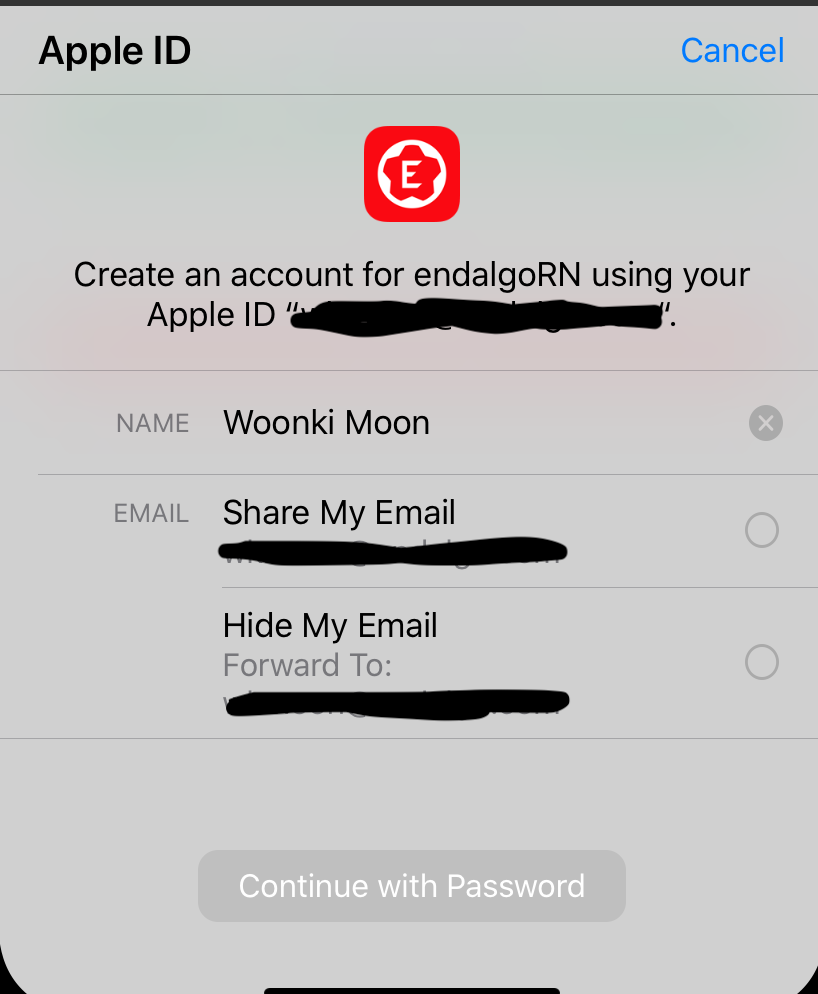
@mikehardy How about your simulator? Once you pass the initial set-up state, do you have this screen after it?
 mattdamon108
on 30 Mar 2020
mattdamon108
on 30 Mar 2020
I'm experiencing the same issue. I've added the Sign in with Apple capability and did the initial iCloud setup, still no luck. getCredentialStateForUser throws Error: The operation couldn’t be completed. (com.apple.AuthenticationServices.AuthorizationError error 1000.) error on the simulator.
I can confirm this to work on a real device tho (with the same iCloud account).
 mihaerzen
on 8 Apr 2020
mihaerzen
on 8 Apr 2020
Same issues here as above.
 Jonjoe
on 8 Apr 2020
Jonjoe
on 8 Apr 2020
The same issue here, works on real device but not on simulator...
com.apple.AuthenticationServices.AuthorizationError error 1000
 big-toni
on 15 Apr 2020
big-toni
on 15 Apr 2020
@big-toni @Jonjoe @mihaerzen "works" "same issue" -> what works? what does not work? the example app? Even after the first log in where you set up your apple id on the simulator? Definitely with a full up to date simulator? (for me that's iOS 13.4). Without specifics, commentary piques interest but does not move the technical part of the conversation
mikehardy
on 15 Apr 2020
@mikehardy Absolutely, sorry for being vague.
I'm using the following piece of code:
import appleAuth, {
  AppleAuthCredentialState,
  AppleAuthRequestOperation,
  AppleAuthRequestScope,
  AppleButton,
} from '@invertase/react-native-apple-authentication';

try {
  const appleAuthResponse = await appleAuth.performRequest({
    requestedOperation: AppleAuthRequestOperation.LOGIN,
    requestedScopes: [AppleAuthRequestScope.EMAIL, AppleAuthRequestScope.FULL_NAME],
  });
  console.log('appleAuthRequestResponse');

  const { user } = appleAuthResponse;

  const credentialState = await appleAuth.getCredentialStateForUser(user);
  console.log('credentialState', credentialState);
} catch(e) {
  console.error(e);
}
On the simulator (iPhone 11 Pro 13.4), I always get an error when calling appleAuth.getCredentialStateForUser(user); saying Error: The operation couldn’t be completed. (com.apple.AuthenticationServices.AuthorizationError error 1000.).
This, however, does not occur when ruining it on a real device (iPhone 8 13.4) with the same configuration and the same iCloud account.
mihaerzen
on 15 Apr 2020
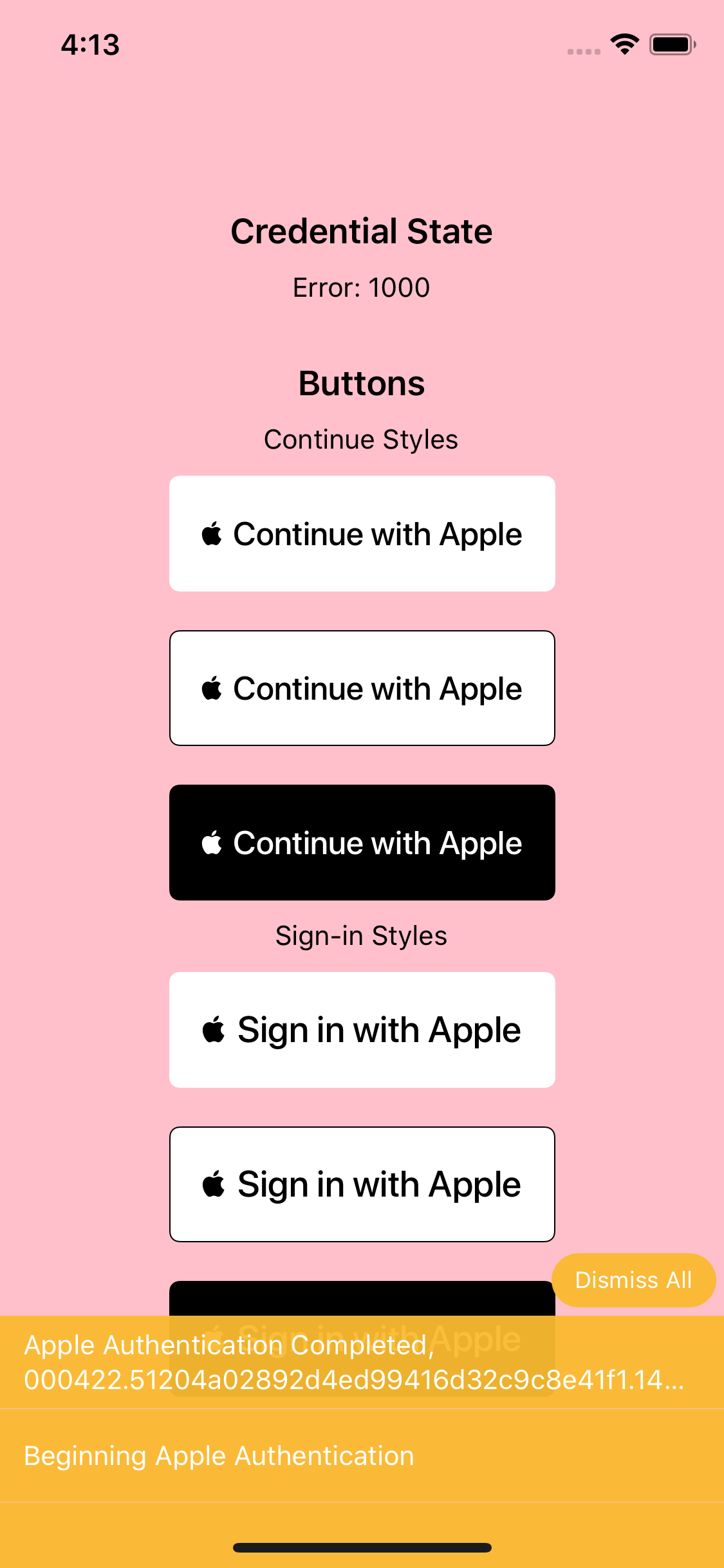
Okay, have you tried that with the example?
mikehardy
on 15 Apr 2020
Just tried it now in the simulator (iPhone 11 Pro 13.4), and I get the same error (Credential state Error: 1000):
mihaerzen
on 15 Apr 2020
Fascinating. Okay - the authentication is definitely working, but in my project I don't really track credential state (probably something I should do, but...) so I hadn't noticed. @Salakar I just did a clean checkout of the project + example and I reproduce exactly as above
mikehardy
on 15 Apr 2020
Got this working in the simulator using the onAppleButtonPress code from https://github.com/invertase/react-native-apple-authentication/blob/master/example/app.js excluding the fetchAndUpdateCredentialState lines with a combination of:
- Configuring the email relay (had custom email template domain) https://firebase.google.com/docs/auth/ios/apple?authuser=0#configure_sign_in_with_apple
- Populating the Services ID and OAuth flow
https://firebase.google.com/docs/auth/ios/apple?authuser=0#enable-apple-as-a-sign-in-provider - Explicitly setting "Sign in with Apple" Capabilities in XCode for both Debug and Release
- Signing into iCloud on the Simulator
 solace
on 16 Apr 2020
solace
on 16 Apr 2020
Got this working in the simulator using the
onAppleButtonPresscode from https://github.com/invertase/react-native-apple-authentication/blob/master/example/app.js excluding thefetchAndUpdateCredentialStatelines with a combination of:
- Configuring the email relay (had custom email template domain) https://firebase.google.com/docs/auth/ios/apple?authuser=0#configure_sign_in_with_apple
- Populating the Services ID and OAuth flow
https://firebase.google.com/docs/auth/ios/apple?authuser=0#enable-apple-as-a-sign-in-provider- Explicitly setting "Sign in with Apple" Capabilities in XCode for both Debug and Release
- Signing into iCloud on the Simulator
... but that is the problem on simulator: authentication works, but the fetchAndUpdateCredentialState does not. fetchAndUpdateCredentialState always returns Error 1000 on simulator.
I don't use firebase auth.
I send identityToken from apple auth from my RN app to node server where i call verifyIdToken function from apple-signin to just verify the user and save his sub which is Apple's userId. After that I return my custom token to RN app and the flow continues like with other auth options...
So i don't actually need fetchAndUpdateCredentialState
big-toni
on 16 Apr 2020
@big-toni Step 1 isn't firebase specific, and is broadly applicable to other backends. Step 2 is, so skip that.
After seeing what fetchAndUpdateCredentialState did after the remote call, I found I didn't need it, which is why it was omitted.
solace
on 16 Apr 2020
@solace yeah, I know that. New provisioning profile is needed after enabling that capability on Apple developer page... everything done and everything works. Just omitted fetchAndUpdateCredentialState
big-toni
on 16 Apr 2020
Seems to be project error - not actionable for the module
mikehardy
on 2 May 2020
As mentioned on the expo sign in package, similar to this one. getCredentialStateForUser will always failed on simulator, this method should only be used on real devices.
Maybe a quick quote can be added in the documentation.
 magrinj
on 18 Jun 2020
magrinj
on 18 Jun 2020
The issue not related this library need fix backend. Before I have spend few day to fix it.
 dangtienngoc
on 25 Jun 2020
dangtienngoc
on 25 Jun 2020
After banging my head against this for 2 hours, I figured out what is happening (at least for me).
I was also having the problem where apple sign in was not working in the simulator, but was working on the device in debug and release builds.
I tried reseting my simulator, and signed in with iCloud again through settings; no luck.
I tried resetting again and signed in to iCloud with another apple ID and it worked.
I reset a 3rd time and signed in to iCloud with my original apple ID and it didn't work.
So..... I went to https://appleid.apple.com/account/manage and scrolled down to where it shows my Devices that are signed in with this ID. I clicked on "Simulator" and chose "Remove from Account".
I went back to my simulator, tried to signin with apple and it prompted me for the 2-factor code. I entered it, then my password, and it worked.
So the problem seems to have been the association between my Simulator device and my Apple ID. I have no idea what could have caused this -- Time, too many signins to different devices when testing, Entropy, Chaos Theory or perhaps it's just Apple's way of keeping its faithful app developers on our toes :)
 dchersey
on 6 Aug 2020
dchersey
on 6 Aug 2020
Very interesting @dchersey - thanks for reporting that! Could you hit the edit button (top right corner) on the README and maybe add it to this section? https://github.com/invertase/react-native-apple-authentication/blob/master/README.md#troubleshouting - this one gets people a lot!
mikehardy
on 6 Aug 2020
After banging my head against this for 2 hours, I figured out what is happening (at least for me).
I was also having the problem where apple sign in was not working in the simulator, but was working on the device in debug and release builds.I tried reseting my simulator, and signed in with iCloud again through settings; no luck.
I tried resetting again and signed in to iCloud with another apple ID and it _worked_.
I reset a 3rd time and signed in to iCloud with my original apple ID and it didn't work.So..... I went to https://appleid.apple.com/account/manage and scrolled down to where it shows my Devices that are signed in with this ID. I clicked on "Simulator" and chose "Remove from Account".
I went back to my simulator, tried to signin with apple and it prompted me for the 2-factor code. I entered it, then my password, and it _worked_.
So the problem seems to have been the association between my Simulator device and my Apple ID. I have no idea what could have caused this -- Time, too many signins to different devices when testing, Entropy, Chaos Theory or perhaps it's just Apple's way of keeping its faithful app developers on our toes :)
Thank you, your suggestion is worked 👍🏼
 bsonmez
on 7 Aug 2020
bsonmez
on 7 Aug 2020
After banging my head against this for 2 hours, I figured out what is happening (at least for me).
I was also having the problem where apple sign in was not working in the simulator, but was working on the device in debug and release builds.I tried reseting my simulator, and signed in with iCloud again through settings; no luck.
I tried resetting again and signed in to iCloud with another apple ID and it _worked_.
I reset a 3rd time and signed in to iCloud with my original apple ID and it didn't work.So..... I went to https://appleid.apple.com/account/manage and scrolled down to where it shows my Devices that are signed in with this ID. I clicked on "Simulator" and chose "Remove from Account".
I went back to my simulator, tried to signin with apple and it prompted me for the 2-factor code. I entered it, then my password, and it _worked_.
So the problem seems to have been the association between my Simulator device and my Apple ID. I have no idea what could have caused this -- Time, too many signins to different devices when testing, Entropy, Chaos Theory or perhaps it's just Apple's way of keeping its faithful app developers on our toes :)
This worked for me.
 thetpaingsoe
on 11 Aug 2020
thetpaingsoe
on 11 Aug 2020
After banging my head against this for 2 hours, I figured out what is happening (at least for me).
I was also having the problem where apple sign in was not working in the simulator, but was working on the device in debug and release builds.I tried reseting my simulator, and signed in with iCloud again through settings; no luck.
I tried resetting again and signed in to iCloud with another apple ID and it _worked_.
I reset a 3rd time and signed in to iCloud with my original apple ID and it didn't work.So..... I went to https://appleid.apple.com/account/manage and scrolled down to where it shows my Devices that are signed in with this ID. I clicked on "Simulator" and chose "Remove from Account".
I went back to my simulator, tried to signin with apple and it prompted me for the 2-factor code. I entered it, then my password, and it _worked_.
So the problem seems to have been the association between my Simulator device and my Apple ID. I have no idea what could have caused this -- Time, too many signins to different devices when testing, Entropy, Chaos Theory or perhaps it's just Apple's way of keeping its faithful app developers on our toes :)
This works fine. Help me a lot, ty!
 SnowLew
on 17 Aug 2020
SnowLew
on 17 Aug 2020
@SnowLew can you please propose a docs PR (you can do it just using the web UI on github) to save everyone else the trouble :pray: :pray:
Very interesting @dchersey - thanks for reporting that! Could you hit the edit button (top right corner) on the README and maybe add it to this section? https://github.com/invertase/react-native-apple-authentication/blob/master/README.md#troubleshouting - this one gets people a lot!
mikehardy
on 17 Aug 2020
After banging my head against this for 2 hours, I figured out what is happening (at least for me).
I was also having the problem where apple sign in was not working in the simulator, but was working on the device in debug and release builds.I tried reseting my simulator, and signed in with iCloud again through settings; no luck.
I tried resetting again and signed in to iCloud with another apple ID and it _worked_.
I reset a 3rd time and signed in to iCloud with my original apple ID and it didn't work.So..... I went to https://appleid.apple.com/account/manage and scrolled down to where it shows my Devices that are signed in with this ID. I clicked on "Simulator" and chose "Remove from Account".
I went back to my simulator, tried to signin with apple and it prompted me for the 2-factor code. I entered it, then my password, and it _worked_.
So the problem seems to have been the association between my Simulator device and my Apple ID. I have no idea what could have caused this -- Time, too many signins to different devices when testing, Entropy, Chaos Theory or perhaps it's just Apple's way of keeping its faithful app developers on our toes :)
THANK YOU! Removing and re-adding the Simulator on my Apple Developer account was the solution for me as well.
 lorenjohnson
on 17 Aug 2020
lorenjohnson
on 17 Aug 2020
@SnowLew can you please propose a docs PR (you can do it just using the web UI on github) to save everyone else the trouble 🙏 🙏
Very interesting @dchersey - thanks for reporting that! Could you hit the edit button (top right corner) on the README and maybe add it to this section? https://github.com/invertase/react-native-apple-authentication/blob/master/README.md#troubleshouting - this one gets people a lot!
I will write doc for this error and request a PR. thank you!
Edit: @mikehardy I've send a PR adding some solutions for this issue. (readme)
SnowLew
on 26 Aug 2020
After banging my head against this for 2 hours, I figured out what is happening (at least for me).
I was also having the problem where apple sign in was not working in the simulator, but was working on the device in debug and release builds.I tried reseting my simulator, and signed in with iCloud again through settings; no luck.
I tried resetting again and signed in to iCloud with another apple ID and it _worked_.
I reset a 3rd time and signed in to iCloud with my original apple ID and it didn't work.So..... I went to https://appleid.apple.com/account/manage and scrolled down to where it shows my Devices that are signed in with this ID. I clicked on "Simulator" and chose "Remove from Account".
I went back to my simulator, tried to signin with apple and it prompted me for the 2-factor code. I entered it, then my password, and it _worked_.
So the problem seems to have been the association between my Simulator device and my Apple ID. I have no idea what could have caused this -- Time, too many signins to different devices when testing, Entropy, Chaos Theory or perhaps it's just Apple's way of keeping its faithful app developers on our toes :)
This worked for after trying so many solutions and enabling everything as per docs. Thanks
 MandipGiri
on 2 Sep 2020
MandipGiri
on 2 Sep 2020
Just a note for iOS 14+ and xcode 12+ as of now this seems to be a big issue.
https://developer.apple.com/forums/thread/651533
I'm currently having this problem so I'm downgrading to iOS 13.5 sim for testing.
 ryansaam
on 16 Oct 2020
ryansaam
on 16 Oct 2020
Working on my iPad with ios 14 and xcode 12 but not on mobile devices when i run with diawi and also from testflight.
 avbeladiya
on 20 Oct 2020
avbeladiya
on 20 Oct 2020
@ryansaam does downgrading ios to 13.5 works ?
avbeladiya
on 20 Oct 2020
works on every ios14 iPhone real device I've tested it on. 11, SE, 7
I don't know what diawi is but you need to test it on a real device you are holding in your hands I think.
mikehardy
on 20 Oct 2020
@avbeladiya I also don't know what diawi is but I can confirm testing in a simulator running iOS 13.5 works for me. The problem also seems to be that if you upload a build to App Store Connect (using sign in with apple) they're rejecting it. So I'm also uploading iOS 13.5 builds. However an unrelated problem is messing that up too https://developer.apple.com/forums/thread/118719
ryansaam
on 20 Oct 2020
ICOULD needs to logged in aswell. . Else you might always see error 1000
 Singh-KiaTec
on 23 Oct 2020
Singh-KiaTec
on 23 Oct 2020
This happen also if you use not right signature from you apple (password)
 ZaikinaEvgeniya-2
on 25 Dec 2020
ZaikinaEvgeniya-2
on 25 Dec 2020
you guys might need to do this also https://dev.to/aryaminus/how-to-sign-in-with-apple-on-react-and-react-native-using-node-5g0b
 CallmeKingsley
on 31 Jan 2021
CallmeKingsley
on 31 Jan 2021
Anyone suffer from this problem like me can use iOS version 13.5 and iPhone 11 to overcome this problem, starting React native debugging with this command. Offcourse other versions may work but I tested and confirm the below command.
npx react-native run-ios --simulator="iPhone 11 (13.5)"
 EnginYilmaz
on 29 May 2021
EnginYilmaz
on 29 May 2021
Related issues
 mohitbhansali
·
11Comments
mohitbhansali
·
11Comments
 vanminhnguyenbmt
·
7Comments
vanminhnguyenbmt
·
7Comments
 bcbcbcbcbcl
·
8Comments
bcbcbcbcbcl
·
8Comments
 dbarner1
·
4Comments
dbarner1
·
4Comments
 doublelam
·
9Comments
doublelam
·
9Comments
Most helpful comment
I fix it by configuration in xcode.
TARGETS>Signing & Capabilities>+Capabilitythen searchsign inthen add it. Problem solved!@colloquet suggestion is on point for me. Thank you :)