React-native-app-auth: RNAppAuth.m: 'AppAuth/AppAuth.h' file not found
I've just integrated RNAppAuth v2.6.1 and AppAuth-iOS v0.93.0 (AppAuth-iOS linked through cocoapods), and I get this error. Any ideas in resolving this?
 davidliu
All 55 comments
Oddly, seems to be the opposite of #80. I'm not quite sure how to supply RNAppAuth with the information for it to know about AppAuth-iOS as a linked framework, so the build fails. If I revert the change so that it's #import "AppAuth.h" instead, the build works.
davidliu
on 2 Jul 2018
I've just published v3.0.0 of this library which changes how the library is integrated to your app on iOS. Could you please try again with v3.0.0? (note that the instructions for what needs to be added to the AppDelegate have changed).
 kadikraman
on 11 Jul 2018
kadikraman
on 11 Jul 2018
@kadikraman Hmm weird, I just integrated RN-AppAuth with version 3.0.1 on our RN project and face the exact same error message.
Cross-Checking with the sample app now
Edit: Ah, we're not using podfiles yet. Maybe we should change as the Example does indeed work.
Edit2: Just did pod init, edit Podfile, pod install and now it's working. Perfect!
Edit3: There were still errors
so undid everything beside the podfile stuff
cleaned the project
ran rn-link instead of manual linking
reverted the android changes (as I already had that working and finally it worked.
My bad, hope if anyone else has problems he finds this issue :-).
Cheers!
 creambyemute
on 13 Jul 2018
creambyemute
on 13 Jul 2018
@kadikraman still broken on 3.0.1. I'm not quite sure how it's supposed to build, since it doesn't seem to build against AppAuth as a dependent framework?
davidliu
on 20 Jul 2018
Ok, I think I figured it out? I had the use_frameworks! tag in my Podfile, and removing it seems to have fixed it, sort of. It still pops an error that it can't find the AppAuth/AppAuth.h file, but for some reason it actually builds now regardless of the error. I'm clueless, but whatever I guess?
davidliu
on 20 Jul 2018
Depending on build configurations, in your AppDelegate import either with:
@import RNAppAuth;
or
import <AppAuth/AppAuth.h>
import "RNAppAuthAuthorizationFlowManager.h"
^^ do both of these give you the same error?
kadikraman
on 21 Jul 2018
I seem to be having the same problem and am getting this error:
import "AppDelegate.h"
import
import "RNAppAuthAuthorizationFlowManager.h"
'RNAppAuthAuthorizationFlowManager.h' file not found
import
import
These are the steps that I followed to build the project:
Manual installation
iOS
In XCode, in the project navigator, right click Libraries ➜ Add Files to [your project's name]
Go to node_modules ➜ react-native-app-auth and add RNAppAuth.xcodeproj
In XCode, in the project navigator, select your project. Add libRNAppAuth.a to your project's Build Phases ➜ Link Binary With Libraries
Run your project (Cmd+R)<CocoaPods
With CocoaPods, add the following line to your Podfile:
pod 'AppAuth', '>= 0.91'
Then run pod install.
- Add these statements to AppDelegate:
import
import "RNAppAuthAuthorizationFlowManager.h"
 cherylbearden
on 30 Jul 2018
cherylbearden
on 30 Jul 2018
Also, if I try to link the project using react-native link, it says that the IOS project is already linked:
react-native link react-native-app-auth
rnpm-install info Platform 'ios' module react-native-app-auth is already linked
rnpm-install info Linking react-native-app-auth android dependency
rnpm-install info Platform 'android' module react-native-app-auth has been successfully linked
Thanks.
cherylbearden
on 30 Jul 2018
I was able to get the code to compile in IOS using:
npm install react-native-app-auth --save
react-native link react-native-app-auth
and cocoa pods according to the directions. But if you use CocoaPods, be sure to open your project using xcworkspace file rather than xcodeproj. Otherwise you will get the AppAuth/AppAuth.h not found error again.
cherylbearden
on 30 Jul 2018
Getting the same issue in RNAppAuth.m:
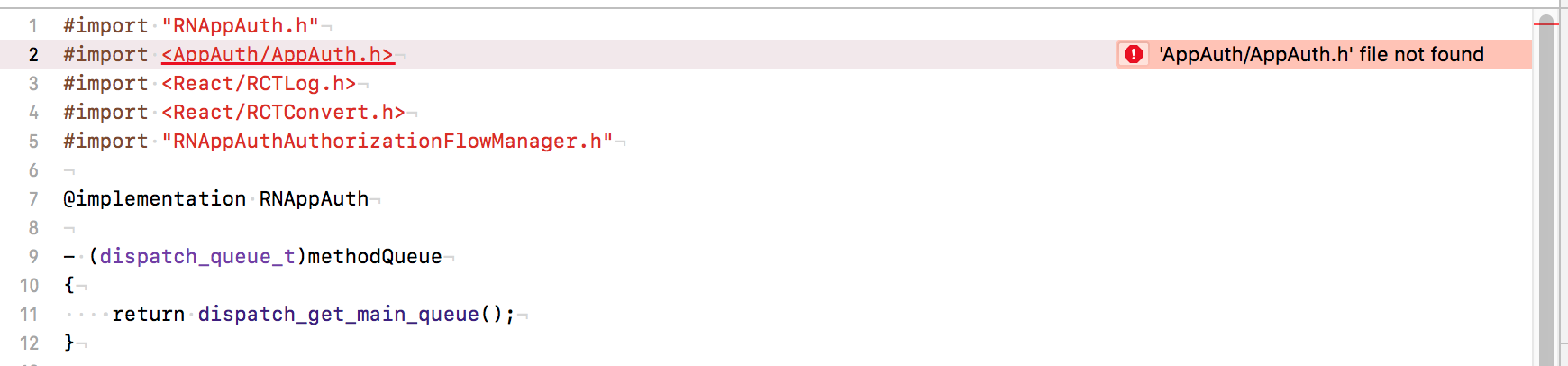
'AppAuth/AppAuth.h' file not found
Podfile
platform :ios, '10.0'
source 'https://github.com/CocoaPods/Specs'

target 'MyApp' do
  use_frameworks!
  pod 'AppAuth', '>= 0.94'
  # some other private pods

  target 'MyAppTests' do
  end
end

post_install do |installer_representation|
  installer_representation.pods_project.targets.each do |target|
    target.build_configurations.each do |config|
      config.build_settings['ONLY_ACTIVE_ARCH'] = 'NO'
    end
  end
end
(The issue goes away if I remove use_frameworks! but I need that for other pods)
package.json
Has "react-native-app-auth": "^3.0.1", under dependencies
App Delegate
If I use:
@import RNAppAuth;
I get:
Module 'RNAppAuth' not found
Presumably because the module doesn't build.
If I use
#import <AppAuth/AppAuth.h>
#import "RNAppAuthAuthorizationFlowManager.h"
I instead get:
'AppAuth/AppAuth.h' file not found
 getaaron
on 2 Aug 2018
getaaron
on 2 Aug 2018
I got it to work only by doing:
npm install react-native-app-auth --save
react-native link react-native-app-auth
and using CocoaPods
I could never get it to work either by using the manual installation instead of react-native link or using a static library.
cherylbearden
on 2 Aug 2018
@kadikraman Ultimately the error message also went away. Wasn't paying attention to it, and it disappeared. Probably the removal of !use_frameworksalready fixed it, and XCode was caching the error message for some reason.
For my build setup, @import doesn't work, only the direct importing of the .h files.
davidliu
on 3 Aug 2018
Why close this issue if it’s not resolved? @kadikraman can we please reopen this?
getaaron
on 3 Aug 2018
Yes, this is still very much an unsolved issue it seems. Can we re-open?
 cpjolicoeur
on 10 Aug 2018
cpjolicoeur
on 10 Aug 2018
I've published a new release with some iOS fixes that change the iOS integration slightly - new instructions in the Readme - released as v3.1.0
I've verified these instructions 100% work on a brand new RN project created through react-native init. Hopefully we've got it right this time! 🤞
kadikraman
on 21 Aug 2018
Thanks Kadi! I look forward to trying it out soon. 😊
From: Kadi Kraman notifications@github.com
Sent: Tuesday, August 21, 2018 7:07 AM
To: FormidableLabs/react-native-app-auth
Cc: cherylbearden; Comment
Subject: Re: [FormidableLabs/react-native-app-auth] RNAppAuth.m: 'AppAuth/AppAuth.h' file not found (#134)
I've published a new release with some iOS fixes that change the iOS integration slightly - new instructions in the Readmehttps://github.com/FormidableLabs/react-native-app-auth#define-openurl-callback-in-appdelegate - released as v3.1.0https://github.com/FormidableLabs/react-native-app-auth/releases/tag/v3.1.0
I've verified these instructions 100% work on a brand new RN project created through react-native init. Hopefully we've got it right this time! 🤞
—
You are receiving this because you commented.
Reply to this email directly, view it on GitHubhttps://github.com/FormidableLabs/react-native-app-auth/issues/134#issuecomment-414637539, or mute the threadhttps://github.com/notifications/unsubscribe-auth/AFdunOS8AWlok4X4jeXzvUACOc2-KB6Oks5uS-nggaJpZM4U9v0I.
cherylbearden
on 23 Aug 2018
@kadikraman I just finished updating to v3.1.0 and it works by following the new instructions; I just hit one snag: Xcode kept complaining that it couldn't find RNAppAuthAuthorizationFlowManager.h. I was able to fix it by adding it as a public header in my project Build Phases. Maybe there should be a note in the Readme about this? I'd be happy to provide a PR with those added instructions, if you want it! 🙂
 bingocaller
on 3 Sep 2018
bingocaller
on 3 Sep 2018
@bingocaller interesting! What version of RN are you on? I'd like to try to reproduce this 🤓
kadikraman
on 5 Sep 2018
I upgraded an existing project from RN 0.55.4 to 0.56! 🙂
bingocaller
on 5 Sep 2018
Ah, I see! Well I can't reproduce it in a fresh 0.56 project so I _think_ it's an edge case. Did you use the automatic upgrade tool? For me, it always creates a tangled mess of conflicts in project.pbxproj which could have caused the issue 😅
Thanks for posting your solution. Hopefully it will help someone having the same problem!
Closing this again, hopefully for good🤞
kadikraman
on 6 Sep 2018
@kadikraman Yes, I used react-native-git-upgrade.
I agree. Googling the problem got me here in the first place, so hopefully others will be able to find this issue, too! 😄
bingocaller
on 7 Sep 2018
@kadikraman
Hi, I have error "#import
Please help me.
 awesome341
on 14 Sep 2018
awesome341
on 14 Sep 2018
@Excellent1212 Which version of RN are you on? Have you upgraded RN at any point either via react-native-git-upgrade (like I did; see my previous comments) or the alternative method?
As I mentioned, I was able to fix my missing header error by adding it as a Public Header under Build Phases in Xcode. I actually ended up doing a fresh install when I upgraded to RN 0.57 and I haven't had any problems with missing headers since.
bingocaller
on 22 Sep 2018
@kadikraman I'm tempted to open a new issue because this 'AppAuth/AppAuth.h' file not found is still plaguing my project.
Our configuration differs from the examples above. We're using:
- XCode 9.4.1
- React Native 0.55.4
- Installed
AppAuth-iOSusing Carthage - Using this fork to deal with Cognito nonces (I'm teammates with @FelipeBuiles, and our branch is otherwise up-to-date with your
masterbranch)
Things We've Tried
- Tried
react-native linkas well as the manual installation - Cleared
/ios/Carthagedirectory and rerancarthage bootstrap --platform ios - Deleted contents in DerivedData
- Flipped tables
Questions
- Is there an expectation that we need to upgrade to RN 0.57?
- Is there an expectation that we should use Xcode 10.x?
- Is there a discrepancy between the docs saying to add
#import "RNAppAuthAuthorizationFlowManager.h"toAppDelegate.hbut the example does#import <RNAppAuth/RNAppAuthAuthorizationFlowManager.h>? - How should we go about adding a public header specifically for AppAuth-iOS as described above by @bingocaller?
 benjarwar
on 10 Oct 2018
benjarwar
on 10 Oct 2018
@benjarwar thanks for your detailed report.
I've been able to reproduce this with Xcode 10 and RN 57.2 so it's not related to either. I think it's to do with missing/incorrect header search paths when installing the native dependency from carthage. The example app uses pods.
I've opened a new issue for this: https://github.com/FormidableLabs/react-native-app-auth/issues/188
kadikraman
on 10 Oct 2018
@benjarwar In case you're still interested in instructions for adding public headers, here's how I did it:
In Xcode, select your main project, go to Build Phases, click the plus sign in the upper left corner of the pane, click New Headers Phase:
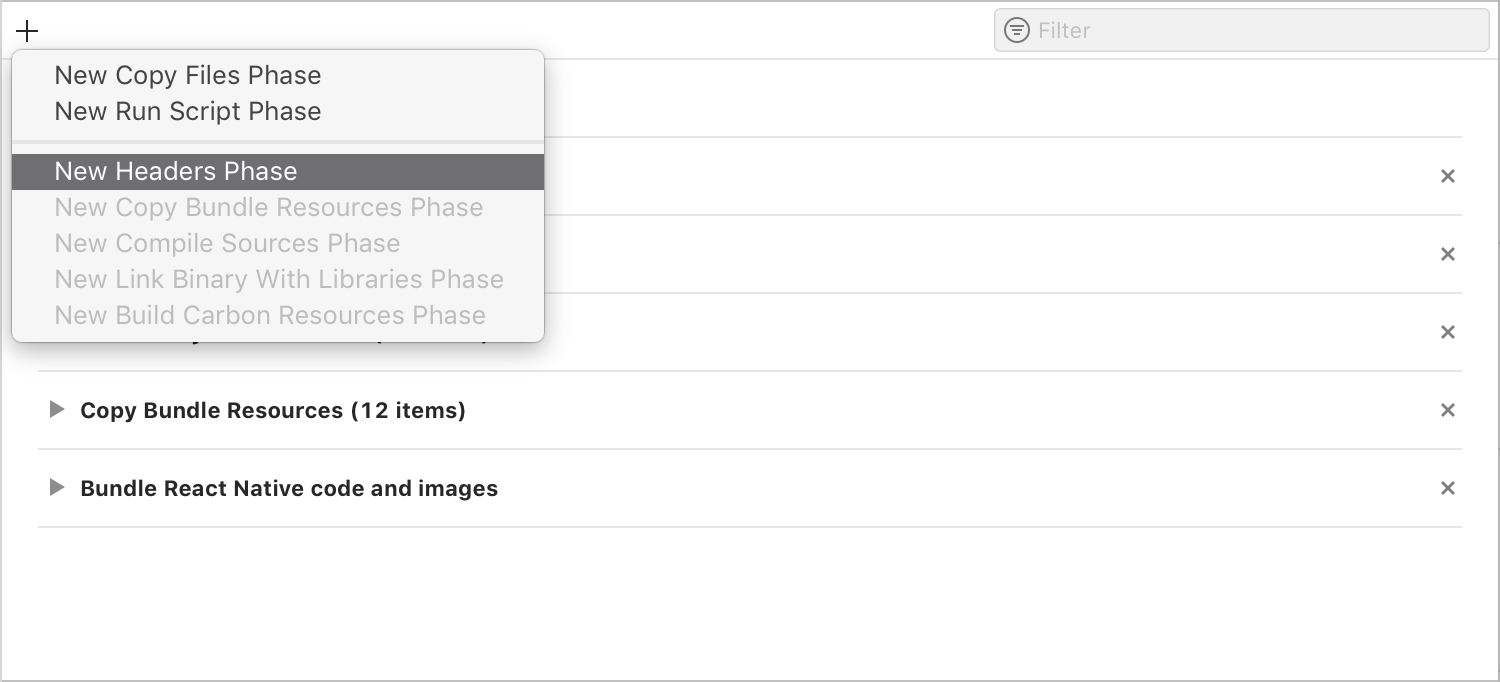
Then click the little plus sign under the Headers list (Public, Private, Project):

This will bring up a dialog where you can search for your missing header file. If it shows up in a search, you can add it from there; if not, you can click Add Other… and find it in <root_folder_of_your_project>/node_modules/react-native-app-auth/ios.
Notice: you don't actually have to add it as a _Public_ header; Project is fine, since it's only for use inside your project.
Hope that helps! 🙂
bingocaller
on 12 Oct 2018
Hi,
Is this fixed?
I am new to iOS. I installed react-native-app-auth in android and it seems to be working fine there.
I imported the whole app to the mac and opened the .xcodeproj file and ran build, and I started getting this error.
I ran
npm install react-native-app-auth --save
react-native link react-native-app-auth
it said
Platform 'ios' module react-native-app-auth is already linked
Still the same error. I am so new, I don't even know what are CocoaPods or Carthage? I am not sure if I even have them in my project
"react": "16.6.0-alpha.8af6728",
"react-native": "0.57.3",
"react-native-app-auth": "^4.1.1",
This is what I have
Can someone please help me out here?
 ws7one
on 5 Mar 2019
ws7one
on 5 Mar 2019
Follow the instructions to install the AppAuth dependency using Pods (that’s like npm for iOS). It’s in the readme 😊
kadikraman
on 5 Mar 2019
Hi @kadikraman
This is everything I have done so far:
1) right click Libraries ➜ Add Files to [your project's name]
2) Go to node_modules ➜ react-native-app-auth and add RNAppAuth.xcodeproj
3) Add libRNAppAuth.a to your project's Build Phases ➜ Link Binary With Libraries
then cmd+R
4)Did pod init in the iOS folder
5) Added pod 'AppAuth', '>= 0.94' to the pod file
My pod file looks like this

6) Registered redirect url scheme
<key>CFBundleURLTypes</key>
    <array>
        <dict>
            <key>CFBundleURLName</key>
            <string>org.reactjs.native.example.AlphaM</string>
            <key>CFBundleURLSchemes</key>
            <array>
            <string>com.app.mediaanalytics</string>
            </array>
        </dict>
    </array>
7) Define openURL callback in AppDelegate
My appDelegate.h looks like this now

Now I get the following error in AppDelegate.h
'RNAppAuthAuthorizationFlowManager.h' file not found
I even closed xcode and opened project with .xcworkspace and not .xcodeproj
Can't figure out how to fix this
ws7one
on 5 Mar 2019
Hi @ws7one - some of the first steps should not be necessary. Could you stash all your changes and do exactly the following:
- install the library
npm install react-native-app-auth --save
- link the library
react-native link react-native-app-auth
- create a Podfile
cd ios && pod init
- add the AppAuth pod to your Podfile
Open the Podfile that was created in step 3 and add pod 'AppAuth', '>= 0.94'
The Podfile should look something like:
# Uncomment the next line to define a global platform for your project
# platform :ios, '9.0'

target '<your app name>' do
  # Uncomment the next line if you're using Swift or would like to use dynamic frameworks
  # use_frameworks!
  # Pods for <your app name>
  pod 'AppAuth', '>= 0.94'
end
Where < your app name > is the name of your app (should be autogenerated.
Side note: there is usually more text in the Podfile about the Tv-OS and test dependencies. I usually remove them, but feel free not to, it doesn't make a difference.
install the pods
runpod installin the directory where your Podfile isupdate AppDelegate.h
Open the file and update the following:
+ #import "RNAppAuthAuthorizationFlowManager.h"

- @interface AppDelegate : UIResponder <UIApplicationDelegate>
+ @interface AppDelegate : UIResponder <UIApplicationDelegate, RNAppAuthAuthorizationFlowManager>

+ @property(nonatomic, weak)id<RNAppAuthAuthorizationFlowManagerDelegate>authorizationFlowManagerDelegate;
- update AppDelegate.m
Open the file and add the following:
- (BOOL)application:(UIApplication *)app openURL:(NSURL *)url options:(NSDictionary<NSString *, id> *)options {
 return [self.authorizationFlowManagerDelegate resumeExternalUserAgentFlowWithURL:url];
}
Hi @kadikraman
I have followed pretty much everything to the dot here
I still get the following
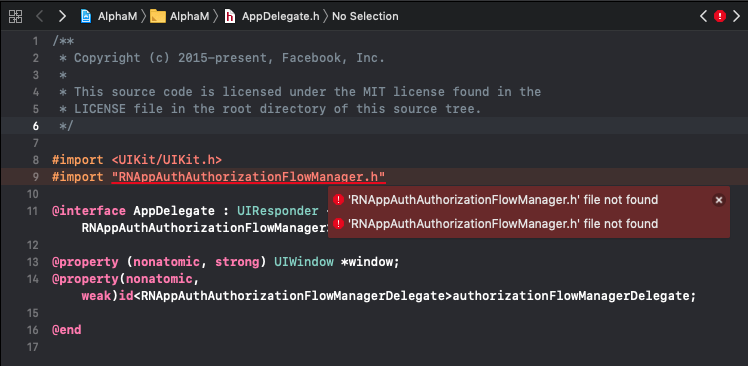
Only difference being if I add #import <AppAuth/AppAuth.h> in AppDelegate.h, i get 1 less error of the same
My AppDelegate.m looks like this

ws7one
on 5 Mar 2019
Try #import <RNAppAuth/RNAppAuthAuthorizationFlowManager.h> 🤔
kadikraman
on 5 Mar 2019
@kadikraman
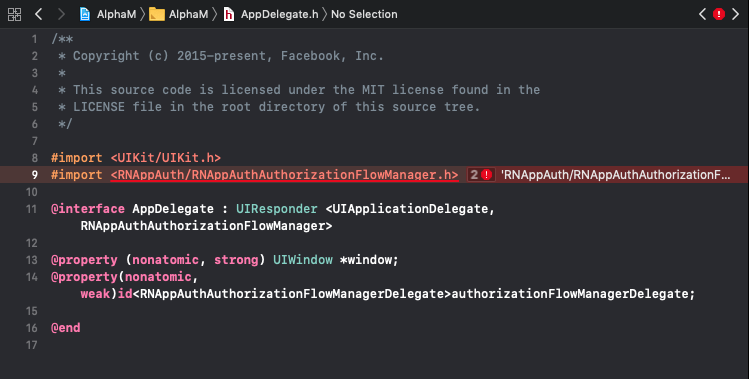
Tried that too doesn't seem to work.
I am not sure if I have missed any step. I have covered everything mentioned in the readme.
Is there something amiss with the OS or the versions of libraries
This is the OS version that I have
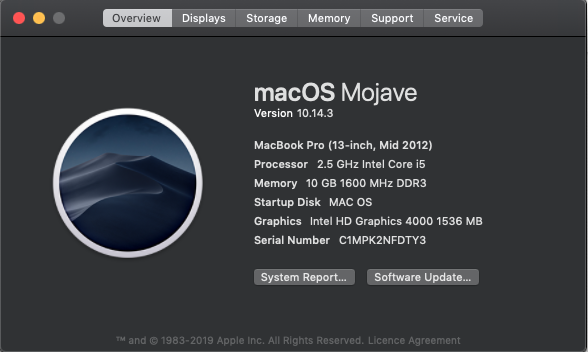
My package.json

My Xcode project navigator
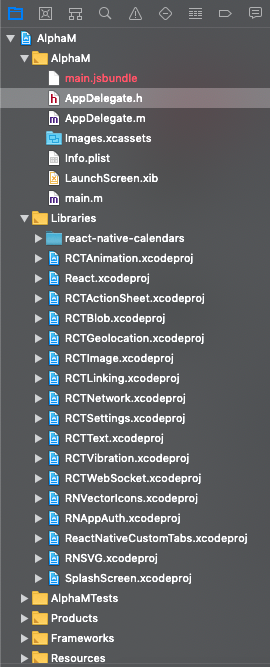
My Linked Binary with Libraries
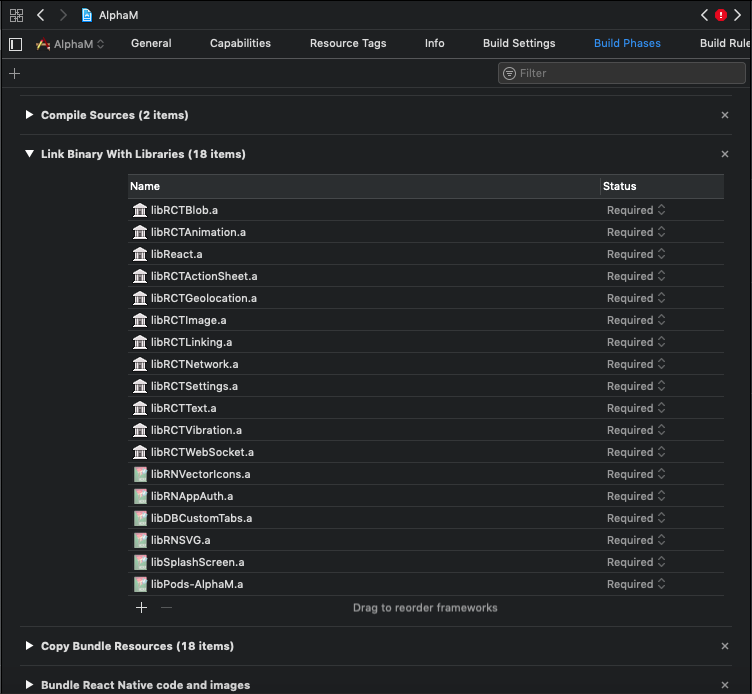
My header search paths

Seems like I have covered everything, not sure what I am missing.
Works fine on Android, thought should be much easier on iOS.
Please help.
ws7one
on 6 Mar 2019
@ws7one we'll figure it out :)
Could you try running the pods example app locally on your machine? Just clone this repo, go to /Examples/iOSPodsExample and follow the readme instructions.
I've just checked it works with the latest version of of library, and it's using RN 0.57.2 and React 16.5.0, which are very close to yours.
See if you can run it locally, and if you can, open it up on XCode so you could compare it with your own project and see what's different.
kadikraman
on 6 Mar 2019
@kadikraman
This is the appdelegate.m file of my app

There is
#import "AppAuth.h"
.
.
.
- (BOOL)application:(UIApplication *)app openURL:(NSURL *)url options:(NSDictionary<NSString *, id> *)options {
  return [self.authorizationFlowManagerDelegate resumeExternalUserAgentFlowWithURL:url];
}
When i do a jump to definition on resumeExternalUserAgentFlowWithURL , i get 3 overloaded functions i suppose
Following is the image of the example app

there is no #import "AppAuth.h", removing the same from my app returns me an error saying No known instance method for selector 'resumeExternalUserAgentFlowWithURL:'
Also trying to do a jump to definition on resumeExternalUserAgentFlowWithURL in the example app gets me 4 overloads. Which means I am missing something but cannot figure it out, which by the looks of it is a file called OIDAuthorizationService.m
Also AppDelegate.h is the same in both but I still get the same error as mentioned before.
ws7one
on 7 Mar 2019
@kadikraman
I looked a little bit more into the fourth overloaded function, it pointed to a file OIDAuthorizationService.m in the Pod's AppAuth folder and when did a compare on both my file and the example's file, the following is what i got

The part
- (BOOL)resumeExternalUserAgentFlowWithURL:(NSURL *)URL {
  // rejects URLs that don't match redirect (these may be completely unrelated to the authorization)
  if (![self shouldHandleURL:URL]) {
    return NO;
  }
which is the actual overloaded part, exists in both files.
I still am stuck with the same error. Not sure how to fix it.
ws7one
on 8 Mar 2019
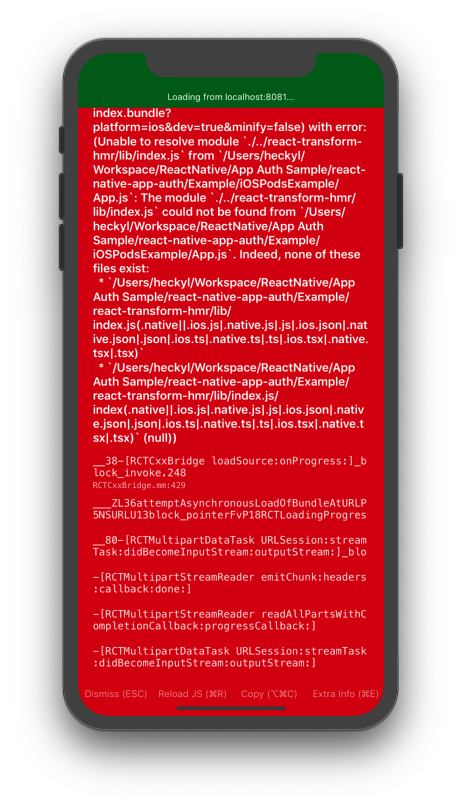
@kadikraman Also when I do a react-native run-ios on the example app, i get this error
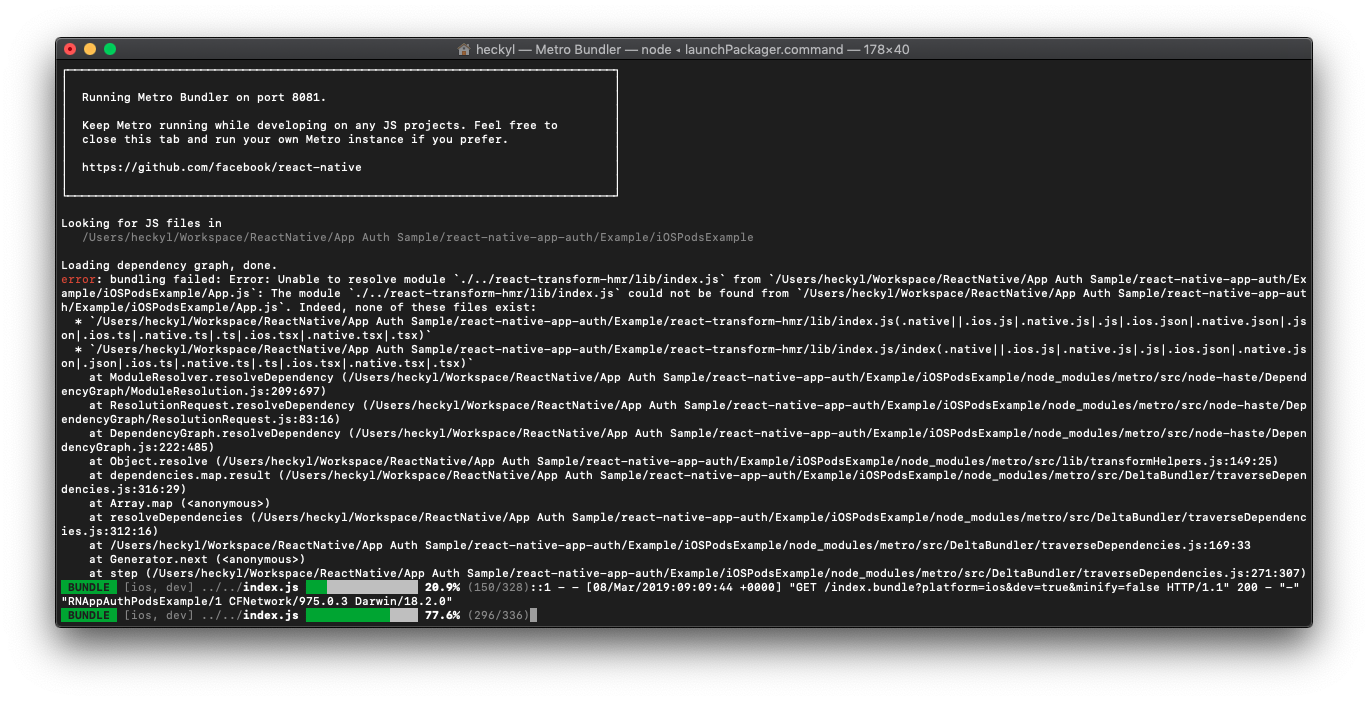
Even when I directly run the app from Xcode, it build fine but on runtime gives this
ws7one
on 8 Mar 2019
@ws7one can you do yarn start --reset-cache on the example app and see if that works?
kadikraman
on 8 Mar 2019
@kadikraman I used npm, but resetting cache did fix it.. But the issue on my app is still there.
ws7one
on 8 Mar 2019
Phew, well I'm glad that the example app worked. That means it's a configuration issue in your project. I'm in a bit of a loss here.
The only thing I can think of is that there are many competing versions of the iOS library. Like here steps 1, 2 and 3 are adding the library in 2 different ways (this is _not needed_, it is a workaround for if you can't use Pods for some reason), so with those two and pods, you end up with 3 instances of the library, when you only need one.
Could you undo what you did in 1, 2 and 3 and _only_ install the dependency with pods?
Or, ideally just git add --all && git stash and do _exactly_ this.
kadikraman
on 8 Mar 2019
@kadikraman Ok this is not a new project, this is a fully built app on the android which I have committed and pushed on the mercurial server.
Now what I have done is cloned the whole repo on the mac.
Now I know linking has already happened once when I did react-native link while building on android. So this probably wont be needed here. Which means even if I did 'react-native link' again I'll get its already linked.
Obviously I have to do an npm install once.
Then move on Pod init in the iOS folder and then go ahead right?
So I did that, and then pod Install.
After this the next step is Updating AppDelegate.h, and the moment I go and add #import "RNAppAuthAuthorizationFlowManager.h", even before building I start getting the error "RNAppAuthAuthorizationFlowManager.h" file not found
This was d clean slate, doesn't seem like I did anything outside steps mentioned
ws7one
on 8 Mar 2019
@kadikraman is the react-native link required if you are going to use cocoapods and do a pod install?
ws7one
on 11 Mar 2019
@ws7one react-native link checks for the presence of a Podfile, then adds dependencies there if the Podfile is present. Check out Linking Libraries for more info!
bingocaller
on 11 Mar 2019
@ws7one I'm all out of ideas. If you like, we can have a call on Google Meet and pair on it.
kadikraman
on 11 Mar 2019
@kadikraman
is it common for the Build Settings -> "Header Search Paths" to look like this with all first characters cut out
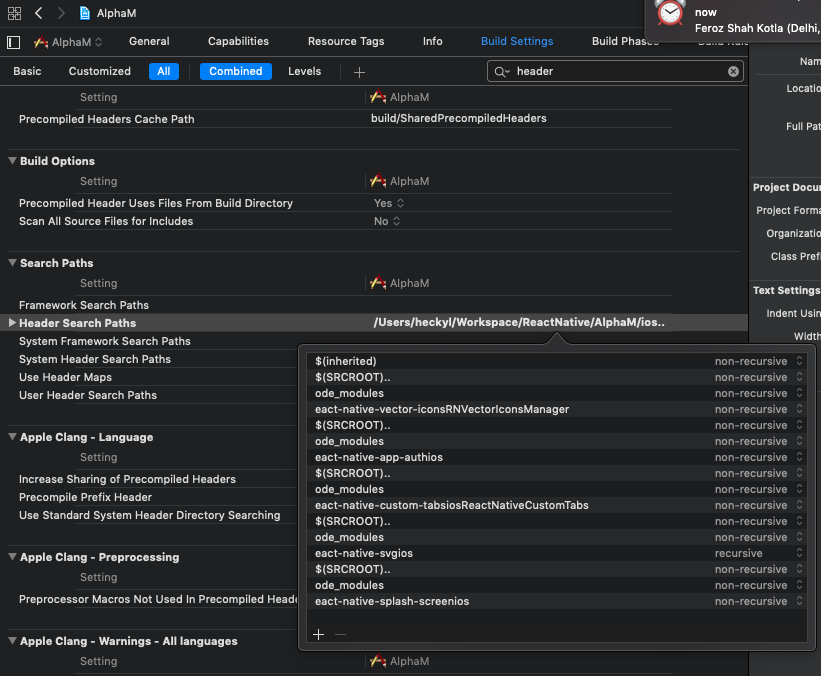
Could this be related to this issue?
ws7one
on 13 Mar 2019
@kadikraman
Weirdly this issue got fixed after changing the Build Settings -> "Header Search Paths" to the below one
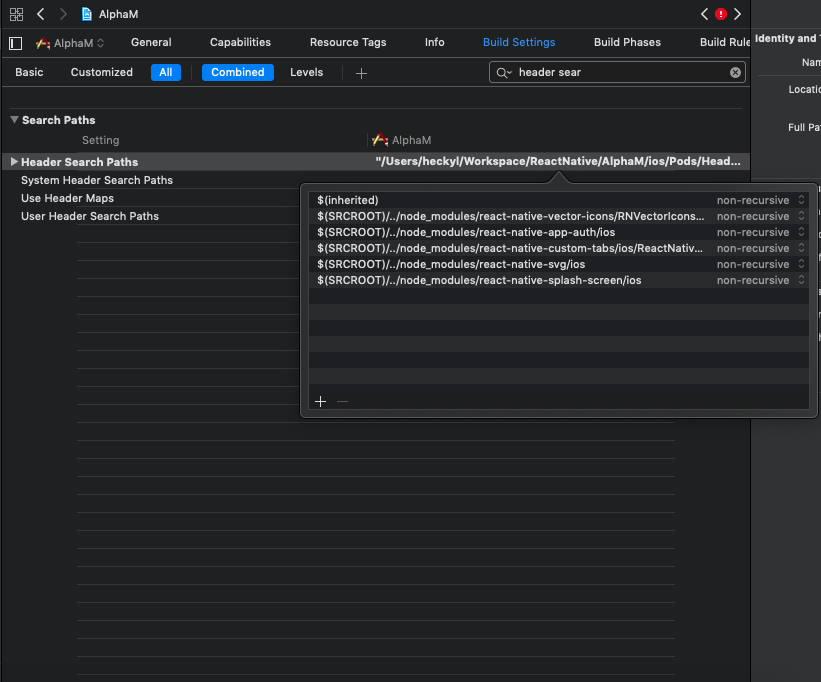
But after more than a week of trying to fix this, this got resolved only to end up facing another issue in a different library. Hope that doesn't take this long, though it has already taken up a day of mine without getting resolved
ws7one
on 13 Mar 2019
@ws7one I'm glad your issue got resolved! Here's to hoping your other issue isn't as difficult! 🙂
This is a bit off-topic, but I just wanted to jump in and thank @kadikraman and the whole team for their work on the react-native-app-auth project in general, and this issue in particular. Answering questions and helping out, even to the point of offering to pair with someone who is having an issue is just going above and beyond! You are awesome! 🙌
bingocaller
on 13 Mar 2019
I tried to follow the documentation to install Auth-App with cocoapods but keep getting this error message: [!] No podspec found for RNAppAuth in ../node_modules/react-native-app-auth.
and when I run react-native run-ios I get this error message: 'RNAppAuthAuthorizationFlowManager.h' file not found
import "RNAppAuthAuthorizationFlowManager.h"
and I have already import RNAppAuthAuthorizationFlowManager.h in appdelegate.h
 adujoseph
on 4 Jul 2019
adujoseph
on 4 Jul 2019
@kadikraman I have an error installing AuthApp in cocoapod. This used to work fine before the recent update in react-native.
Error Message: [!] No podspec found for RNAppAuth in ../node_modules/react-native-app-auth
I followed the steps below:
1- react-native init GetAuth
2- cd GetAuth
3- install the library
npm install react-native-app-auth --save
4- link the library
react-native link react-native-app-auth
5- create a Podfile {errorMessage: pod file already exist}
cd ios && pod init
6- add the AppAuth pod to your Podfile
. Open the Podfile that was created in step 3 and add pod
'AppAuth', '>= 0.94'
,
then run pod install
Error Message: [!] No podspec found for RNAppAuth in ../node_modules/react-native-app-auth
The Podfile should look something like:
# Uncomment the next line to define a global platform for your project
# platform :ios, '9.0'

target '<your app name>' do
  # Uncomment the next line if you're using Swift or would like to use dynamic frameworks
  # use_frameworks!
  # Pods for <your app name>
  pod 'AppAuth’,po
end
NB: the podfile does not look like anything above. Instead it looks like:
platform :ios, '9.0'
require_relative '../node_modules/@react-native-community/cli-platform-ios/native_modules'
target 'getAuth' do
# Pods for getAuth
pod 'React', :path => '../node_modules/react-native/'
pod 'React-Core', :path => '../node_modules/react-native/React'
pod 'React-DevSupport', :path => '../node_modules/react-native/React'
pod 'React-fishhook', :path => '../node_modules/react-native/Libraries/fishhook'
pod 'React-RCTActionSheet', :path => '../node_modules/react-native/Libraries/ActionSheetIOS'
pod 'React-RCTAnimation', :path => '../node_modules/react-native/Libraries/NativeAnimation'
pod 'React-RCTBlob', :path => '../node_modules/react-native/Libraries/Blob'
pod 'React-RCTImage', :path => '../node_modules/react-native/Libraries/Image'
pod 'React-RCTLinking', :path => '../node_modules/react-native/Libraries/LinkingIOS'
pod 'React-RCTNetwork', :path => '../node_modules/react-native/Libraries/Network'
pod 'React-RCTSettings', :path => '../node_modules/react-native/Libraries/Settings'
pod 'React-RCTText', :path => '../node_modules/react-native/Libraries/Text'
pod 'React-RCTVibration', :path => '../node_modules/react-native/Libraries/Vibration'
pod 'React-RCTWebSocket', :path => '../node_modules/react-native/Libraries/WebSocket'
pod 'React-cxxreact', :path => '../node_modules/react-native/ReactCommon/cxxreact'
pod 'React-jsi', :path => '../node_modules/react-native/ReactCommon/jsi'
pod 'React-jsiexecutor', :path => '../node_modules/react-native/ReactCommon/jsiexecutor'
pod 'React-jsinspector', :path => '../node_modules/react-native/ReactCommon/jsinspector'
pod 'yoga', :path => '../node_modules/react-native/ReactCommon/yoga'
pod 'DoubleConversion', :podspec => '../node_modules/react-native/third-party-podspecs/DoubleConversion.podspec'
pod 'glog', :podspec => '../node_modules/react-native/third-party-podspecs/glog.podspec'
pod 'Folly', :podspec => '../node_modules/react-native/third-party-podspecs/Folly.podspec'
pod 'RNAppAuth', :path => '../node_modules/react-native-app-auth'
pod 'AppAuth', '>= 0.94'
target 'getAuthTests' do
inherit! :search_paths
# Pods for testing
end
use_native_modules!
end
target 'getAuth-tvOS' do
# Pods for getAuth-tvOS
target 'getAuth-tvOSTests' do
inherit! :search_paths
# Pods for testing
end
end
7- react-native run-ios
Builds succesfully
8- update AppDelegate.h
ErrorMessage : 'RNAppAuthAuthorizationFlowManager.h' file not found
AppDelegate.h looks like this:
import
import
import "RNAppAuthAuthorizationFlowManager.h"
@interface AppDelegate : UIResponder
@property(nonatomic, weak)id
@end
At this point, the app will not build. Would appreciate any help.
react-native-cli: 2.0.1
react-native: 0.60.0
npm 6.9.0
node 10.13.1
adujoseph
on 4 Jul 2019
Hi @adujoseph - RN 0.60+ is supported in our @next version that you can install with yarn add react-native-app-auth@next
kadikraman
on 16 Jul 2019
Thanks for this information. I there reference on documentation as to steps
involved in using this new version?
On Tue, Jul 16, 2019 at 6:51 AM Kadi Kraman notifications@github.com
wrote:
Hi @adujoseph https://github.com/adujoseph - RN 0.60+ is supported in
our @next version that you can install with yarn add
react-native-app-auth@next—
You are receiving this because you were mentioned.
Reply to this email directly, view it on GitHub
https://github.com/FormidableLabs/react-native-app-auth/issues/134?email_source=notifications&email_token=AGZ6O53AKETXEAVDCBCL6J3P7VOXBA5CNFSM4FHW7UEKYY3PNVWWK3TUL52HS4DFVREXG43VMVBW63LNMVXHJKTDN5WW2ZLOORPWSZGODZ7YXXI#issuecomment-511675357,
or mute the thread
https://github.com/notifications/unsubscribe-auth/AGZ6O5ZU6KMDGUDYSCS2FIDP7VOXBANCNFSM4FHW7UEA
.
adujoseph
on 16 Jul 2019
The Readme should provide all the information required. The major difference in RN0.60 and above is that you no longer need to run react-native link.
kadikraman
on 16 Jul 2019
Thanks...
I have followed the process as visible on the readme but got error message:
TypeError. null is not an object. (evaluating 'RNAppAuth.authorize')
On Tue, Jul 16, 2019 at 9:26 AM Kadi Kraman notifications@github.com
wrote:
The Readme should provide all the information required. The major
difference in RN0.60 and above is that you no longer need to run react-native
link.—
You are receiving this because you were mentioned.
Reply to this email directly, view it on GitHub
https://github.com/FormidableLabs/react-native-app-auth/issues/134?email_source=notifications&email_token=AGZ6O53Y5N23EZRRWIYYEQTP7WA4JA5CNFSM4FHW7UEKYY3PNVWWK3TUL52HS4DFVREXG43VMVBW63LNMVXHJKTDN5WW2ZLOORPWSZGOD2ADJCA#issuecomment-511718536,
or mute the thread
https://github.com/notifications/unsubscribe-auth/AGZ6O5YDTTIMTMKCC4ZDGF3P7WA4JANCNFSM4FHW7UEA
.
adujoseph
on 16 Jul 2019
react-native init Test
cd Test
yarn add react-native-app-auth@next
cd ios
pod install
cd ..
react-native run-ios
^^ this will link the project correctly.
kadikraman
on 16 Jul 2019
fatal error: 'RNAppAuthAuthorizationFlowManager.h' file not found
I can see references to this above, but can't see where it's resolved? What is the fix/update regarding this error. As others, followed all instructions and documentation.
Thanks
 rohankleem
on 6 Feb 2020
rohankleem
on 6 Feb 2020
Related issues
 janpieterz
·
4Comments
janpieterz
·
4Comments
 timeinvestgroup
·
8Comments
timeinvestgroup
·
8Comments
 erichulser
·
5Comments
erichulser
·
5Comments
 titoff002
·
7Comments
titoff002
·
7Comments
 lequangnguyenqn
·
5Comments
lequangnguyenqn
·
5Comments
Most helpful comment
Why close this issue if it’s not resolved? @kadikraman can we please reopen this?