React-native-app-auth: iOS build failed, RNAppAuth, Unknown type name 'namespace' (Expo)
I am trying to add react-native-app-auth to existing, but quite fresh project with Expo.
I'm following your setup guide, so doing following steps:
yarn add [email protected] --dev- Add
pod 'AppAuth', '>= 0.91' cd iso && pod installreact-native link
And I get:
rnpm-install info Linking react-native-app-auth ios dependency
rnpm-install WARN ERRGROUP Group 'Libraries' does not exist in your Xcode project. We have created it automatically for you.
rnpm-install info Platform 'ios' module react-native-app-auth has been successfully linked
which looks fine.
Then when I build in XCode i get the following error:

After searching the web I found it may be connected with compilator I changed it use Objective-C++:

and now I get more errors:
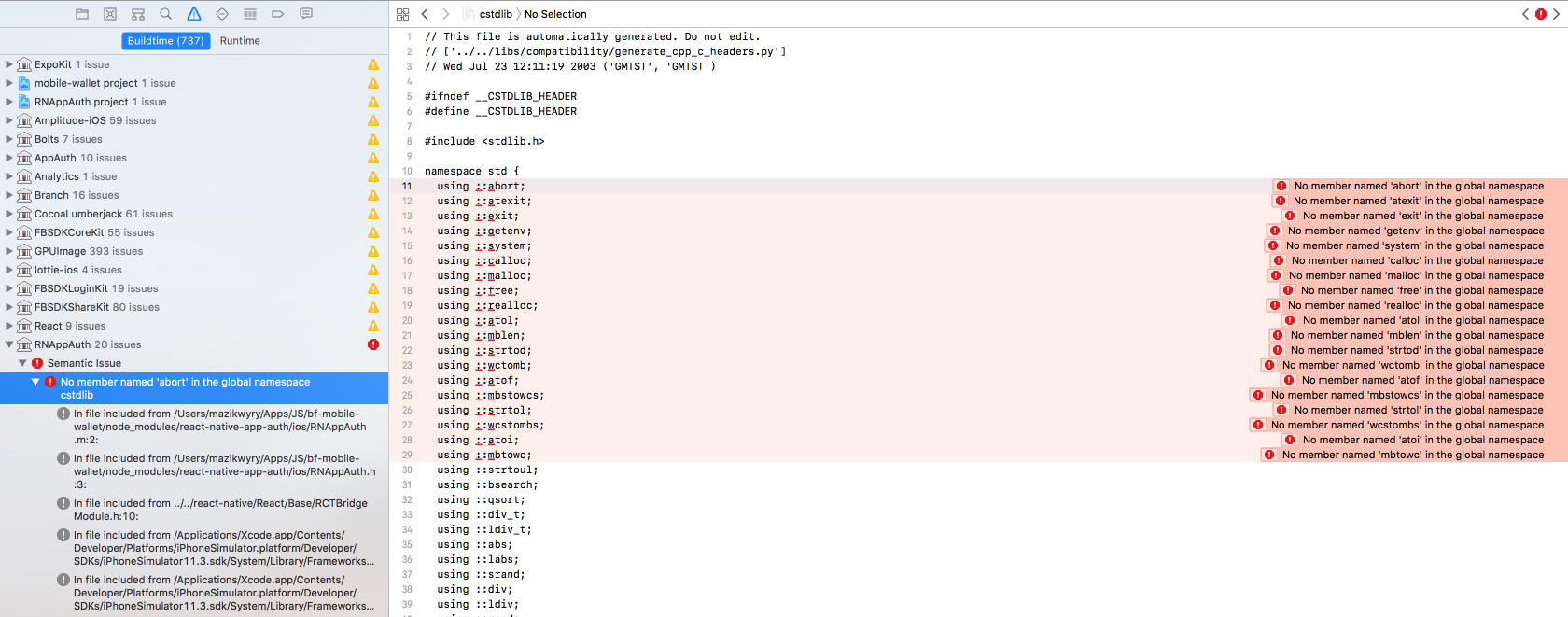
I also tried:
- Changing Target version to
9.0 - Doing it again
- Praying 🙏
Nothing helps :( Xcode Version 9.3 (9E145)
app.js
{
  "expo": {
    "sdkVersion": "26.0.0",
    "ios": {
      "bundleIdentifier": "com.xxx.xxx",
      "publishBundlePath": "ios/mobile-xxx/Supporting/shell-app.bundle",
      "publishManifestPath": "ios/mobile-xxx/Supporting/shell-app-manifest.json"
    },
    "android": {
      "package": "com.xxx.xxx"
    },
    "name": "mobile-xxx",
    "slug": "mobile-xxx",
    "version": "0.1.0",
    "isDetached": true,
    "entryPoint": "./index.js",
    "detach": {
      "scheme": "exp997ce9c6b4fd43cfa14f4eede063ecf5",
      "iosExpoViewUrl": "https://s3.amazonaws.com/exp-exponent-view-code/ios-v2.4.4-sdk26.0.0-3bd935c7-cdd3-4002-8e44-4df857a675f2.tar.gz",
      "androidExpoViewUrl": "https://s3.amazonaws.com/exp-exponent-view-code/android-v2.4.0-sdk26.0.0-e63d9209-070c-4118-b06b-c60e82da0b66.tar.gz"
    }
  }
}
package.js
{
  "name": "mobile-xxx",
  "version": "0.1.0",
  "private": true,
  "devDependencies": {
    "jest-expo": "26.0.0",
    "react-native-app-auth": "2.2.0",
    "react-test-renderer": "16.3.0-alpha.1"
  },
  "main": "node_modules/expo/AppEntry.js",
  "scripts": {
    "test": "jest"
  },
  "jest": {
    "preset": "jest-expo"
  },
  "dependencies": {
    "expo": "^26.0.0",
    "prop-types": "^15.6.1",
    "react": "16.3.0-alpha.1",
    "react-native": "https://github.com/expo/react-native/archive/sdk-26.0.0.tar.gz",
    "react-native-app-auth": "^2.2.0",
    "react-native-router-flux": "^4.0.0-beta.28",
    "react-redux": "^5.0.7",
    "redux": "^3.7.2"
  }
}
 mazikwyry
All 12 comments
Hi @mazikwyry - Expo actually comes with AppAuth already built in. It might be easier for you to use their implementation if you've already got all the Expo code in your app anyway. The API is slightly different than ours, but here are some docs for it .
Disclaimer: I've never used the Expo version, I just know it exists.
 kadikraman
on 24 Apr 2018
kadikraman
on 24 Apr 2018
Hello @kadikraman. Thanks for suggestion. I didn't know about that. Does it mean that react-native-app-auth shouldn't be use with Expo? It's not compatible? Just trying to set up totally fresh app with this package to see if it's going to work.
EDIT: I have just setup a fresh Expo app following this guide and have exactly the same error. 😞
mazikwyry
on 25 Apr 2018
@mazikwyry - it should be fine to use with Expo, just wanted to let you know there's an alternative.
Could you try running your app using react-native run-ios instead of through Xcode and see if the build still fails? (this is to see if it's an issue with the Xcode compiler)
Does the Example app in this repo work for you? (this is to confirm the problem is definitely Expo)
kadikraman
on 25 Apr 2018
@kadikraman
react-native run-ios gives exactly the same errors as XCode build.
I've just removed Expo from my project altogether and setup react-native run-ios again following the same steps and now it works, so it looks like Expo was the problem.
mazikwyry
on 26 Apr 2018
Have the same issue at my project without Expo ("react-native": "0.55.4", "react-native-app-auth":"2.4.2").
Unknown type name 'namespace'
'utility' file not found
Errors start to appear after adding to Podfile next code:
pod 'React', :path => '../node_modules/react-native', :subspecs => [
'Core',
'CxxBridge', # Include this for RN >= 0.47
'DevSupport', # Include this to enable In-App Devmenu if RN >= 0.43
'RCTText',
'RCTNetwork',
'RCTWebSocket', # Needed for debugging
'RCTAnimation', # Needed for FlatList and animations running on native UI thread
# Add any other subspecs you want to use in your project
]
# Explicitly include Yoga if you are using RN >= 0.42.0
pod 'yoga', :path => '../node_modules/react-native/ReactCommon/yoga'
pod 'DoubleConversion', :podspec => '../node_modules/react-native/third-party-podspecs/DoubleConversion.podspec'
pod 'glog', :podspec => '../node_modules/react-native/third-party-podspecs/glog.podspec'
pod 'Folly', :podspec => '../node_modules/react-native/third-party-podspecs/Folly.podspec'
Need this code to fix issue with CodePush
Any suggestions?
 blyzniuk
on 18 Jul 2018
blyzniuk
on 18 Jul 2018
Try linking the RN library through CocoaPods too, using the solution: https://sandstorm.de/de/blog/post/react-native-managing-native-dependencies-using-xcode-and-cocoapods.html
Unlink first
react-native unlink react-native-app-auth
Podfile configuration
pod 'RNAppAuth', :path => '../node_modules/react-native-app-auth/ios'
pod 'AppAuth', '>= 0.91'
 psantiagomm
on 24 Jul 2018
psantiagomm
on 24 Jul 2018
I think this issue has something to do with boost-for-react-native. Using a fresh install of react native, I compared everything (build settings, linked libraries, code) between the fresh install (which worked with react-native-app-auth) and an Expokit project. The only clue I found was that Expokit appears to include boost in the pods, where the clean install didn't.
 JulianKingman
on 2 Aug 2018
JulianKingman
on 2 Aug 2018
I've experienced and managed to solve the same issue recently. The problem is that there is an import in header search paths, which searches in the whole /ios folder:
$(SRCROOT)/../../../ios/**
If you happen to use Expo and CocoaPods, there will be boost-for-react-native as a dependency inside your Pods folder. In fact, any package depending on boost will cause this problem. XCode tries to build boost as well, but it has some non-ObjC files, so it will fail.
The solution is not to include the whole /ios folder, but only these instead:
"$(SRCROOT)/../../../ios/YOUR_PROJECT_NAME",
"$(SRCROOT)/../../../ios/Pods/AppAuth/**",
To wrap things up, you can make it work by opening RNAppAuth.xcodeproj, switching to Build Settings tab and searching for header search paths, then replacing the above mentioned lines.
I'm still thinking about how this issue could be solved without hardcoding the project name. If I find a solution, I'm happy to make it into a pull request.
 Peter-Nagy
on 11 Aug 2018
Peter-Nagy
on 11 Aug 2018
I wanted to make this into a pull request but I've just discovered that it was fixed by this commit.
I think this issue can be closed now.
Peter-Nagy
on 17 Aug 2018
Thanks @Peter-Nagy - closing 🙅
kadikraman
on 6 Sep 2018
Have the same issue at my project without Expo ("react-native": "0.55.4", "react-native-app-auth":"2.4.2").
Unknown type name 'namespace'
'utility' file not found
Errors start to appear after adding to Podfile next code:
pod 'React', :path => '../node_modules/react-native', :subspecs => [
   'Core',
   'CxxBridge', # Include this for RN >= 0.47
   'DevSupport', # Include this to enable In-App Devmenu if RN >= 0.43
   'RCTText',
   'RCTNetwork',
   'RCTWebSocket', # Needed for debugging
   'RCTAnimation', # Needed for FlatList and animations running on native UI thread
   # Add any other subspecs you want to use in your project
]
# Explicitly include Yoga if you are using RN >= 0.42.0
pod 'yoga', :path => '../node_modules/react-native/ReactCommon/yoga'
pod 'DoubleConversion', :podspec => '../node_modules/react-native/third-party-podspecs/DoubleConversion.podspec'
pod 'glog', :podspec => '../node_modules/react-native/third-party-podspecs/glog.podspec'
pod 'Folly', :podspec => '../node_modules/react-native/third-party-podspecs/Folly.podspec'
Need this code to fix issue with CodePush
Any suggestions?
@blyzniuk did you fix this issue? i am facing it.
 HannanShaikYara
on 4 Oct 2018
HannanShaikYara
on 4 Oct 2018
@Peter-Nagy
Thanks. Removing Pods ... recursive from Header Search Paths fixed it for me
 kesha-antonov
on 13 May 2019
kesha-antonov
on 13 May 2019
Related issues
 zyofeng
·
3Comments
zyofeng
·
3Comments
 ahaider48
·
7Comments
ahaider48
·
7Comments
 janpieterz
·
4Comments
janpieterz
·
4Comments
 jevakallio
·
5Comments
jevakallio
·
5Comments
 Jarzka
·
4Comments
Jarzka
·
4Comments
Most helpful comment
I've experienced and managed to solve the same issue recently. The problem is that there is an import in header search paths, which searches in the whole
/iosfolder:$(SRCROOT)/../../../ios/**If you happen to use Expo and CocoaPods, there will be
boost-for-react-nativeas a dependency inside your Pods folder. In fact, any package depending on boost will cause this problem. XCode tries to build boost as well, but it has some non-ObjC files, so it will fail.The solution is not to include the whole /ios folder, but only these instead:
To wrap things up, you can make it work by opening
RNAppAuth.xcodeproj, switching toBuild Settingstab and searching forheader search paths, then replacing the above mentioned lines.I'm still thinking about how this issue could be solved without hardcoding the project name. If I find a solution, I'm happy to make it into a pull request.