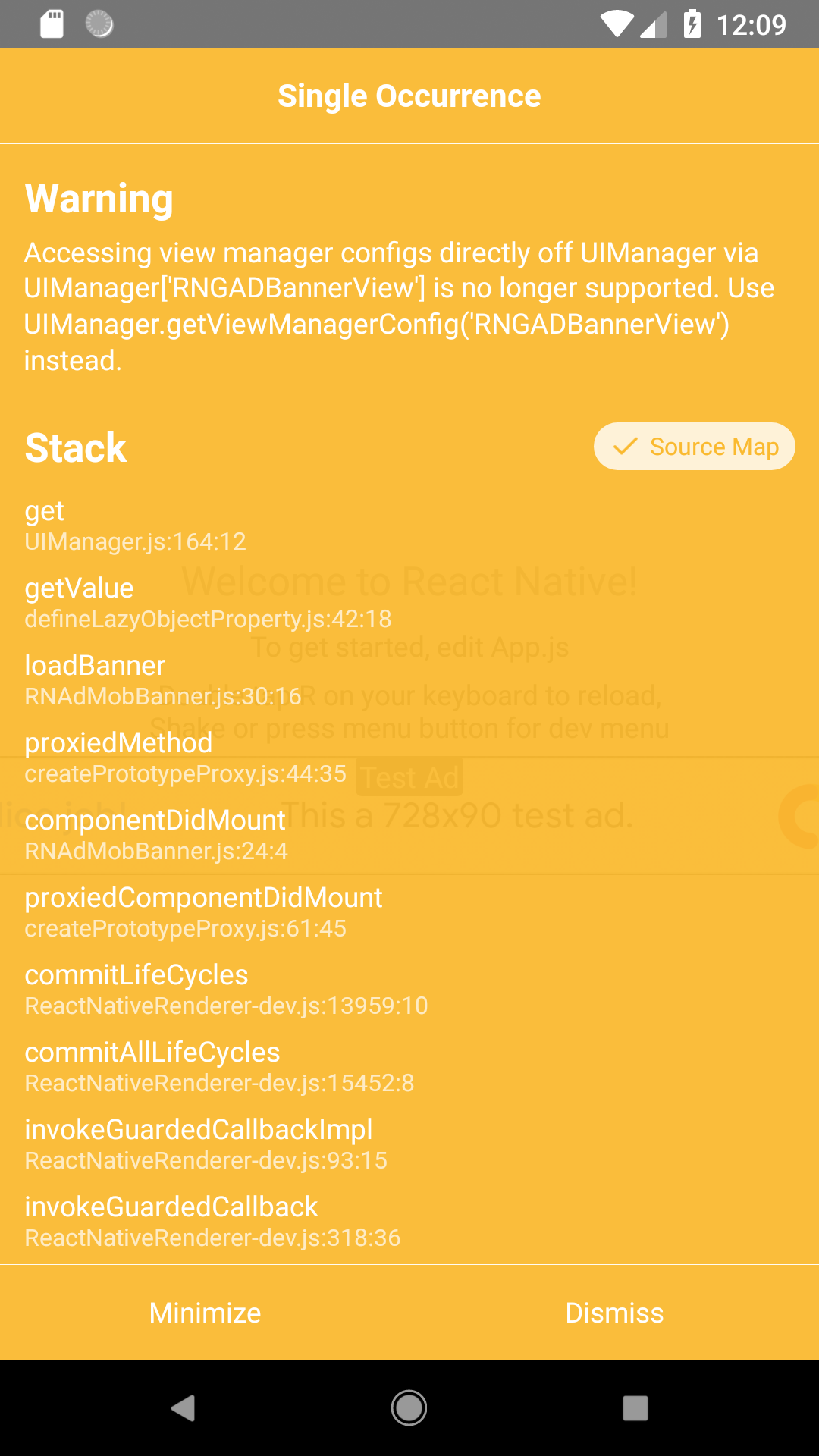
React-native-admob: Accessing view manager configs directly off UIManager via UIManager['RNGADBannerView'] is no longer supported
Will it be updated ?
or we can update it somewhere inside native-modules ?
Help !
 alphabikram
All 10 comments
I need to know about this too !
 PedroFonseca17
on 27 Feb 2019
PedroFonseca17
on 27 Feb 2019
I just started using this lib, and this is popping up for me as well.
 DoWhileGeek
on 28 Feb 2019
DoWhileGeek
on 28 Feb 2019
All,
I've fixed this issue on my environment.
- Go to node_modules/react-native-admob folder
- In the file RNAdMobBanner.js, go to line 30
- Change to UIManager.RNDFPBannerView.Commands.loadBanner, to UIManager.getViewManagerConfig('RNGADBannerView').Commands.loadBanner,
Re-build and reload.
Note, I am not using PublisherBanner but if you do, then you also have to change it in RNPublisherBanner.js, line 31
 flagman5
on 28 Feb 2019
flagman5
on 28 Feb 2019
I wish we could get this merged into master
DoWhileGeek
on 28 Feb 2019
I completely ditched off this library and used from firebase & saved my life :) :)
alphabikram
on 2 Mar 2019
I completely ditched off this library and used from firebase & saved my life :) :)
can you till me how?
 baselbj
on 10 Mar 2019
baselbj
on 10 Mar 2019
@baselbj it's simple uninstall react-native-admob and following the instruction to use firebase admob.
alphabikram
on 14 Mar 2019
@octopusbaba I am now using firebase admob. for me I prefer simple library but unfortunately this library has many issues
baselbj
on 16 Mar 2019
I use PublisherBanner and the @flagman5 works for me. Thanks :)
loadBanner() {
    UIManager.dispatchViewManagerCommand(
      findNodeHandle(this._bannerView),
      //UIManager.RNDFPBannerView.Commands.loadBanner,  **<== Comment or replace this line**
      UIManager.getViewManagerConfig('RNDFPBannerView').Commands.loadBanner, **<== Add this line**
      null,
    );
  }
 davidcort
on 21 Mar 2019
davidcort
on 21 Mar 2019
I just copied the RNAdMobBanner.js to an Overrides folder in my src/ and dus did
import AdMobBanner from "../Overrides/RNAdMobBanner";
in stead of import {AdMobBanner} from "react-native-admob";
Code can be found here:
(I just changed the line 30 code @flagman5 suggested and changed import { createErrorFromErrorData } from './utils;
to
import { createErrorFromErrorData } from 'react-native-admob/utils';
New RNAdMobBanner.js:
``` import React, { Component } from 'react';
import {
requireNativeComponent,
UIManager,
findNodeHandle,
ViewPropTypes,
} from 'react-native';
import { string, func, arrayOf } from 'prop-types';
import { createErrorFromErrorData } from 'react-native-admob/utils';
class AdMobBanner extends Component {
constructor() {
super();
this.handleSizeChange = this.handleSizeChange.bind(this);
this.handleAdFailedToLoad = this.handleAdFailedToLoad.bind(this);
this.state = {
style: {},
};
}
componentDidMount() {
this.loadBanner();
}
loadBanner() {
UIManager.dispatchViewManagerCommand(
findNodeHandle(this._bannerView),
UIManager.getViewManagerConfig('RNGADBannerView').Commands.loadBanner,
null,
);
}
handleSizeChange(event) {
const { height, width } = event.nativeEvent;
this.setState({ style: { width, height } });
if (this.props.onSizeChange) {
this.props.onSizeChange({ width, height });
}
}
handleAdFailedToLoad(event) {
if (this.props.onAdFailedToLoad) {
this.props.onAdFailedToLoad(createErrorFromErrorData(event.nativeEvent.error));
}
}
render() {
return (
style={[this.props.style, this.state.style]}
onSizeChange={this.handleSizeChange}
onAdFailedToLoad={this.handleAdFailedToLoad}
ref={el => (this._bannerView = el)}
/>
);
}
}
AdMobBanner.simulatorId = 'SIMULATOR';
AdMobBanner.propTypes = {
...ViewPropTypes,
/**
- AdMob iOS library banner size constants
- (https://developers.google.com/admob/ios/banner)
- banner (320x50, Standard Banner for Phones and Tablets)
- largeBanner (320x100, Large Banner for Phones and Tablets)
- mediumRectangle (300x250, IAB Medium Rectangle for Phones and Tablets)
- fullBanner (468x60, IAB Full-Size Banner for Tablets)
- leaderboard (728x90, IAB Leaderboard for Tablets)
- smartBannerPortrait (Screen width x 32|50|90, Smart Banner for Phones and Tablets)
- smartBannerLandscape (Screen width x 32|50|90, Smart Banner for Phones and Tablets)
* - banner is default
*/
adSize: string,
/**
- AdMob ad unit ID
*/
adUnitID: string,
/**
- Array of test devices. Use AdMobBanner.simulatorId for the simulator
*/
testDevices: arrayOf(string),
/**
- AdMob iOS library events
*/
onSizeChange: func,
onAdLoaded: func,
onAdFailedToLoad: func,
onAdOpened: func,
onAdClosed: func,
onAdLeftApplication: func,
};
const RNGADBannerView = requireNativeComponent('RNGADBannerView', AdMobBanner);
export default AdMobBanner;
```
 mikebouwmans
on 30 May 2019
mikebouwmans
on 30 May 2019
Related issues
 giladno
·
6Comments
giladno
·
6Comments
 shinriyo
·
3Comments
shinriyo
·
3Comments
 xencodes
·
5Comments
xencodes
·
5Comments
 brkrtp
·
3Comments
brkrtp
·
3Comments
 kanekotic
·
6Comments
kanekotic
·
6Comments
Most helpful comment
All,
I've fixed this issue on my environment.
Re-build and reload.
Note, I am not using PublisherBanner but if you do, then you also have to change it in RNPublisherBanner.js, line 31