React-native-admob: AdMobInterstitial undefined is not a function
import { AdMobInterstitial } from 'react-native-admob';
...
componentDidMount() {
      AdMobInterstitial.setTestDeviceID('EMULATOR').catch(error => console.warn(error));
      AdMobInterstitial.setAdUnitID(admobInterstitialUnitId).catch(error => console.warn(error));
      AdMobInterstitial.requestAd().catch(error => console.warn(error));
  }
I am getting error below. All i have done like example codes here but it is not working. I have checked the build.gradle, settings.gradle, MainApplication.java. All files are same with example of this page.

 aligenc
All 3 comments
I am getting the same error too.
Edit: I've fixed it.
My code;
AdMobInterstitial.setAdUnitID('ca-app-pub-3940256099942544/1033173712');
AdMobInterstitial.requestAd().then(() => AdMobInterstitial.showAd());
 yildiz
on 13 Jun 2018
yildiz
on 13 Jun 2018
You can put Sample ad Unit ID for testing or Original ad Unit Id which you might be created
I use sample ad unit Id here,
componentWillMount() {
AdMobInterstitial.setAdUnitID('ca-app-pub-3940256099942544/1033173712');
AdMobInterstitial.setTestDevices([AdMobInterstitial.simulatorId]);
AdMobInterstitial.requestAd().then(() => AdMobInterstitial.showAd());
}
You can refer to this link:
https://react-native-solutions.blogspot.com/2018/07/how-to-create-react-native-app-with.html
 Verma-Pooja
on 13 Jul 2018
Verma-Pooja
on 13 Jul 2018
You can put Sample ad Unit ID for testing or Original ad Unit Id which you might be created
I use sample ad unit Id here,componentWillMount() {
AdMobInterstitial.setAdUnitID('ca-app-pub-3940256099942544/1033173712');
AdMobInterstitial.setTestDevices([AdMobInterstitial.simulatorId]);
AdMobInterstitial.requestAd().then(() => AdMobInterstitial.showAd());
}You can refer to this link:
https://react-native-solutions.blogspot.com/2018/07/how-to-create-react-native-app-with.html
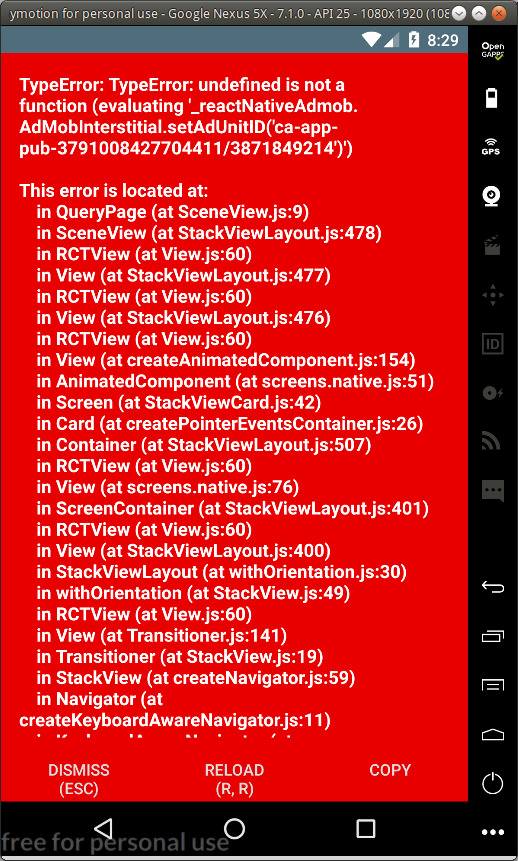
I have used your example. And exactly the code (replacing the admobUnitId with mine). I am still getting the error similar to the above (undefined is not a function) - see attached snapshot.
Very strange indeed.
react-native-admob:2.0.0-beta.5
EDITED: I have fixed the problem
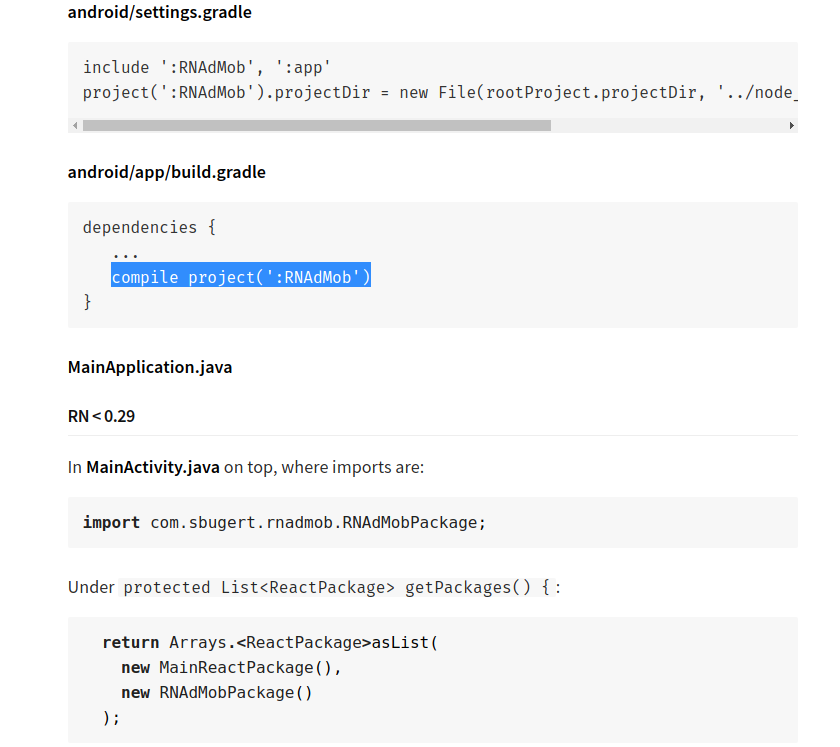
Basically, I still need to link the native code even while using the simulator (bugger me!)
I forgot to do all the android native library linkage. Once I complete all the manual step, everything compiled and run perfectly. My mistake!
Below is an example. Reply to this message if you want more details!
 yazidIT
on 18 Oct 2018
yazidIT
on 18 Oct 2018
Related issues
 jonigl
·
4Comments
jonigl
·
4Comments
 ozmaat
·
3Comments
ozmaat
·
3Comments
 danvass
·
6Comments
danvass
·
6Comments
 priya-vr
·
3Comments
priya-vr
·
3Comments
 EpicNem
·
6Comments
EpicNem
·
6Comments
Most helpful comment
I have used your example. And exactly the code (replacing the admobUnitId with mine). I am still getting the error similar to the above (undefined is not a function) - see attached snapshot.
Very strange indeed.

react-native-admob:2.0.0-beta.5
EDITED: I have fixed the problem
Basically, I still need to link the native code even while using the simulator (bugger me!)
I forgot to do all the android native library linkage. Once I complete all the manual step, everything compiled and run perfectly. My mistake!
Below is an example. Reply to this message if you want more details!