React-modal: Excessive amount of portals in dom
Summary:
Hi, it's rather a question (not sure if an issue but wanted to bring your attention to this case), if portals should be created even when Modal has isOpen state set to false. We are having quite a big app with many items opening modals. Version used is: "react-modal": "3.6.1". Whenever we use modal and leave mounting / showing logic to be handled there - we end up with having an outrageous number of portals been created.
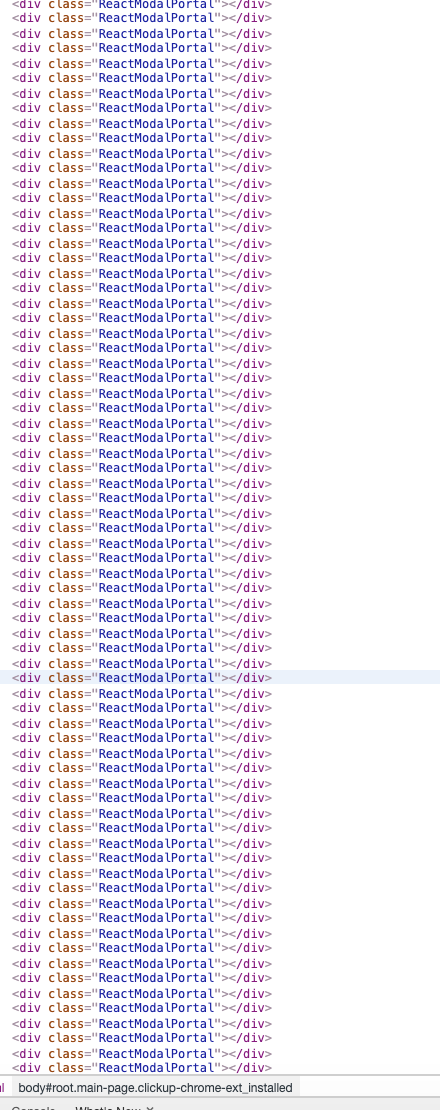
Is there a reason you create them on ''mount'' even though the isOpen state is set to false?
I tried to handle this by doing conditional render on modal, but that is duplicating logic both in component and in modal.
Thanks!
Steps to reproduce:
1.
2.
3.
Expected behavior:
I Would expect React Modal Portal to be created on Modal's Open event.
Link to example of issue:
Additional notes:
 tomsonpl
All 14 comments
Same here
 adambartniak
on 17 Jun 2019
adambartniak
on 17 Jun 2019
Hi @tomsonpl @adambartniak, can you make a reproducible example, please?
 diasbruno
on 17 Jun 2019
diasbruno
on 17 Jun 2019
@tomsonpl Seems that everytime you create a
This is the code I used before that had lots of portal classes, like in your case
                    <Modal
                        className="crm-modal"
                        isOpen={this.modalIsOpen}
                        contentLabel="Example Modal"
                        onRequestClose={this.closeActivityModal}
                    >
                        <div>I am a modal</div>
                        <button onClick={this.closeActivityModal}>close</button>
                        <form>
                            <input/>
                        </form>
                    </Modal>
and here is the same code that I updated so that it only shows the modal if it's supposed to be open. This only generates 1 portal class for each open modal. I wonder if there's any downside to it though. The functionality seems to be the same.
                {this.modalIsOpen ?
                    (<Modal
                        className="crm-modal"
                        isOpen={true}
                        contentLabel="Example Modal"
                        onRequestClose={this.closeActivityModal}
                    >
                        <div>I am a modal</div>
                        <button onClick={this.closeActivityModal}>close</button>
                        <form>
                            <input/>
                        </form>
                    </Modal>)
                    : null
                }
 pixelplant
on 2 Aug 2019
pixelplant
on 2 Aug 2019
@pixelplant this is exactly the case, and exactly how I tried to work around it. However it doesnt seem clear to have opening logic duplicated. {this.modalIsOpen ? and isOpen={true} while we could have it in isOpen={this.modalIsOpen} only.
tomsonpl
on 6 Aug 2019
pen modal. I wonder if there's any downside to it though. The functionality seems to be the same.
Do you have transition for modals? Does it work as expected?
 universse
on 27 Aug 2019
universse
on 27 Aug 2019
@tomsonpl @universse @pixelplant @adambartniak
Each modal you instantiate will create an element that is used by createPortal (react 16+) or renderSubtreeIntoContainer (react 16-) to place the modal.
Hope this clarifies what is going on.
diasbruno
on 27 Aug 2019
@diasbruno thanks, however this does not answer "WHY" ;p what is the upside of handling "OPEN state" inside modal, against conditional rendering the whole modal in the first place. It doesn't sound sane to render PORTAL x 50, when you can have just one.
tomsonpl
on 27 Aug 2019
On previous version of react 16-, renderSubtreeIntoContainer needs a clean element to mount the new tree, otherwise it will clear the node to place it. So, this was kept to make react-modal backwards compartible.
diasbruno
on 27 Aug 2019
You can have a look on this https://codesandbox.io/s/condescending-chebyshev-7jl2i and change the react and react-dom versions to see the behavior.
diasbruno
on 27 Aug 2019
@tomsonpl Is your component, that contains the modal, rendered in a list?
diasbruno
on 27 Aug 2019
Hello, @diasbruno the question is whether it is possible to conditionally render React.createPortal for projects with React v16 or above. The condition would be modal open state.
I see the argument behind backward compatibility and code coherence, but, to begin with, do we really need to keep backward compatibility for React lower than v16, I suggest major version bump and provide the best experience for developers using current React major version. Of course only when we establish that this is possible as asked above.
Considering using modals in lists, it is always possible to use less modals, or move them up the component tree, but that binds users to specifically think about optimization solely because or react-modal package. Furthermore, it almost always increases code complexity, so not always a good solution.
My point is to present my own use case issue and to suggest possible solution, your decision though. I will use react-modal anyway, because it is a great work :) Thanks!
 mchl-hub
on 28 Aug 2019
mchl-hub
on 28 Aug 2019
the question is whether it is possible to conditionally render React.createPortal for projects with React v16 or above.
We have an issue related to this. Unfortunately, conditional render, in react 16+, will kill the modal before it got time to finish the transitions. So, I can only recommend if you don't need transitions.
[this may be outdated, I need to check this again]
I see the argument behind backward compatibility and code coherence, but, to begin with, do we really need to keep backward compatibility for React lower than v16, I suggest major version bump and provide the best experience for developers using current React major version. Of course only when we establish that this is possible as asked above.
It seems the way to go. I just don't have time to work on this, but I can help if someone wants to work on this.
Considering using modals in lists, it is always possible to use less modals, or move them up the component tree, but that binds users to specifically think about optimization solely because or react-modal package. Furthermore, it almost always increases code complexity, so not always a good solution.
There will always be some situations where the developer needs to investigate and find a nice solution for a given problem. In this case, it's just how react-modal is implemented today. I guess it just a matter of someone provide a solution for this problem.
Also, contributions are always welcome and I'll do my best to review and accept them.
diasbruno
on 28 Aug 2019
Hello, @diasbruno just wanted to check in and see if this was anywhere in the pipeline, or if anything has changed between then and now. Thanks!
 VicFrolov
on 15 Dec 2020
VicFrolov
on 15 Dec 2020
@VicFrolov No...sorry.
diasbruno
on 16 Dec 2020
Related issues
 CXJoyce
·
4Comments
CXJoyce
·
4Comments
 ChristopherVH
·
3Comments
ChristopherVH
·
3Comments
 claydiffrient
·
4Comments
claydiffrient
·
4Comments
 sizeight
·
3Comments
sizeight
·
3Comments
 jrock17
·
4Comments
jrock17
·
4Comments
Most helpful comment
@tomsonpl Seems that everytime you create a tag it adds a portal class for it.
This is the code I used before that had lots of portal classes, like in your case
and here is the same code that I updated so that it only shows the modal if it's supposed to be open. This only generates 1 portal class for each open modal. I wonder if there's any downside to it though. The functionality seems to be the same.