React-modal: How to allow scrolling on modal if window is too small
Summary:
Hey, I'm having trouble with some styling of this library. I know its not a bug per-se, but figured it might be good to explore if anyone else has had or solved this issue. By default, the styling of the modal is not responsive, in that if you make the window height less than the modal height, you're not able to scroll the modal. This can be fixed by using a fixed height modal, but using a fixed height modal is restrictive on larger screens.
After some testing, I feel like there is a good solution to this using flexbox, but I haven't managed to find it yet.
TL;DR I'm trying to have a modal fit to its contents, but scroll if the window is too small.
Expected Behaviour
I'm trying to get the modal to function similarly to this codepen: https://codepen.io/anon/pen/Rodxjx
 johnwiseheart
All 10 comments
@johnwiseheart there is PR #281 which I think It will allow the content of overlay to scroll (modal is inside the overlay).
 diasbruno
on 26 Dec 2016
diasbruno
on 26 Dec 2016
I solved the problem by giving the modal max-height: 100vh (that is the height of the viewport) and an overflow-y: auto. This way, if the height of the modal is more than the height of the viewport (for example when you bring up the keyboard to fill a text input) the modal adjusts its height to the height of the viewport, allowing you to scroll.
 igghera
on 23 May 2018
igghera
on 23 May 2018
This fixes it:
ReactModal.defaultStyles = {} // Flushes all of react-modal's styles
.ReactModal__Html--open,
.ReactModal__Body--open {
  overflow: hidden; /* prevents background page from scrolling when the modal is open */
}

.ReactModal__Overlay {
  position: fixed;
  z-index: 999999;
  top: 0;
  left: 0;
  width: 100vw;
  height: 100vh;
  background: rgba(0, 0, 0, 0.5);
  display: flex;
  align-items: center;
  justify-content: center;
}

.ReactModal__Content {
  background: white;
  width: 50rem;
  max-width: calc(100vw - 2rem);
  max-height: calc(100vh - 2rem);
  box-shadow: 0 0 30px 0 rgba(0, 0, 0, 0.25);
  overflow-y: auto;
  position: relative;
}

.modal-close-btn {
  cursor: pointer;
  top: 1.5rem;
  right: 1.5rem;
  position: absolute;
  width: 3rem;
  height: 3rem;
}
tbh the maintainers could/should do a major bump and assign .ReactModal__Overlay's styles to .ReactModalPortal, then assign .ReactModal__Content's styles to .ReactModal__Overlay.
Then they could get rid of the .ReactModal__Overlay <div> all together while fixing this gross scrolling bug.
 corysimmons
on 4 Jun 2019
corysimmons
on 4 Jun 2019
Hey @corysimmons, thanks for having a look at this.
Can you try to make a PR to show how this would work?
diasbruno
on 4 Jun 2019
@diasbruno Yup sure can. Busy the next few days but might have some time over the weekend to prepare something. It's really not much more than what I posted above, but happy to PR. Adding this to my GH Todo. If I forget by this weekend, someone ping me.
corysimmons
on 4 Jun 2019
Sorry, still working on work-work stuff... 😩
Here's what I've got:

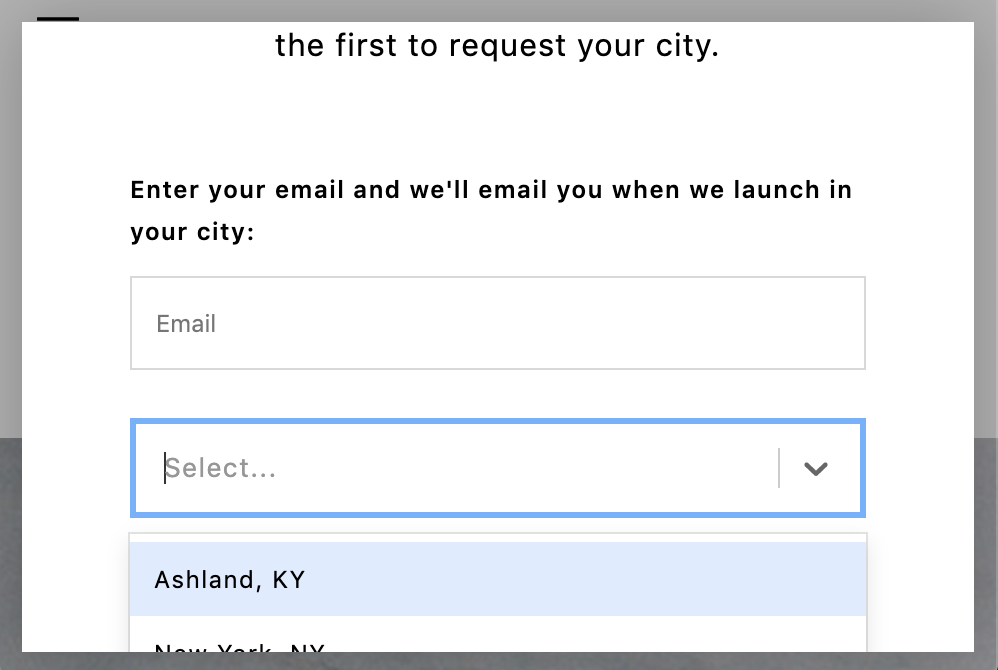
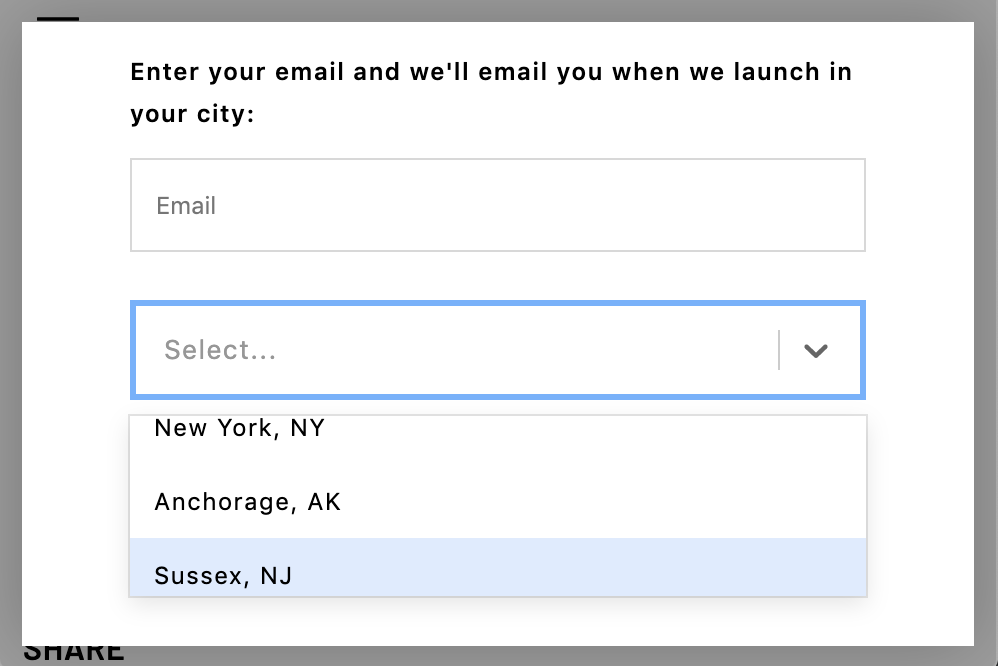
Code I'm using: https://gist.github.com/corysimmons/c1adcc4af71e7d9eb9ced0437bd208d6
The relevant bit:
.ReactModal__Html--open,
.ReactModal__Body--open {
  overflow: hidden;
}

.ReactModal__Overlay {
  position: fixed;
  z-index: 999999;
  top: 0;
  left: 0;
  width: 100vw;
  height: 100vh;
  background: rgba(0, 0, 0, 0.3);
  display: flex;
  align-items: center;
  justify-content: center;
}

.ReactModal__Content {
  background: white;
  outline: none;
  width: 50rem;
  max-width: calc(100vw - 2rem);
  max-height: calc(100vh - 2rem);
  box-shadow: 0 0 34px 0 rgba(0, 0, 0, 0.24);
  overflow-y: auto;
  position: relative;
}
My current approach isn't getting rid of the superfluous wrapping div. I think it's 100% possible to get rid of .ReactModal__Overlay and just put those styles directly on .ReactModalPortal.
corysimmons
on 8 Jun 2019
Did anyone ever figure this out?
 justinledelson
on 30 Apr 2021
justinledelson
on 30 Apr 2021
@justinledelson It's insane you commented on this. I literally just implemented this and was looking at this issue for my Gist after years. Anyway, my Gist still works great. Just copy/paste it and go from there.
corysimmons
on 30 Apr 2021
@corysimmons's implementation also works, but I'd recommend this way just to separate the modal from the scroll component.
How to make a scrollable container
react-modal is responsible to provide a frame where you can add your content.
To add a scroll, you can add these elements and styles.
<Modal ...>
   <div className="scroll-component">
      <div className="scroll-content">
          <Content ... />
      </div>
   </div>
</Modal>
The .scroll-component must have the save frame size as the .ReactModal__Content.
.scroll-component {
   width: 100%;
   height: 100%;
   overflow-y: auto;
}

.scroll-content { /* doesn't need anything... */ }
I'm closing this issue, since it's not react-modal responsibility. Please, feel free to reopen if none of the suggestions works or any questions.
diasbruno
on 30 Apr 2021
Related issues
 jrock17
·
4Comments
jrock17
·
4Comments
 davidmfoley
·
3Comments
davidmfoley
·
3Comments
 CXJoyce
·
4Comments
CXJoyce
·
4Comments
 claydiffrient
·
4Comments
claydiffrient
·
4Comments
 shmekla
·
3Comments
shmekla
·
3Comments
Most helpful comment
I solved the problem by giving the modal
max-height: 100vh(that is the height of the viewport) and anoverflow-y: auto. This way, if the height of the modal is more than the height of the viewport (for example when you bring up the keyboard to fill a text input) the modal adjusts its height to the height of the viewport, allowing you to scroll.