React-md: [DatePicker] - Wrong month names with preset value
Description
When a value or a default value is set on the component with a date turning point the date selector shows wrong month names.
Here is an example. I'm in GMT+1 and if I set the value to new Date(2017, 10, 21, 0, 0, 0) the following happens:
- The input field and the calendar sidebar will show 11/20/2017 selected correctly and the calendar title will show November 2017
- Clicking on the next month selector the calendar title will still show November 2017 but the days and weeks will change
- Clicking on the previous month selector the calendar title will show October 2017, but the days and weeks will actually show November
- Selecting a date will pick the correct value
By setting the value to new Date(2017, 10, 21, 2, 0, 0) this issue is not reproducible.
I've also noticed the following two issues:
- The days within the months are shown incorrectly, e.g. November starts with the date 30 and ends with the date 30
- The current date is shown correctly in the sidebar but incorrectly in the calendar, the previous day is highlighted as the current date and is selected by default
Version
- React - 16.1.1
- React-MD - 1.2.8
- Browser - Reproducible on Chrome, Safari, Firefox, Opera
 gyurist
All 14 comments
I think this might be related to this fix.
 mlaursen
on 22 Nov 2017
mlaursen
on 22 Nov 2017
Hi @gyurist ...
- Is the DatePicker docs page working OK for you in the timezone where you found the bug? ...
- Is the bug appearing only when you set defaultValue ?, what about value?
I might have introduced this bug in the fix mentioned by @mlaursen
😓
 hisapy
on 22 Nov 2017
hisapy
on 22 Nov 2017
Hey @hisapy,
- No, I forgot to mention it in the description but the issue is reproducible on the documentation page
- The bug appears both for the
valueanddefaultValueproperties
Thank's for looking into it!
I'll dig into the source code as well if I have some free time on my hands.
gyurist
on 22 Nov 2017
Hello again @gyurist
I tried to reproduce the bug in the Docs page as well as in my localhost but couldn't. I'm on GMT-3. I'll see if I can setup an environment on GMT+1 to reproduce it hopefully this weekend.
In the meantime, could you please provide us with some screenshots of the component and your react console?
hisapy
on 24 Nov 2017
Hey @hisapy,
I'll make some screenshots but if you have access to BrowserStack Live - they have a 30 minute free trial - you can quickly check it, they seem to be in the same timezone so the error is reproducible on the docs page.
gyurist
on 24 Nov 2017
Hi guys,
I have experienced this problem too.
Scenario 1: When the page loads
Please see screen shot attached. When the page _initially loads_ the intended date is Friday 8th December 2017 which appears in the text area, however when opening the date modal Thursday 7th December 2017 is displayed.
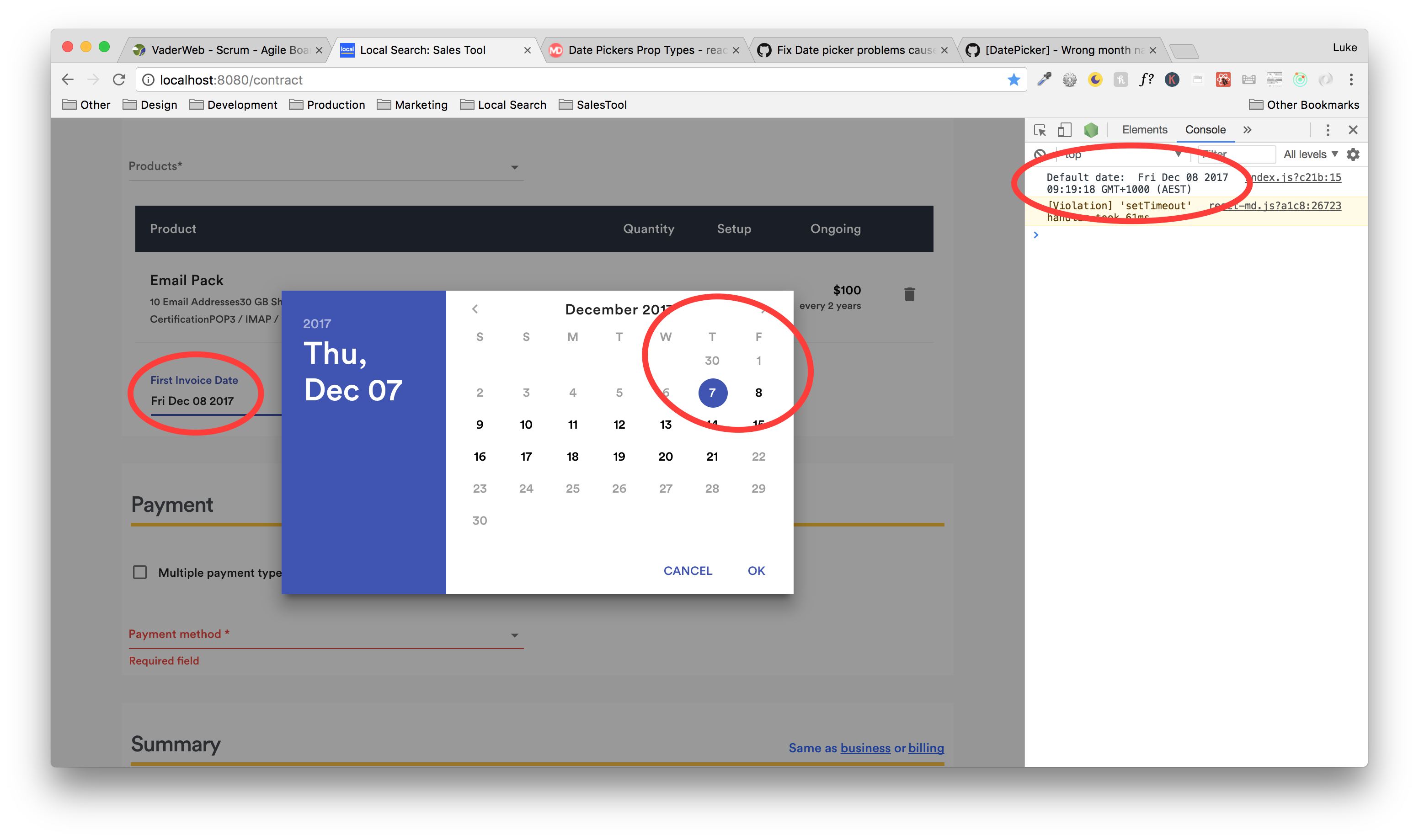
Scenario 2: Changing the date after the page has loaded
This is similar behavior to scenario 1 that occurs when _changing_ the date. For example, if i change the date to Tuesday 12th December, Monday 11th December will appear in the text area.
Interestingly, scenario 1 will always happen. Scenario 2 is intermittent - it will happen about 90% of time - the other 10% of the time it will work as expected.
Has there been any progress on this matter? Happy to provide further info as needed.
Thanks
 lukedarmanin
on 8 Dec 2017
lukedarmanin
on 8 Dec 2017
This is still existent even on the demo page (GMT + 5.30)
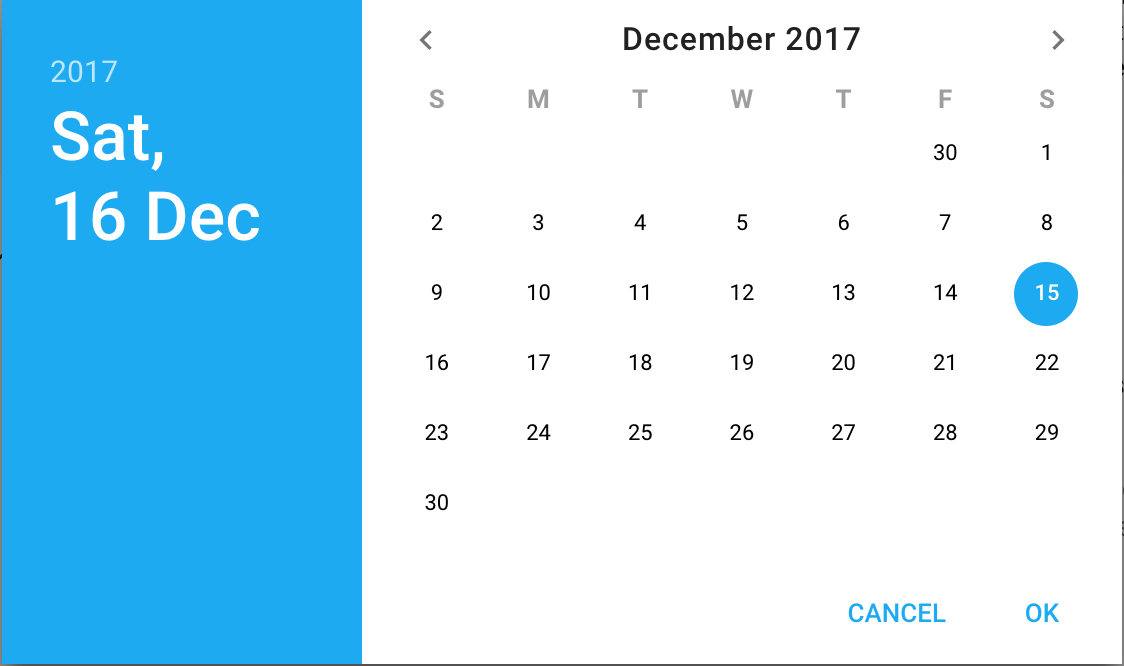
UPDATE: Goes off when reverted to v1.2.4
 tanmay-gp
on 16 Dec 2017
tanmay-gp
on 16 Dec 2017
I didn't have the time to fix this for timezones > 0.00 ... Hopefully, I'd be able to work on this next week after some deadlines I have to meet.
Anyway, what happens if you manually provide the prop formatOptions={timeZone: 'UTC'} to your DatePicker ?
hisapy
on 16 Dec 2017
Here's a little update for this issue:
I had to make a different DatePicker for work that has solved most of the date problems that we are seeing here and are finishing QA on them by next Thursday. Once it is done with QA, I'll start working on moving the correct logic into here. I'm hoping I can get the date fixes into a patch instead of a major/minor release, but if it can't I'll put them in the 1.3.0 release. In 2.0.0 or 1.3.0 I'll also be adding some newer Date, Time, and DateTime pickers that will allow for text input as well.
mlaursen
on 5 Jan 2018
@mlaursen any update on this one?
tanmay-gp
on 23 Jan 2018
Sorry, still doing heavy QA, and I'm a bit burnt out so it's hard to apply the fixes after work. I'm hoping to include the fixes by this or next Friday in the 1.2.12 release. Sorry about the delay!
mlaursen
on 30 Jan 2018
For anyone watching this thread.. I have a PR up #680 with the new logic. I'm going to be testing a bit more to make sure I applied it correctly since there were different features between the date pickers, but it is looking good in the first few timezone tests I ran.
This should hopefully be released in 1.2.12 by Friday Feb 9.
EDIT: The changes should now be live at https://react-md.mlaursen.com/components/pickers/date and [email protected] if you'd like to check as well.
mlaursen
on 7 Feb 2018
Hi,
Just tried with your last beta (1.2.12-beta.2) and now the Datepicker works like a charm! (at least I don't see the bugs like before)
Thanks a lot @mlaursen
 M-Blobby
on 5 Mar 2018
M-Blobby
on 5 Mar 2018
Glad it works for you! I think I am going to do something terrible and release this as 1.2.12 today even though I messed up the backwards compatibility if using the timeZone prop. I don't know how to keep the newer "correct" date logic as well as supporting the timeZone, so I would not update to 1.2.12 if you were using that.
_Hopefully_ this isn't too bad since now there are yarn.lock and package.lock files so it won't automatically be pulled the next time the modules are installed. I just really need to release a new fix or else I'll keep being stagnant at 1.2.11
I still think the eventual fix for this will be the new date and time picker implementations that I've started in #677 that'll have to be in my next major release since it changes a lot. Sorry for any bugs or inconveniences this might cause, but hopefully it will just fix the weird display errors for the majority of users.
mlaursen
on 16 Mar 2018
Related issues
 frol
·
3Comments
frol
·
3Comments
 yoshi415
·
6Comments
frol
·
7Comments
mlaursen
·
8Comments
yoshi415
·
6Comments
frol
·
7Comments
mlaursen
·
8Comments
 aleksanderd
·
7Comments
aleksanderd
·
7Comments
Most helpful comment
@mlaursen any update on this one?