React-map-gl: How to update e.point reference obtained from onClick event map when map change the zoom or drag it?
I'm getting the x and y coordinates relative to the viewport when I click in to the map to add a new marker using e.point[0] and e.point[1] provided by onClick event, the problem comes when the user pan or change the zoom in to the map I need to recalculate them to get the new values.
I tried the get that point property related to the <Marker> object but it's not available. Other approach was gather de objects inside an array to read again the e.point values with onInteractionStateChange event, but they aren't updated and I get the initial values.
_Summarized code approach_
const [clickedPoint, setClickedPoint] = useState([])
const [stateMarkers, setStateMarkers] = useState([]);

const mapClicked = e => {
      setClickedPoint(clickedPoint => clickedPoint.concat(e))
      const newMarker = stateMarkers.concat({
        latitude: e.lngLat[1],
        longitude: e.lngLat[0],
        x: e.point[0],
        y: e.point[1]
      });
      setStateMarkers(newMarker);
  };

const mapInteracting = e => {
    console.log( clickedPoint); // No updated e.point values 😥
}

return(
<>
     <ReactMapGL
        onClick={e => mapClicked(e)}
        onInteractionStateChange={ e => mapInteracting (e)}
      >
       {stateMarkers.map((localState, index) => (
          <Marker
            ref={markerRef || index}
            key={index}
            offsetTop={-10}
            offsetLeft={-10}
            latitude={localState.latitude}
            longitude={localState.longitude}
          >
            <img src={require("../assets/markers-icon.svg")} />
          </Marker>
        ))}
      </ReactMapGL>
<>
)
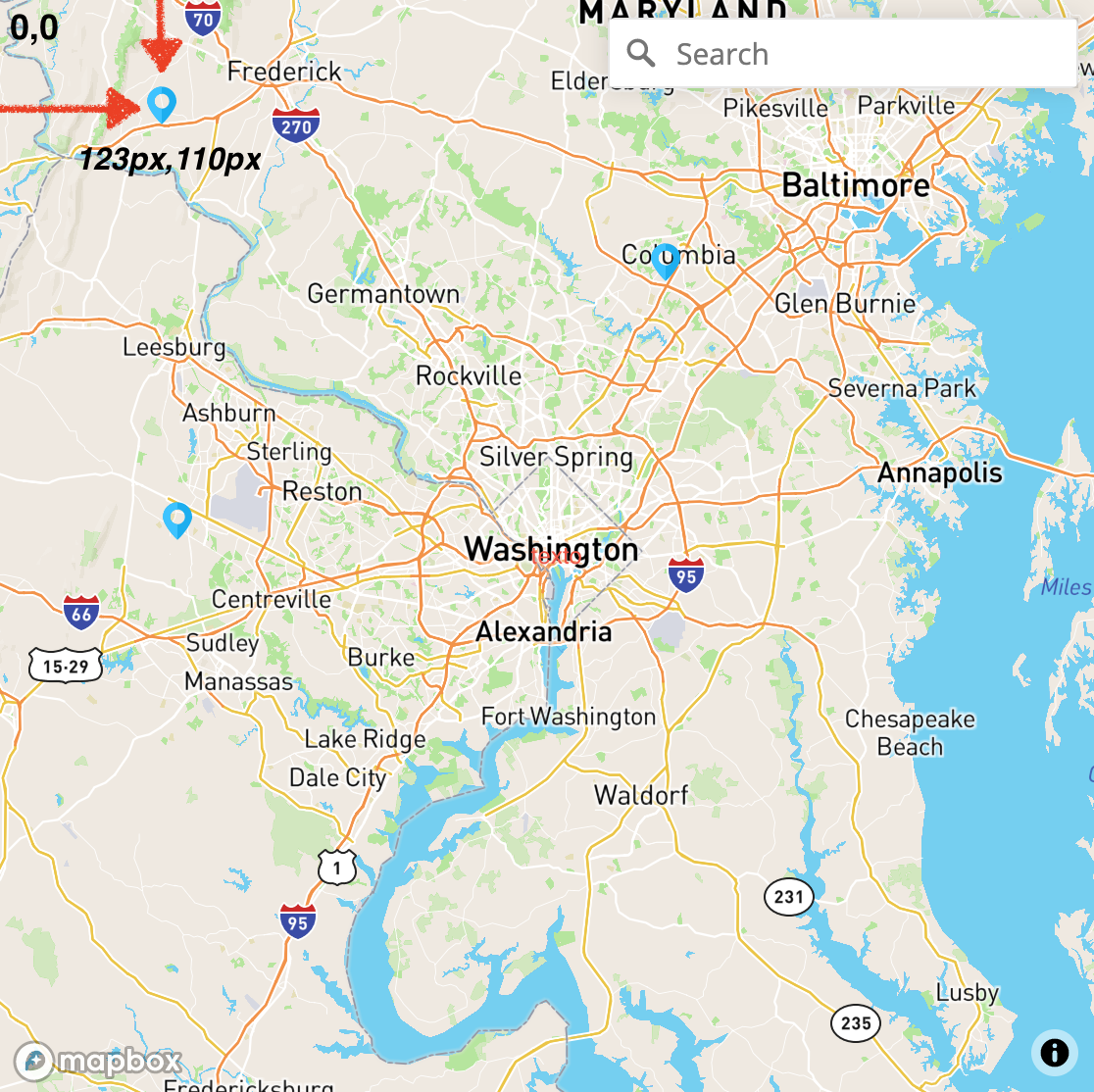
Any idea or new approach to achieve an updated x and y values? Thanks !
 ergum
ergum
All 6 comments
No "click" happened when you drag or zoom. If you want to know where the pointer is, use onHover.
 Pessimistress
on 6 Feb 2021
Pessimistress
on 6 Feb 2021
Thanks @Pessimistress but I shouldn't force the user to do a hover for each marker created. I should do it for him when he finish to pan the map for example. The next recording may help to understand it:
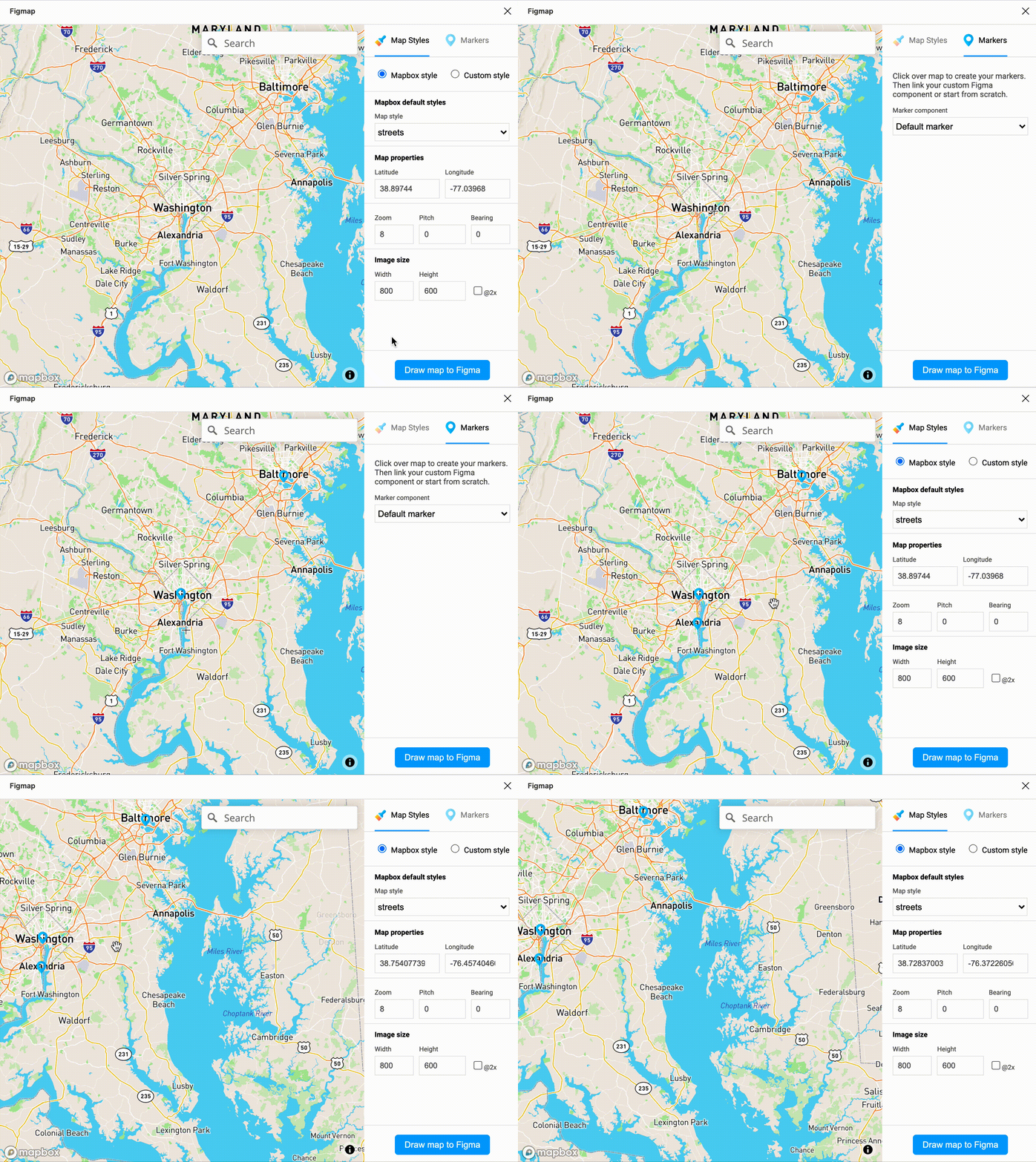
When the marker is created I get the proper x and y position but I'm not able to find the way to get the real x and y position of the rest of the markers when the user stops dragging the map. Getting in mind the 0,0 x and y its the top left corner of the map viewport.
ergum
on 6 Feb 2021
Maybe I am not understanding what you are trying to accomplish. To render a marker you only need longitude and latitude, which does not change with panning or zooming. What are you using x and y for?
If you want to know where a given lng/lat location is projected to in the current viewport, you can use WebMercatorViewport.
Pessimistress
on 6 Feb 2021
So sorry for not fully explication about what I'm trying to achieve. I'm creating a Figma plugin an UI Design tool and it will let you configure the style map, create markers and then get an image and markers to Figma thru his API tool.
Figma and other UI/Design tools works of course just with x and y properties and in some way I need to transpolate/translate marker map coordinates lat/lng to x and y properties and get them in sync in every moment to draw it in Figma with accuracy.
ergum
on 6 Feb 2021
In that case, you should place your logic in onViewportChange:
import {WebMercatorViewport} from 'react-map-gl';

const onViewportChange = viewport => {
  const v = new WebMercatorViewport(viewport);
  for (const marker of stateMarkers) {
    const [x, y] = v.project([marker.longitude, marker.latitude]);
    // Update your figma drawing with x, y
  }

  setViewport(viewport);
};
event.point reflects the mouse position when the event occurred. It does not update with the map over time.
Pessimistress
on 6 Feb 2021
It works like a charm ! Thanks @Pessimistress
I updated the plugin fix here Figmap
I will post a reference to your valuable help in the github repo
ergum
on 6 Feb 2021
Related issues
 miccferr
·
4Comments
miccferr
·
4Comments
 cjmyles
·
3Comments
cjmyles
·
3Comments
 bogdancaspar
·
3Comments
bogdancaspar
·
3Comments
 tomrussell
·
5Comments
tomrussell
·
5Comments
 joseomar10
·
5Comments
joseomar10
·
5Comments
Most helpful comment
In that case, you should place your logic in
onViewportChange:event.pointreflects the mouse position when the event occurred. It does not update with the map over time.