React-jsonschema-form: The ui:widget hidden does not hide description
Prerequisites
@rjsf/material-ui
Description
By hiding a field it should hide all field related ui items (e.g.: labels, description etc.)
Steps to Reproduce
uiSchema
{
      myfield: { 'ui:widget': 'hidden' },
}
schema
{
  "mySchema": {
    "type": "object",
    "properties": {
      "myfield": {
        "type": "string",
        "description": "myfield description"
      }
    }
  }
}
Expected behavior
Whole div element is hidden
<div class="MuiGrid-root MuiGrid-item MuiGrid-grid-xs-12" style="margin-bottom: 10px;" hidden>
  <div class="MuiFormControl-root MuiFormControl-fullWidth">
    <input id="root_myfield" value="">
    <span class="MuiTypography-root MuiTypography-caption MuiTypography-colorTextSecondary">myfield description</span>
  </div>
</div>
Actual behavior
Description is still visible
Only input field is marked as hidden
<div class="MuiGrid-root MuiGrid-item MuiGrid-grid-xs-12" style="margin-bottom: 10px;">
  <div class="MuiFormControl-root MuiFormControl-fullWidth">
    <input type="hidden" id="root_myfield" value="">
    <span class="MuiTypography-root MuiTypography-caption MuiTypography-colorTextSecondary">myfield description</span>
  </div>
</div>
Version
"@rjsf/core": "^2.0.0-alpha.4",
"@rjsf/material-ui": "^2.0.0-alpha.4",
 j-zimnowoda
👍1
All 3 comments
One ugly workaround that still adds invisible space: 'ui:description': ' '
 Morriz
on 18 Apr 2020
Morriz
on 18 Apr 2020
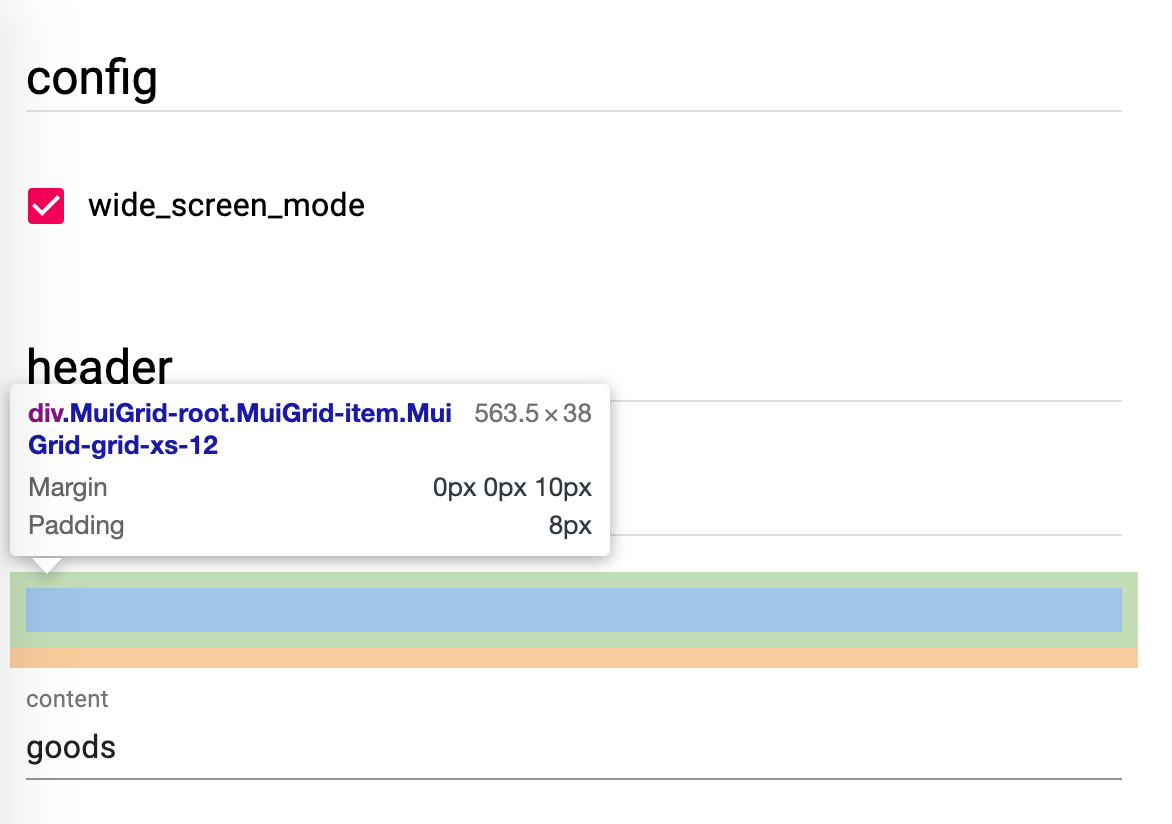
Not only description, but also the grid is left for the hidden widget (which is not expected)
 zhaoyao91
on 24 Jun 2020
zhaoyao91
on 24 Jun 2020
👍2
Any progress or timeline for fixing this bug?
 boskjoett
on 23 Nov 2020
boskjoett
on 23 Nov 2020
Was this page helpful?
1 / 5 - 1 ratings
Related issues
 mfulton26
·
3Comments
mfulton26
·
3Comments
 pablen
·
3Comments
pablen
·
3Comments
 norim13
·
3Comments
norim13
·
3Comments
 epicfaace
·
3Comments
epicfaace
·
3Comments
 ClockerZadq
·
3Comments
ClockerZadq
·
3Comments
Most helpful comment
Not only description, but also the grid is left for the hidden widget (which is not expected)