React-jsonschema-form: Fieldset preventing flexbox styling
Prerequisites
- [x] I have read the documentation
Description
Currently, the form is wrapped with a fieldset element:
<div class="form-group field field-object">
  <fieldset>
    ...
  </fieldset>
</div>
This is great, and semantic, however this can prevent some styling with flex. Flex cannot be applied to a fieldset, and so you cannot use flex to render the form layout as desired.
It would be great to have an optional prop that would change this fieldset to a div or something similar.
Just an initial idea - probably a better way to handle this. Any thoughts? I could do a PR.
 ttbarnes
All 11 comments
@ttbarnes Until that optional prop is available a workaround is to use the customFields form prop to override for example the ObjectField with a custom object field using divs instead of fieldsets but it's a lot of duplicated code for such a small change.
Also see: #443
Update: Sorrry, I missed that #653 in 0.51.0 adds support for ObjectFieldTemplate which will solve this in a much cleaner way.
 matias-sandell
on 13 Nov 2017
matias-sandell
on 13 Nov 2017
I found a workaround through random cutting and pasting and going through the source.
This is the default object field template (from https://github.com/mozilla-services/react-jsonschema-form/blob/174e136af4fe728eb79e92594733ea729f3d659f/src/components/fields/ObjectField.js)
function ObjectFieldTemplate(props) {
  const canExpand = function canExpand() {
    const { formData, schema, uiSchema } = props;
    if (!schema.additionalProperties) {
      return false;
    }
    const { expandable } = getUiOptions(uiSchema);
    if (expandable === false) {
      return expandable;
    }
    // if ui:options.expandable was not explicitly set to false, we can add
    // another property if we have not exceeded maxProperties yet
    if (schema.maxProperties !== undefined) {
      return Object.keys(formData).length < schema.maxProperties;
    }
    return true;
  };

  const { TitleField, DescriptionField } = props;
  return (
    <fieldset id={props.idSchema.$id}>
      {(props.uiSchema['ui:title'] || props.title) && (
        <TitleField
          id={`${props.idSchema.$id}__title`}
          title={props.title || props.uiSchema['ui:title']}
          required={props.required}
          formContext={props.formContext}
        />
      )}
      {props.description && (
        <DescriptionField
          id={`${props.idSchema.$id}__description`}
          description={props.description}
          formContext={props.formContext}
        />
      )}
      {props.properties.map(prop => prop.content)}
      {canExpand() && (
        <AddButton
          className="object-property-expand"
          onClick={props.onAddClick(props.schema)}
          disabled={props.disabled || props.readonly}
        />
      )}
    </fieldset>
  );
}
So if you want to keep your form the same as the default one, except for the <fieldset>, you can change the <fieldset> to a <div> (or any other element) and then use this as a custom object field (from https://react-jsonschema-form.readthedocs.io/en/latest/advanced-customization/#object-field-template) like this:
          <Form
            schema={formSchema}
            uiSchema={formUiSchema}
            formData={this.state.formData}
            onChange={this.handleChange}
            onBlur={this.handleBlur}
            onSubmit={this.handleSubmit}
            ObjectFieldTemplate={ObjectFieldTemplate}
          >
          </Form>
With the important bit being the ObjectFieldTemplate that you've included in your component and referenced in the form.
One of the confusing parts of the docs is that they did include versions of this object and the array template field overrides but they were so dramatically different than the default form it was hard to understand how to use them and not totally change your form. I use 15+ forms on my site and so it was important to fully understand how to only slightly deviate from the default.
Lastly, you'll have to make <AddButton> and <IconButton> components in your app (unless there is an easy way to include them from react-jsonschema-form) if you want to use the default ones, or remove them from the ObjectFieldTemplate and remake them yourself.
 paintedbicycle
on 29 Jan 2019
paintedbicycle
on 29 Jan 2019
This fieldset issue is pretty annoying. It would make sense to change fieldset to div elements when we release V2.
 epicfaace
on 25 May 2019
epicfaace
on 25 May 2019
FYI flex on fieldset is working in Firefox 46+, Safari, IE10-11
It would also be useful to know what exactly cannot be achieved why flex on fieldset. Could anyone provide a real world example?
 ivarprudnikov
on 6 Jan 2020
ivarprudnikov
on 6 Jan 2020
@ivarprudnikov basically flex is ignored by fieldset.
Right now I think that only chrome have this behaviour (stackoverflow).
 JoshVazq
on 3 Feb 2020
JoshVazq
on 3 Feb 2020
@ivarprudnikov display:grid is also ignored by fieldset in Chrome and Edge
 alihusic
on 27 Feb 2020
alihusic
on 27 Feb 2020
@JoshVazq could you come up with a real world example so that it is easy to see and test it? It would be useful to people looking into this issue.
ivarprudnikov
on 27 Feb 2020
@ivarprudnikov
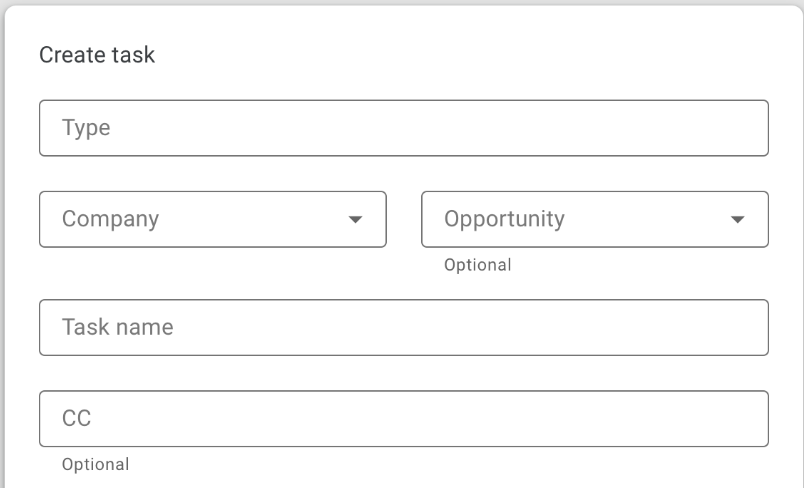
A typical use case for this would be a part of the form which should contain 2 inline styles as shown on this image(found via Google search).
Creating custom widgets could be an overkill for larger forms, this can be solved by replacing fieldset with div in the library and setting its display to grid with 2 columns via overriding ObjectFieldTemplate and setting a custom class name for a certain part of the form. The next step would be adding custom class names in the ui schema which would set the fields to the first or second column (using grid-column-start and grid-column-end).
However, it would be very beneficial to at least have a prop which would use div instead of fieldset and thus avoid overriding ObjectFieldTemplate.
alihusic
on 27 Feb 2020
Chrome is fixing this bug.
https://bugs.chromium.org/p/chromium/issues/detail?id=375693#c80
paintedbicycle
on 17 Apr 2020
27-04-2020 still anoying. What is the purpose of the fieldset. please remove it.pleeeaseee
 shacco
on 28 Apr 2020
shacco
on 28 Apr 2020
Chromium has now fixed this. https://bugs.chromium.org/p/chromium/issues/detail?id=375693#c87
paintedbicycle
on 14 Aug 2020
Related issues
 anttivikman
·
3Comments
anttivikman
·
3Comments
 marinav
·
3Comments
marinav
·
3Comments
 n1k0
·
3Comments
n1k0
·
3Comments
 videni
·
3Comments
videni
·
3Comments
 pablen
·
3Comments
pablen
·
3Comments
Most helpful comment
I found a workaround through random cutting and pasting and going through the source.
This is the default object field template (from https://github.com/mozilla-services/react-jsonschema-form/blob/174e136af4fe728eb79e92594733ea729f3d659f/src/components/fields/ObjectField.js)
So if you want to keep your form the same as the default one, except for the
<fieldset>, you can change the<fieldset>to a<div>(or any other element) and then use this as a custom object field (from https://react-jsonschema-form.readthedocs.io/en/latest/advanced-customization/#object-field-template) like this:With the important bit being the ObjectFieldTemplate that you've included in your component and referenced in the form.
One of the confusing parts of the docs is that they did include versions of this
objectand thearraytemplate field overrides but they were so dramatically different than the default form it was hard to understand how to use them and not totally change your form. I use 15+ forms on my site and so it was important to fully understand how to only slightly deviate from the default.Lastly, you'll have to make
<AddButton>and<IconButton>components in your app (unless there is an easy way to include them fromreact-jsonschema-form) if you want to use the default ones, or remove them from the ObjectFieldTemplate and remake them yourself.