React-joyride: Spotlight not transparent on Edge (opacity not working)
Expected behavior

Actual behavior
React version
16.4.1
React-Joyride version
2.0.0-13
Browser name and version
Microsoft Edge
 yaskor
All 6 comments
I've found a solution.
no background-color for: joyride-overlay
instead add a box- shadow to: joyride-spotlight
0px 0px 0px 9999px rgba(0,0,0,0.5)
yaskor
on 17 Jul 2018
As of 2.0.0-11, this worked in Edge. I believe joyride gracefully fell back to using the "legacy" box-shadow technique on it's own. After upgrading to 2.0.0-13, I too am experiencing this issue. It appears a regression happened between pre-release 11 and 13.
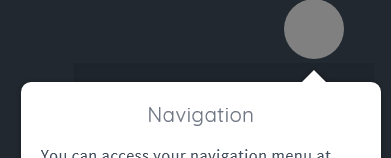
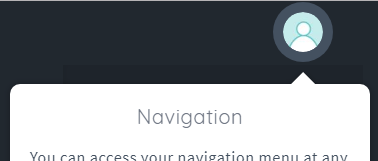
Interestingly, I'm seeing a grey spotlight on Edge, not just a dimmed version as shown above. For me, joyride is clearly trying to use the hard-light blend mode trick on Edge, which fails and renders as grey.
Edge:
Chrome:
 MilllerTime
on 24 Jul 2018
MilllerTime
on 24 Jul 2018
I believe the change to this line a few days ago is the source of the problem.
The change marks Edge as no longer being a legacy browser, but Edge still doesn't support mix-blend-mode. Therefore, Edge should still be considered "legacy".
MilllerTime
on 24 Jul 2018
Just following up on this since it's been over a week. Any plans to release a fix for this? Reverting the change I linked to above should do it. Is there anything blocking a release?
MilllerTime
on 3 Aug 2018
@MilllerTime yes, time. :)
Fixed in 2.0.0-14
 gilbarbara
on 6 Aug 2018
gilbarbara
on 6 Aug 2018
Totally understand. Thank you for the update, and your time :)
MilllerTime
on 6 Aug 2018
Related issues
 rlajous
·
3Comments
rlajous
·
3Comments
 zlwaterfield
·
6Comments
zlwaterfield
·
6Comments
 sarates
·
6Comments
sarates
·
6Comments
 adnux
·
4Comments
adnux
·
4Comments
 monsieurnebo
·
4Comments
monsieurnebo
·
4Comments