React-instantsearch: Unable to pass "props" into Hits
Hi there, I'm currently using algolia instant search on my website, but trying on react-native,
I couldn't pass navigator props into Hits connector, any idea?
I tried understand react high order functions but I didn't handle.
Here's my code;
import React from 'react';
import { InstantSearch } from 'react-instantsearch/native';
import {
  connectInfiniteHits,
  connectSearchBox,
} from 'react-instantsearch/connectors';
import {
  StyleSheet,
  View,
  FlatList,
  Image,
  Text,
  TextInput,
  TouchableOpacity
} from 'react-native';

import {Container, Content, Item, Input, Icon, List, ListItem, Left, Body, Right, Thumbnail} from 'native-base'

export default class App extends React.Component {
  render() {
    return (
      <Container>
        <InstantSearch
          appId="W69XAGVDFM"
          apiKey="adee40d0e5a869dad0e1654d94324ee0"
          indexName="documents">
          <SearchBox />
          <Hits />
        </InstantSearch>
      </Container>
    );
  }
}


const Hits = connectInfiniteHits(({ hits, hasMore, refine }) => {
  /* if there are still results, you can
  call the refine function to load more */
  const { navigate } = this.props.navigation

  console.log(navigate); // I tried to access navigate props here.

  const onEndReached = function() {
    if (hasMore) {
      refine();
    }
  };

  return (
    <List>
      <FlatList
        data={hits}
        onEndReached={onEndReached}
        keyExtractor={(item, index) => item.objectID}
        renderItem={({ item }) => {
          return (
            <ListItem avatar>
              <Left>
                <TouchableOpacity onPress={() => alert(1)}>
                  <Thumbnail square source={{ uri: item.thumbnail.url }} />
                </TouchableOpacity>
              </Left>
                <Body>
                  <TouchableOpacity onPress={() => alert(1)}>
                    <Text>{item.title}</Text>
                  </TouchableOpacity>
                </Body>
            </ListItem>
          );
        }}
      />
    </List>
  );
});

const SearchBox = connectSearchBox(({ refine, currentRefinement }) => {

  const styles = {
    height: 60,
    borderWidth: 1,
    padding: 10,
    margin: 10,
    marginTop: -10,
    flex: 1,
  };

  return (
    <Item>
      <Input
        onChangeText={text => refine(text)}
        value={currentRefinement}
        placeholder={'Tüm dökümanlar arasında arama yap'}
        clearButtonMode={'always'}
        spellCheck={false}
        autoCorrect={false}
        autoCapitalize={'none'}
        />
        <Icon active name='ios-search' />
    </Item>
  );
});

const styles = StyleSheet.create({
  container: {
    flex: 1,
    marginTop: 20,
  },
});
 cagataycali
All 7 comments
You have to list all the props you expect like this:
const Hits = connectInfiniteHits(({ hits, hasMore, refine, navigation }) => {
/* if there are still results, you can
call the refine function to load more */
const { navigate } = navigation
console.log(navigate); // I tried to access navigate props here.
const onEndReached = function() {
if (hasMore) {
refine();
}
};
return (
<List>
<FlatList
data={hits}
onEndReached={onEndReached}
keyExtractor={(item, index) => item.objectID}
renderItem={({ item }) => {
return (
<ListItem avatar>
<Left>
<TouchableOpacity onPress={() => alert(1)}>
<Thumbnail square source={{ uri: item.thumbnail.url }} />
</TouchableOpacity>
</Left>
<Body>
<TouchableOpacity onPress={() => alert(1)}>
<Text>{item.title}</Text>
</TouchableOpacity>
</Body>
</ListItem>
);
}}
/>
</List>
);
});
And then you can pass it as normal:
export default class App extends React.Component {
render() {
return (
<Container>
<InstantSearch
appId="W69XAGVDFM"
apiKey="adee40d0e5a869dad0e1654d94324ee0"
indexName="documents">
<SearchBox />
<Hits navigation={whatever} />
</InstantSearch>
</Container>
);
}
}
 Haroenv
on 26 Apr 2018
Haroenv
on 26 Apr 2018
👍1
I already tried this vay, but nothing changed
cagataycali
on 26 Apr 2018
That seems quite odd, did you pass the prop in both places? What's the value?
Haroenv
on 26 Apr 2018
// ....
async componentDidMount() {
const { navigate } = this.props.navigation
console.log(navigate, 'did mount');
}
render() {
const { navigate } = this.props.navigation
console.log(navigate, 'render');
return (
<Container>
<InstantSearch
appId="W69XAGVDFM"
apiKey="adee40d0e5a869dad0e1654d94324ee0"
indexName="documents">
<SearchBox />
// Passed navigation here
<Hits navigation={this.props.navigation}/>
</InstantSearch>
</Container>
);
}
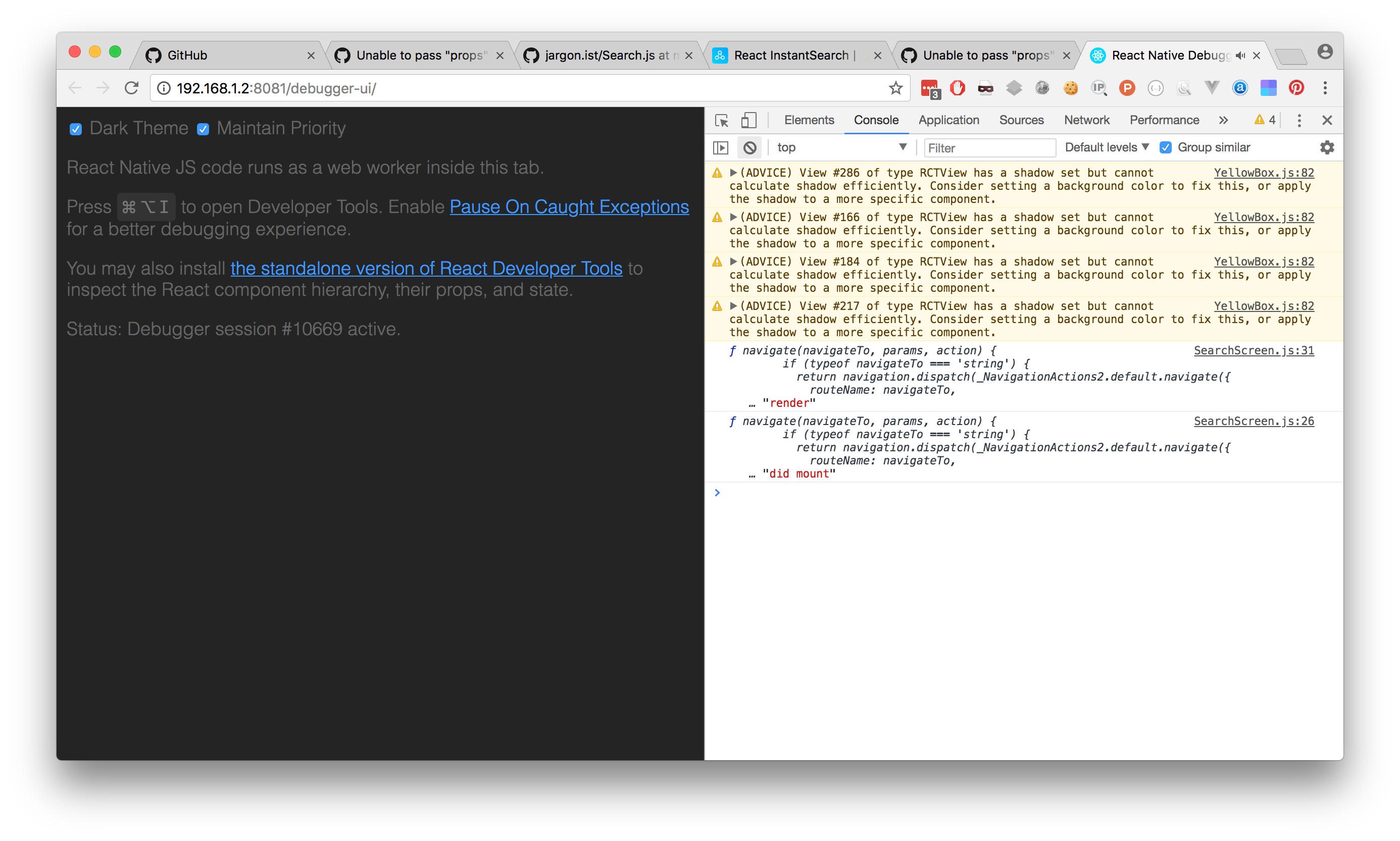
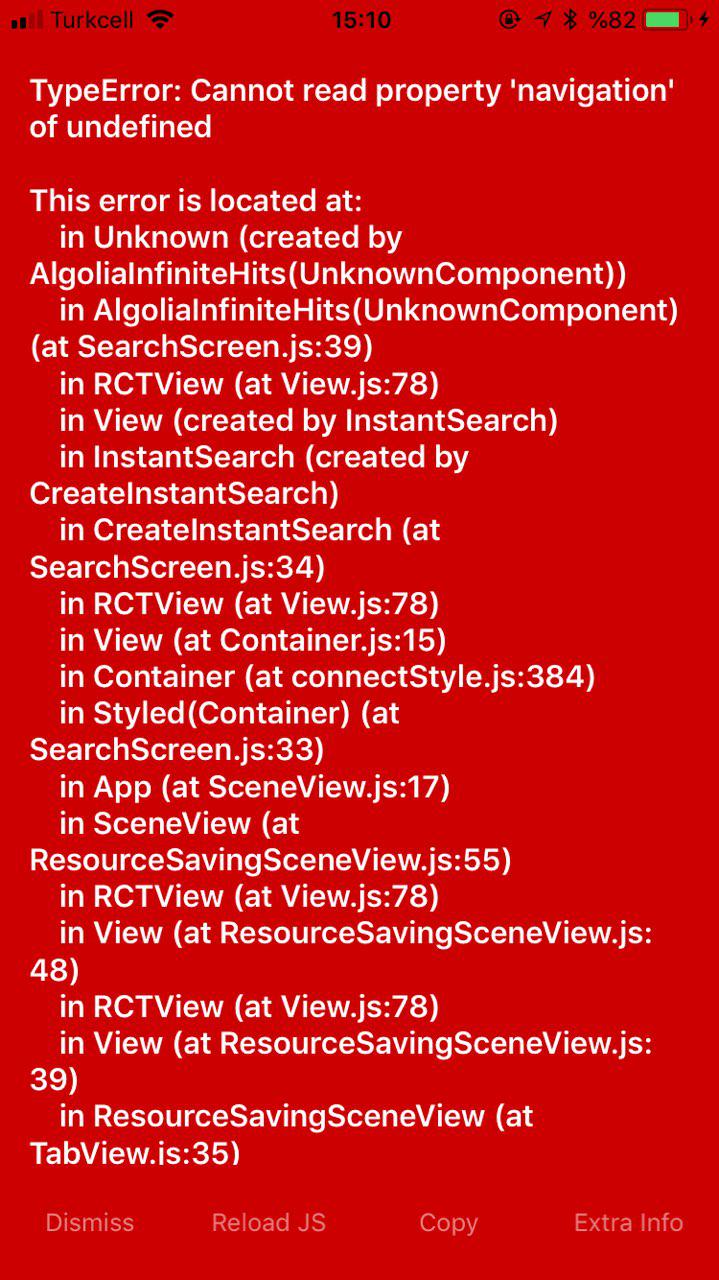
But still this code is throwing err;
const Hits = connectInfiniteHits(({ hits, hasMore, refine }) => {
/* if there are still results, you can
call the refine function to load more */
const { navigate } = this.props.navigation
console.log(navigate); // I tried to access navigate props here.
const onEndReached = function() {
if (hasMore) {
refine();
}
};
// ....
cagataycali
on 26 Apr 2018
- const Hits = connectInfiniteHits(({ hits, hasMore, refine }) => {
+ const Hits = connectInfiniteHits(({ hits, hasMore, refine, navigation }) => {
    /* if there are still results, you can
    call the refine function to load more */
-   const { navigate } = this.props.navigation
+   const { navigate } = navigation

    console.log(navigate); // I tried to access navigate props here.

    const onEndReached = function() {
      if (hasMore) {
        refine();
      }
    };
  // ....
❤2
👍2
Thanks for saving my tons of time! I tried nearly everything but I couldn't try this thanks a lot!
cagataycali
on 26 Apr 2018
no problemo!
Haroenv
on 26 Apr 2018
🎉1
Was this page helpful?
0 / 5 - 0 ratings
Related issues
 afgoulart
·
4Comments
afgoulart
·
4Comments
 denkristoffer
·
4Comments
denkristoffer
·
4Comments
 markmiller21
·
3Comments
markmiller21
·
3Comments
 aaronbushnell
·
4Comments
aaronbushnell
·
4Comments
 developerk786
·
3Comments
developerk786
·
3Comments
Most helpful comment