React-instantsearch: {flex: 1} doesn't work inside <InstantSearch> component
Is there a way to pass {flex: 1} to
{Root: View, props: {flex: 1}}
 pyankoff
All 14 comments
Hi @pyankoff,
What styling issue did you have? What are you trying to achieve? If you can provide a codesandbox it would help me determinate if there's an improvement to make or if it can already fix.
Thanks!
 mthuret
on 28 Aug 2017
mthuret
on 28 Aug 2017
Hi @mthuret , sorry forgot to mention its React-Native. Red container should be fullscreen, but InstantSearch doesn't have {flex: 1} styling:
import React, { Component } from 'react';
import { Text, View, StyleSheet } from 'react-native';
import { Constants } from 'expo';
import { InstantSearch } from 'react-instantsearch/native'
export default class App extends Component {
render() {
return (
<InstantSearch algoliaClient={algoliaClient} indexName="indexName">
<View style={styles.container}>
<Text>
Red container should be fullscreen
</Text>
</View>
</InstantSearch>
);
}
}
const styles = StyleSheet.create({
container: {
flex: 1,
alignItems: 'center',
justifyContent: 'center',
backgroundColor: 'red',
},
});
Why not having the view with flex:1 on top of <InstantSearch> like we do on our react-native recipe?
Something like:
<View style={styles.container}>
<InstantSearch appId="latency" apiKey="" indexName="">
<Text>Red container should be fullscreen</Text>
</InstantSearch>
</View>
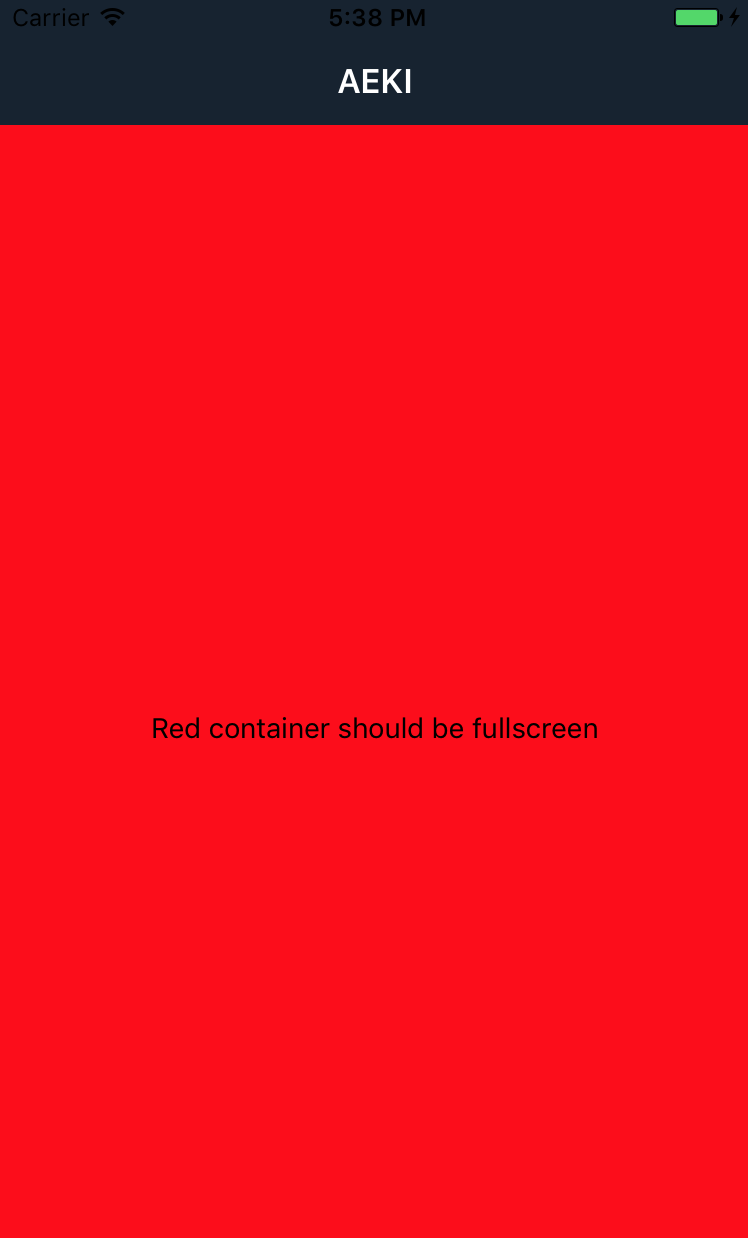
Will that work for you?
mthuret
on 28 Aug 2017
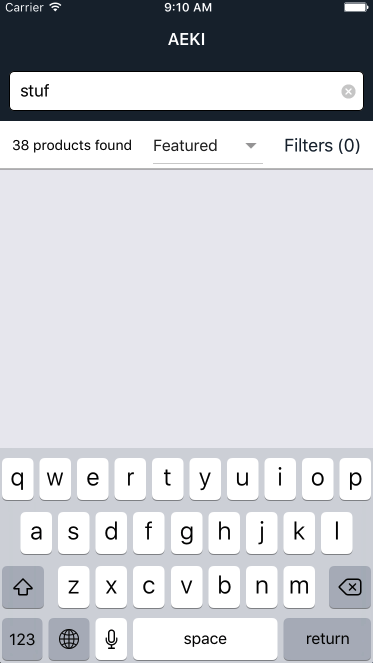
There is a hardcoded height for items view there:
https://github.com/algolia/react-instantsearch/blob/eabedc54a2486731f7a1d8610619880c552cae54/packages/react-instantsearch/examples/react-native/src/Home.js#L39-L46
If you change these hardcoded values to {flex: 1} height goes to 0 (there 38 results, but you can't see them):
pyankoff
on 28 Aug 2017
We could forward the style props to InstantSearch maybe?
@pyankoff to be sure to understand: if you remove completely the fix height on our example, it still work. I believe that's because the navigation library we use has fixed some stuff. Why would you need to add { flex : 1 } to it?
mthuret
on 11 Sep 2017
@mthuret I noticed this behaviour as well. Is there any update on this?
 ghost
on 3 Nov 2017
ghost
on 3 Nov 2017
@reinvanimschoot Do you face this in a way where you can't get rid of it? Could you provide a small repo showing it? As for now I failed being completely blocked with the need of passing this flex:1. Thanks very much!
mthuret
on 3 Nov 2017
@mthuret The problem is that when I have only one or two search results in my FlatList and I drag down, the last item gets cut off and disappears the moment it goes down. This is because the list does not get the whole height it should be given. If you have a solution for this, I'd be very grateful. I tried using flex: 1 as I do in my other list setups, but when using InstantSearch, it results in no list shown at all, just as the behaviour spoken of in this issue.
ghost
on 3 Nov 2017
@reinvanimschoot Do you have a small repo that I can run and try stuff on it?
On our example what I tried is putting flex:1 on items and yes I was able to see things disappear. But if I'm removing every styles on items, including fix height that I believe are not useful anymore, then the list is perfectly ok even with low items number and therefore I miss seeing what's impossible to do here.
Thanks in advance :)
mthuret
on 6 Nov 2017
@mthuret is there an update on this? My FlatList does not render at all because of this issue. Adding { flex: 1} to the props as mentioned above fixes the problem.
Any child of <InstantSearch> that uses { flex: 1 } is inherently broken if <InstantSearch> itself is not { flex: 1 }. Thus, there needs to be a way to configure this.
 obibring
on 3 Dec 2017
obibring
on 3 Dec 2017
@obibring @reinvanimschoot @pyankoff @Haroenv
I reproduced a similar issue due to the lack of { flex: 1 } on the Root component of InstantSearch. What I propose is to expose the root prop on InstantSearch in order to be able to customize the Root component & the props applied to it. The usage will be something like this:
<InstantSearch
  root={{
    Root: View, // component to render as the root of InstantSearch
    props: {} // props that will be applied on the root component aka View
  }}
>
  <ConnectedSearchBox />
  <ConnectedHits />
</InstantSearch>;
I propose something like that, because internally we already provide an API to customize the root property. We just need to expose it in order to be able to pass it down to InstantSearch. At some point we could probably remove the existence of the Root component and use the Fragments instead - when [email protected] will be widespread.
 samouss
on 5 Dec 2017
samouss
on 5 Dec 2017
Glad you guys added this and glad I found this post! 🚀 Any reason why flex: 1 isn't set by default in InstantSearch?
 GioLogist
on 18 Jan 2019
GioLogist
on 18 Jan 2019
It’s done to avoid being too opinionated IIRC. Is it usual for other libraries in react native to set a size by default?
 Haroenv
on 19 Jan 2019
Haroenv
on 19 Jan 2019
I'll try and find examples, but I imagine that in situations where it acts as a wrapper, flex: 1 would be default - based on how RN handles styling.
GioLogist
on 19 Jan 2019
Related issues
mthuret
·
5Comments
 danhodkinson
·
3Comments
danhodkinson
·
3Comments
 econner
·
3Comments
econner
·
3Comments
 flouc001
·
5Comments
flouc001
·
4Comments
flouc001
·
5Comments
flouc001
·
4Comments
Most helpful comment
@obibring @reinvanimschoot @pyankoff @Haroenv
I reproduced a similar issue due to the lack of
{ flex: 1 }on theRootcomponent ofInstantSearch. What I propose is to expose therootprop onInstantSearchin order to be able to customize theRootcomponent & the props applied to it. The usage will be something like this:I propose something like that, because internally we already provide an API to customize the
rootproperty. We just need to expose it in order to be able to pass it down toInstantSearch. At some point we could probably remove the existence of theRootcomponent and use theFragmentsinstead - when[email protected]will be widespread.