React-instantsearch: <RefinementList/> when no refinements are available is empty
<RefinementList/> just renders an empty element when no refinements are available.
This is nonsense when viewed from a user's perspective.
My current workaround is:
// This is a hack to display something instead of an empty collapsible.
// `<RefinementList/>` provides no customization for the "no refinement" scenario.
.ais-RefinementList__noRefinement:after
  display: block
  content: "Nothing found"
Still it won't work in an international application not to mention it's not the way it should have been implemented.
 catamphetamine
All 9 comments
Hi @catamphetamine,
You're right, we do not provide this option to our RefinementList widget.
However you can use our connectRefinementList connector to build easily your own refinementList and implement this logic using internationalisation if you need to.
Does this help?
 mthuret
on 31 Jul 2017
mthuret
on 31 Jul 2017
Using the connectRefinementList connector just because the authors of the library forgot to output "No results" in case of no refinement items is kinda retarded if that's what you're asking.
Still if you find that a suitable solution then you can close this issue.
catamphetamine
on 31 Jul 2017
Could you be a bit more polite please, this behaviour is against our code of conduct
 Haroenv
on 31 Jul 2017
Haroenv
on 31 Jul 2017
@Haroenv Could you fix the library then, this behaviour is against our code of writing good software
catamphetamine
on 31 Jul 2017
Hi @catamphetamine thanks for sending us this feedback. In many situations when your refinement list is empty then you also don't have any hits showing. Thus our users will display "No hits matching" and hide the widgets completely rather than displaying "No hits" - "No categories" - "No pagination" etc..
This is a tricky subject of the whole instant-search experience: showing the right amount of context given the user and results. What seems obvious to you may be a bad decisions for other users.
That's why our default behaviour for now has been like the one you are experiencing. But we believe we can always improve.
Can you give us concrete examples on your use case that will help us re-think our default behaviour and provide options/different ways of solving this?
We understand your frustration but we also require everyone collaborating to this repository to avoid using sentences such as:
- "this is nonsense"
- and, "kinda retarded"
Given people perspective this could be seen as complete normal talking or very harsh and violent (from our POV for instance). Thus we ask everyone to avoid using such sentences and use only facts or good arguments instead of using judgemental sentences.
Again, we are here to help you but require you to collaborate in a more calm way to better help you out. Thanks for participating in this project.
mthuret
on 31 Jul 2017
Well, ok, since you even wrote back, I'm gonna adjust my dictionary a bit towards your liking.
Our exact use case is this:
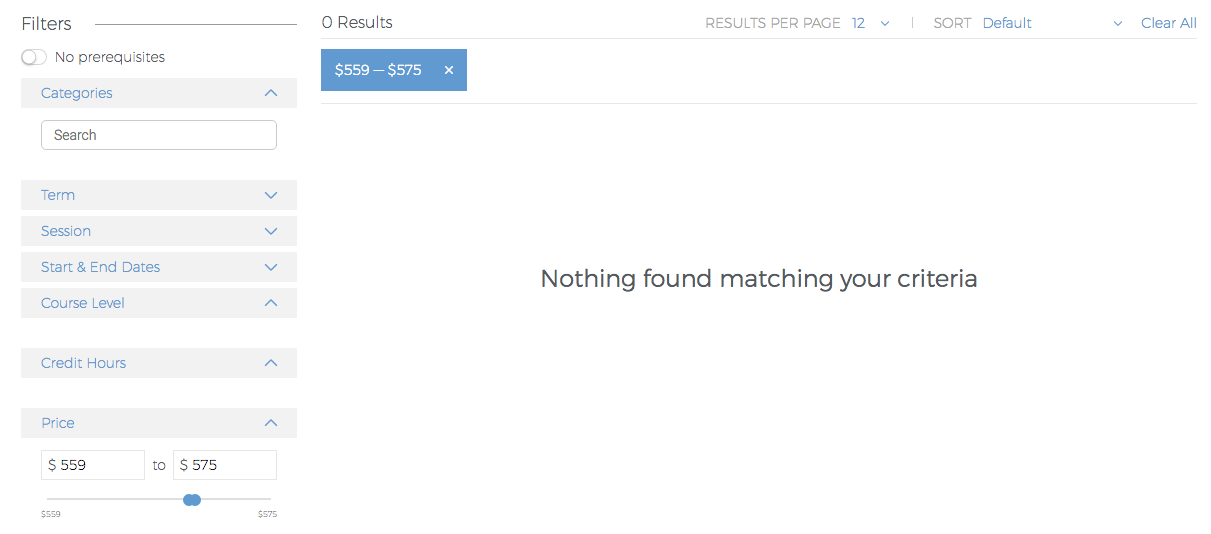
Notice how weird the empty panels look – your library should have said "No results".
Notice also that the "facet value search" input is still visible which is a bug in your library.
Thus our users will display "No hits matching" and hide the widgets completely
How would they undo the excessive refinements made then, if the widgets are now completely hidden.
When searching on eBay, does it hide the filters when there are no matching results?
You absolutely sure it's a sane and acceptable user experience?
If you want my impressions of this library in its current state, it's a bit smelly if you know what I mean (code smells).
Not polished, having inconsistencies here and there, some controversial design decisions, etc.
Seems to me your company doesn't dedicate too much efforts into making this a really quality software (which could bring customers).
Perhaps your company would like to invest more into re-polishing it given that it affects sales in the most direct way imaginable.
catamphetamine
on 31 Jul 2017
That can be definitely weird yes if you're using titles. Currently we decided to solve this issue by providing the <Panel> component. The idea is to wrap a widget that has refinements and its title. That way you're able to remove everything and provide a good no results page. By using the <CurrentRefinements> and <ClearAll> widgets, the user is able to go back in term of refinements choices.
Also, I'm not sure to understand the eBay reference as it seems to remove completely some unexisting facets.

In any case we're going to discuss adding this option with the team. If you want to participate and have an API proposal for this, don't hesitate to share it with us.
You're also implying that you have encountered others issues. Please don't hesitate to report them as it gives us the opportunity to improve the whole library. If you have any features ideas or thoughts about the design of the library, we would love to hear it too.
The SearchBox not being disabled when there's no refinements is clearly an issue, we would have still missed it if you haven't shared that with us. Feel free to open a new github issue.
Thank you for taking the time to write this feedback
mthuret
on 31 Jul 2017
@mthuret Oooh. You have that...
class Panel extends Component {
  static propTypes = {
    title: PropTypes.string.isRequired,
    children: PropTypes.node,
  };

  static childContextTypes = {
    canRefine: PropTypes.func,
  };

  getChildContext() {
    return { canRefine: this.canRefine };
  }

  constructor(props) {
    super(props);
    this.state = { canRefine: true };
    this.canRefine = canRefine => {
      this.setState({ canRefine });
    };
  }
Seems that it's using the context and some kind of tricky callback magic but as long as it works that will do.
So I guess one can copy and paste that context handling code and use canRefine in a collapsible wrapper component to output the "No refinements" message.
Ok then, I'll call it a draw.
Anyway, your answers did resolve the issue and you've been quite elaborate with all those screen captures.
If you happened to be insulted along the process don't be, same goes for the guy.
I'm closing this issue then, since the context trick has no reason to not work after I copy-paste it.
General issues I noticed are also:
- When a checkbox is clicked in Chrome and then it's placed on top of the refinement list then the scroll position jumps – the same amount the clicked checkbox has travelled along the Y axis. This is intended I guess, I mean the web browser, but still not the best user experience if you know what I mean. We might eventually rewrite the RefinementList unsemantically removing checkboxes at all because the web browser messes with scroll because of them.
- When a checkbox is clicked it doesn't immediately become checked/unchecked – that's because
currentRefinementwaits for the Ajax roundtrip to the server side before passing the toggled value down to the RefinementList component. The delay is sometimes negligible, and sometimes about 100ms which is noticeable. This behaviour results in a laggy user experience. Therefore some kind of optimistic strategy has to be employed if you want to take this widget far enough into people's projects. "Optimistic" like they do it in Relay: they assume the response has already arrived and check the checkbox immediately. Perhapsthis.statecould be employed in RefinementList component internally for that. While it's round-tripping the RefinementList component should be disabled (or at least the checkbox in question). But it's an advanced matter, not MVP stuff.
catamphetamine
on 31 Jul 2017
I have my refinement lists each in their own Accordion. Is it possible for me to simply wrap the accordion in code that would make it so the entire accordion would not appear if there are no options to load in the refinement list?
 cmarabate
on 1 Oct 2020
cmarabate
on 1 Oct 2020
Related issues
 aaronbushnell
·
4Comments
aaronbushnell
·
4Comments
 markmiller21
·
3Comments
mthuret
·
5Comments
markmiller21
·
3Comments
mthuret
·
5Comments
 flouc001
·
4Comments
flouc001
·
4Comments
 tstehle
·
4Comments
tstehle
·
4Comments
Most helpful comment
Could you be a bit more polite please, this behaviour is against our code of conduct