React-i18next: Error occurs on render when using tOptions.interpolation
🐛 Bug Report
With the merge of my PR https://github.com/i18next/react-i18next/pull/1204, when I try to pass interpolation to tOptions, an error occurs. When I remove the tOptions prop that I passed in, then it works, which is very weird :thinking:.
In the console React on the first few lines says:
The above error occurred in the <br> component:
    in br (at dashboard-greeting/index.tsx:40)
    in Trans (at dashboard-greeting/index.tsx:34)
In the very last line of console React says React will try to recreate this component tree from scratch using the error boundary you provided, ErrorBoundary.
To Reproduce
To reproduce this you would have to use Trans like this:
<Trans
        i18nKey="home:UserGreetingHeadline"
        defaults="Hallo {{ firstName }},<br/>
        willkommen auf <bold>meine</bold>tonies, hier kannst du ganz zentral
        Deine Toniesammlung und Tonieboxen verwalten."
        values={{ firstName: 'Tiger<no>' }}
        components={{ br: <br />, bold: <strong /> }}
        tOptions={{ interpolation: { escapeValue: true } }}
      />
As for the i18nKey, you do not have to specifically put it into a home.json file :+1:.
Expected behavior
I do expect this to at least be able to render, with or without tOptions prop. I still find it very strange that it is working when I do not use the tOptions prop.
PS. I am happy to work on whatever has to be fixed in case this happens because of either my last PR or if anything else has to be changed :two_hearts:.
Pictures
Picture of the error:

Picture when not using tOptions prop, then it works apparently :thinking: :
Here the message is also broken because of the HTML tags in firstName :cry:.

Your Environment
- runtime version: i.e. node v14.15.0
- i18next version: i.e. 11.7.4
- os: Linux, Ubuntu
 tigerabrodi
All 42 comments
@jamuhl I could fork this on my work laptop, in case there is something that has to be changed :tada:. Anyways, looking forward to work on this :smiley:.
tigerabrodi
on 3 Dec 2020
Does it work if you remove the "< br >" from the components prop?
like: components={{ bold: <strong /> }}
 adrai
on 3 Dec 2020
adrai
on 3 Dec 2020
@adrai Interestingly it does. I also wonder why I get a line-break here, even though I am not passing br in components prop, is it because this is sort of "baked" into Trans components?
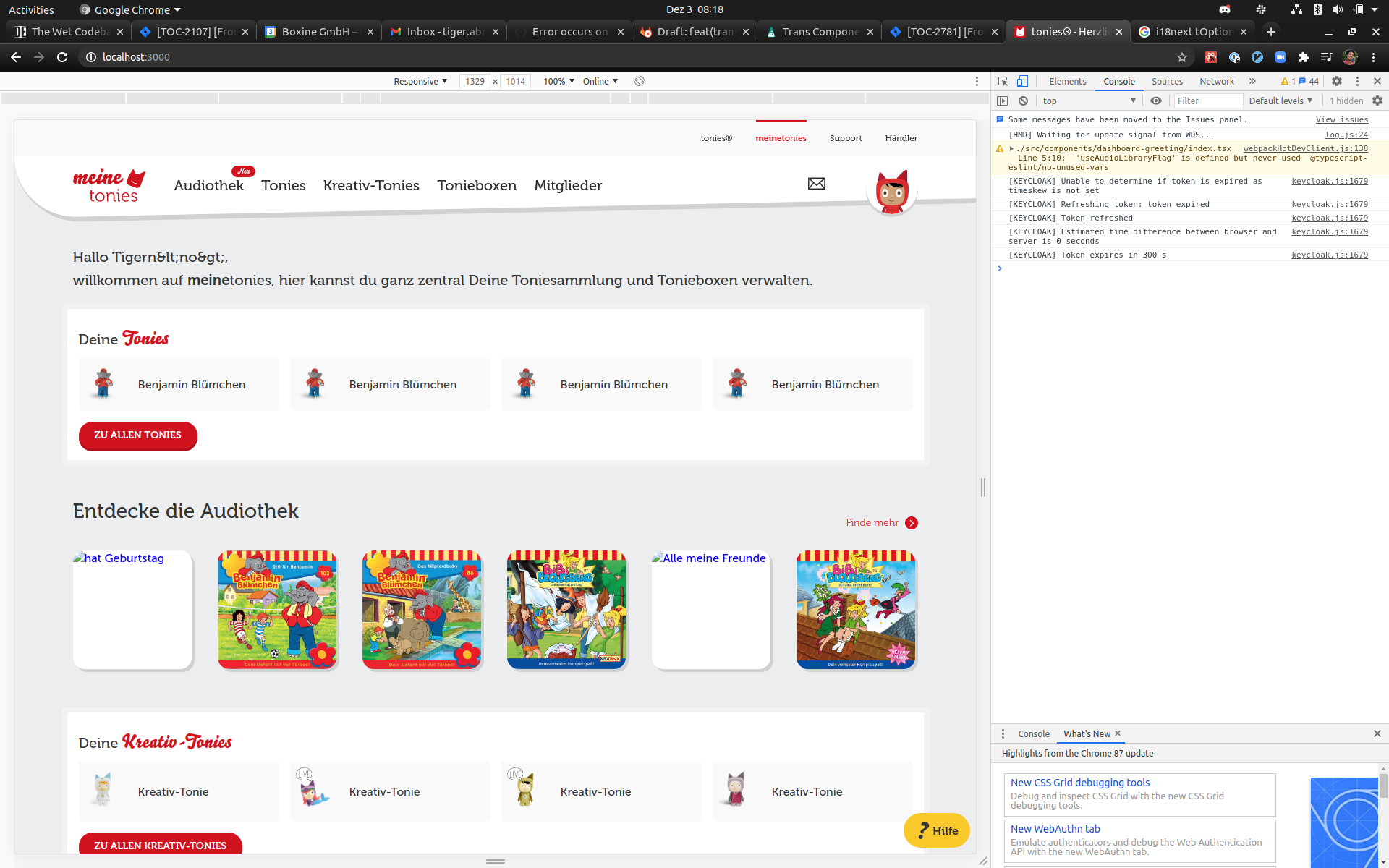
Picture of the current state. It seems like it is taking the different signs, and interpreting them as JavaScript? "lt" I think stands for "less than".
tigerabrodi
on 3 Dec 2020
If you watch the greeting text above Hallo Tigern<no>,, is there a way we could instead display the name properly like Tigern<no> :thinking: ?
tigerabrodi
on 3 Dec 2020
If you watch the greeting text above
Hallo Tigern<no>,, is there a way we could instead display the name properly likeTigern<no>🤔 ?
This is what @jamuhl tried to explain here: https://github.com/i18next/react-i18next/pull/1204#issuecomment-737062765
So while this PR fixes an issue - I guess, it will not solve the initial problem you liked to solve. You might open an issue with the content you like to get translated and we might help out with some options on how to use the Trans component for it.
adrai
on 3 Dec 2020
@adrai @jamuhl Before we close this issue, if I understood it right, there is no way we can get the name to be displayed properly if containing HTML tags?
Also thanks for yesterday and today :pray:, I look forward to opening the PR tomorrow regarding conversion to React Testing Library :two_hearts:.
tigerabrodi
on 3 Dec 2020
Note that the HTML tags are not set in the code, rather if the User himself sets it in the profile, which has happened only a few times :+1:.
tigerabrodi
on 3 Dec 2020
The br in components props does not work as https://react.i18next.com/latest/trans-component#alternative-usage-v-11-6-0 (see the warning: Existing self-closing HTML tag names are reserved keys).
The br in the translation will be converted to valid react element thanks to: https://react.i18next.com/latest/trans-component#using-for-less-than-br-greater-than-and-other-simple-html-elements-in-translations-v-10-4-0
Not had the time to create a reproducible sample but my guess is that setting { escapeValue: true } conflicts with interpolating react elements into the result.
to get Tigern<no> working adding it to the https://react.i18next.com/latest/trans-component#using-for-less-than-br-greater-than-and-other-simple-html-elements-in-translations-v-10-4-0 might already work - but not tested myself.
-> i18next.options.react: { ..., transKeepBasicHtmlNodesFor: ['br', 'strong', 'i', 'p', 'no'] }
 jamuhl
on 3 Dec 2020
jamuhl
on 3 Dec 2020
@jamuhl Thanks :two_hearts:, regarding the HTML tags, they could also be different from <no>. I would have a look at the links you posted, as for a reproducible sample, I am sorry I did not create one with codesandbox, so that is my fault :+1:.
Thanks, both of you, I still can't imagine my first experience with OSS is with such amazing people :blush: :revolving_hearts:, it is still so unbelievable for me haha :smiley:
tigerabrodi
on 3 Dec 2020
well if it works with <no> you would have to define what you accept...allowing HTML inside user input is always a bit risky as it opens the door for injecting malicious scripts...
jamuhl
on 3 Dec 2020
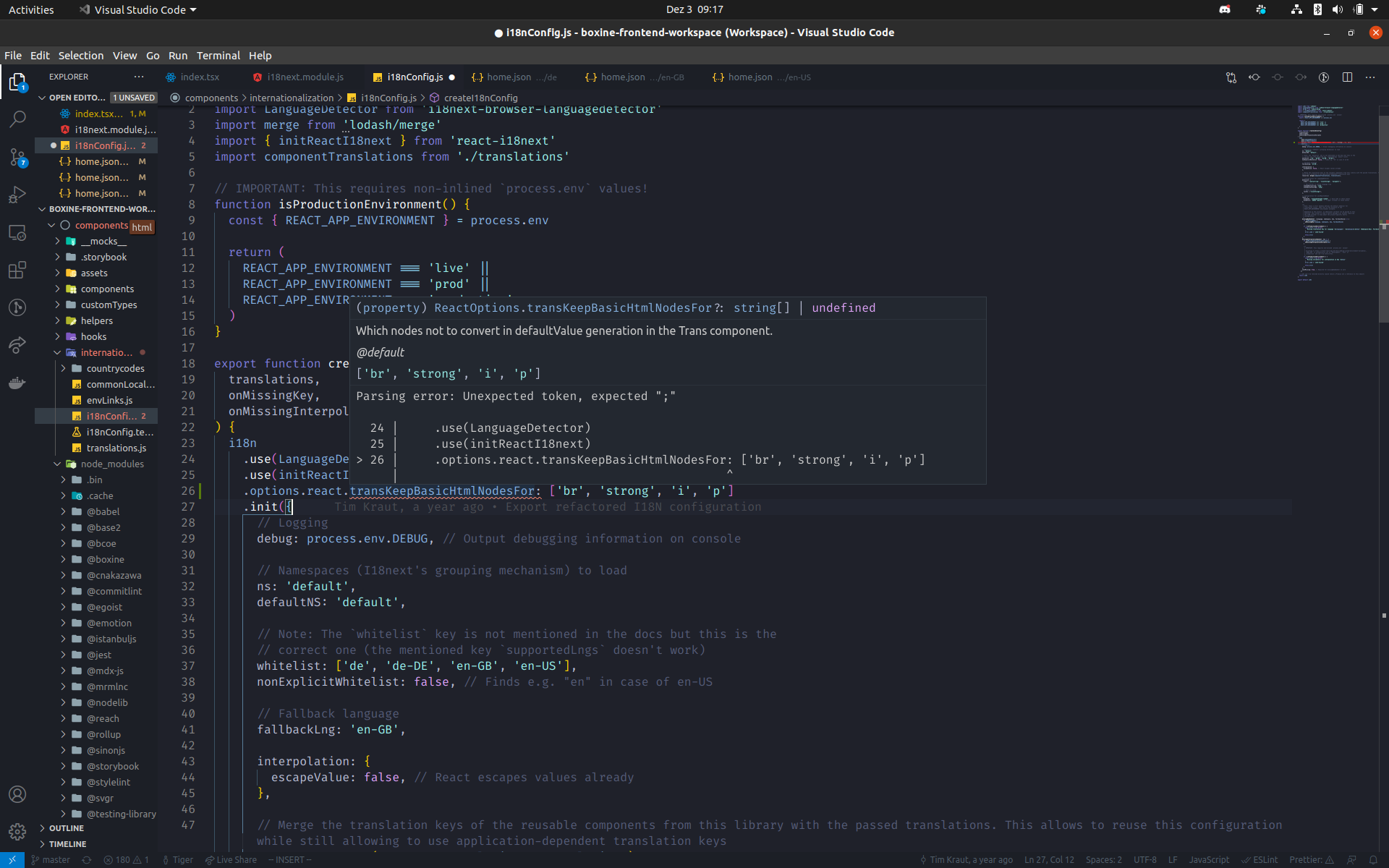
@jamuhl How would I add it here? We are sort of chaining methods.
This does not work somehow.
tigerabrodi
on 3 Dec 2020
Also since we have this as you mentioned https://react.i18next.com/latest/trans-component#using-for-less-than-br-greater-than-and-other-simple-html-elements-in-translations-v-10-4-0, then I do not need to add strong as bold right? That would just be more unnecessary code? I could just use strong in the text :+1:.
tigerabrodi
on 3 Dec 2020
i18n.init({
// all your options
react: {
transKeepBasicHtmlNodesFor: ['br', 'strong', 'i', 'p', 'no']
}
})
and yes...you can just use the other tags (strong, br, ...) as is in the translations...
jamuhl
on 3 Dec 2020
Thank you! Is it okay to close this issue?
I would open the PR tomorrow regarding Testing Library :+1:.
tigerabrodi
on 3 Dec 2020
We could also idk, leave it open in case other people encounter similar issues :man_shrugging:
tigerabrodi
on 3 Dec 2020
If solved sure...just close it
jamuhl
on 3 Dec 2020
@jamuhl @adrai I know I closed this, but I was wondering when using t from useTranslation, it escapes HTML tags properly, but not with Trans we have already discussed, is there a different implementation in useTranslation, that allows HTML tags to be properly escaped or did I miss anything?
Thanks :two_hearts: :gift_heart:
tigerabrodi
on 3 Dec 2020
your settings already set escapeValues to false in interpolation. so to make it work with using t from useTranslation you will still have to use dangerouslySetInnerHTML of react to avoid escaping: https://reactjs.org/docs/dom-elements.html#dangerouslysetinnerhtml
jamuhl
on 3 Dec 2020
@jamuhl Actually t from useTranslation already escapes it properly (it works with t from useTranslation :tada:) :sweat_smile:, I could show you a picture tomorrow if you want. I still wonder why it works for t from useTranslation and not for Trans :thinking:.
tigerabrodi
on 3 Dec 2020
I'd love to do an investigation actually, this is quite interesting.
tigerabrodi
on 3 Dec 2020
@tigerabrodi I suspect one reason why it automatically escapes your examples, like 'Tiger<no>', is because of HTML.parse => https://github.com/i18next/react-i18next/blob/master/src/Trans.js#L136
adrai
on 3 Dec 2020
I think I managed to reproduce the issue, in a much reduced setup: https://codesandbox.io/s/react-i18next-forked-hs32f?file=/src/app.js
Here the difference between Trans and t() is obvious. Hopefully that helps!
 jzaefferer
on 3 Dec 2020
jzaefferer
on 3 Dec 2020
Here the difference between
Transandt()is obvious. Hopefully that helps!
Yes, this reinforces my suspicion about HTML.parse
adrai
on 3 Dec 2020
Yes, HTML.parse takes the tag and converts it to something valid ->
But one can also see: https://codesandbox.io/s/react-i18next-forked-eig23 works for
(which is in the transKeepBasicHtmlNodesFor list)
Main difference:
t always gives you a string
Trans tries its best to create a valid react component tree from the translation and node children it gets
jamuhl
on 4 Dec 2020
@jamuhl That seems to be reasonable since in the components prop, HTML tags can be passed in, while useTranslation just returns a text :tada:.
tigerabrodi
on 4 Dec 2020
Thanks again :two_hearts:
tigerabrodi
on 4 Dec 2020
To me it looks like a bug that <Trans> doesn't escape values like t() does.
Since setting escapeValue: true breaks it in a different way, that doesn't seem like a good "not a bug, its a feature" explanation.
If it is a bug, could you reopen the issue? Or should we (@tigerabrodi or me) file a new one? We could dig into the implementation to see if we can come up with a solution.
jzaefferer
on 4 Dec 2020
I'd be really down to dig into the implementation :heart_eyes:, if this can get fixed, then that'd be really awesome for our company and many other companies :smiley: :two_hearts: :tada:
tigerabrodi
on 4 Dec 2020
just set
    react: {
      transSupportBasicHtmlNodes: false
    },
https://codesandbox.io/s/react-i18next-forked-0opfv and results are the same
jamuhl
on 4 Dec 2020
@jamuhl Looks fire :raised_hands:, but then we would have to pass br, i and strong into components as prop right? Like for other HTML tags? If we do wanna use HTML tags in the translations texts?
Thanks :two_hearts:
tigerabrodi
on 4 Dec 2020
@tigerabrodi would guess so...
jamuhl
on 4 Dec 2020
That looks good to me, too: https://codesandbox.io/s/react-i18next-forked-1hfow?file=/src/app.js
I think we'll set this in our global config then, to avoid the escaping issue globally.
I wonder if this should be mentioned in the documentation. I'm sure @tigerabrodi would be happy to do a PR for that :-)
jzaefferer
on 4 Dec 2020
That looks good to me, too: https://codesandbox.io/s/react-i18next-forked-1hfow?file=/src/app.js
I think we'll set this in our global config then, to avoid the escaping issue globally.
I wonder if this should be mentioned in the documentation. I'm sure @tigerabrodi would be happy to do a PR for that :-)
@jamuhl Defo would be happy to update the documentation if needed :tada:, react-i18next gitbook right :wink:, I was about to fork it before since I did not know if updating the documentation for my last PR was needed :partying_face:
tigerabrodi
on 4 Dec 2020
Actually this is still broken :/ When adding an unclosed tag, it again breaks the rendering badly: https://codesandbox.io/s/react-i18next-forked-1hfow?file=/src/app.js:381-437 Despite using transSupportBasicHtmlNodes: false
jzaefferer
on 4 Dec 2020
@jamuhl Regarding this issue, of Trans not escaping properly, perhaps this could be something to fix in the future :smile:, I am also down to heavily contribute as mentioned :smiling_face_with_three_hearts:. I think it'd be great if we could fix this, then not just our, but other companies hopefully won't encounter the same bug :tada:. This would also be great, as more and more companies start using react-i18next :raised_hands:.
Also @jamuhl, something I forgot to ask regarding fixing this, do you have any ideas on how we could possibly fix this, or if it even is possible :thinking:?
Thanks :pray: :two_hearts:
tigerabrodi
on 7 Dec 2020
@jamuhl Regarding this issue, of
Transnot escaping properly, perhaps this could be something to fix in the future :smile:, I am also down to heavily contribute as mentioned :smiling_face_with_three_hearts:. I think it'd be great if we could fix this, then not just our, but other companies hopefully won't encounter the same bug :tada:. This would also be great, as more and more companies start using react-i18next :raised_hands:.Also @jamuhl, something I forgot to ask regarding fixing this, do you have any ideas on how we could possibly fix this, or if it even is possible :thinking:?
Thanks :pray: :two_hearts:
Analyze html-parse-stringify2 and propose a fix there or find an alternative.
adrai
on 7 Dec 2020
@adrai We would then work on the Trans file right? Just to get some direction :raised_hands:
tigerabrodi
on 7 Dec 2020
Yes, the HTML.parse call is the problem.
adrai
on 7 Dec 2020
@adrai I will reopen this issue, and try to find a solution for this :tada: :raised_hands: :muscle:
tigerabrodi
on 7 Dec 2020
@adrai Hmm, seems like html-parse-stringify2 was last updated three years ago https://github.com/rayd/html-parse-stringify2
tigerabrodi
on 8 Dec 2020
I think a good step would be to find the exact problem or whatever HTML.parse is doing, and from there see what we can do to fix this.
tigerabrodi
on 8 Dec 2020
This issue has been automatically marked as stale because it has not had recent activity. It will be closed if no further activity occurs. Thank you for your contributions.
![stale[bot] picture](https://avatars.githubusercontent.com/in/1724?v=4&s=40) stale[bot]
on 15 Dec 2020
stale[bot]
on 15 Dec 2020
Related issues
 aniket-dalvi
·
4Comments
aniket-dalvi
·
4Comments
 simoami
·
3Comments
simoami
·
3Comments
 tankpower1
·
3Comments
tankpower1
·
3Comments
 ezze
·
4Comments
ezze
·
4Comments
 Flo-Slv
·
4Comments
Flo-Slv
·
4Comments
Most helpful comment
just set
https://codesandbox.io/s/react-i18next-forked-0opfv and results are the same