React-i18next: Error after upgrading: "Invariant Violation: Hooks can only be called inside the body of a function component."
Describe the bug
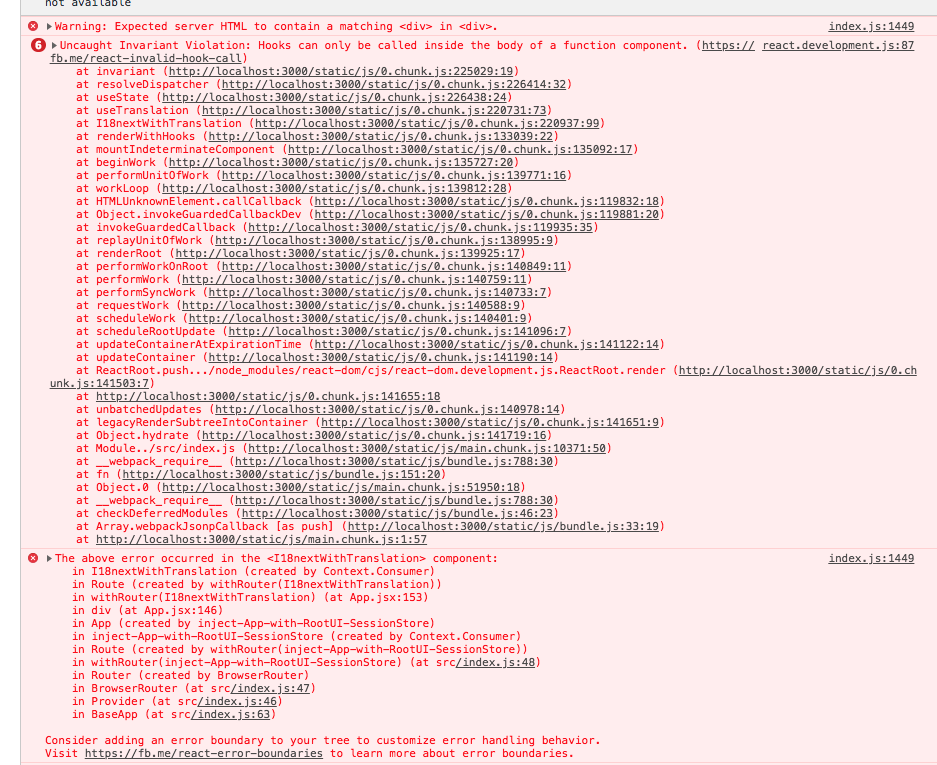
Invariant Violation: Hooks can only be called inside the body of a function component.
This error occurs for me after upgrading to the newest version of react-i18next. I'm using SSR for my app but this is occurring in the client-side rendering portion, so I don't think it's SSR specific. I compared my code against the razzle-ssr code and it's effectively the same, the only difference is my App.jsx is a class and not a function. (I tried changing my App to a function and I still got this error).
I am not using Hooks anywhere except for useSSR. I am only using withTranslation (because of decorators)
Occurs in react-i18next version
- "i18next": "15.0.4"
- "i18next-browser-languagedetector": "3.0.1"
- "i18next-express-middleware": "1.7.1"
- "i18next-node-fs-backend": "2.1.1"
- "i18next-xhr-backend": "2.0.1"
- "react-i18next": "10.2.0"
To Reproduce
Not sure. Works fine in the Razzle example.
Expected behaviour
I should be able to do... anything. My app is broken and I'm not sure why.
Screenshots
If applicable, add screenshots or a GIF to help explain your problem.

OS (please complete the following information):
- Device: MacBook Pro (Retina, 15-inch, Mid 2015)
- Browser: Chrome Version 72.0.3626.109 (Official Build) (64-bit)
Additional context
config:
import i18n from 'i18next';
import { initReactI18next } from 'react-i18next';
import XHR from 'i18next-xhr-backend';
import LanguageDetector from 'i18next-browser-languagedetector';

const options = {
  allLanguages: ['en'],
  fallbackLng: 'en',
  load: 'languageOnly',

  ns: [
    'about',
  ],
  defaultNS: 'translations',

  saveMissing: false,
  debug: false,


  interpolation: {
    escapeValue: false // not needed for react!!
  },
  wait: process && !process.release
};

// for browser use xhr backend to load translations and browser lng detector
if (process && !process.release) {
  i18n
    .use(XHR)
    // .use(Cache)
    .use(LanguageDetector);
}

i18n.use(initReactI18next);

// initialize if not already initialized
if (!i18n.isInitialized) {
  i18n.init(options);
}

export default i18n;
src/index.js (for client side) -- not all of the code but the relevant stuff.
const BaseApp = () => {
  useSSR(window.initialI18nStore, window.initialLanguage);
  return (
    <MobxProvider {...stores}>
      <BrowserRouter>
        <App
          isClientSideRendered={!window.IS_SSR}
          show404Page={window.show404Page || false}
          show500Page={window.show500Page || false}
          userData={window.userData}
        />
      </BrowserRouter>
    </MobxProvider>
  );
};


// It is important to keep the following in sync with `server/app.js`.

ReactDOM.hydrate(
  <BaseApp />,
  document.getElementById('root')
);
 Dakkers
All 21 comments
react and react-dom up-to-date >= 16.8.0
 jamuhl
on 26 Feb 2019
jamuhl
on 26 Feb 2019
They are. useSSR doesn't throw any errors
Dakkers
on 26 Feb 2019
i do not get this errors at all...so must be something in hydrate internals
jamuhl
on 26 Feb 2019
I tried changing hydrate to render, same error. (also removed the SSR stuff when I changed it to render). I think I might know the issue but I'll double check and come back.
Dakkers
on 26 Feb 2019
@jamuhl originally i thought i wasn't running my API, but I was and the same error is occurring.
Dakkers
on 28 Feb 2019
Please provide a sample to reproduce on codesandbox...can't reproduce this without (sorry)
jamuhl
on 1 Mar 2019
I can report a similar problem with v10. I do not believe that this is related to hydrate
My problem (I suspect) could be related to the useContext hook in this method. https://github.com/i18next/react-i18next/blob/0fafb4563a9c852792bd6851b45008d1315566f0/src/Trans.js#L133 In my app, I am importing another app (across the imperative boundary) that is only class components. I create my own i18n instance, and down the tree, they have use theirs (in a different context). The stack trace is attached.
localhost-1551427723908.log
 christopher-johnson
on 1 Mar 2019
christopher-johnson
on 1 Mar 2019
Trans component is a function: https://github.com/i18next/react-i18next/blob/master/src/Trans.js#L119
so there should no be such warning
jamuhl
on 1 Mar 2019
in the stacktrace, you can see that useContext executes (not sure why yet). The caller (at z (http://localhost:3000/static/js/bundle.js:174709:42) is this method (which is Trans#133 transpiled)
function z(e) {
var t = (arguments.length > 1 && void 0 !== arguments[1] ? arguments[1] : {}).i18n,
n = (A() ? Object(o.useContext)(R) : {}).i18n,
r = t || n || j();
actually, stepping through the code, I realize now that this is from useTranslation not Trans. it looks like if getHasUsedI18nextProvider is true, then it executes useContext, which it will in my case, because there are two providers.
christopher-johnson
on 1 Mar 2019
that changes nothing...useContext gets executed when you're using a provider -> still this usage of useContext is in a functional component and therefore should not give an error
jamuhl
on 1 Mar 2019
Or are you using useTranslation in a class component?
jamuhl
on 1 Mar 2019
the upstream app has just started using the withTranslation HOC on their class components, and it looks like this method in useTranslation is called from that.
christopher-johnson
on 1 Mar 2019
Also the HOC wrappes using a functional component: https://github.com/i18next/react-i18next/blob/master/src/withTranslation.js#L6
So this is not the cause...
jamuhl
on 1 Mar 2019
I have solved this. The problem is that upstream bundles react and react-dom. Discussed here:
https://reactjs.org/warnings/invalid-hook-call-warning.html. (#3)
So, it appears that my specific error is unrelated to react-i18next
Adding this to the upstream webpack bundler is the fix:
  externals: {
    // Don't bundle react or react-dom
    react: {
      commonjs: "react",
      commonjs2: "react",
      amd: "React",
      root: "React"
    },
    "react-dom": {
      commonjs: "react-dom",
      commonjs2: "react-dom",
      amd: "ReactDOM",
      root: "ReactDOM"
    }
  },
I'm using create-react-app to bundle my client side code, so I can't
imagine changing the externals in the client webpack would work.
Additionally this problem is occurring in my client side code, not my
server code.
Dakkers
on 1 Mar 2019
@Dakkers Like said...rather sure it's an issue with your code...so please provide a sample to reproduce.
jamuhl
on 1 Mar 2019
FOUND IT HOLY FUCKIN CANOLI
My project is a monorepo with this structure:
- react
- site
- admin
- lib1
- lib2
site, admin are create-react-app apps. They have the dep react-script. This installs react under the hood. The top level folder react has its own dependency of react which lib1, lib2 reference. However, this is a problem: https://reactjs.org/warnings/invalid-hook-call-warning.html#duplicate-react
The way I fixed it (temporarily) is by removing web/node_modules/react. I will need to reorganize my app.
Dakkers
on 1 Mar 2019
@jamuhl thank you for your assistance, same to you @christopher-johnson .
Dakkers
on 1 Mar 2019
If you like this module don’t forget to star this repo. Make a tweet, share the word or have a look at our https://locize.com to support the devs of this project -> there are many ways to help this project :pray:
jamuhl
on 1 Mar 2019
I have solved this. The problem is that upstream bundles
reactandreact-dom. Discussed here:
https://reactjs.org/warnings/invalid-hook-call-warning.html. (#3)So, it appears that my specific error is unrelated to
react-i18nextAdding this to the upstream webpack bundler is the fix:
  externals: {
    // Don't bundle react or react-dom
    react: {
      commonjs: "react",
      commonjs2: "react",
      amd: "React",
      root: "React"
    },
    "react-dom": {
      commonjs: "react-dom",
      commonjs2: "react-dom",
      amd: "ReactDOM",
      root: "ReactDOM"
    }
  },
I solved the problem by this way
 Lapsec
on 26 Jul 2019
Lapsec
on 26 Jul 2019
Related issues
 aniket-dalvi
·
4Comments
aniket-dalvi
·
4Comments
 skbhardwaj
·
4Comments
skbhardwaj
·
4Comments
 nicholasmaddren
·
4Comments
nicholasmaddren
·
4Comments
 simoami
·
3Comments
simoami
·
3Comments
 pwiszowaty0
·
4Comments
pwiszowaty0
·
4Comments
Most helpful comment
I have solved this. The problem is that upstream bundles
reactandreact-dom. Discussed here:https://reactjs.org/warnings/invalid-hook-call-warning.html. (#3)
So, it appears that my specific error is unrelated to
react-i18nextAdding this to the upstream webpack bundler is the fix: