React-i18next: Link on text content
Hi guys,
First of all: Thanks for your amazing work!
I'd like to introduce a link inside my translated text. HTML example:
[...]
  "text_two": "Go to <a href='//google.com.br'>Google Portuguese</a>"
[...]
How could I do something similar in RN?
Do you have a direction to point me? I'm very newbie in i18n.
Thanks in advance
 cassio-nuke
All 6 comments
Are you using react-navigation with reactnative? if so find a sample here: https://github.com/i18next/react-i18next/blob/master/example/reactnative-expo/js/pages/Home.js#L32
Just do not use a Button but a Text component with style underline (there is nothing like a a tag in RN)
 jamuhl
on 17 Oct 2018
jamuhl
on 17 Oct 2018
Hi Jan,
Thanks for your answer.
My example was bad, but my situation is that I have a huge text with links inside it.
Here's my layout:
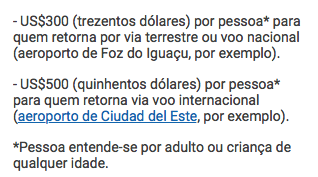
The best approach is to cut this text into many parts?
cassio-nuke
on 17 Oct 2018
Not cutting it...use the Trans component: https://react.i18next.com/components/trans-component#sample
In that sample replace the Link with whatever is right for your RN link component.
jamuhl
on 17 Oct 2018
That is exactly what I was looking for. Thank you!
cassio-nuke
on 17 Oct 2018
Both of the links in this answer are broken. Could you post the solution here inline?
 MareoRaft
on 24 May 2019
jamuhl
on 24 May 2019
MareoRaft
on 24 May 2019
jamuhl
on 24 May 2019
Related issues
 a-barbieri
·
4Comments
a-barbieri
·
4Comments
 Jessidhia
·
4Comments
Jessidhia
·
4Comments
 pwiszowaty0
·
4Comments
pwiszowaty0
·
4Comments
 martinlaregina
·
3Comments
martinlaregina
·
3Comments
 ok2ju
·
3Comments
ok2ju
·
3Comments
Most helpful comment
Not cutting it...use the Trans component: https://react.i18next.com/components/trans-component#sample
In that sample replace the Link with whatever is right for your RN link component.