React-hot-loader: React component type is confused
If you are reporting a bug or having an issue setting up React Hot Loader, please fill in below. For feature requests, feel free to remove this template entirely.
Description
What you are reporting:
All react nodes are created by a proxy function in react-hot-loader now, and this affects all codes like node.type === Component. This assertion will always be false.
And this is very common in many codebases, like react bootstrap here.
Expected behavior
What you think should happen:
See function location, it is from correct file location, and node.type === Component is true.
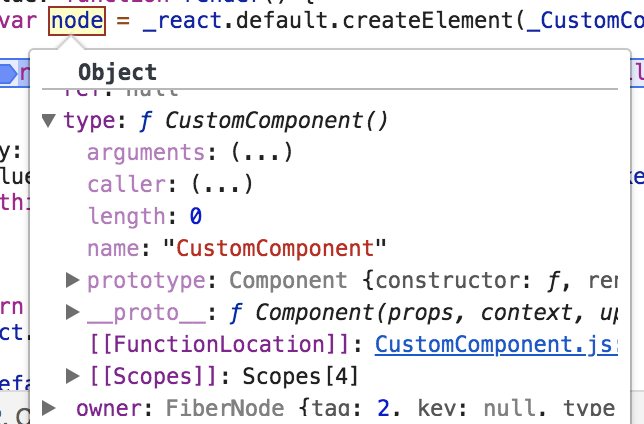
Actual behavior
What actually happens:
react node's type has dynamic function location, which I believe is a dynamic generated, see screenshot:
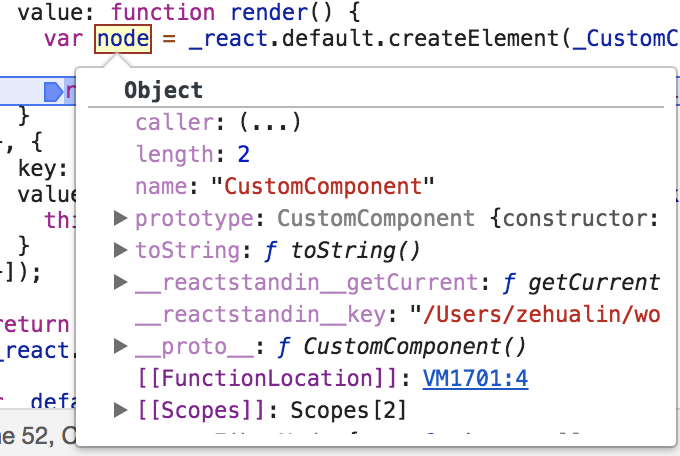
[[FunctionLocation]]: VMxxx is a dynamically generated file in chrome, and node.type === Component is false now.
Environment
React Hot Loader version:
Run these commands in the project folder and fill in their results:
node -v: v6.9.5npm -v: 5.8.0
Then, specify:
- Operating system: Mac
- Browser and version: Chrome Version 65.0.3325.181 (Official Build) (64-bit)
Reproducible Demo
Please take the time to create a new project that reproduces the issue.
You can copy your project that experiences the problem and start removing things until you’re left with the minimal reproducible demo. This helps contributors, and you might get to the root of your problem during that process.
Push to GitHub and paste the link here.
- git clone https://github.com/zlk89/react-hot-loader-clear/tree/hmr-function-location-bug, checkout branch
hmr-function-location-bug npm installnpm run startand openlocalhost:3000in browser
- You should see
Correct!
- You should see
- Then enable any one of these lines:
- and then rerun
npm run start
- Refresh page, you should see
Wrong!in browser
- Refresh page, you should see
 zlk89
zlk89
All 3 comments
We know this problem, but could not do anything to solve it. At least today.
The only proper way to write your code is to compare the _same things_:
node.type === <Component />.type
 theKashey
on 18 Apr 2018
theKashey
on 18 Apr 2018
Thank you for taking the time @theKashey! I tested your workaround when running into the same problem and it works. It forces <Component /> to either be instantiated with all required props or not have any required props however (assuming PropTypes are used), otherwise a propType warning will be thrown. Instantiating components for equality checks also raises performance concerns.
Could it be enough to compare string representations of the functions in the particular case of React components? I am not sure whether this approach has drawbacks, it worked in a quick test.
node.type.toString() === Component.toString()
Either way, thank you for providing a working solution to the problem!
 fspoettel
on 20 Apr 2018
fspoettel
on 20 Apr 2018
Nope. But we do have a special helper for it - areComponentsEqual, check out https://github.com/gaearon/react-hot-loader#checking-element-types.
PS: @gaearon, I know that we have to have this conversation a long time ago, but is it possible to move RHL a bit more "deeply" inside React? Make React more "hackable"?
Basically, only 1 things is required:
- a function to derive
typefromtypebefore element creation.
The same logic as we put into createElement, but in the proper place - below user space.
This will solve all endless "element comparison problems", and actually remove the last side-effect we have.
theKashey
on 21 Apr 2018
Related issues
 adesmet
·
4Comments
adesmet
·
4Comments
 Opty1712
·
4Comments
Opty1712
·
4Comments
 tiberiumaxim
·
4Comments
tiberiumaxim
·
4Comments
 JamesIves
·
4Comments
JamesIves
·
4Comments
 niba
·
4Comments
niba
·
4Comments
Most helpful comment
Nope. But we do have a special helper for it -
areComponentsEqual, check out https://github.com/gaearon/react-hot-loader#checking-element-types.PS: @gaearon, I know that we have to have this conversation a long time ago, but is it possible to move RHL a bit more "deeply" inside React? Make React more "hackable"?
Basically, only 1 things is required:
typefromtypebefore element creation.The same logic as we put into createElement, but in the proper place - below user space.
This will solve all endless "element comparison problems", and actually remove the last side-effect we have.