React-grid-layout: Auto-Height (or similar) Layout Items
Hi,
first of all i want to do congratulations for this library because it is really fantastic!
I just wanted to know if anyone had found a way to make the Layout Item dynamic in terms of height, based on the content that is in it
Thank you so much,
Matteo
 mperu92
All 18 comments
If I understood you correctly, you want the content inside to adapt to the layout item size? In that case a simple CSS would take care of it height: 100%;
Alternatively if you want to have the actual layout wrapper adapt to the content height you can create an HOC component that would recalculate its own min-height of the content inside and then update the elements layout in the store somewhere.
Here's a basic example of what I use. Mine involves a few more things that are specific to my case, but this is the general idea of it:
https://gist.github.com/TheImpressionist/083c729ca2b049ef6439f59461adc0c1
Hope this helps. Let me know if you have questions.
 TheImpressionist
on 9 Aug 2019
TheImpressionist
on 9 Aug 2019
@mperu92
I'm rendering a component inside the grid item and keeping the ref. Then using:
useLayoutEffect(() => {
  if (ref.current) {
       const height = ref.current.clientHeight
       const scroll = ref.current.scrollHeight
        if (scroll > height) {
          const newRowHeight = Math.ceil(scroll / GRID_ROW_SIZE)
          // –> update this grid item { h: newRowHeight }
        }
  }
}, [ref.current])
It's more or less that. My grid item component receives a prop named updateHeight which is called whenever the height of the div element changes and we need to resize the grid item in order to cover the overflow. It's actually wrapped in setInterval which checks every 200ms. Not perfect but it works.
 eddyw
on 14 Aug 2019
eddyw
on 14 Aug 2019
@mperu92
I'm rendering a component inside the grid item and keeping theref. Then using:useLayoutEffect(() => { if (ref.current) { const height = ref.current.clientHeight const scroll = ref.current.scrollHeight if (scroll > height) { const newRowHeight = Math.ceil(scroll / GRID_ROW_SIZE) // –> update this grid item { h: newRowHeight } } } }, [ref.current])It's more or less that. My grid item component receives a prop named
updateHeightwhich is called whenever the height of thedivelement changes and we need to resize the grid item in order to cover the overflow. It's actually wrapped insetIntervalwhich checks every200ms. Not perfect but it works.
@eddyw Could you please tell me/explain to me the value of GRID_ROW_SIZE?
 nz-chris
on 15 Aug 2019
nz-chris
on 15 Aug 2019
@nz-chris GRID_ROW_SIZE is a constant I use to set rowHeight prop on GridLayout
<GridLayout rowHeight={GRID_ROW_SIZE} .... >
This line:
const newRowHeight = Math.ceil(scroll / GRID_ROW_SIZE)
Calculates how many rows we need in order to fit the content that is overflow. Then, you just need to update the layout item h prop to the new row height.
eddyw
on 15 Aug 2019
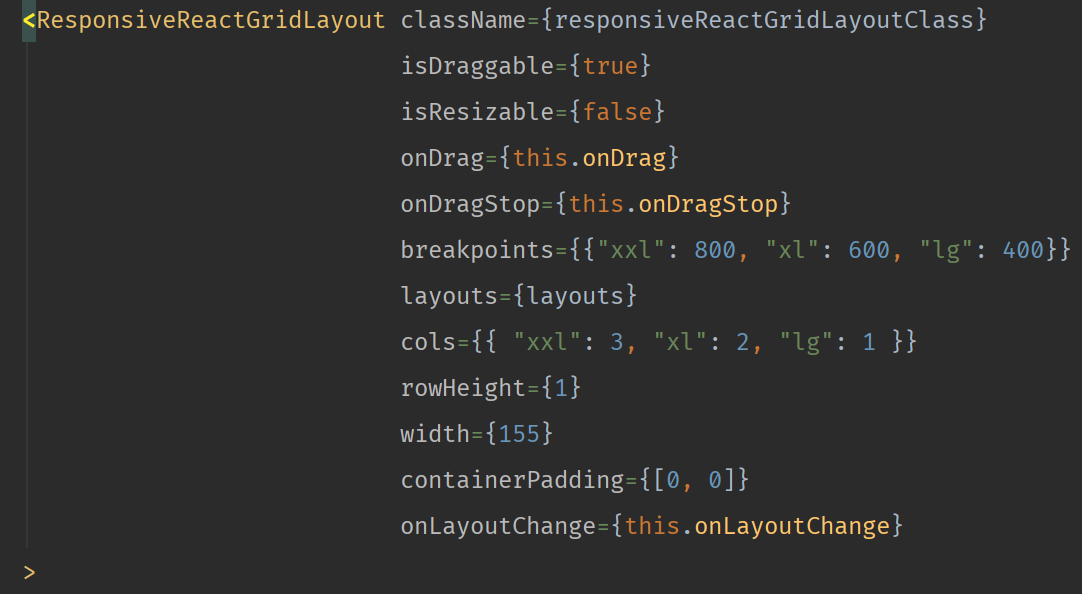
@eddyw Thanks. Interesting... We have a similar function to you, but we had to experiment with what number to divide the height of the component inside the grid item by. We use 10.897, despite our rowHeight prop set to 1. Do you know why this might be?
We use const ResponsiveReactGridLayout = WidthProvider(Responsive); as our grid layout component (WidthProvider and Responsive coming directly from the package).
Here's what our props look like
nz-chris
on 15 Aug 2019
@nz-chris hm, clientHeight and scrollHeight includes padding but it neither includes border nor margin. So I'd check first if my grid item has border and/or margin. Maybe try setting the CSS attr box-sizing: border-box;
eddyw
on 16 Aug 2019
@nz-chris yeah, I just noticed that you don't specify margin prop, so this by default falls back to (as in README.md):
// Margin between items [x, y] in px.
margin: ?[number, number] = [10, 10],
In my case, it's set to margin={[0, 0]}, so I don't calculate top/bottom margin which is not included in clientHeight/scrollHeight. The other 0.897 is .. my best guess, horizontal scrollbar which is also not included in clientHeight/scrollHeight
eddyw
on 16 Aug 2019
@nz-chris hm,
clientHeightandscrollHeightincludes padding but it neither includes border nor margin. So I'd check first if my grid item has border and/or margin. Maybe try setting the CSS attrbox-sizing: border-box;
You can get margins for your ref by using getComputedStyle(node)
// Node is the HTMLElement that you need to get the margins/paddings/anything else of
const computedStyle = window.getComputedStyle(node);

// You need to cast the values though
const totalYMargin = parseInt(computedStyle.marginTop, 10) + parseInt(computedStyle.marginBottom, 10);
const totalXMargin = parseInt(computedStyle.marginLeft, 10) + parseInt(computedStyle.marginRight, 10);
...
Same can be done with borders. However, I think you'd want to use offsetHeight. It contains the padding and borders. Unless you can't for any reason. Then you can just calculate the total height using
I'm not sure about the scrollbar. It's not part of the DOM nor the box model. Also they way to works is very browser/os specific too.
TheImpressionist
on 16 Aug 2019
@mperu92
I'm rendering a component inside the grid item and keeping theref. Then using:useLayoutEffect(() => { if (ref.current) { const height = ref.current.clientHeight const scroll = ref.current.scrollHeight if (scroll > height) { const newRowHeight = Math.ceil(scroll / GRID_ROW_SIZE) // –> update this grid item { h: newRowHeight } } } }, [ref.current])It's more or less that. My grid item component receives a prop named
updateHeightwhich is called whenever the height of thedivelement changes and we need to resize the grid item in order to cover the overflow. It's actually wrapped insetIntervalwhich checks every200ms. Not perfect but it works.@eddyw Could you please tell me/explain to me the value of GRID_ROW_SIZE?
Thank, but when I should call this function?
mperu92
on 4 Sep 2019
@mperu92 that depends on what you're building. In my case, I have a RichText editor (built with SlateJS) inside a grid item, so this item needs to update its height (h) whenever the height of the RichText editor changes (new lines of text are added), so the react effect takes care of comparing the height and checking if it should resize. When resize is needed it calls updateHeight (in example code, it calls where comment is // –> update this grid item { h: newRowHeight })
eddyw
on 4 Sep 2019
@mperu92 did you find the answer?
 daynin
on 20 Sep 2019
daynin
on 20 Sep 2019
If I understood you correctly, you want the content inside to adapt to the layout item size? In that case a simple CSS would take care of it
height: 100%;Alternatively if you want to have the actual layout wrapper adapt to the content height you can create an HOC component that would recalculate its own min-height of the content inside and then update the elements layout in the store somewhere.
Here's a basic example of what I use. Mine involves a few more things that are specific to my case, but this is the general idea of it:
https://gist.github.com/TheImpressionist/083c729ca2b049ef6439f59461adc0c1Hope this helps. Let me know if you have questions.
@TheImpressionist I tried using this and I can't seem to get componentDidUpdate to ever trigger during the resize. What state/props are supposed to change during the dragging?
 kevinqiu92
on 30 Sep 2019
kevinqiu92
on 30 Sep 2019
It also seems that the HOC gets unmounted and remounted every time a resize happens, so I can see why componentDidUpdate isn't being called. Is anyone else seeing different behavior?
kevinqiu92
on 1 Oct 2019
@kevinqiu92 That could be the issue. Although, it doesn't remount each time a resize or drag event happens for me. Are you doing anything with the onResizeStop or onLayoutChange callbacks?
Or perhaps you're creating the HOC each time on a re-render? That would cause a remount, as the component is a new instance each time.
TheImpressionist
on 2 Oct 2019
@mperu92 did you find the answer?
Not yet, but I'm still trying
mperu92
on 2 Oct 2019
@kevinqiu92 That could be the issue. Although, it doesn't remount each time a resize or drag event happens for me. Are you doing anything with the
onResizeStoporonLayoutChangecallbacks?Or perhaps you're creating the HOC each time on a re-render? That would cause a remount, as the component is a new instance each time.
Yeah I believe the HOC is getting recreated each time. It might be because I have a div as a wrapper for the HOC? I'm pretty new to react so the lifecycle stuff isn't super clear for me yet.
kevinqiu92
on 2 Oct 2019
@TheImpressionist do you have a full example of your implementation?
My problem is: i have a widget which has the initial height of 2 and is displaying a spinner, after the data is loaded the widget should resize to the height of the fetched data. After i pass the new size, the widget does not resize, the correct size is displayed after i remount the widget.
 EdgarKisman
on 15 Oct 2019
EdgarKisman
on 15 Oct 2019
This issue is stale because it has been open 30 days with no activity. Remove stale label or comment or this issue will be closed in 7 days
![github-actions[bot] picture](https://avatars2.githubusercontent.com/in/15368?v=4&s=40) github-actions[bot]
on 14 Nov 2019
github-actions[bot]
on 14 Nov 2019
Related issues
 f15gdsy
·
4Comments
f15gdsy
·
4Comments
 moritzschaefer
·
3Comments
moritzschaefer
·
3Comments
 victor-unsw
·
3Comments
victor-unsw
·
3Comments
 MaksZhukov
·
3Comments
MaksZhukov
·
3Comments
 Francismb
·
4Comments
Francismb
·
4Comments
Most helpful comment
@mperu92
I'm rendering a component inside the grid item and keeping the
ref. Then using:It's more or less that. My grid item component receives a prop named
updateHeightwhich is called whenever the height of thedivelement changes and we need to resize the grid item in order to cover the overflow. It's actually wrapped insetIntervalwhich checks every200ms. Not perfect but it works.