React-grid-layout: GridItem Destroys the Wrapped Child Element
Thanks for submitting an issue to RGL!
Please mark the type of this issue:
- [X] Bug
- [ ] Feature Request
- [X] Question
If you have a question or bug report, please use the WebpackBin Template
to demonstrate. It is much easier for us to help you if you do.
NOTE: I can't get the bin working. The app constantly reports that some error occurs in the template... I'd like to create a simple demo if the error can be fixed...
For now, I'll describe the issue, expectations and possible solution with code snippets and references...
The code this issue discusses is here.
Summary
In my case, I use this library to create an editable dashboard (refer to sample code blow). The UI provides a button toggling the editable state of the dashboard via setting isDraggable and isResizable props of ReactGridLayout...But, due to the aforementioned implementation, every time the values of these two props change, the custom element/component wrapped in GridItem will be recreated by cloning. Hence, the original wrapped element is destroyed and its internal state is lost...
This seems to imply that every custom item/component passed into the grid layout has to be stateless. If this is true, its not very feasible, since it's not always true for a custom component to be stateless...
// dashboard code
// A modification borrowed from https://github.com/STRML/react-grid-layout/blob/master/test/examples/1-basic.jsx

class Dashboard extends React.PureComponent {
  static defaultProps = {
    items: 20,
    rowHeight: 30,
    cols: 12
  }

  constructor(props) {
    super(props);

    const layout = this.generateLayout();

    this.state = {
      editable: false,
      layout
    };
  }

  toggleEditMode = () => {
    this.setState(({editable}) => {
      editable: !editable
    });
  }

  generateLayout() {
    const p = this.props;
    return _.map(new Array(p.items), function(item, i) {
      const y = _.result(p, "y") || Math.ceil(Math.random() * 4) + 1;
      return {
        x: (i * 2) % 12,
        y: Math.floor(i / 6) * y,
        w: 2,
        h: y,
        i: i.toString()
      };
    });
  }

  generateDOM() {
    return _.map(_.range(this.props.items), (i) => (<CustomItem key={i} />));
  }

  render() {
    const {
      editable,
      layout
    } = this.state;

    return (
      <div className="dashboard">
        <div className="controls">
          <button onClick={this.toggleEditMode}>editable toggle</button>
        </div>
        <div className="display-panel">
          <ReactGridLayout
            {...this.props}
            layout={layout}
            isDraggable={editable}
            isResizable={editable}
          >
            {this.generateDOM()}
          </ReactGridLayout>
        </div>
      </div>
    );
  }
}

class CustomItem extends React.Component {
  componentWillUnmount() {
    console.info("Oh no, I'm destroyed!!!!");
  }

  render() {
    return (
      <div>
        <span className="text">Some custom item/component might have internal state.</span>
      </div>
    );
  }
}
Current behavior:
changing isResizable or isDraggable destroys the custom element/component always.
Expect behavior:
the custom element/component should be destroyed only when necessary by the React itself.
Possible solution
After reading this comment,
https://github.com/STRML/react-grid-layout/blob/aacba5fcb466860573284d8d081d71e1965c2f8c/lib/GridItem.jsx#L471
I think it's more useful to use hoc (a function that wraps GridItem around the custom element/component) to achieve the same goal. A draft skeleton looks like below:
function connectToGridItem(Component) {
  class GridItem extends React.Component {
    ...
    render() {
      const newClassNames = classNames(
        "react-grid-item",
        this.props.className,
        {
          static: this.props.static,
          resizing: Boolean(this.state.resizing),
          "react-draggable": isDraggable,
          "react-draggable-dragging": Boolean(this.state.dragging),
          cssTransforms: useCSSTransforms
        }
      );

      return (
        <Component
          classNames={newClassNames}
          style={
            ...this.props.style,
            ...child.props.style,
            ...this.createStyle(pos)
          }
        />
      );
    }
    ...
  }

  return GridItem;
}
For any custom component being rendered into the grid, it should be wrapped by the above hoc (this will give React a chance to reuse the rendered component which can result in more performant code):
class CustomComp extends React.Component {
  ...
}

export default connectToGridItem(CustomComp);
 ZheyangSong
All 18 comments
May I see the output ? :)
 michaelroevievictoria
on 8 Feb 2018
michaelroevievictoria
on 8 Feb 2018
@michaelroevievictoria Is there other online IDEs set-up (other than WebpackBin) where I can put up a sample for this issue? That might be more helpful. As of the output in console, it's N times of "Oh no, I'm destroyed!!!!" on every editing mode toggling, where N is the number of rendered items.
ZheyangSong
on 8 Feb 2018
@ZheyangSong Actually I have a problem to you can see my issue. Well I just create a GIF to see my output. :)
michaelroevievictoria
on 9 Feb 2018
I had this exact same problem. If you need a quick solution to work around it here is what I did:
isDraggable and isResizable is always set to true. draggableHandle set to '.dragHandle'
I wrapped all children of the grid layout with my own GridItemEditable component. The editable prop is also passed down to all the children.
GridItemEditable:
for draggable - when editable is true, add 'dragHandle' class otherwise leave it out.
for resizable - when editable is false, remove the last child
e.g.
    const childrenCount = React.Children.count(this.props.children);
    const childrenArray = React.Children.toArray(this.props.children);
    const resizeHandle = childrenArray.slice(childrenCount - 1);
    const otherChildren = childrenArray.slice(0, childrenCount - 1);

    return (
      <div
        className={classnames('item', {dragHandle: editMode})}>
        {otherChildren}
        {editMode && resizeHandle}
      </div>
    );
Ugly but it works.
 foodforarabbit
on 10 Feb 2018
foodforarabbit
on 10 Feb 2018
I'm having the same exact issue as well. @foodforarabbit can you elaborate more on how you handle removing the resize handle? Are you manually removing the one that react-grid-layout adds?
EDIT: ignore -- I just used css to handle it! That's some smart ingenuity on a workaround though.
 jackie-benowitz
on 12 Feb 2018
jackie-benowitz
on 12 Feb 2018
@michaelroevievictoria was the issue deleted?
ZheyangSong
on 12 Feb 2018
@foodforarabbit Thank you. That's quite a solution before the library resolves it, I hope the owner will agree on improving the library itself though.
ZheyangSong
on 12 Feb 2018
@jackie-benowitz Yes I am manually removing the resize handle that react-grid-layout generates inside the ReactGridLayout children. The resize handle they generate is ALWAYS the last child so you can simply count the children inside your GridItemEditable object, and the last one is the handle. Then I simply output the other children as usual, and do a conditional render of the handle. Probably better to wrap the handle in a div and show/hide it with css classes.
Here is my ReactGridLayout:
<ReactGridLayout
  dragApiRef={dragApi}
  verticalCompact={true}
  onDragStop={layoutOnChange}
  onResizeStop={layoutOnChange}
  isDraggable={true}
  isResizable={true}
  draggableHandle=".dragHandle"
  layout={layout}
  margin={[32, 32]}
>
  <GridItemEditable>
    {your_content}
  </GridItemEditable>
  <GridItemEditable>
    {more content}
  </GridItemEditable>
</ReactGridLayout>
with GridItemEditable looking something like this:
class GridItemEditable extends React.Component {

  render() {
    const {
      classes,
      editMode = false,
    } = this.props;

    const isDragging = (className || '').indexOf('react-draggable-dragging') !== -1;
    const isResizing = (className || '').indexOf('resizing') !== -1;

    const childrenCount = React.Children.count(children);
    const childrenArray = React.Children.toArray(children);
    const resizeHandle = childrenArray.slice(childrenCount - 1);
    const otherChildren = childrenArray.slice(0, childrenCount - 1);

    return (
      <div className={classnames({dragHandle: editMode})}>
        {/* your "normal" content here*/}
        {otherChildren}
        {/* other custom editMode things you want to add... e.g. floating absolute positioned delete button */}
        {editMode &&  <Button
          variant="fab"
          style={{position: 'absolute', top: '8px', right: '8px'}}
          onClick={deleteItem}
        >
          <FontAwesome name="trash" />
        </Button>}
        {/* only render resizeHandle if editMode is true */}
        {editMode && resizeHandle}
      </div>
    );
  }
}
@foodforarabbit my issue .. My problem is I try to install React-grid-layout and I Just follow the usage and importing the '/node_modules/react-grid-layout/css/styles.css'
and '/node_modules/react-resizable/css/styles.css ' and I don't know why the behaviour is not like this demo
I like to achieve the resizable and the background when the component is being drag to the grid background..
NOTE: My React Version: "react": "^16.2.0"
my code is look like this
import React, {Component, Fragment} from 'react'
import {Grid, Row, Col} from 'react-flexbox-grid'

// Material imports
import Paper from 'material-ui/Paper'
import  rg, {Responsive, WidthProvider} from 'react-grid-layout'
const ResponsiveReactGridLayout = WidthProvider(Responsive)

const ReactGridLayout = WidthProvider(rg);

export default class extends Component {


  constructor(props) {
    super(props)

  }

  render() {

  return <ReactGridLayout className="layout" cols={12} rowHeight={30} width={1200} >
            <div style={{border: '1px  solid'}} key="a" data-grid={{x: 0, y: 0, w: 12, h: 8}}>a</div>
            <div style={{border: '1px  solid'}} key="b" data-grid={{x: 0, y: 0, w: 12, h: 8}}>b</div>
            <div style={{border: '1px  solid'}} key="c" data-grid={{x: 0, y: 0, w: 12, h: 8}}>c</div>
          </ReactGridLayout>
  }
}
and the preview looks like this

michaelroevievictoria
on 13 Feb 2018
@michaelroevievictoria I tried out your code (minus the react-flexbox-grid import) and it works fine. Are you sure you're importing the css correctly? I have this in my code:
import 'react-grid-layout/css/styles.css';
import 'react-resizable/css/styles.css';
I get somewhat similar behaviour to yours when I remove the css imports...
foodforarabbit
on 13 Feb 2018
@foodforarabbit yes,
i actually
import 'react-grid-layout/css/styles.css';
import 'react-resizable/css/styles.css';
from my parent component and also to my component, actually I made different solution,, Like copy paste the css style from the node_mudules and create my own css style, And the output is actually the same.
michaelroevievictoria
on 14 Feb 2018
@michaelroevievictoria It doesn't look like CSS problem to me. Could you try to use your rg without wrapping it in WidthProvider? The WidthProvide expects the Responsive one as input. Here is the relevant code positioning an item while being dragged: https://github.com/STRML/react-grid-layout/blob/5a7afc42fee7267126af29e4248800de33e6789f/lib/ReactGridLayout.jsx#L345
I guess the WidthProvider somehow affects the calculation of the above method...
ZheyangSong
on 14 Feb 2018
@STRML hi, any thoughts on the issue and proposal?
ZheyangSong
on 14 Feb 2018
@foodforarabbit Thank you very much for your workaround. Works like a charm.
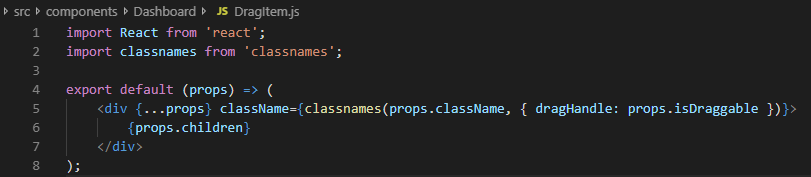
I now use a stateless DragItem component which sets the dragHandler class and that solves the issue.
The DragItem just wraps around the actual children.
 Fensterbank
on 7 Sep 2018
Fensterbank
on 7 Sep 2018
Is this an issue you will think about addressing soon? I created a minimum reproducible sandbox demonstrating the issue. In my case, I am trying to allow the users to pin a card in place so it is static. https://codesandbox.io/s/x7kyrly7rz?codemirror=1&fontsize=14 I will try the workarounds to manually remove the resize/draggable classes
 ansela
on 21 Feb 2019
ansela
on 21 Feb 2019
We are also encountering this issue, just wondering if there's any plans to git this fixed in master?
 Rojuinex
on 9 Oct 2019
Rojuinex
on 9 Oct 2019
Relates to #892
 STRML
on 9 Oct 2019
STRML
on 9 Oct 2019
This issue is stale because it has been open 30 days with no activity. Remove stale label or comment or this issue will be closed in 7 days
![github-actions[bot] picture](https://avatars2.githubusercontent.com/in/15368?v=4&s=40) github-actions[bot]
on 9 Nov 2019
github-actions[bot]
on 9 Nov 2019
Related issues
 fsalamida
·
3Comments
fsalamida
·
3Comments
 sasha240100
·
3Comments
sasha240100
·
3Comments
 daumann
·
3Comments
daumann
·
3Comments
 DTwigs
·
3Comments
DTwigs
·
3Comments
 uc-rpr
·
4Comments
uc-rpr
·
4Comments
Most helpful comment
I had this exact same problem. If you need a quick solution to work around it here is what I did:
isDraggable and isResizable is always set to true. draggableHandle set to '.dragHandle'
I wrapped all children of the grid layout with my own GridItemEditable component. The editable prop is also passed down to all the children.
GridItemEditable:
for draggable - when editable is true, add 'dragHandle' class otherwise leave it out.
for resizable - when editable is false, remove the last child
e.g.
Ugly but it works.