React-google-maps: MarkerCluster custom image is not replaced
I am trying to provide custom images for the cluster. I checked both react-google-maps doc and google map doc. According to both document, it will change images if you provide image path.
on that /static/images/cluster/m contains m1.png ... m5.png images.
I also checked network image tab and it does not even try to get image from custom path. It just getting image from v3 lib. Any opinion ?
<MarkerClusterer
       averageCenter
       maxZoom={15}
       defaultMaxZoom={20}
       onClick={(e) => {console.log(e)}}
       gridSize={60}
       imagePath='/static/images/cluster/m'
>
 intelcoder
All 7 comments
Maybe they've changed the API? I'm not that familiar with MarkerClusterer. Maybe we need an update?
https://googlemaps.github.io/js-marker-clusterer/docs/reference.html
 tomchentw
on 2 Oct 2017
tomchentw
on 2 Oct 2017
@tomchentw
I tried this and it changes image
styles={[
              {
                url: "/static/images/cluster/m1.png",
                height: 53,
                width: 53
              },
              {
                url: "/static/images/cluster/m2.png",
                height: 53,
                width: 53
              },
              {
                url: "/static/images/cluster/m3.png",
                height: 53,
                width: 53
              },
              {
                url: "/static/images/cluster/m4.png",
                height: 53,
                width: 53
              },
              {
                url: "/static/images/cluster/m5.png",
                height: 53,
                width: 53
              }
            ]}
Same issue here, imagePath is not doing anything at all.
 gabma
on 18 Oct 2017
gabma
on 18 Oct 2017
@tomchentw Why did you close this? It's an open bug.
 Jiia
on 20 Jun 2018
Jiia
on 20 Jun 2018
@Jiia
Here’s how me managed it. Check the Google doc as well, since some configurations are not linked to react-google-maps implementation.
<MarkerClusterer
      averageCenter
      enableRetinaIcons
      gridSize={40}
      minimumClusterSize={4}
      maxZoom={15}
      zoomOnClick={true}
      onClick={props.onMarkerClustererClick}
      styles={[
         {
           url: "/img/map-cluster/m1.png",
           height: 26,
           width: 26,
           fontFamily:"Lato",
           textColor:"#FFF",
        },
        {
          url: "/img/map-cluster/m2.png",
          height: 29,
          width: 29,
          fontFamily:"Lato",
          textColor:"#FFF",
        },
        {
          url: "/img/map-cluster/m3.png",
          height: 34,
          width: 34,
          fontFamily:"Lato",
          textColor:"#FFF",
        },
        {
          url: "/img/map-cluster/m4.png",
          height: 40,
          width: 40,
          fontFamily:"Lato",
          textColor:"#FFF",
        },
        {
          url: "/img/map-cluster/m5.png",
          height: 46,
          width: 46,
          fontFamily:"Lato",
          textColor:"#FFF",
        }
      ]}
>
I tried this implementation too creating src>img>m1.png and using url "img/m1.png",then adding addidtional configurations as u mentioned but its still not working @Jiia . Can anyone help me solving the issue?
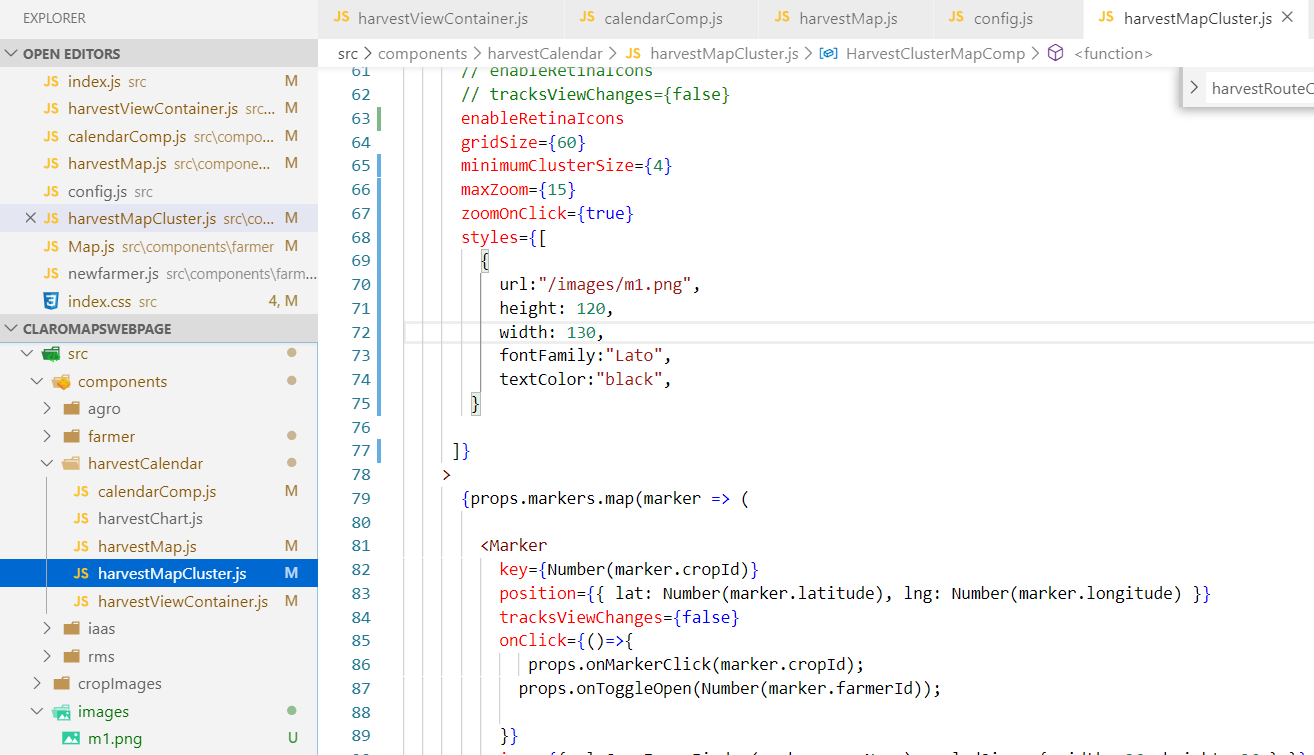
I also tried uploading an img on git or googleDrive
sample url- "https://github.com/kartik4all/DemoBucket/blob/master/m1.png"
Tried the same url and its not displaying any image .If i choose a path from google images,it works.
 kartik4all
on 22 Nov 2019
kartik4all
on 22 Nov 2019
@kartik4all
The repo of this project is unmaintained more than a year, and we had build new version https://www.npmjs.com/package/@react-google-maps/api
We had rewrite it to TypeScript, and updating it frequently: https://github.com/JustFly1984/react-google-maps-api/tree/master/packages/react-google-maps-api
You can enjoy autocomplete.
You can see our docs: https://react-google-maps-api-docs.netlify.com/
Also a lot of examples: https://react-google-maps-api-gatsby-demo.netlify.com/ https://github.com/JustFly1984/react-google-maps-api/tree/master/packages/react-google-maps-api-gatsby-example/src/examples
The bundle size is much smaller: https://bundlephobia.com/result?p=@react-google-maps/api@1.7.7
Our Spectrum community: https://spectrum.chat/react-google-maps
Enjoy!
 JustFly1984
on 22 Nov 2019
JustFly1984
on 22 Nov 2019
Related issues
 viveksrivastawa
·
24Comments
viveksrivastawa
·
24Comments
 SyedSaifAli
·
18Comments
SyedSaifAli
·
18Comments
 mmahalwy
·
19Comments
mmahalwy
·
19Comments
 corbpaul
·
18Comments
corbpaul
·
18Comments
 jgoux
·
19Comments
jgoux
·
19Comments
Most helpful comment
@tomchentw
I tried this and it changes image