React-google-maps: Changing zoom prop has no effect after user zoom.
Before the user changes the zoom level, alterations to GoogleMap's zoom prop seem to work as expected. When I change the zoom prop, the map's level of zoom changes as well. However, if the user zooms in or out of the map manually, changing the map's zoom prop has no effect whatsoever.
 bwdvorak
All 4 comments
You need to hook it up zoom and onZoomChange yourself.
 tomchentw
on 2 Oct 2017
tomchentw
on 2 Oct 2017
In case anyone else ends up having as much trouble with this as I did, this illustrates how I ended up doing this.
const GoogleMapHOC = withGoogleMap(props => (
  <GoogleMap
    onZoomChanged={props.onZoomChanged}
    ref={props.onMapMounted}
    zoom={props.zoom}
  >
)
[...]
onMapMounted(mapRef) {
  this.setState({ mapRef: mapRef });
}

onZoomChanged(){
  this.setState({ zoom: this.state.mapRef.getZoom() });
}

render() {
  return (
    <GoogleMapHOC
      onMapMounted={this.onMapMounted}
      onZoomChanged={this.onZoomChanged}
      zoom={this.state.zoom}
    />
  );
}
 brybeecher
on 5 Oct 2017
brybeecher
on 5 Oct 2017
@brybeecher hi i have a problem with this. i copy my code and the error
class Component extends React.PureComponent {
constructor(props) {
super(props)
this.state = {
zoom: props.zoom,
mapRef: ""
}
}
onMapMounted(mapRef) {
console.log(mapRef)
if(mapRef.refs !== ""){
this.setState({ mapRef: mapRef })
}
}
onZoomChanged(){
this.setState({ zoom: this.state.mapRef.getZoom() });
}
render() {
console.log(this.state)
return(
onZoomChanged={this.onZoomChanged}
onMapMounted={this.onMapMounted}
center={this.props.center}
googleMapURL= "https://maps.googleapis.com/maps/api/js?key=AIzaSyA5aHhKGZxiy_9OZ0vyakabi1FCbOHrEWI&v=3.exp&libraries=geometry,drawing,places"
loadingElement={
containerElement={
75% }} />}mapElement={
/>
)
}
}
const Map = withScriptjs(withGoogleMap((props) =>
//Todo el mapa con sus markers
onZoomChanged={props.onZoomChanged}
zoom={props.zoom}
center={{lat: props.center.lat, lng: props.center.lng }}>
return(
totalGuias.map((guia, index) => {
return(
)
} )
)
} }
));
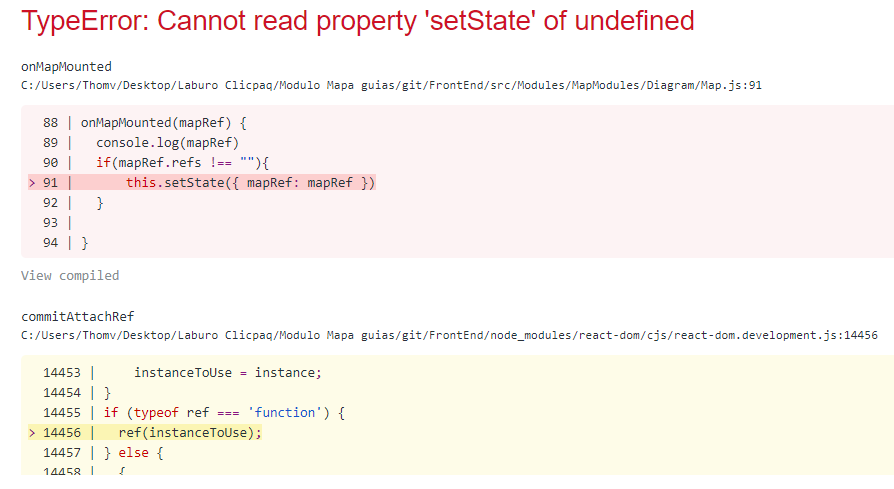
if u can help y thanks u a lot!
 thomvilla
on 16 Aug 2018
thomvilla
on 16 Aug 2018
well i cant put code correctly, stupid back ticks :(
i shared my link
https://gist.github.com/thomvilla/05eed32f39b002b2b480835fc563d2a0
thomvilla
on 16 Aug 2018
Related issues
 timkraut
·
3Comments
timkraut
·
3Comments
 Mahmood004
·
3Comments
Mahmood004
·
3Comments
 ShintaroNippon
·
3Comments
ShintaroNippon
·
3Comments
 manoj150283
·
3Comments
manoj150283
·
3Comments
 bossbossk20
·
3Comments
bossbossk20
·
3Comments
Most helpful comment
In case anyone else ends up having as much trouble with this as I did, this illustrates how I ended up doing this.
[...]