React-google-maps: OverlayView loses other libraries context
I'm using react material-ui lib with react-google-maps.
When I'm trying to nest any material-ui component, eg. List, into OverlayView, I get this error:
Warning: Failed context type: The context
muiThemeis marked as required inList, but its value isundefined.
In whole application, including other react-google-maps components muiTheme exist in the context.
 tomasz89nowak
All 9 comments
hrmm yeah this could def be an issue. I'll take a look.
Out of curiosity, have you tried to pass it down as props from the parent context?
 oshalygin
on 9 Aug 2017
oshalygin
on 9 Aug 2017
Yes I tried and it is not working.
tomasz89nowak
on 11 Aug 2017
thanks @tomasz89nowak i'll look at it shortly.
oshalygin
on 11 Aug 2017
Any upates here?
 emilsgulbis
on 23 Aug 2017
emilsgulbis
on 23 Aug 2017
I was able to confirm this, seems like a known issue. There are also a number of big changes in play for the material-ui library(1.0 coming soon). I'm tempted to defer until they've released 1.0 so we can accommodate that release as opposed to trying to support 0.XX
oshalygin
on 24 Aug 2017
Hey! I think it's not problem with material ui, but with OverlayView context.
Im using isomorphic-style-loader and it doesnt work with OverlayView..
emilsgulbis
on 24 Aug 2017
Alright I'll mark this as an issue that we can dev against
oshalygin
on 24 Aug 2017
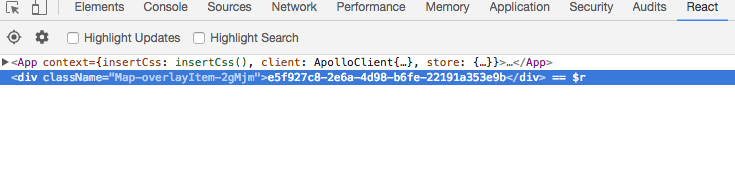
Here is sceenshot of Chrome browser React dev tool - Overlayview CONTENT is rendered outside App
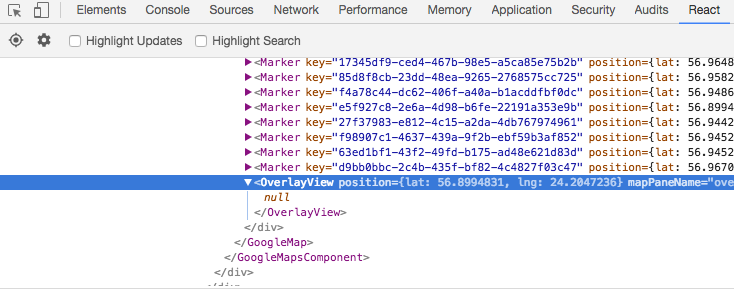
But OverlayView is in App
emilsgulbis
on 6 Sep 2017
Fixed in v8.0.0. Please try the new version.
https://tomchentw.github.io/react-google-maps/#!/OverlayView
 tomchentw
on 14 Sep 2017
tomchentw
on 14 Sep 2017
Related issues
 ShintaroNippon
·
3Comments
ShintaroNippon
·
3Comments
 farhan687
·
3Comments
farhan687
·
3Comments
 shrimpy
·
3Comments
shrimpy
·
3Comments
 julienvincent
·
3Comments
julienvincent
·
3Comments
 PaulieScanlon
·
3Comments
PaulieScanlon
·
3Comments
Most helpful comment
Fixed in v8.0.0. Please try the new version.
https://tomchentw.github.io/react-google-maps/#!/OverlayView