React-google-maps: Stop map from re-rendering every time state changes
Maybe I'm doing something else wrong, but right now every time my application state gets changed the map component goes gray and re-draws the same map with the same marker. On my use case I actually don't need any interaction with the map, I just want to display the marker and I know it will not change in the future, so I was wondering, is there a way to have like a read-only mode for the map? I want just to render the map one time and to for the map to stay like that even if the there are some state changes.
 figalex
All 8 comments
You can use a wrapper component and implement the method shouldComponentUpdate:
shouldComponentUpdate: function(nextProps, nextState) {
// If shouldComponentUpdate returns false,
// then render() will be completely skipped until the next state change.
// In addition, componentWillUpdate and componentDidUpdate will not be called.
return false;
}
 wedneyyuri
on 28 Feb 2016
wedneyyuri
on 28 Feb 2016
Thanks, that was helpful.
figalex
on 15 Mar 2016
Glad it's resolved! We're also looking for maintainers. Involve in #266 to help strengthen our community!
 tomchentw
on 29 May 2016
tomchentw
on 29 May 2016
In case if anyone faced same issue and struggled like me, here is a sample component based on comment above.
<Map
center={{lat: 35.6688654, lng: 139.4611935}}
height='300px'
zoom={15}
/>
import React from 'react'
import { withGoogleMap, GoogleMap } from "react-google-maps"
import withScriptjs from "react-google-maps/lib/async/withScriptjs"
class Map extends React.Component{
constructor(props){
super(props)
}
shouldComponentUpdate(nextProps, nextState){
if(this.props.center.lat === nextProps.center.lat){
return false
}else{
return true
}
}
render(){
const AsyncMap = withScriptjs(
withGoogleMap(
props => (
<GoogleMap
defaultZoom={this.props.zoom}
defaultCenter={{ lat: this.props.center.lat, lng: this.props.center.lng }}
>
</GoogleMap>
)
)
)
var map
if(this.props.center.lat !== undefined){
map = <AsyncMap
googleMapURL="https://maps.googleapis.com/maps/api/js?key=your_key"
loadingElement={
<div style={{ height: `100%` }} />
}
containerElement={
<div style={{ height: this.props.height }} />
}
mapElement={
<div style={{ height: `100%` }} />
}
/>
}else{
map = <div style={{height: this.props.height}} />
}
return(map)
}
}
export default Map
it avoids InvalidValueError: setPosition: not a LatLng or LatLngLiteral: in property lat: not a number error, and flicker re-rendering of map.
 foloinfo
on 15 Jun 2017
foloinfo
on 15 Jun 2017
I am having the exact same issue, except I don't want a read only map and I need to load the updated props...
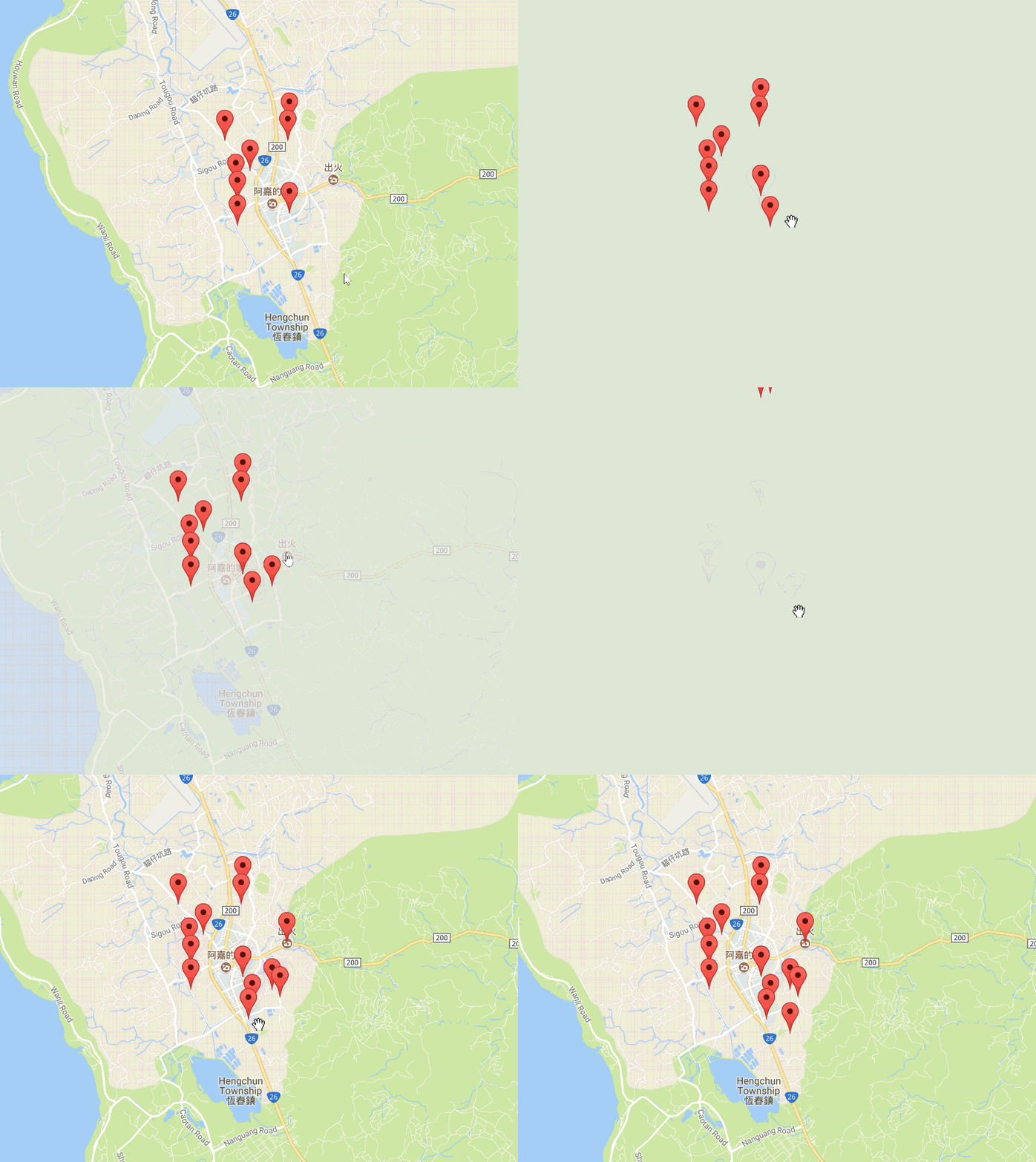
My code is here, props.map.markers holds the markers array so shouldComponentUpdate needs to return true when the markers have been updated...
shouldComponentUpdate(nextProps, nextState) {
if (this.props.profile != nextProps.profile) {
return true;
}
if (this.props.map != nextProps.map) {
return true;
}
if (this.state == nextState) {
return false;
}
return true;
}
 NickBrooks
on 1 Aug 2017
NickBrooks
on 1 Aug 2017
Okay - I found the problem, the withGoogleMap component must be outside the component you used to render it, like this:
import React from 'react';
import { withGoogleMap, GoogleMap, Marker } from "react-google-maps";

const RenderMap = withGoogleMap(props => (
    <GoogleMap
        ref={props.onMapLoad}
        onClick={props.onMapClick}
        defaultZoom={13}
        center={props.center}>
        {
            props.markers.map(marker => (
                <Marker
                    {...marker}
                />
            ))
        }
    </GoogleMap >
));

class Map extends React.Component {
    constructor(props) {
        super(props);
    }

    handleMapLoad(map) {
        this._map = map;
    }

    handleMapClick(event) {
        console.log(event);
    }

    render() {
        return (
            <div>
                <RenderMap
                    onMapLoad={this.handleMapLoad}
                    onMapClick={this.handleMapClick}
                    {...etc}
                />
            </div>
        )
    }
}

export default Map;
@NickBrooks I was just about to pull the plug on this component but I knew I must be doing something wrong since it's so popular. I never would have guessed to pull the definition out of the component! Thank you!
 dwatts3624
on 19 Aug 2018
dwatts3624
on 19 Aug 2018
my map is flickering on outside change.I have a scenario where marker will change dynamically on outer change(prop).Each time my data changes my map starts dancing.Please help me out with the solution or any concept which will help me.
 kulkarnipradnyas
on 13 Nov 2020
kulkarnipradnyas
on 13 Nov 2020
Related issues
 mmahalwy
·
19Comments
mmahalwy
·
19Comments
 appako
·
24Comments
appako
·
24Comments
 bieber
·
30Comments
bieber
·
30Comments
 Kalcode
·
19Comments
Kalcode
·
19Comments
 spaceforestchu
·
20Comments
spaceforestchu
·
20Comments
Most helpful comment
Okay - I found the problem, the
withGoogleMapcomponent must be outside the component you used to render it, like this: